---
products:
- fulfillment
- product
---
import { CodeTabs, CodeTab, Table } from "docs-ui"
export const metadata = {
title: `Links between Pricing Module and Other Modules`,
}
# {metadata.title}
This document showcases the module links defined between the Pricing Module and other Commerce Modules.
## Summary
The Pricing Module has the following links to other modules:
First Data Model
Second Data Model
Type
Description
[ShippingOption](/references/fulfillment/models/ShippingOption) in [Fulfillment Module](../../fulfillment/page.mdx)
[PriceSet](/references/pricing/models/PriceSet)
Stored - one-to-one
[Learn more](#fulfillment-module)
[ProductVariant](/references/product/models/ProductVariant) in [Product Module](../../product/page.mdx)
[PriceSet](/references/pricing/models/PriceSet)
Stored - one-to-one
[Learn more](#product-module)
---
## Fulfillment Module
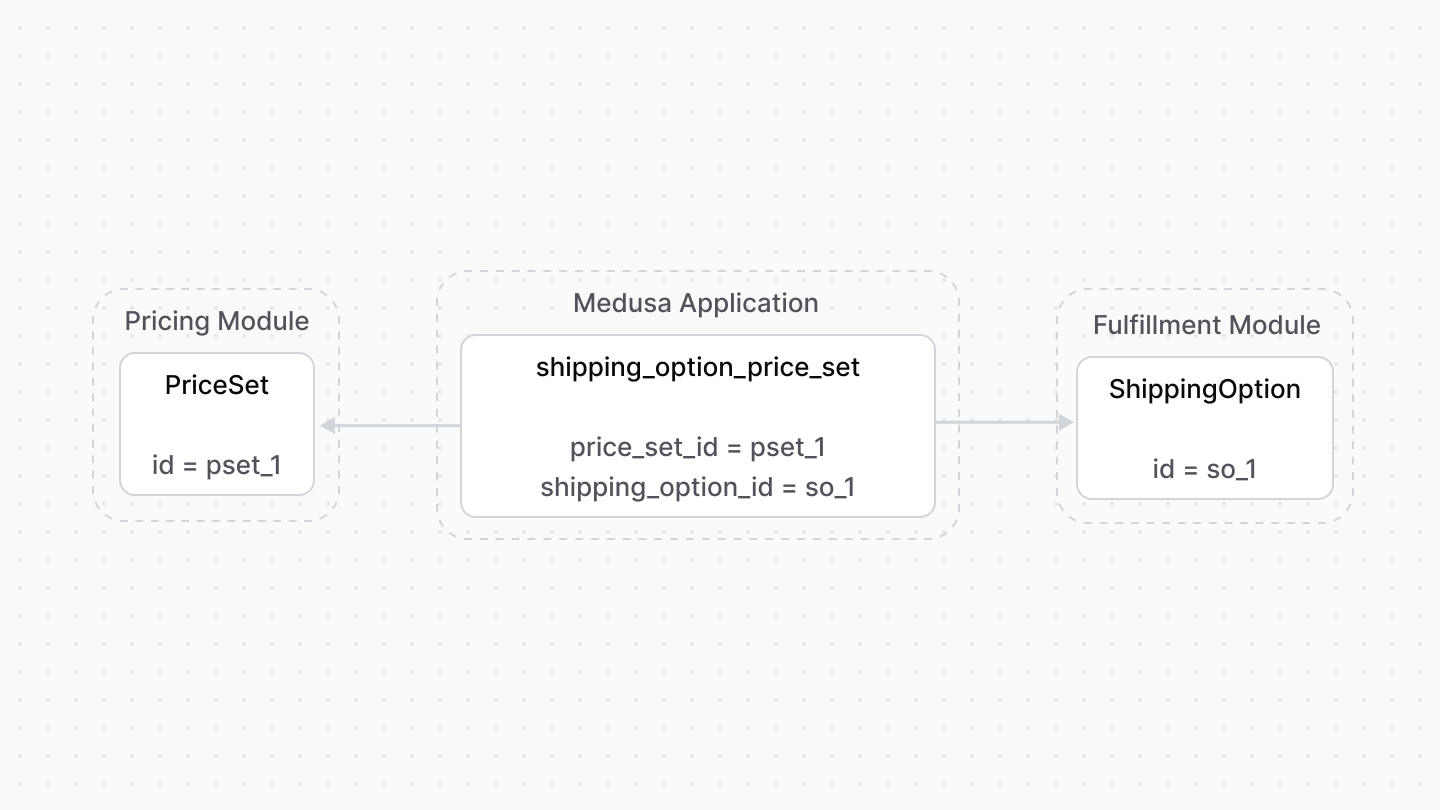
The Fulfillment Module provides fulfillment-related functionalities, including shipping options that the customer chooses from when they place their order. However, it doesn't provide pricing-related functionalities for these options.
Medusa defines a link between the `PriceSet` and `ShippingOption` data models. A shipping option's price is stored as a price set.
### Retrieve with Query
To retrieve the shipping option of a price set with [Query](!docs!/learn/fundamentals/module-links/query), pass `shipping_option.*` in `fields`:
```ts
const { data: priceSets } = await query.graph({
entity: "price_set",
fields: [
"shipping_option.*",
],
})
// priceSets[0].shipping_option
```
```ts
import { useQueryGraphStep } from "@medusajs/medusa/core-flows"
// ...
const { data: priceSets } = useQueryGraphStep({
entity: "price_set",
fields: [
"shipping_option.*",
],
})
// priceSets[0].shipping_option
```
### Manage with Link
To manage the price set of a shipping option, use [Link](!docs!/learn/fundamentals/module-links/link):
```ts
import { Modules } from "@medusajs/framework/utils"
// ...
await link.create({
[Modules.FULFILLMENT]: {
shipping_option_id: "so_123",
},
[Modules.PRICING]: {
price_set_id: "pset_123",
},
})
```
```ts
import { Modules } from "@medusajs/framework/utils"
import { createRemoteLinkStep } from "@medusajs/medusa/core-flows"
// ...
createRemoteLinkStep({
[Modules.FULFILLMENT]: {
shipping_option_id: "so_123",
},
[Modules.PRICING]: {
price_set_id: "pset_123",
},
})
```
---
## Product Module
The Product Module doesn't store or manage the prices of product variants.
Medusa defines a link between the `ProductVariant` and the `PriceSet`. A product variant’s prices are stored as prices belonging to a price set.
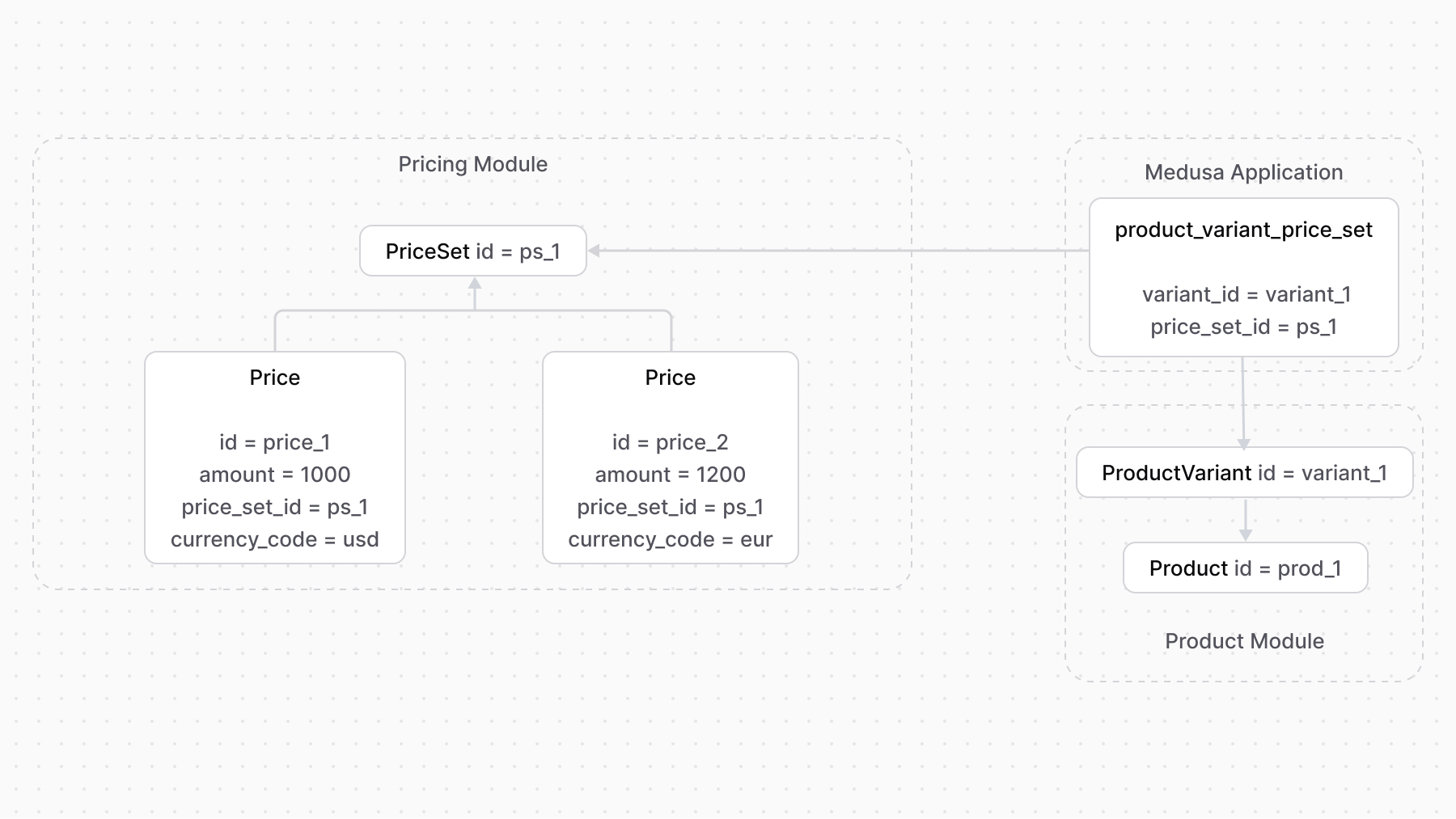
So, when you want to add prices for a product variant, you create a price set and add the prices to it.
You can then benefit from adding rules to prices or using the `calculatePrices` method to retrieve the price of a product variant within a specified context.
### Retrieve with Query
To retrieve the variant of a price set with [Query](!docs!/learn/fundamentals/module-links/query), pass `variant.*` in `fields`:
```ts
const { data: priceSets } = await query.graph({
entity: "price_set",
fields: [
"variant.*",
],
})
// priceSets[0].variant
```
```ts
import { useQueryGraphStep } from "@medusajs/medusa/core-flows"
// ...
const { data: priceSets } = useQueryGraphStep({
entity: "price_set",
fields: [
"variant.*",
],
})
// priceSets[0].variant
```
### Manage with Link
To manage the price set of a variant, use [Link](!docs!/learn/fundamentals/module-links/link):
```ts
import { Modules } from "@medusajs/framework/utils"
// ...
await link.create({
[Modules.PRODUCT]: {
variant_id: "variant_123",
},
[Modules.PRICING]: {
price_set_id: "pset_123",
},
})
```
```ts
import { Modules } from "@medusajs/framework/utils"
import { createRemoteLinkStep } from "@medusajs/medusa/core-flows"
// ...
createRemoteLinkStep({
[Modules.PRODUCT]: {
variant_id: "variant_123",
},
[Modules.PRICING]: {
price_set_id: "pset_123",
},
})
```