---
sidebar_label: "Two Column"
---
export const metadata = {
title: `Two Column Layout - Admin Components`,
}
# {metadata.title}
In this guide, you'll learn how to create a layout component that matches the Medusa Admin's design conventions for pages with two columns of content.
The Medusa Admin has pages with two columns of content.
This doesn't include the sidebar, only the main content.
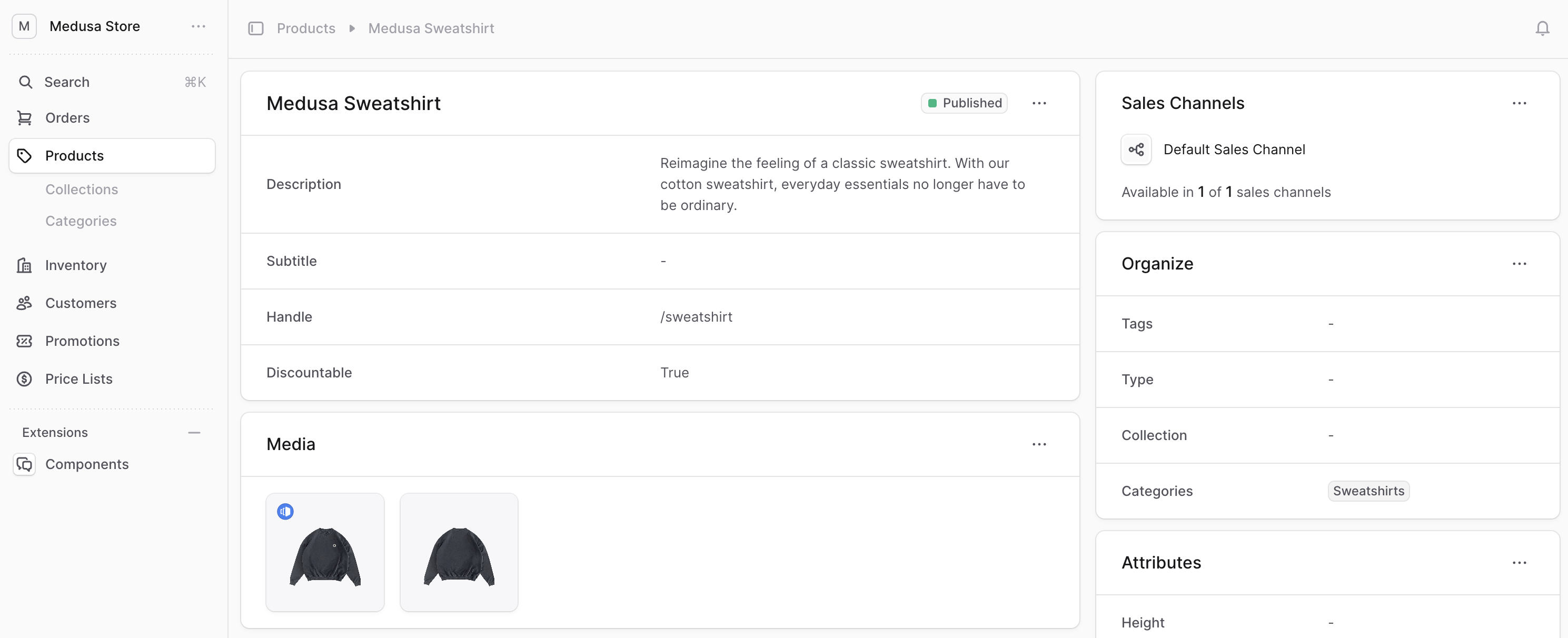
To create a layout that you can use in UI routes to support two columns of content, create the component `src/admin/layouts/two-column.tsx` with the following content:
```tsx title="src/admin/layouts/two-column.tsx"
export type TwoColumnLayoutProps = {
firstCol: React.ReactNode
secondCol: React.ReactNode
}
export const TwoColumnLayout = ({
firstCol,
secondCol,
}: TwoColumnLayoutProps) => {
return (
)
}
```
The `TwoColumnLayout` accepts two props:
- `firstCol` indicating the content of the first column.
- `secondCol` indicating the content of the second column.
---
## Example
Use the `TwoColumnLayout` component in your UI routes that have a single column. For example:
```tsx title="src/admin/routes/custom/page.tsx" highlights={[["9"]]}
import { defineRouteConfig } from "@medusajs/admin-sdk"
import { ChatBubbleLeftRight } from "@medusajs/icons"
import { Container } from "../../components/container"
import { Header } from "../../components/header"
import { TwoColumnLayout } from "../../layouts/two-column"
const CustomPage = () => {
return (
}
secondCol={
}
/>
)
}
export const config = defineRouteConfig({
label: "Custom",
icon: ChatBubbleLeftRight,
})
export default CustomPage
```
This UI route also uses [Container](../../components/container/page.mdx) and [Header]() custom components.