---
sidebar_label: "Data Table"
---
import { TypeList } from "docs-ui"
export const metadata = {
title: `Data Table - Admin Components`,
}
# {metadata.title}
This component is available after [Medusa v2.4.0+](https://github.com/medusajs/medusa/releases/tag/v2.4.0).
The [DataTable component in Medusa UI](!ui!/components/data-table) allows you to display data in a table with sorting, filtering, and pagination. It's used across the Medusa Admin dashboard to showcase a list of items, such as a list of products.
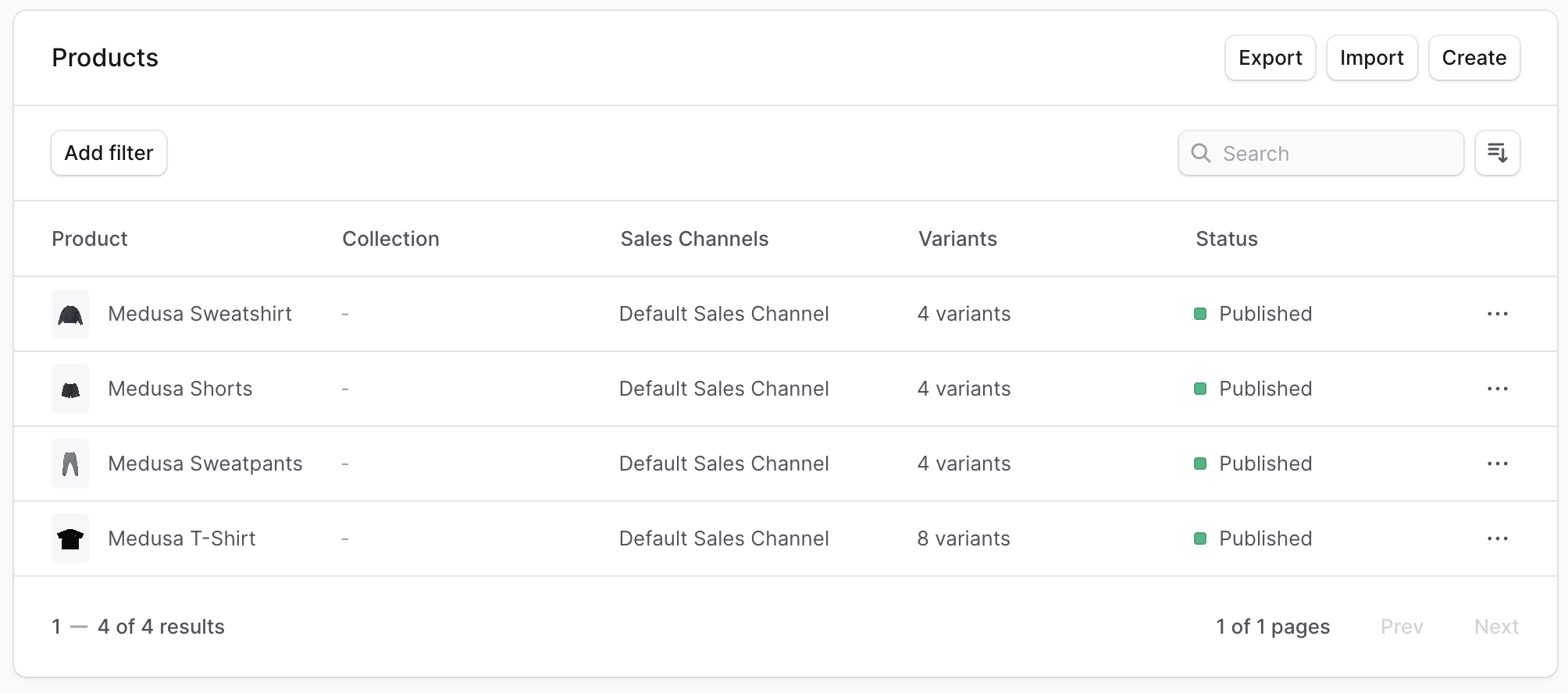
You can use this component in your Admin Extensions to display data in a table format, especially if you're retrieving them from API routes of the Medusa application.
This guide focuses on how to use the `DataTable` component while fetching data from the backend. Refer to the [Medusa UI documentation](!ui!/components/data-table) for detailed information about the DataTable component and its different usages.
## Example: DataTable with Data Fetching
In this example, you'll create a UI widget that shows the list of products retrieved from the [List Products API Route](!api!/admin#products_getproducts) in a data table with pagination, filtering, searching, and sorting.
Start by initializing the columns in the data table. To do that, use the `createDataTableColumnHelper` from Medusa UI:
```tsx title="src/admin/routes/custom/page.tsx"
import {
createDataTableColumnHelper,
} from "@medusajs/ui"
import {
HttpTypes,
} from "@medusajs/framework/types"
const columnHelper = createDataTableColumnHelper()
const columns = [
columnHelper.accessor("title", {
header: "Title",
// Enables sorting for the column.
enableSorting: true,
// If omitted, the header will be used instead if it's a string,
// otherwise the accessor key (id) will be used.
sortLabel: "Title",
// If omitted the default value will be "A-Z"
sortAscLabel: "A-Z",
// If omitted the default value will be "Z-A"
sortDescLabel: "Z-A",
}),
columnHelper.accessor("status", {
header: "Status",
cell: ({ getValue }) => {
const status = getValue()
return (
{status === "published" ? "Published" : "Draft"}
)
},
}),
]
```
`createDataTableColumnHelper` utility creates a column helper that helps you define the columns for the data table. The column helper has an `accessor` method that accepts two parameters:
1. The column's key in the table's data.
2. An object with the following properties:
- `header`: The column's header.
- `cell`: (optional) By default, a data's value for a column is displayed as a string. Use this property to specify custom rendering of the value. It accepts a function that returns a string or a React node. The function receives an object that has a `getValue` property function to retrieve the raw value of the cell.
- `enableSorting`: (optional) A boolean that enables sorting data by this column.
- `sortLabel`: (optional) The label for the sorting button. If omitted, the `header` will be used instead if it's a string, otherwise the accessor key (id) will be used.
- `sortAscLabel`: (optional) The label for the ascending sorting button. If omitted, the default value will be "A-Z".
- `sortDescLabel`: (optional) The label for the descending sorting button. If omitted, the default value will be "Z-A".
Next, you'll define the filters that can be applied to the data table. You'll configure filtering by product status.
To define the filters, add the following:
```tsx title="src/admin/routes/custom/page.tsx"
// other imports...
import {
// ...
createDataTableFilterHelper,
} from "@medusajs/ui"
const filterHelper = createDataTableFilterHelper()
const filters = [
filterHelper.accessor("status", {
type: "select",
label: "Status",
options: [
{
label: "Published",
value: "published",
},
{
label: "Draft",
value: "draft",
},
],
}),
]
```
`createDataTableFilterHelper` utility creates a filter helper that helps you define the filters for the data table. The filter helper has an `accessor` method that accepts two parameters:
1. The key of a column in the table's data.
2. An object with the following properties:
- `type`: The type of filter. It can be either:
- `select`: A select dropdown allowing users to choose multiple values.
- `radio`: A radio button allowing users to choose one value.
- `date`: A date picker allowing users to choose a date.
- `label`: The filter's label.
- `options`: An array of objects with `label` and `value` properties. The `label` is the option's label, and the `value` is the value to filter by.
You'll now start creating the UI widget's component. Start by adding the necessary state variables:
```tsx title="src/admin/routes/custom/page.tsx"
// other imports...
import {
// ...
DataTablePaginationState,
DataTableFilteringState,
DataTableSortingState,
} from "@medusajs/ui"
import { useMemo, useState } from "react"
// ...
const limit = 15
const CustomPage = () => {
const [pagination, setPagination] = useState({
pageSize: limit,
pageIndex: 0,
})
const [search, setSearch] = useState("")
const [filtering, setFiltering] = useState({})
const [sorting, setSorting] = useState(null)
const offset = useMemo(() => {
return pagination.pageIndex * limit
}, [pagination])
const statusFilters = useMemo(() => {
return (filtering.status || []) as ProductStatus
}, [filtering])
// TODO add data fetching logic
}
```
In the component, you've added the following state variables:
- `pagination`: An object of type `DataTablePaginationState` that holds the pagination state. It has two properties:
- `pageSize`: The number of items to show per page.
- `pageIndex`: The current page index.
- `search`: A string that holds the search query.
- `filtering`: An object of type `DataTableFilteringState` that holds the filtering state.
- `sorting`: An object of type `DataTableSortingState` that holds the sorting state.
You've also added two memoized variables:
- `offset`: How many items to skip when fetching data based on the current page.
- `statusFilters`: The selected status filters, if any.
Next, you'll fetch the products from the Medusa application. Assuming you have the JS SDK configured as explained in [this guide](../../../js-sdk/page.mdx), add the following imports at the top of the file:
```tsx title="src/admin/routes/custom/page.tsx"
import { sdk } from "../../lib/config"
import { useQuery } from "@tanstack/react-query"
```
This imports the JS SDK instance and `useQuery` from [Tanstack Query](https://tanstack.com/query/latest).
Then, replace the `TODO` in the component with the following:
```tsx title="src/admin/routes/custom/page.tsx"
const { data, isLoading } = useQuery({
queryFn: () => sdk.admin.product.list({
limit,
offset,
q: search,
status: statusFilters,
order: sorting ? `${sorting.desc ? "-" : ""}${sorting.id}` : undefined,
}),
queryKey: [["products", limit, offset, search, statusFilters, sorting?.id, sorting?.desc]],
})
// TODO configure data table
```
You use the `useQuery` hook to fetch the products from the Medusa application. In the `queryFn`, you call the `sdk.admin.product.list` method to fetch the products. You pass the following query parameters to the method:
- `limit`: The number of products to fetch per page.
- `offset`: The number of products to skip based on the current page.
- `q`: The search query, if set.
- `status`: The status filters, if set.
- `order`: The sorting order, if set.
So, whenever the user changes the current page, search query, status filters, or sorting, the products are fetched based on the new parameters.
Next, you'll configure the data table. Medusa UI provides a `useDataTable` hook that helps you configure the data table. Add the following imports at the top of the file:
```tsx title="src/admin/routes/custom/page.tsx"
import {
// ...
useDataTable,
} from "@medusajs/ui"
import { useNavigate } from "react-router-dom"
```
Then, replace the `TODO` in the component with the following:
```tsx title="src/admin/routes/custom/page.tsx"
const navigate = useNavigate()
const table = useDataTable({
columns,
data: data?.products || [],
getRowId: (row) => row.id,
rowCount: data?.count || 0,
isLoading,
pagination: {
state: pagination,
onPaginationChange: setPagination,
},
search: {
state: search,
onSearchChange: setSearch,
},
filtering: {
state: filtering,
onFilteringChange: setFiltering,
},
filters,
sorting: {
// Pass the pagination state and updater to the table instance
state: sorting,
onSortingChange: setSorting,
},
onRowClick: (event, row) => {
// Handle row click, for example
navigate(`/products/${row.id}`)
},
})
// TODO render component
```
The `useDataTable` hook accepts an object with the following properties:
Finally, you'll render the data table. But first, add the following imports at the top of the page:
```tsx title="src/admin/routes/custom/page.tsx"
import {
// ...
DataTable,
} from "@medusajs/ui"
import { SingleColumnLayout } from "../../layouts/single-column"
import { Container } from "../../components/container"
```
Aside from the `DataTable` component, you also import the [SingleColumnLayout](../../layouts/single-column/page.mdx) and [Container](../container/page.mdx) components implemented in other Admin Component guides. These components ensure a style consistent to other pages in the admin dashboard.
Then, replace the `TODO` in the component with the following:
```tsx title="src/admin/routes/custom/page.tsx"
return (
Products
)
```
You render the `DataTable` component and pass the `table` instance as a prop. In the `DataTable` component, you render a toolbar showing a heading, filter menu, sorting menu, and a search input. You also show pagination after the table.
Lastly, export the component and the UI widget's configuration at the end of the file:
```tsx title="src/admin/routes/custom/page.tsx"
// other imports...
import { defineRouteConfig } from "@medusajs/admin-sdk"
import { ChatBubbleLeftRight } from "@medusajs/icons"
// ...
export const config = defineRouteConfig({
label: "Custom",
icon: ChatBubbleLeftRight,
})
export default CustomPage
```
If you start your Medusa application and go to `localhost:9000/app/custom`, you'll see the data table showing the list of products with pagination, filtering, searching, and sorting functionalities.
### Full Example Code
```tsx title="src/admin/routes/custom/page.tsx"
import { defineRouteConfig } from "@medusajs/admin-sdk"
import { ChatBubbleLeftRight } from "@medusajs/icons"
import {
Badge,
createDataTableColumnHelper,
createDataTableFilterHelper,
DataTable,
DataTableFilteringState,
DataTablePaginationState,
DataTableSortingState,
Heading,
useDataTable,
} from "@medusajs/ui"
import { useQuery } from "@tanstack/react-query"
import { SingleColumnLayout } from "../../layouts/single-column"
import { sdk } from "../../lib/config"
import { useMemo, useState } from "react"
import { Container } from "../../components/container"
import { HttpTypes, ProductStatus } from "@medusajs/framework/types"
const columnHelper = createDataTableColumnHelper()
const columns = [
columnHelper.accessor("title", {
header: "Title",
// Enables sorting for the column.
enableSorting: true,
// If omitted, the header will be used instead if it's a string,
// otherwise the accessor key (id) will be used.
sortLabel: "Title",
// If omitted the default value will be "A-Z"
sortAscLabel: "A-Z",
// If omitted the default value will be "Z-A"
sortDescLabel: "Z-A",
}),
columnHelper.accessor("status", {
header: "Status",
cell: ({ getValue }) => {
const status = getValue()
return (
{status === "published" ? "Published" : "Draft"}
)
},
}),
]
const filterHelper = createDataTableFilterHelper()
const filters = [
filterHelper.accessor("status", {
type: "select",
label: "Status",
options: [
{
label: "Published",
value: "published",
},
{
label: "Draft",
value: "draft",
},
],
}),
]
const limit = 15
const CustomPage = () => {
const [pagination, setPagination] = useState({
pageSize: limit,
pageIndex: 0,
})
const [search, setSearch] = useState("")
const [filtering, setFiltering] = useState({})
const [sorting, setSorting] = useState(null)
const offset = useMemo(() => {
return pagination.pageIndex * limit
}, [pagination])
const statusFilters = useMemo(() => {
return (filtering.status || []) as ProductStatus
}, [filtering])
const { data, isLoading } = useQuery({
queryFn: () => sdk.admin.product.list({
limit,
offset,
q: search,
status: statusFilters,
order: sorting ? `${sorting.desc ? "-" : ""}${sorting.id}` : undefined,
}),
queryKey: [["products", limit, offset, search, statusFilters, sorting?.id, sorting?.desc]],
})
const table = useDataTable({
columns,
data: data?.products || [],
getRowId: (row) => row.id,
rowCount: data?.count || 0,
isLoading,
pagination: {
state: pagination,
onPaginationChange: setPagination,
},
search: {
state: search,
onSearchChange: setSearch,
},
filtering: {
state: filtering,
onFilteringChange: setFiltering,
},
filters,
sorting: {
// Pass the pagination state and updater to the table instance
state: sorting,
onSortingChange: setSorting,
},
})
return (
Products
)
}
export const config = defineRouteConfig({
label: "Custom",
icon: ChatBubbleLeftRight,
})
export default CustomPage
```