 Shahed Nasser
d510639193
Shahed Nasser
d510639193
* added draft order plugin docs

* fix vale error

* added note about draft order being optional

* add new shipping option - shipping method link

* update user guides

* generate

* fix github icon

* changes to shipping option type

* document logger

* reorder list

* fixes

* fixes
706 lines
17 KiB
Plaintext
706 lines
17 KiB
Plaintext
---
|
|
products:
|
|
- customer
|
|
- order
|
|
- payment
|
|
- product
|
|
- promotion
|
|
- region
|
|
- sales channel
|
|
---
|
|
|
|
import { CodeTabs, CodeTab, Table } from "docs-ui"
|
|
|
|
export const metadata = {
|
|
title: `Links between Cart Module and Other Modules`,
|
|
}
|
|
|
|
# {metadata.title}
|
|
|
|
This document showcases the module links defined between the Cart Module and other Commerce Modules.
|
|
|
|
## Summary
|
|
|
|
The Cart Module has the following links to other modules:
|
|
|
|
<Note title="Tip">
|
|
|
|
Read-only links are used to query data across modules, but the relations aren't stored in a pivot table in the database.
|
|
|
|
</Note>
|
|
|
|
<Table>
|
|
<Table.Header>
|
|
<Table.Row>
|
|
<Table.HeaderCell>
|
|
First Data Model
|
|
</Table.HeaderCell>
|
|
<Table.HeaderCell>
|
|
Second Data Model
|
|
</Table.HeaderCell>
|
|
<Table.HeaderCell>
|
|
Type
|
|
</Table.HeaderCell>
|
|
<Table.HeaderCell>
|
|
Description
|
|
</Table.HeaderCell>
|
|
</Table.Row>
|
|
</Table.Header>
|
|
<Table.Body>
|
|
<Table.Row>
|
|
<Table.Cell>
|
|
[Cart](/references/cart/models/Cart)
|
|
</Table.Cell>
|
|
<Table.Cell>
|
|
[Customer](/references/customer/models/Customer) in [Customer Module](../../customer/page.mdx)
|
|
</Table.Cell>
|
|
<Table.Cell>
|
|
Read-only - has one
|
|
</Table.Cell>
|
|
<Table.Cell>
|
|
[Learn more](#customer-module)
|
|
</Table.Cell>
|
|
</Table.Row>
|
|
<Table.Row>
|
|
<Table.Cell>
|
|
[ShippingMethod](/references/cart/models/ShippingMethod)
|
|
</Table.Cell>
|
|
<Table.Cell>
|
|
[ShippingOption](/references/fulfillment/models/ShippingOption) in [Fulfillment Module](../../fulfillment/page.mdx)
|
|
</Table.Cell>
|
|
<Table.Cell>
|
|
Read-only - has one
|
|
</Table.Cell>
|
|
<Table.Cell>
|
|
[Learn more](#fulfillment-module)
|
|
</Table.Cell>
|
|
</Table.Row>
|
|
<Table.Row>
|
|
<Table.Cell>
|
|
[Order](/references/order/models/Order) in [Order Module](../../order/page.mdx)
|
|
</Table.Cell>
|
|
<Table.Cell>
|
|
[Cart](/references/cart/models/Cart)
|
|
</Table.Cell>
|
|
<Table.Cell>
|
|
Stored - one-to-one
|
|
</Table.Cell>
|
|
<Table.Cell>
|
|
[Learn more](#order-module)
|
|
</Table.Cell>
|
|
</Table.Row>
|
|
<Table.Row>
|
|
<Table.Cell>
|
|
[Cart](/references/cart/models/Cart)
|
|
</Table.Cell>
|
|
<Table.Cell>
|
|
[PaymentCollection](/references/payment/models/PaymentCollection) in [Payment Module](../../payment/page.mdx)
|
|
</Table.Cell>
|
|
<Table.Cell>
|
|
Stored - one-to-one
|
|
</Table.Cell>
|
|
<Table.Cell>
|
|
[Learn more](#payment-module)
|
|
</Table.Cell>
|
|
</Table.Row>
|
|
<Table.Row>
|
|
<Table.Cell>
|
|
[LineItem](/references/cart/models/LineItem)
|
|
</Table.Cell>
|
|
<Table.Cell>
|
|
[Product](/references/product/models/Product) in [Product Module](../../product/page.mdx)
|
|
</Table.Cell>
|
|
<Table.Cell>
|
|
Read-only - has one
|
|
</Table.Cell>
|
|
<Table.Cell>
|
|
[Learn more](#product-module)
|
|
</Table.Cell>
|
|
</Table.Row>
|
|
<Table.Row>
|
|
<Table.Cell>
|
|
[LineItem](/references/cart/models/LineItem)
|
|
</Table.Cell>
|
|
<Table.Cell>
|
|
[ProductVariant](/references/product/models/ProductVariant) in [Product Module](../../product/page.mdx)
|
|
</Table.Cell>
|
|
<Table.Cell>
|
|
Read-only - has one
|
|
</Table.Cell>
|
|
<Table.Cell>
|
|
[Learn more](#product-module)
|
|
</Table.Cell>
|
|
</Table.Row>
|
|
<Table.Row>
|
|
<Table.Cell>
|
|
[Cart](/references/cart/models/Cart)
|
|
</Table.Cell>
|
|
<Table.Cell>
|
|
[Promotion](/references/promotion/models/Promotion) in [Promotion Module](../../promotion/page.mdx)
|
|
</Table.Cell>
|
|
<Table.Cell>
|
|
Stored - many-to-many
|
|
</Table.Cell>
|
|
<Table.Cell>
|
|
[Learn more](#promotion-module)
|
|
</Table.Cell>
|
|
</Table.Row>
|
|
<Table.Row>
|
|
<Table.Cell>
|
|
[Cart](/references/cart/models/Cart)
|
|
</Table.Cell>
|
|
<Table.Cell>
|
|
[Region](/references/region/models/Region) in [Region Module](../../region/page.mdx)
|
|
</Table.Cell>
|
|
<Table.Cell>
|
|
Read-only - has one
|
|
</Table.Cell>
|
|
<Table.Cell>
|
|
[Learn more](#region-module)
|
|
</Table.Cell>
|
|
</Table.Row>
|
|
<Table.Row>
|
|
<Table.Cell>
|
|
[Cart](/references/cart/models/Cart)
|
|
</Table.Cell>
|
|
<Table.Cell>
|
|
[SalesChannel](/references/sales-channel/models/SalesChannel) in [Sales Channel Module](../../sales-channel/page.mdx)
|
|
</Table.Cell>
|
|
<Table.Cell>
|
|
Read-only - has one
|
|
</Table.Cell>
|
|
<Table.Cell>
|
|
[Learn more](#sales-channel-module)
|
|
</Table.Cell>
|
|
</Table.Row>
|
|
</Table.Body>
|
|
</Table>
|
|
|
|
|
|
|
|
---
|
|
|
|
## Customer Module
|
|
|
|
Medusa defines a read-only link between the `Cart` data model and the [Customer Module](../../customer/page.mdx)'s `Customer` data model. This means you can retrieve the details of a cart's customer, but you don't manage the links in a pivot table in the database. The customer of a cart is determined by the `customer_id` property of the `Cart` data model.
|
|
|
|
### Retrieve with Query
|
|
|
|
To retrieve the customer of a cart with [Query](!docs!/learn/fundamentals/module-links/query), pass `customer.*` in `fields`:
|
|
|
|
<CodeTabs group="relation-query">
|
|
<CodeTab label="query.graph" value="method">
|
|
|
|
```ts
|
|
const { data: carts } = await query.graph({
|
|
entity: "cart",
|
|
fields: [
|
|
"customer.*",
|
|
],
|
|
})
|
|
|
|
// carts[0].customer
|
|
```
|
|
|
|
</CodeTab>
|
|
<CodeTab label="useQueryGraphStep" value="step">
|
|
|
|
```ts
|
|
import { useQueryGraphStep } from "@medusajs/medusa/core-flows"
|
|
|
|
// ...
|
|
|
|
const { data: carts } = useQueryGraphStep({
|
|
entity: "cart",
|
|
fields: [
|
|
"customer.*",
|
|
],
|
|
})
|
|
|
|
// carts[0].customer
|
|
```
|
|
|
|
</CodeTab>
|
|
</CodeTabs>
|
|
|
|
---
|
|
|
|
## Fulfillment Module
|
|
|
|
Medusa defines a read-only link between the `ShippingMethod` data model and the [Fulfillment Module](../../fulfillment/page.mdx)'s `ShippingOption` data model. This means you can retrieve the details of a shipping method's shipping option, but you don't manage the links in a pivot table in the database. The shipping option of a shipping method is determined by the `shipping_option_id` property of the `ShippingMethod` data model.
|
|
|
|
This link allows you to retrieve the shipping option that a shipping method was created from.
|
|
|
|
<Note>
|
|
|
|
This read-only link was added in [Medusa v2.10.0](https://github.com/medusajs/medusa/releases/tag/v2.10.0)
|
|
|
|
</Note>
|
|
|
|
### Retrieve with Query
|
|
|
|
To retrieve the shipping option of a shipping method with [Query](!docs!/learn/fundamentals/module-links/query), pass `shipping_option.*` in `fields`:
|
|
|
|
<CodeTabs group="relation-query">
|
|
<CodeTab label="query.graph" value="method">
|
|
|
|
```ts
|
|
const { data: shippingMethods } = await query.graph({
|
|
entity: "shipping_method",
|
|
fields: [
|
|
"shipping_option.*",
|
|
],
|
|
})
|
|
|
|
// shippingMethods[0].shipping_option
|
|
```
|
|
|
|
</CodeTab>
|
|
<CodeTab label="useQueryGraphStep" value="step">
|
|
|
|
```ts
|
|
import { useQueryGraphStep } from "@medusajs/medusa/core-flows"
|
|
|
|
// ...
|
|
|
|
const { data: shippingMethods } = useQueryGraphStep({
|
|
entity: "shipping_method",
|
|
fields: [
|
|
"shipping_option.*",
|
|
],
|
|
})
|
|
|
|
// shippingMethods[0].shipping_option
|
|
```
|
|
|
|
</CodeTab>
|
|
</CodeTabs>
|
|
|
|
## Order Module
|
|
|
|
The [Order Module](../../order/page.mdx) provides order-management features.
|
|
|
|
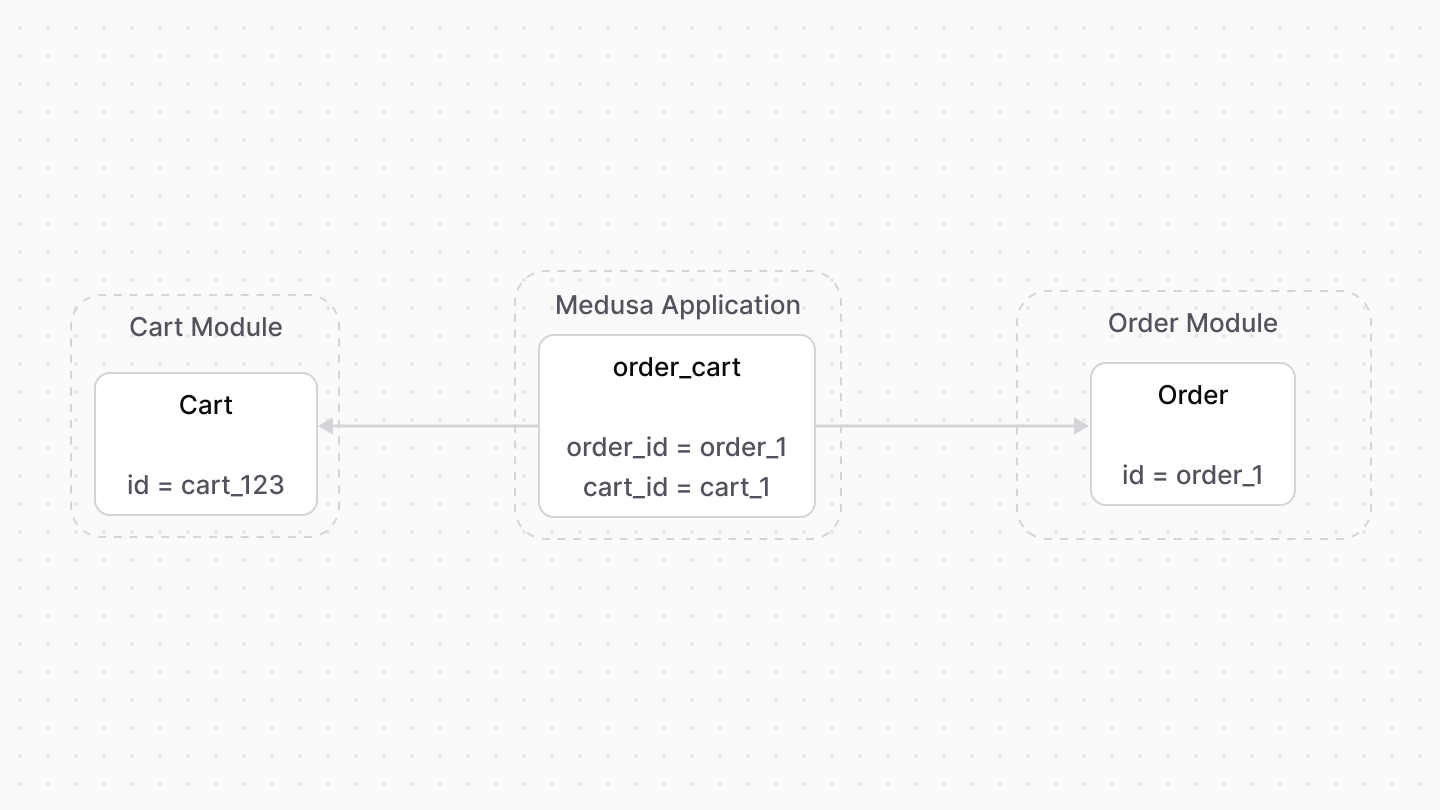
Medusa defines a link between the `Cart` and `Order` data models. The cart is linked to the order created once the cart is completed.
|
|
|
|
|
|
|
|
### Retrieve with Query
|
|
|
|
To retrieve the order of a cart with [Query](!docs!/learn/fundamentals/module-links/query), pass `order.*` in `fields`:
|
|
|
|
<CodeTabs group="relation-query">
|
|
<CodeTab label="query.graph" value="method">
|
|
|
|
```ts
|
|
const { data: carts } = await query.graph({
|
|
entity: "cart",
|
|
fields: [
|
|
"order.*",
|
|
],
|
|
})
|
|
|
|
// carts[0].order
|
|
```
|
|
|
|
</CodeTab>
|
|
<CodeTab label="useQueryGraphStep" value="step">
|
|
|
|
```ts
|
|
import { useQueryGraphStep } from "@medusajs/medusa/core-flows"
|
|
|
|
// ...
|
|
|
|
const { data: carts } = useQueryGraphStep({
|
|
entity: "cart",
|
|
fields: [
|
|
"order.*",
|
|
],
|
|
})
|
|
|
|
// carts[0].order
|
|
```
|
|
|
|
</CodeTab>
|
|
</CodeTabs>
|
|
|
|
### Manage with Link
|
|
|
|
To manage the order of a cart, use [Link](!docs!/learn/fundamentals/module-links/link):
|
|
|
|
<CodeTabs group="relation-link">
|
|
<CodeTab label="link.create" value="method">
|
|
|
|
```ts
|
|
import { Modules } from "@medusajs/framework/utils"
|
|
|
|
// ...
|
|
|
|
await link.create({
|
|
[Modules.CART]: {
|
|
cart_id: "cart_123",
|
|
},
|
|
[Modules.ORDER]: {
|
|
order_id: "order_123",
|
|
},
|
|
})
|
|
```
|
|
|
|
</CodeTab>
|
|
<CodeTab label="createRemoteLinkStep" value="step">
|
|
|
|
```ts
|
|
import { Modules } from "@medusajs/framework/utils"
|
|
import { createRemoteLinkStep } from "@medusajs/medusa/core-flows"
|
|
|
|
// ...
|
|
|
|
createRemoteLinkStep({
|
|
[Modules.CART]: {
|
|
cart_id: "cart_123",
|
|
},
|
|
[Modules.ORDER]: {
|
|
order_id: "order_123",
|
|
},
|
|
})
|
|
```
|
|
|
|
</CodeTab>
|
|
</CodeTabs>
|
|
|
|
---
|
|
|
|
## Payment Module
|
|
|
|
The [Payment Module](../../payment/page.mdx) handles payment processing and management.
|
|
|
|
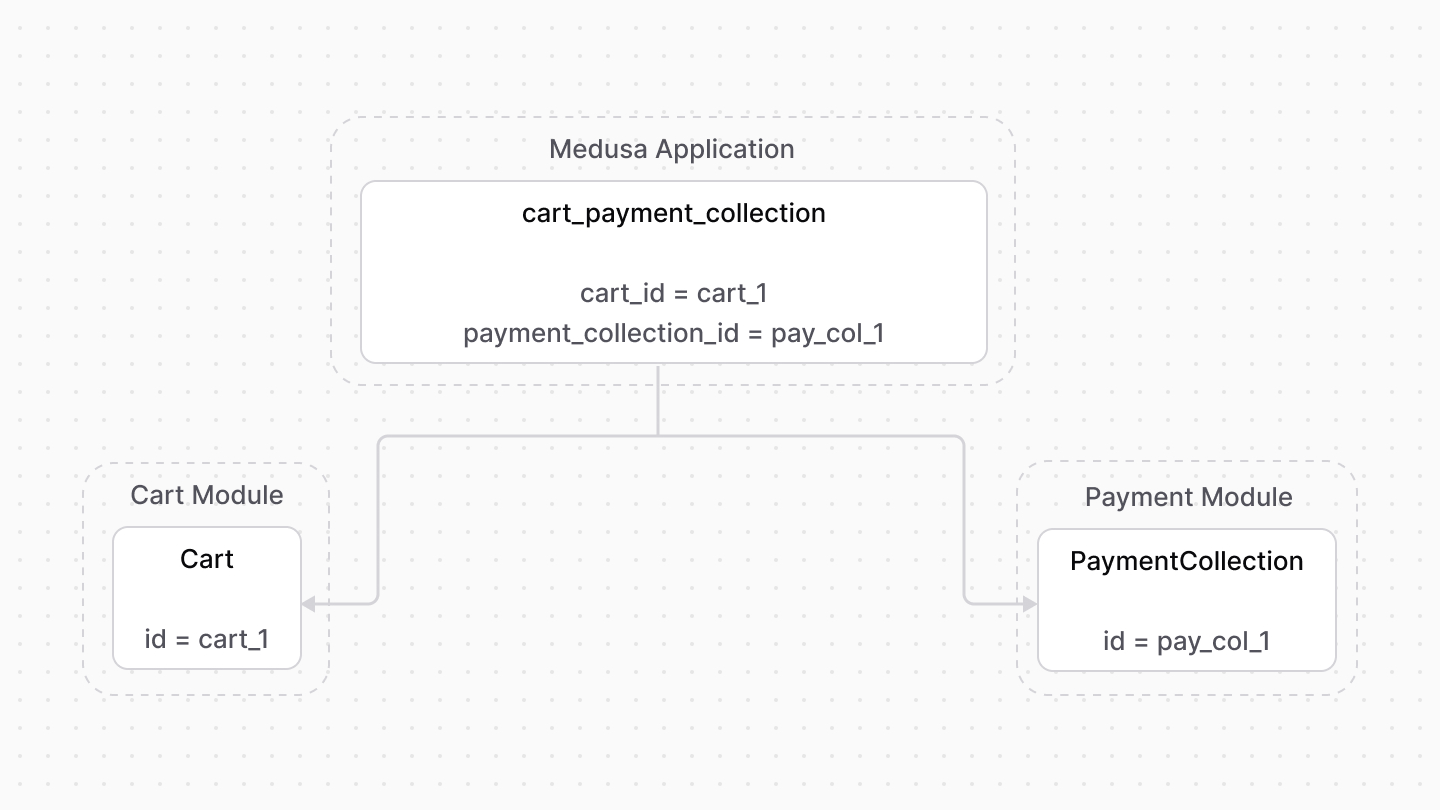
Medusa defines a link between the `Cart` and `PaymentCollection` data models. A cart has a payment collection which holds all the authorized payment sessions and payments made related to the cart.
|
|
|
|
|
|
|
|
### Retrieve with Query
|
|
|
|
To retrieve the payment collection of a cart with [Query](!docs!/learn/fundamentals/module-links/query), pass `payment_collection.*` in `fields`:
|
|
|
|
<CodeTabs group="relation-query">
|
|
<CodeTab label="query.graph" value="method">
|
|
|
|
```ts
|
|
const { data: carts } = await query.graph({
|
|
entity: "cart",
|
|
fields: [
|
|
"payment_collection.*",
|
|
],
|
|
})
|
|
|
|
// carts[0].payment_collection
|
|
```
|
|
|
|
</CodeTab>
|
|
<CodeTab label="useQueryGraphStep" value="step">
|
|
|
|
```ts
|
|
import { useQueryGraphStep } from "@medusajs/medusa/core-flows"
|
|
|
|
// ...
|
|
|
|
const { data: carts } = useQueryGraphStep({
|
|
entity: "cart",
|
|
fields: [
|
|
"payment_collection.*",
|
|
],
|
|
})
|
|
|
|
// carts[0].payment_collection
|
|
```
|
|
|
|
</CodeTab>
|
|
</CodeTabs>
|
|
|
|
### Manage with Link
|
|
|
|
To manage the payment collection of a cart, use [Link](!docs!/learn/fundamentals/module-links/link):
|
|
|
|
<CodeTabs group="relation-link">
|
|
<CodeTab label="link.create" value="method">
|
|
|
|
```ts
|
|
import { Modules } from "@medusajs/framework/utils"
|
|
|
|
// ...
|
|
|
|
await link.create({
|
|
[Modules.CART]: {
|
|
cart_id: "cart_123",
|
|
},
|
|
[Modules.PAYMENT]: {
|
|
payment_collection_id: "paycol_123",
|
|
},
|
|
})
|
|
```
|
|
|
|
</CodeTab>
|
|
<CodeTab label="createRemoteLinkStep" value="step">
|
|
|
|
```ts
|
|
import { createRemoteLinkStep } from "@medusajs/medusa/core-flows"
|
|
|
|
// ...
|
|
|
|
createRemoteLinkStep({
|
|
[Modules.CART]: {
|
|
cart_id: "cart_123",
|
|
},
|
|
[Modules.PAYMENT]: {
|
|
payment_collection_id: "paycol_123",
|
|
},
|
|
})
|
|
```
|
|
|
|
</CodeTab>
|
|
</CodeTabs>
|
|
|
|
---
|
|
|
|
## Product Module
|
|
|
|
Medusa defines read-only links between:
|
|
|
|
- the `LineItem` data model and the [Product Module](../../product/page.mdx)'s `Product` data model. This means you can retrieve the details of a line item's product, but you don't manage the links in a pivot table in the database. The product of a line item is determined by the `product_id` property of the `LineItem` data model.
|
|
- the `LineItem` data model and the [Product Module](../../product/page.mdx)'s `ProductVariant` data model. This means you can retrieve the details of a line item's variant, but you don't manage the links in a pivot table in the database. The variant of a line item is determined by the `variant_id` property of the `LineItem` data model.
|
|
|
|
### Retrieve with Query
|
|
|
|
To retrieve the variant of a line item with [Query](!docs!/learn/fundamentals/module-links/query), pass `variant.*` in `fields`:
|
|
|
|
<Note>
|
|
|
|
To retrieve the product, pass `product.*` in `fields`.
|
|
|
|
</Note>
|
|
|
|
<CodeTabs group="relation-query">
|
|
<CodeTab label="query.graph" value="method">
|
|
|
|
```ts
|
|
const { data: lineItems } = await query.graph({
|
|
entity: "line_item",
|
|
fields: [
|
|
"variant.*",
|
|
],
|
|
})
|
|
|
|
// lineItems.variant
|
|
```
|
|
|
|
</CodeTab>
|
|
<CodeTab label="useQueryGraphStep" value="step">
|
|
|
|
```ts
|
|
import { useQueryGraphStep } from "@medusajs/medusa/core-flows"
|
|
|
|
// ...
|
|
|
|
const { data: lineItems } = useQueryGraphStep({
|
|
entity: "line_item",
|
|
fields: [
|
|
"variant.*",
|
|
],
|
|
})
|
|
|
|
// lineItems.variant
|
|
```
|
|
|
|
</CodeTab>
|
|
</CodeTabs>
|
|
|
|
---
|
|
|
|
## Promotion Module
|
|
|
|
The [Promotion Module](../../promotion/page.mdx) provides discount features.
|
|
|
|
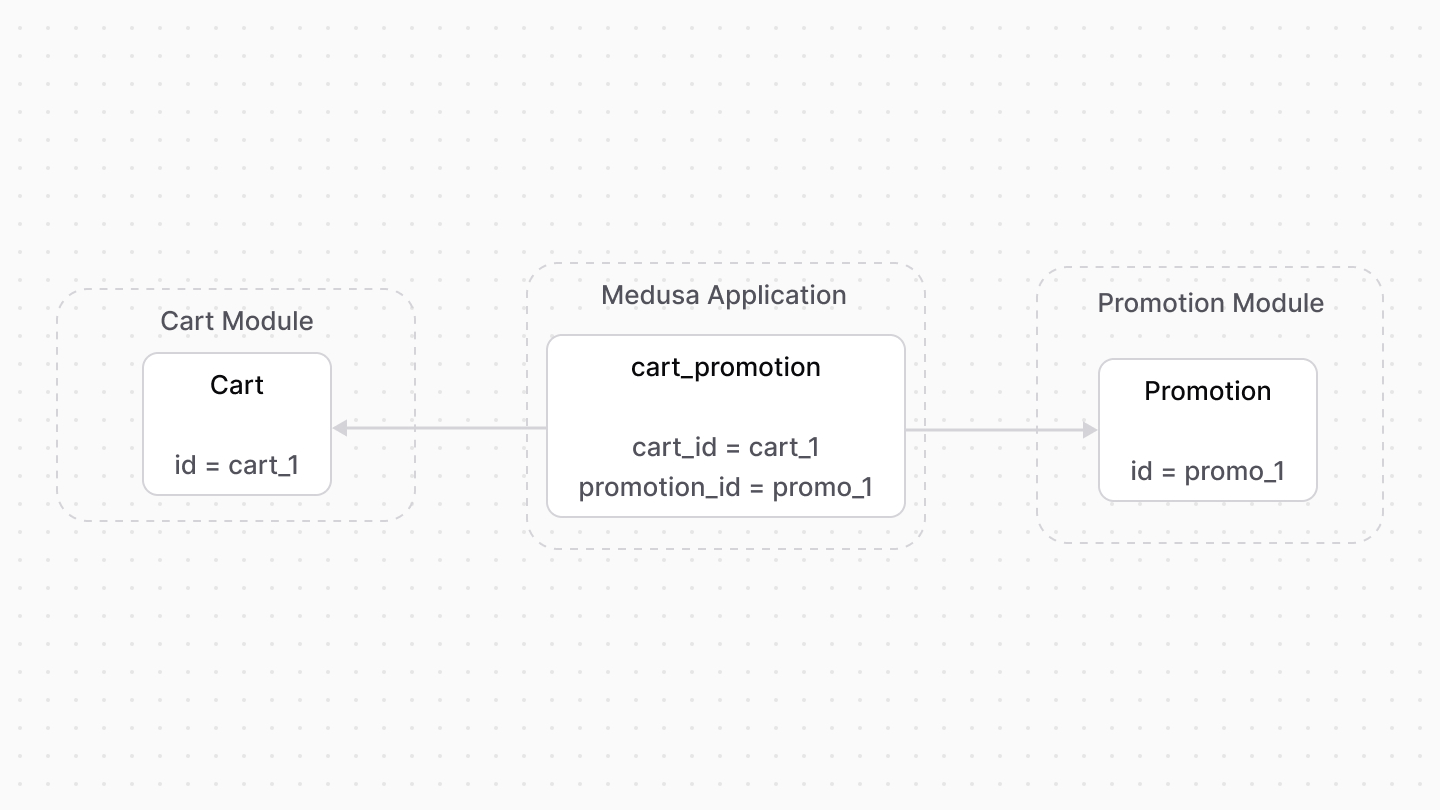
Medusa defines a link between the `Cart` and `Promotion` data models. This indicates the promotions applied on a cart.
|
|
|
|
|
|
|
|
Medusa also defines a read-only link between the `LineItemAdjustment` and `Promotion` data models. This means you can retrieve the details of the promotion applied on a line item, but you don't manage the links in a pivot table in the database. The promotion of a line item is determined by the `promotion_id` property of the `LineItemAdjustment` data model.
|
|
|
|
### Retrieve with Query
|
|
|
|
To retrieve the promotions of a cart with [Query](!docs!/learn/fundamentals/module-links/query), pass `promotions.*` in `fields`:
|
|
|
|
<Note>
|
|
|
|
To retrieve the promotion of a line item adjustment, pass `promotion.*` in `fields`.
|
|
|
|
</Note>
|
|
|
|
<CodeTabs group="relation-query">
|
|
<CodeTab label="query.graph" value="method">
|
|
|
|
```ts
|
|
const { data: carts } = await query.graph({
|
|
entity: "cart",
|
|
fields: [
|
|
"promotions.*",
|
|
],
|
|
})
|
|
|
|
// carts[0].promotions
|
|
```
|
|
|
|
</CodeTab>
|
|
<CodeTab label="useQueryGraphStep" value="step">
|
|
|
|
```ts
|
|
import { useQueryGraphStep } from "@medusajs/medusa/core-flows"
|
|
|
|
// ...
|
|
|
|
const { data: carts } = useQueryGraphStep({
|
|
entity: "cart",
|
|
fields: [
|
|
"promotions.*",
|
|
],
|
|
})
|
|
|
|
// carts[0].promotions
|
|
```
|
|
|
|
</CodeTab>
|
|
</CodeTabs>
|
|
|
|
### Manage with Link
|
|
|
|
To manage the promotions of a cart, use [Link](!docs!/learn/fundamentals/module-links/link):
|
|
|
|
<CodeTabs group="relation-link">
|
|
<CodeTab label="link.create" value="method">
|
|
|
|
```ts
|
|
import { Modules } from "@medusajs/framework/utils"
|
|
|
|
// ...
|
|
|
|
await link.create({
|
|
[Modules.CART]: {
|
|
cart_id: "cart_123",
|
|
},
|
|
[Modules.PROMOTION]: {
|
|
promotion_id: "promo_123",
|
|
},
|
|
})
|
|
```
|
|
|
|
</CodeTab>
|
|
<CodeTab label="createRemoteLinkStep" value="step">
|
|
|
|
```ts
|
|
import { Modules } from "@medusajs/framework/utils"
|
|
import { createRemoteLinkStep } from "@medusajs/medusa/core-flows"
|
|
|
|
// ...
|
|
|
|
createRemoteLinkStep({
|
|
[Modules.CART]: {
|
|
cart_id: "cart_123",
|
|
},
|
|
[Modules.PROMOTION]: {
|
|
promotion_id: "promo_123",
|
|
},
|
|
})
|
|
```
|
|
|
|
</CodeTab>
|
|
</CodeTabs>
|
|
|
|
---
|
|
|
|
## Region Module
|
|
|
|
Medusa defines a read-only link between the `Cart` data model and the [Region Module](../../region/page.mdx)'s `Region` data model. This means you can retrieve the details of a cart's region, but you don't manage the links in a pivot table in the database. The region of a cart is determined by the `region_id` property of the `Cart` data model.
|
|
|
|
### Retrieve with Query
|
|
|
|
To retrieve the region of a cart with [Query](!docs!/learn/fundamentals/module-links/query), pass `region.*` in `fields`:
|
|
|
|
<CodeTabs group="relation-query">
|
|
<CodeTab label="query.graph" value="method">
|
|
|
|
```ts
|
|
const { data: carts } = await query.graph({
|
|
entity: "cart",
|
|
fields: [
|
|
"region.*",
|
|
],
|
|
})
|
|
|
|
// carts[0].region
|
|
```
|
|
|
|
</CodeTab>
|
|
<CodeTab label="useQueryGraphStep" value="step">
|
|
|
|
```ts
|
|
import { useQueryGraphStep } from "@medusajs/medusa/core-flows"
|
|
|
|
// ...
|
|
|
|
const { data: carts } = useQueryGraphStep({
|
|
entity: "cart",
|
|
fields: [
|
|
"region.*",
|
|
],
|
|
})
|
|
|
|
// carts[0].region
|
|
```
|
|
|
|
</CodeTab>
|
|
</CodeTabs>
|
|
|
|
---
|
|
|
|
## Sales Channel Module
|
|
|
|
Medusa defines a read-only link between the `Cart` data model and the [Sales Channel Module](../../sales-channel/page.mdx)'s `SalesChannel` data model. This means you can retrieve the details of a cart's sales channel, but you don't manage the links in a pivot table in the database. The sales channel of a cart is determined by the `sales_channel_id` property of the `Cart` data model.
|
|
|
|
### Retrieve with Query
|
|
|
|
To retrieve the sales channel of a cart with [Query](!docs!/learn/fundamentals/module-links/query), pass `sales_channel.*` in `fields`:
|
|
|
|
<CodeTabs group="relation-query">
|
|
<CodeTab label="query.graph" value="method">
|
|
|
|
```ts
|
|
const { data: carts } = await query.graph({
|
|
entity: "cart",
|
|
fields: [
|
|
"sales_channel.*",
|
|
],
|
|
})
|
|
|
|
// carts[0].sales_channel
|
|
```
|
|
|
|
</CodeTab>
|
|
<CodeTab label="useQueryGraphStep" value="step">
|
|
|
|
```ts
|
|
import { useQueryGraphStep } from "@medusajs/medusa/core-flows"
|
|
|
|
// ...
|
|
|
|
const { data: carts } = useQueryGraphStep({
|
|
entity: "cart",
|
|
fields: [
|
|
"sales_channel.*",
|
|
],
|
|
})
|
|
|
|
// carts[0].sales_channel
|
|
```
|
|
|
|
</CodeTab>
|
|
</CodeTabs>
|