
111 lines
5.2 KiB
Plaintext
111 lines
5.2 KiB
Plaintext
export const metadata = {
|
||
title: `${pageNumber} Events and Subscribers`,
|
||
}
|
||
|
||
# {metadata.title}
|
||
|
||
In this chapter, you’ll learn about Medusa's event system, and how to handle events with subscribers.
|
||
|
||
## Handle Core Commerce Flows with Events
|
||
|
||
When building commerce digital applications, you'll often need to perform an action after a commerce operation is performed. For example, sending an order confirmation email when the customer places an order, or syncing data that's updated in Medusa to a third-party system.
|
||
|
||
Medusa emits events when core commerce features are performed, and you can listen to and handle these events in asynchronous functions. You can think of Medusa's events like you'd think about webhooks in other commerce platforms, but instead of having to setup separate applications to handle webhooks, your efforts only go into writing the logic right in your Medusa codebase.
|
||
|
||
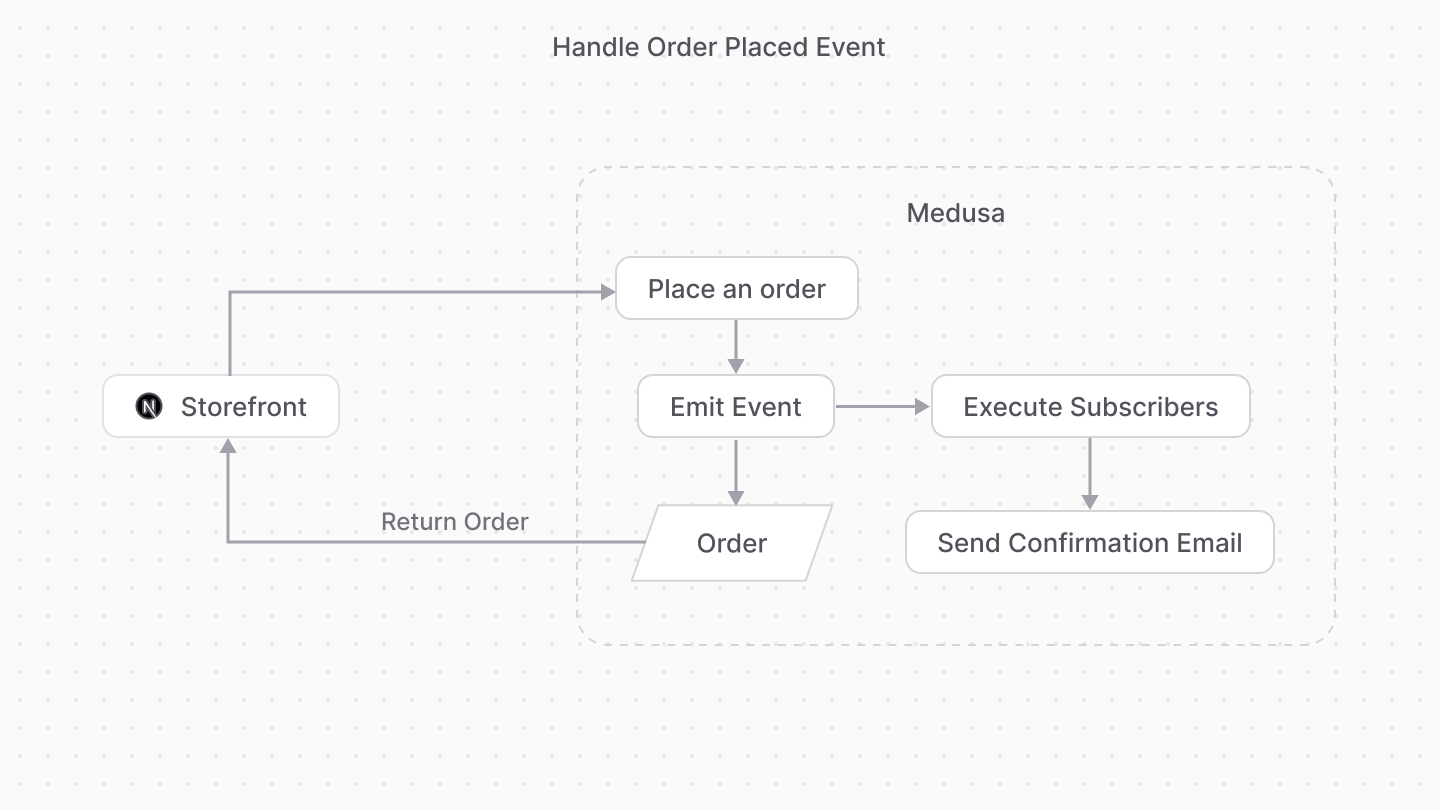
You listen to an event in a subscriber, which is an asynchronous function that's executed when its associated event is emitted.
|
||
|
||
|
||
|
||
Subscribers are useful to perform actions that aren't integral to the original flow. For example, you can handle the `order.placed` event in a subscriber that sends a confirmation email to the customer. The subscriber has no impact on the original order-placement flow, as it's executed outside of it.
|
||
|
||
<Note>
|
||
|
||
If the action you're performing is integral to the main flow of the core commerce feature, use [workflow hooks](../workflows/workflow-hooks/page.mdx) instead.
|
||
|
||
</Note>
|
||
|
||
### List of Emitted Events
|
||
|
||
Find a list of all emitted events in [this reference](!resources!/references/events).
|
||
|
||
---
|
||
|
||
## How to Create a Subscriber?
|
||
|
||
You create a subscriber in a TypeScript or JavaScript file under the `src/subscribers` directory. The file exports the function to execute and the subscriber's configuration that indicate what event(s) it listens to.
|
||
|
||
For example, create the file `src/subscribers/order-placed.ts` with the following content:
|
||
|
||
```ts title="src/subscribers/order-placed.ts"
|
||
import { SubscriberArgs, type SubscriberConfig } from "@medusajs/framework"
|
||
import { sendOrderConfirmationWorkflow } from "../workflows/send-order-confirmation"
|
||
|
||
export default async function orderPlacedHandler({
|
||
event: { data },
|
||
container,
|
||
}: SubscriberArgs<{ id: string }>) {
|
||
const logger = container.resolve("logger")
|
||
|
||
logger.info("Sending confirmation email...")
|
||
|
||
await sendOrderConfirmationWorkflow(container)
|
||
.run({
|
||
input: {
|
||
id: data.id,
|
||
},
|
||
})
|
||
}
|
||
|
||
export const config: SubscriberConfig = {
|
||
event: `order.placed`,
|
||
}
|
||
```
|
||
|
||
This subscriber file exports:
|
||
|
||
- An asynchronous subscriber function that's executed whenever the associated event, which is `order.placed` is triggered.
|
||
- A configuration object with an `event` property whose value is the event the subscriber is listening to. You can also pass an array of event names to listen to multiple events in the same subscriber.
|
||
|
||
The subscriber function receives an object as a parameter that has the following properties:
|
||
|
||
- `event`: An object with the event's details. The `data` property contains the data payload of the event emitted, which is the order's ID in this case.
|
||
- `container`: The [Medusa container](../medusa-container/page.mdx) that you can use to resolve registered resources.
|
||
|
||
In the subscriber function, you use the container to resolve the Logger utility and log a message in the console. Also, assuming you have a [workflow](../workflows/page.mdx) that sends an order confirmation email, you execute it in the subscriber.
|
||
|
||
---
|
||
|
||
## Test the Subscriber
|
||
|
||
To test the subscriber, start the Medusa application:
|
||
|
||
```bash npm2yarn
|
||
npm run dev
|
||
```
|
||
|
||
Then, try placing an order either using Medusa's API routes or the [Next.js Starter Storefront](!resources!/nextjs-starter). You'll see the following message in the terminal:
|
||
|
||
```bash
|
||
info: Processing order.placed which has 1 subscribers
|
||
Sending confirmation email...
|
||
```
|
||
|
||
The first message indicates that the `order.placed` event was emitted, and the second one is the message logged from the subscriber.
|
||
|
||
### Troubleshooting Subscribers
|
||
|
||
If your subscriber is not working as expected, refer to the [Subscriber Troubleshooting Guide](!resources!/troubleshooting/subscribers/not-working).
|
||
|
||
---
|
||
|
||
## Event Module
|
||
|
||
The subscription and emitting of events is handled by an Event Module, an Infrastructure Module that implements the pub/sub functionalities of Medusa's event system.
|
||
|
||
Medusa provides two Event Modules out of the box:
|
||
|
||
- [Local Event Module](!resources!/infrastructure-modules/event/local), used by default. It's useful for development, as you don't need additional setup to use it.
|
||
- [Redis Event Module](!resources!/infrastructure-modules/event/redis), which is useful in production. It uses [Redis](https://redis.io/) to implement Medusa's pub/sub events system.
|
||
|
||
Medusa's [architecture](../../introduction/architecture/page.mdx) also allows you to build a custom Event Module that uses a different service or logic to implement the pub/sub system. Learn how to build an Event Module in [this guide](!resources!/infrastructure-modules/event/create).
|