 Shahed Nasser
356dcc94ce
Shahed Nasser
356dcc94ce
* docs: avalara integration tutorial

* fix getTaxLines method

* fixes

* fix broken link

* fix build error

* fix vale errors
101 lines
4.1 KiB
Plaintext
101 lines
4.1 KiB
Plaintext
import { CardList } from "docs-ui"
|
||
|
||
export const metadata = {
|
||
title: `Tax Module Provider`,
|
||
}
|
||
|
||
# {metadata.title}
|
||
|
||
In this guide, you’ll learn about the Tax Module Provider and how it's used.
|
||
|
||
<Note title="Looking for no-code docs?">
|
||
|
||
Refer to this [Medusa Admin User Guide](!user-guide!/settings/tax-regions) to learn how to manage tax provider of a tax region using the dashboard.
|
||
|
||
</Note>
|
||
|
||
## What is a Tax Module Provider?
|
||
|
||
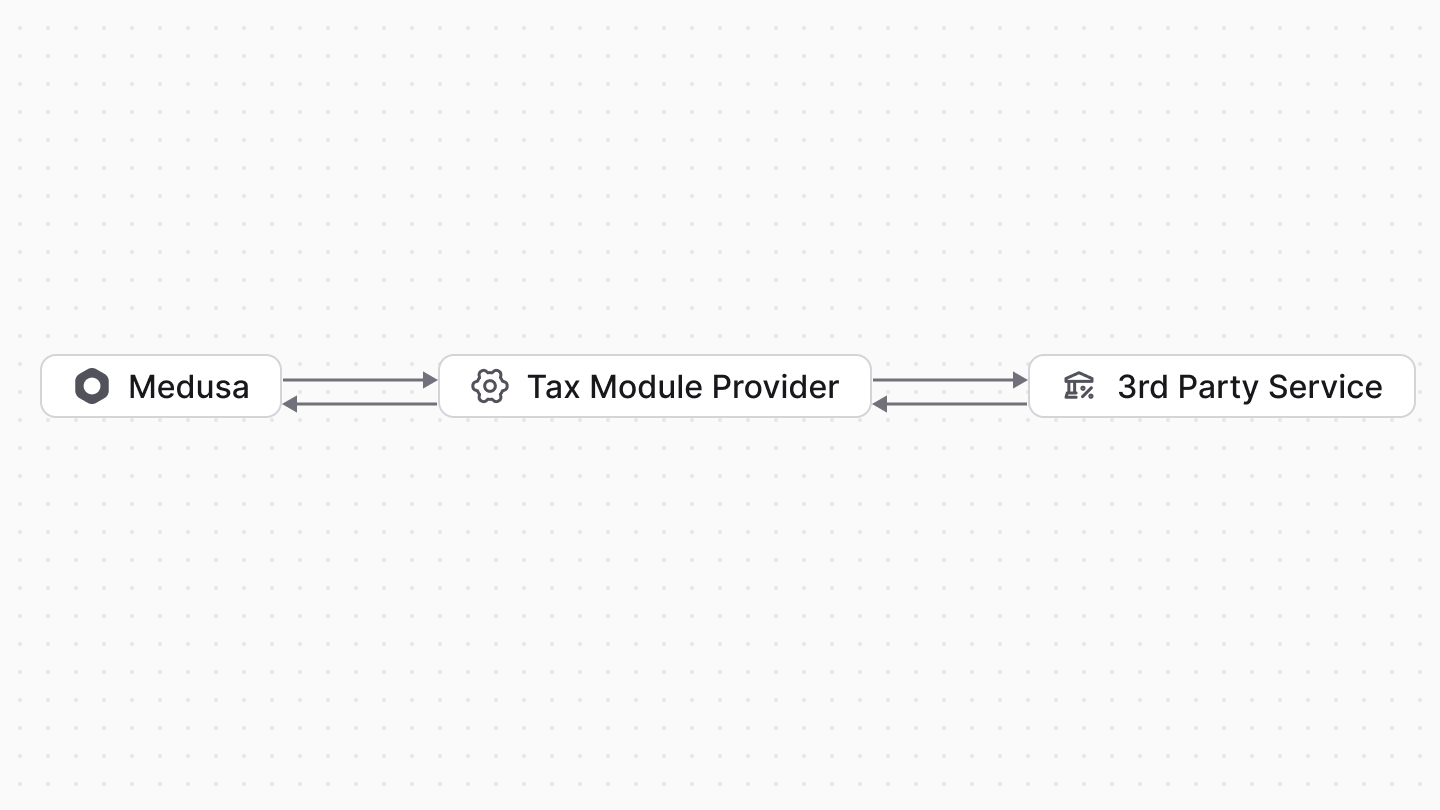
The Tax Module Provider handles tax line calculations in the Medusa application. It integrates third-party tax services, such as TaxJar, or implements custom tax calculation logic.
|
||
|
||
The Medusa application uses the Tax Module Provider whenever it needs to calculate tax lines for a cart or order, or when you [calculate the tax lines using the Tax Module's service](../tax-calculation-with-provider/page.mdx).
|
||
|
||
|
||
|
||
### Default Tax Provider
|
||
|
||
The Tax Module provides a `system` tax provider that acts as a placeholder tax provider. It performs basic tax calculation, as you can see in the [Create Tax Module Provider](/references/tax/provider#gettaxlines) guide.
|
||
|
||
This provider is installed by default in your application and you can use it with tax regions.
|
||
|
||
<Note title="Tip">
|
||
|
||
The identifier of the system tax provider is `tp_system`.
|
||
|
||
</Note>
|
||
|
||
### Other Tax Providers
|
||
|
||
<CardList
|
||
items={[
|
||
{
|
||
href: "/integrations/guides/avalara",
|
||
title: "Avalara",
|
||
badge: {
|
||
variant: "blue",
|
||
children: "Tutorial"
|
||
}
|
||
}
|
||
]}
|
||
className="mb-1"
|
||
/>
|
||
|
||
---
|
||
|
||
## How to Create a Custom Tax Provider?
|
||
|
||
A Tax Module Provider is a module whose service implements the `ITaxProvider` imported from `@medusajs/framework/types`.
|
||
|
||
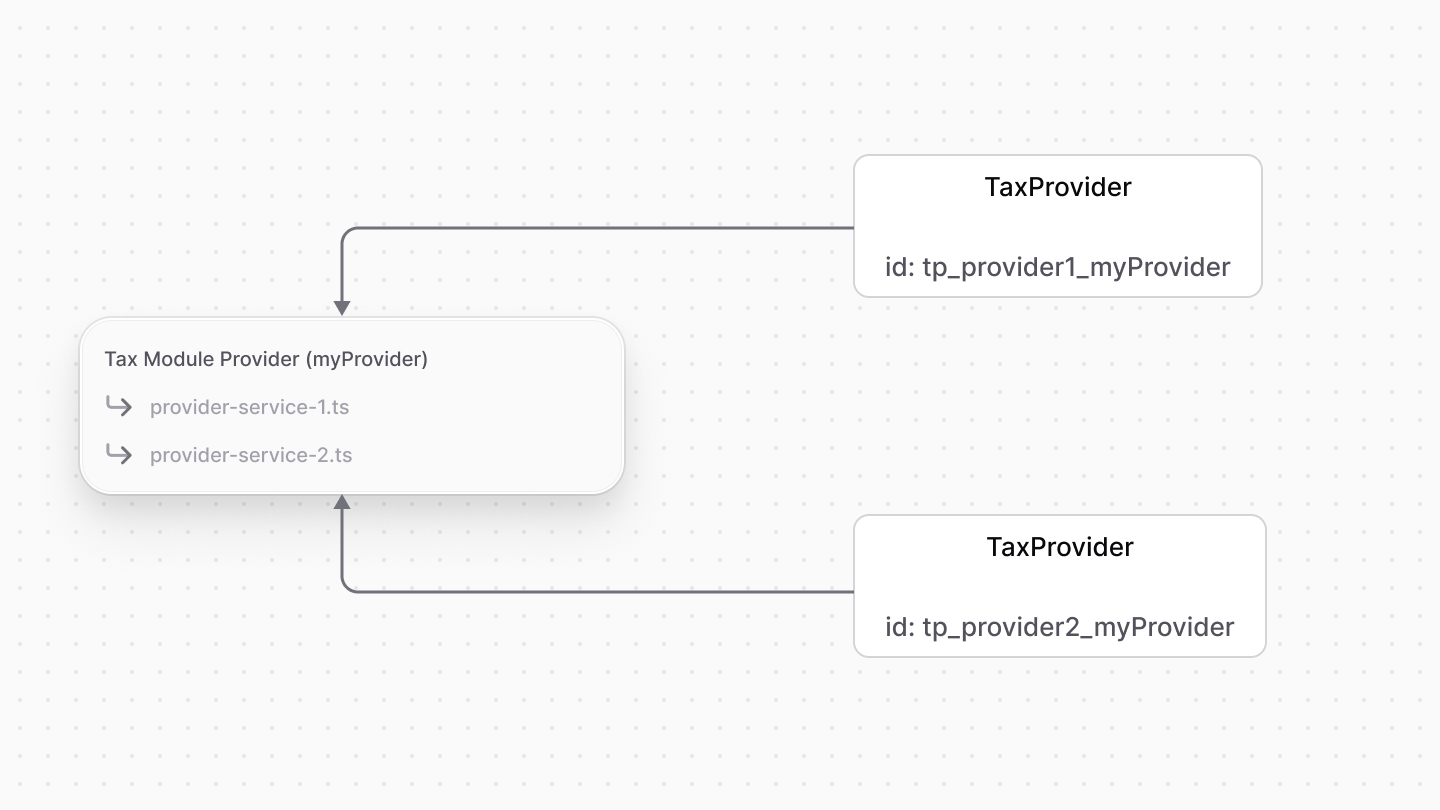
The module can have multiple tax provider services, where each are registered as separate tax providers.
|
||
|
||
Refer to the [Create Tax Module Provider](/references/tax/provider) guide to learn how to create a Tax Module Provider.
|
||
|
||
After you create a tax provider, you can choose it as the default Tax Module Provider for a region in the [Medusa Admin dashboard](!user-guide!/settings/tax-regions).
|
||
|
||
---
|
||
|
||
## How are Tax Providers Registered?
|
||
|
||
### Configure Tax Module's Providers
|
||
|
||
The Tax Module accepts a `providers` option that allows you to configure the providers registered in your application.
|
||
|
||
Learn more about this option in the [Module Options](../module-options/page.mdx) guide.
|
||
|
||
### Registration on Application Start
|
||
|
||
When the Medusa application starts, it registers the Tax Module Providers defined in the `providers` option of the Tax Module.
|
||
|
||
For each Tax Module Provider, the Medusa application finds all tax provider services defined in them to register.
|
||
|
||
### TaxProvider Data Model
|
||
|
||
A registered tax provider is represented by the [TaxProvider data model](/references/tax/models/TaxProvider) in the Medusa application.
|
||
|
||
This data model is used to reference a service in the Tax Module Provider and determine whether it's installed in the application.
|
||
|
||
|
||
|
||
The `TaxProvider` data model has the following properties:
|
||
|
||
- `id`: The unique identifier of the tax provider. The ID's format is `tp_{identifier}_{id}`, where:
|
||
- `identifier` is the value of the `identifier` property in the Tax Module Provider's service.
|
||
- `id` is the value of the `id` property of the Tax Module Provider in `medusa-config.ts`.
|
||
- `is_enabled`: A boolean indicating whether the tax provider is enabled.
|
||
|
||
### How to Remove a Tax Provider?
|
||
|
||
You can remove a registered tax provider from the Medusa application by removing it from the `providers` option in the Tax Module's configuration.
|
||
|
||
Then, the next time the Medusa application starts, it will set the `is_enabled` property of the `TaxProvider`'s record to `false`. This allows you to re-enable the tax provider later if needed by adding it back to the `providers` option.
|