
147 lines
4.0 KiB
Plaintext
147 lines
4.0 KiB
Plaintext
export const metadata = {
|
||
title: `${pageNumber} Link Modules`,
|
||
}
|
||
|
||
# {metadata.title}
|
||
|
||
In this chapter, you’ll learn what a link module is and how to use the remote link in your customizations.
|
||
|
||
## What is a Link Module?
|
||
|
||
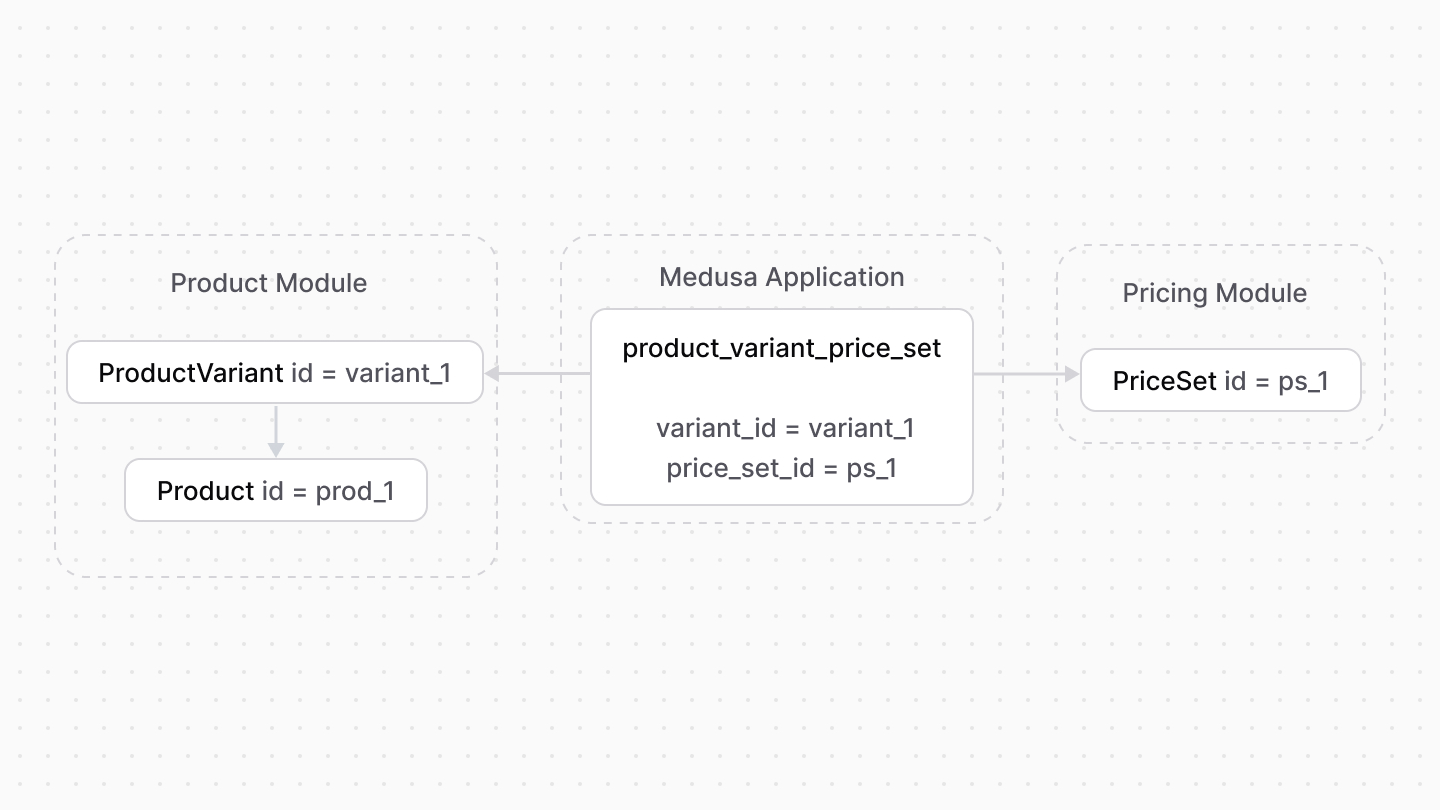
A link module is a module whose only purpose is to define a relationship between two modules’ data models. The relationship is represented as a pivot or link table in the database, pointing at the primary keys of each data model.
|
||
|
||
For example, Medusa defines a link module between the Product and Pricing modules. The link module builds a relationship between the `ProductVariant` data model and the `PriceSet` data model.
|
||
|
||
|
||
|
||
Link modules provide more flexibility in managing relationships between modules while maintaining module isolation.
|
||
|
||
Link modules are currently only available for Medusa’s commerce modules. The Medusa application only creates the link tables when both modules are available.
|
||
|
||
---
|
||
|
||
## What is the Remote Link?
|
||
|
||
The remote link is a class with utility methods to manage links between modules. It’s registered in the Medusa container under the `remoteLink` registration name.
|
||
|
||
For example:
|
||
|
||
```ts
|
||
import {
|
||
MedusaRequest,
|
||
MedusaResponse,
|
||
} from "@medusajs/medusa"
|
||
import {
|
||
ModuleRegistrationName,
|
||
RemoteLink,
|
||
} from "@medusajs/modules-sdk"
|
||
import {
|
||
ContainerRegistrationKeys,
|
||
} from "@medusajs/utils"
|
||
|
||
export async function POST(
|
||
req: MedusaRequest,
|
||
res: MedusaResponse
|
||
): Promise<void> {
|
||
const remoteLink: RemoteLink = req.scope.resolve(
|
||
ContainerRegistrationKeys.REMOTE_LINK
|
||
)
|
||
|
||
// ...
|
||
}
|
||
```
|
||
|
||
You can use its methods to manage links, such as create or delete links.
|
||
|
||
### Create Link
|
||
|
||
To create a link between records of two data models, use the `create` method of the remote link.
|
||
|
||
For example:
|
||
|
||
```ts
|
||
import { Modules } from "@medusajs/utils"
|
||
|
||
// ...
|
||
|
||
await remoteLink.create({
|
||
[Modules.PRODUCT]: {
|
||
variant_id: product.variants[0].id,
|
||
},
|
||
[Modules.PRICING]: {
|
||
price_set_id: price.id,
|
||
},
|
||
})
|
||
```
|
||
|
||
The `create` method accepts as a parameter an object. The object’s keys are the names of the linked modules.
|
||
|
||
The value of each module’s property is an object. It defines the values of the linked fields.
|
||
|
||
So, in the example above, you specify for the Product Module the value of the `variant_id`, and for the Pricing Module the value of `price_set_id`. These are the fields linked between the models of the two modules.
|
||
|
||
### Dismiss Link
|
||
|
||
To remove a link between records of two data models, use the `dismiss` method of the remote link. This doesn’t remove the records, only the relation between them.
|
||
|
||
For example:
|
||
|
||
```ts
|
||
import { Modules } from "@medusajs/utils"
|
||
|
||
// ...
|
||
|
||
await remoteLink.dismiss({
|
||
[Modules.PRODUCT]: {
|
||
variant_id: product.variants[0].id,
|
||
},
|
||
[Modules.PRICING]: {
|
||
price_set_id: price.id,
|
||
},
|
||
})
|
||
```
|
||
|
||
The `dismiss` method accepts the same parameter type as the [create method](#create-link).
|
||
|
||
### Cascade Delete Linked Records
|
||
|
||
If a record, such as a variant, is deleted, use the `delete` method of the remote link to delete all associated links with cascade delete enabled.
|
||
|
||
For example:
|
||
|
||
```ts
|
||
import { Modules } from "@medusajs/utils"
|
||
|
||
// ...
|
||
|
||
await productModuleService.deleteVariants([variant.id])
|
||
|
||
await remoteLink.delete({
|
||
[Modules.PRODUCT]: {
|
||
variant_id: variant.id,
|
||
},
|
||
})
|
||
```
|
||
|
||
This deletes all records linked to the deleted variant with cascade delete enabled in their relationship.
|
||
|
||
### Restore Linked Records
|
||
|
||
If a record, such as a variant, that was previously soft-deleted is now restored, use the `restore` method of the remote link to restore all associated links that were cascade deleted.
|
||
|
||
For example:
|
||
|
||
```ts
|
||
import { Modules } from "@medusajs/utils"
|
||
|
||
// ...
|
||
|
||
await productModuleService.restoreVariants([variant.id])
|
||
|
||
await remoteLink.restore({
|
||
[Modules.PRODUCT]: {
|
||
variant_id: variant.id,
|
||
},
|
||
})
|
||
```
|