 Shahed Nasser
0462cc5acf
Shahed Nasser
0462cc5acf
- Change existing data model guides and add new ones for DML
- Change module's docs around service factory + remove guides that are now necessary
- Hide/remove all mentions of module relationships, or label them as coming soon.
- Change all data model creation snippets to use DML
- use `property` instead of `field` when referring to a data model's properties.
- Fix all snippets in commerce module guides to use new method suffix (no more main model methods)
- Rework recipes, removing/hiding a lot of sections as a lot of recipes are incomplete with the current state of DML.


### Other changes

- Highlight fixes in some guides
- Remove feature flags guide
- Fix code block styles when there are no line numbers.

### Upcoming changes in other PRs

- Re-generate commerce module references (for the updates in the method names)
- Ensure that the data model references are generated correctly for models using DML.
- (probably at a very later point) revisit recipes
99 lines
3.3 KiB
Plaintext
99 lines
3.3 KiB
Plaintext
import { Table } from "docs-ui"
|
||
|
||
export const metadata = {
|
||
title: `Promotion Concepts`,
|
||
}
|
||
|
||
# {metadata.title}
|
||
|
||
In this document, you’ll learn about the main promotion and rule concepts in the Promotion Module.
|
||
|
||
## What is a Promotion?
|
||
|
||
A promotion, represented by the [Promotion data model](/references/promotion/models/Promotion), represents a discount applied on cart items, shipping methods, or entire orders.
|
||
|
||
A promotion has two types:
|
||
|
||
- `standard`: A standard promotion with rules.
|
||
- `buyget`: “A buy X get Y” promotion with rules.
|
||
|
||
<Table>
|
||
<Table.Header>
|
||
<Table.Row>
|
||
<Table.HeaderCell>
|
||
|
||
`standard` Promotion Examples
|
||
|
||
</Table.HeaderCell>
|
||
<Table.HeaderCell>
|
||
|
||
`buyget` Promotion Examples
|
||
|
||
</Table.HeaderCell>
|
||
</Table.Row>
|
||
</Table.Header>
|
||
<Table.Body>
|
||
<Table.Row>
|
||
<Table.Cell>
|
||
|
||
A coupon code that gives customers 10% off their entire order.
|
||
|
||
</Table.Cell>
|
||
<Table.Cell>
|
||
|
||
Buy two shirts and get another for free.
|
||
|
||
</Table.Cell>
|
||
</Table.Row>
|
||
<Table.Row>
|
||
<Table.Cell>
|
||
|
||
A coupon code that gives customers $15 off any shirt in their order.
|
||
|
||
</Table.Cell>
|
||
<Table.Cell>
|
||
|
||
Buy two shirts and get 10% off the entire order.
|
||
|
||
</Table.Cell>
|
||
</Table.Row>
|
||
<Table.Row>
|
||
<Table.Cell>
|
||
|
||
A discount applied automatically for VIP customers that removes 10% off their shipping method’s amount.
|
||
|
||
</Table.Cell>
|
||
<Table.Cell>
|
||
|
||
Spend $100 and get free shipping.
|
||
|
||
</Table.Cell>
|
||
</Table.Row>
|
||
</Table.Body>
|
||
</Table>
|
||
|
||
## PromotionRule
|
||
|
||
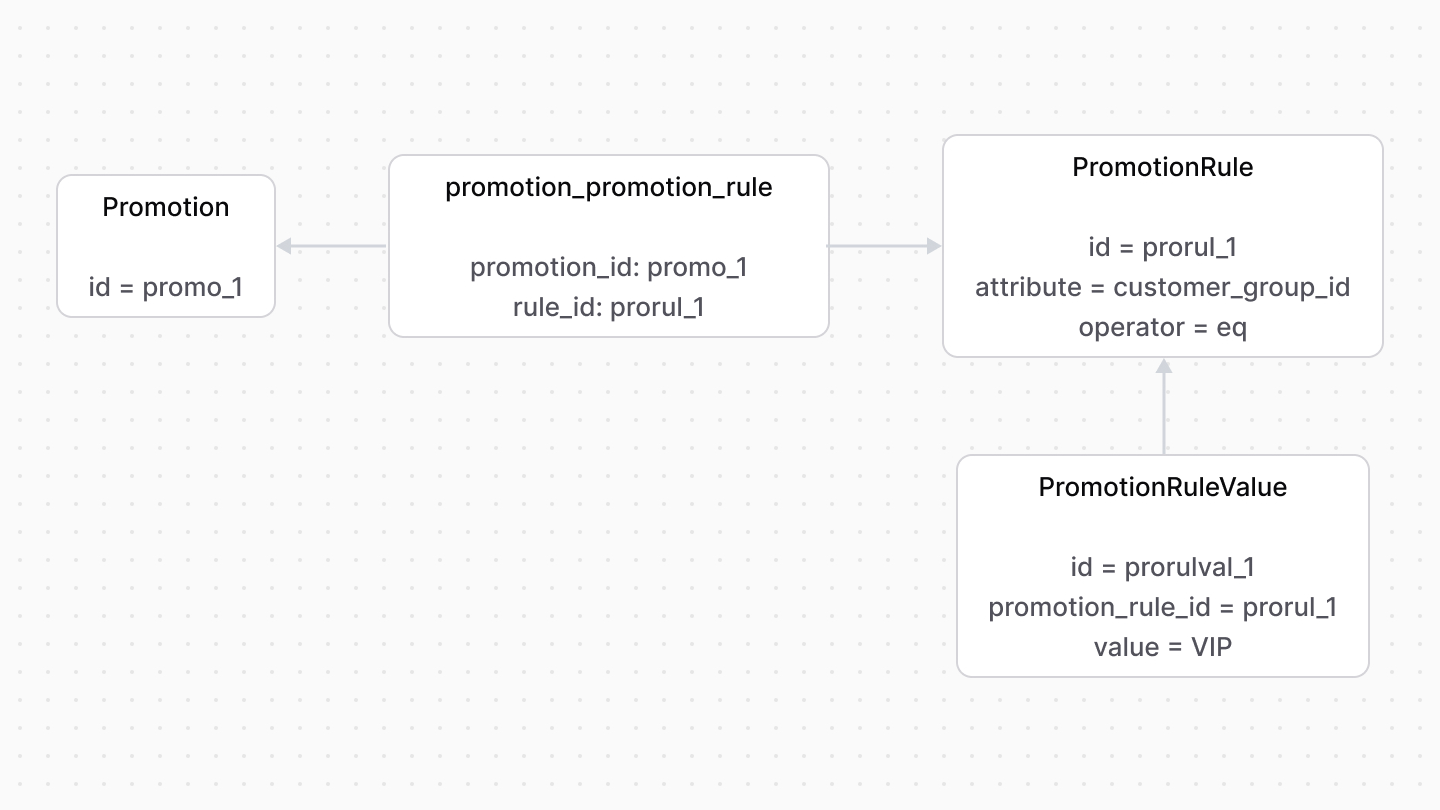
A promotion can be restricted by a set of rules, each rule is represented by the [PromotionRule data model](/references/promotion/models/PromotionRule). For example, you can create a promotion that only customers of the `VIP` customer group can use.
|
||
|
||
|
||
|
||
A `PromotionRule`'s `attribute` property indicates the property's name to which this rule is applied. For example, `customer_group_id`. Its value is stored in the `PromotionRuleValue` data model. So, a rule can have multiple values.
|
||
|
||
When testing whether a promotion can be applied to a cart, the rule's `attribute` property and its values are tested on the cart itself. For example, the cart's customer must be part of the customer group(s) indicated in the promotion rule's value.
|
||
|
||
---
|
||
|
||
## Flexible Rules
|
||
|
||
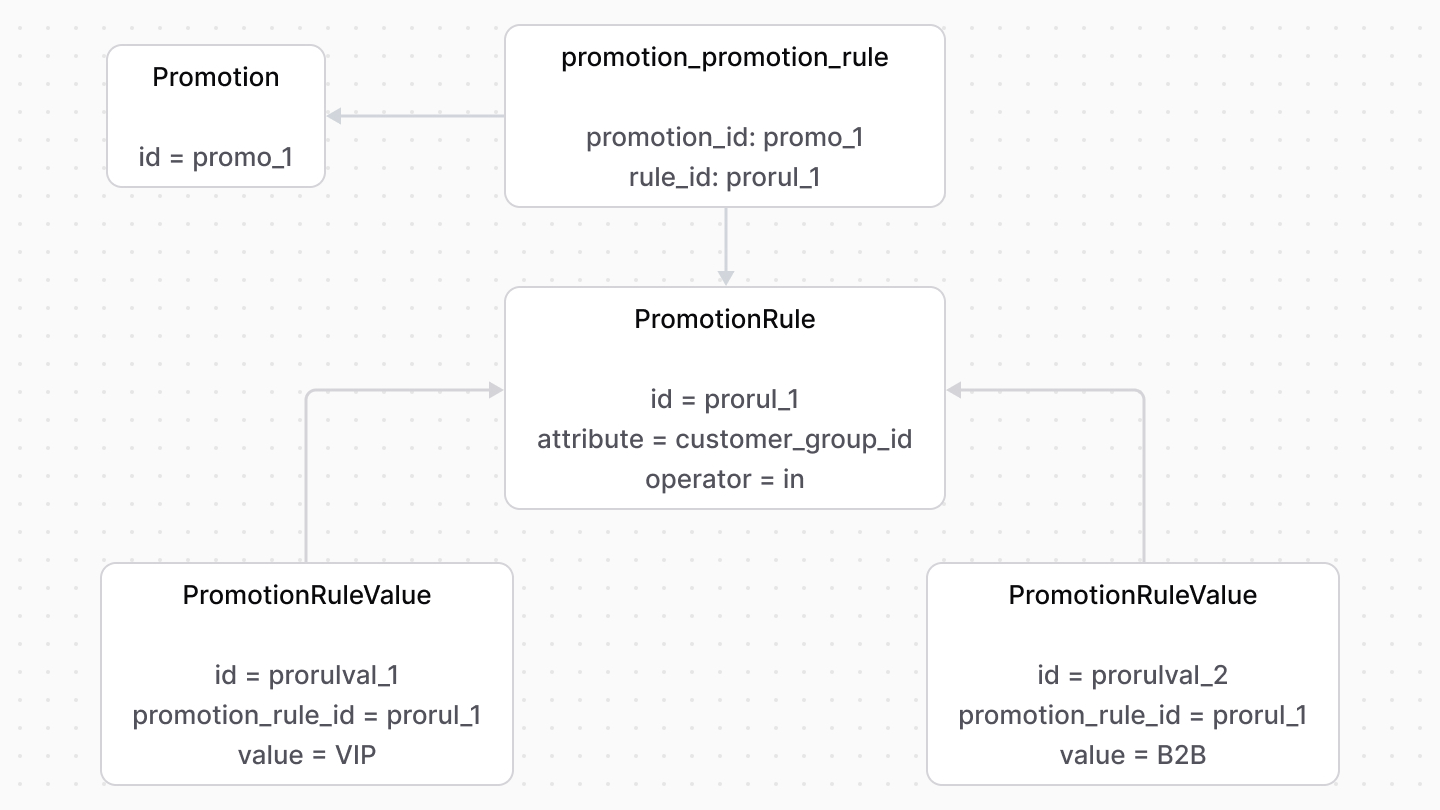
The `PromotionRule`'s `operator` property adds more flexibility to the rule’s condition rather than simple equality (`eq`).
|
||
|
||
For example, to restrict the promotion to only `VIP` and `B2B` customer groups:
|
||
|
||
- Add a `PromotionRule` with its `attribute` property set to `customer_group_id` and `operator` property to `in`.
|
||
- Add two `PromotionRuleValue` associated with the rule: one with the value `VIP` and the other `B2B`.
|
||
|
||
|
||
|
||
In this case, a customer’s group must be in the `VIP` and `B2B` set of values to use the promotion.
|