 4e1c474dfa
* docs: emails in cloud

* add notes to user guides

* small updates

* small change

* fix link

* addressed feedback
344 lines
7.9 KiB
Plaintext
344 lines
7.9 KiB
Plaintext
import { Prerequisites, Table } from "docs-ui"
|
|
|
|
export const metadata = {
|
|
title: `Medusa Cache`,
|
|
}
|
|
|
|
# {metadata.title}
|
|
|
|
In this guide, you'll learn about Medusa Cache.
|
|
|
|
## What is Medusa Cache?
|
|
|
|
Medusa Cache is a caching layer that improves your application's performance and reduces costs. It's available to all environments and plans out of the box at no additional cost.
|
|
|
|
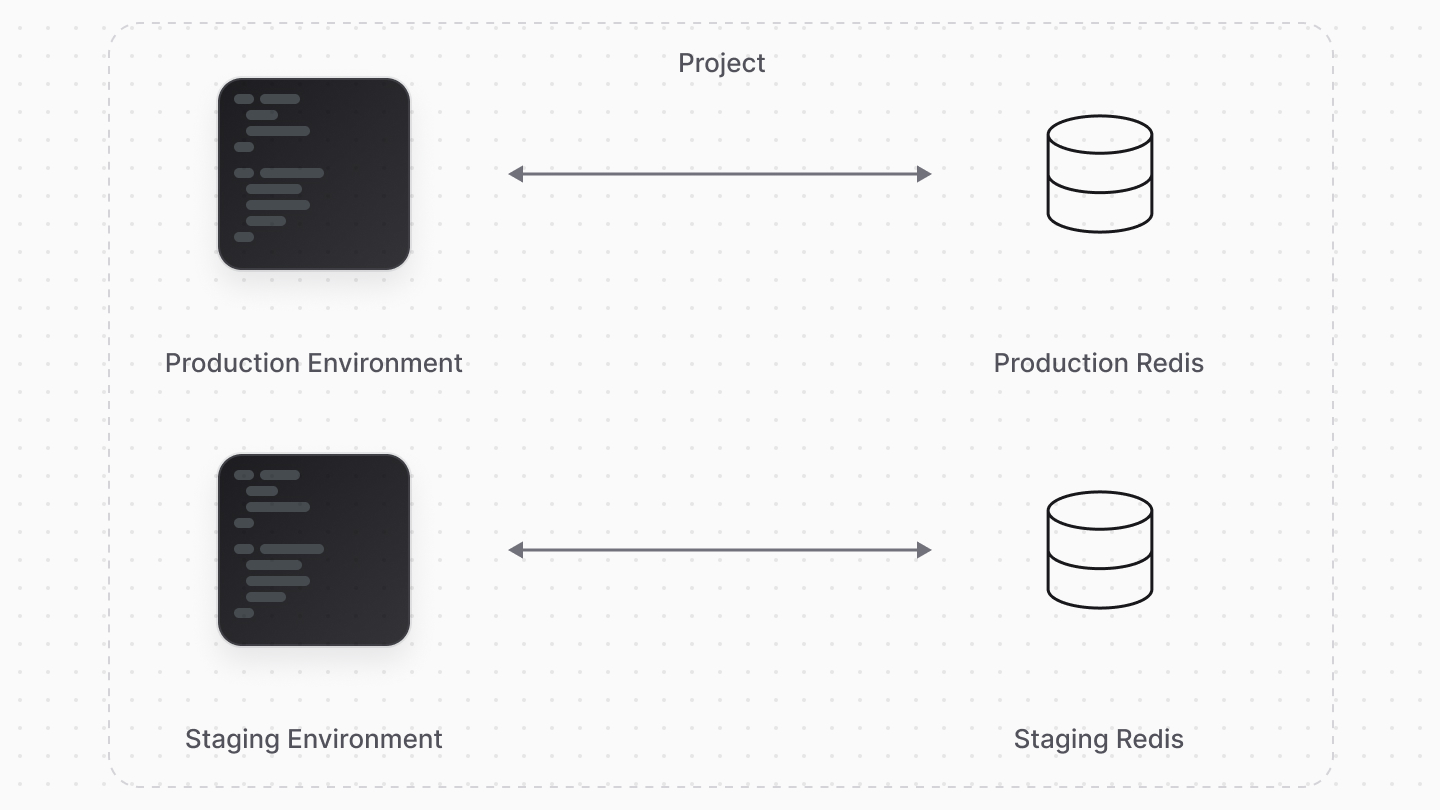
Medusa Cache relies on the existing key/value [Redis](../redis/page.mdx) store already provisioned for environments. Each environment has its own isolated cache.
|
|
|
|
|
|
|
|
---
|
|
|
|
## Enable Medusa Cache
|
|
|
|
<Prerequisites
|
|
items={[
|
|
{
|
|
text: "Medusa v2.11.0+",
|
|
href: "https://github.com/medusajs/medusa/releases/tag/v2.11.0",
|
|
}
|
|
]}
|
|
/>
|
|
|
|
To enable Medusa Cache for your Medusa project deployed on Cloud, set the `caching` feature flag in `medusa-config.ts`:
|
|
|
|
```ts title="medusa-config.ts"
|
|
module.exports = defineConfig({
|
|
// ...
|
|
featureFlags: {
|
|
caching: true,
|
|
},
|
|
})
|
|
```
|
|
|
|
This will enable all Medusa Cache functionality in your project.
|
|
|
|
---
|
|
|
|
## How Does Medusa Cache Work?
|
|
|
|
### Cached Data in API Routes
|
|
|
|
By using Medusa Cache, data is cached across several business-critical APIs to boost performance and throughput. This includes all cart-related operations, where the following data is cached:
|
|
|
|
- Regions
|
|
- Promotion codes
|
|
- Variant price sets
|
|
- Variants
|
|
- Shipping options
|
|
- Sales channels
|
|
- Customers
|
|
|
|
### Integrated into Query
|
|
|
|
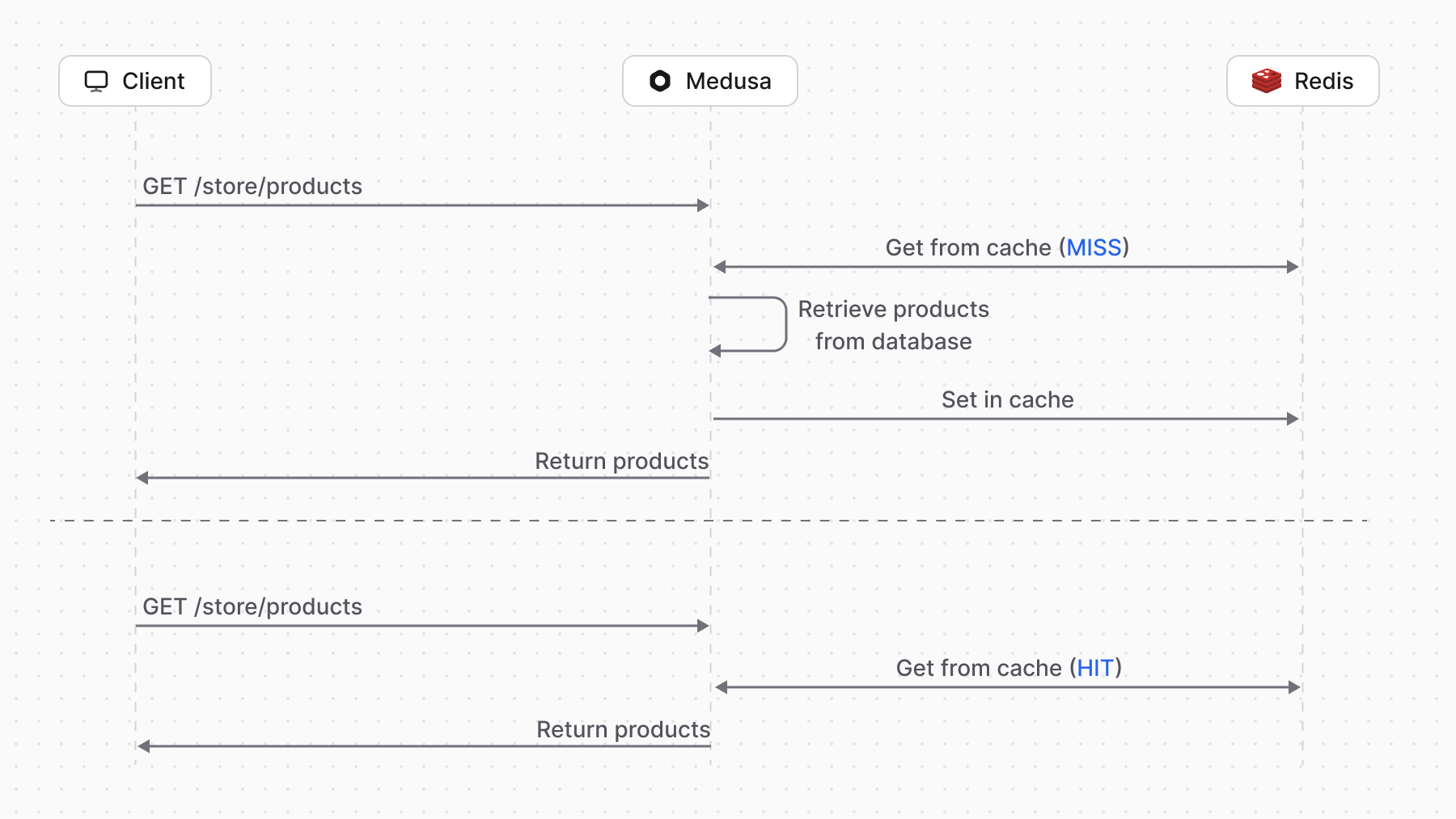
Medusa Cache is built on the new [Caching Module](!resources!/infrastructure-modules/caching). The module has been integrated into [Query](!docs!/learn/fundamentals/module-links/query) so that `query.graph` calls can be cached easily.
|
|
|
|
You can enable caching for your custom `query.graph` calls by passing a `cache` option. For example:
|
|
|
|
```ts
|
|
const { data: products } = await query.graph({
|
|
entity: "product",
|
|
fields: ["id", "title", "handle"],
|
|
}, {
|
|
cache: {
|
|
enable: true,
|
|
},
|
|
})
|
|
```
|
|
|
|
This code caches the query result. When the same query is made again, the cached result is returned instead of querying the database.
|
|
|
|
|
|
|
|
### Automatic Invalidation
|
|
|
|
By default, data is cached for one hour or until invalidated. Invalidation occurs automatically when related data is created, updated, or deleted.
|
|
|
|
Learn more about automatic invalidation in the [Caching Module documentation](!resources!/infrastructure-modules/caching/concepts#automatic-cache-invalidation).
|
|
|
|
---
|
|
|
|
## Performance Benchmark Comparisons
|
|
|
|
The following benchmark comparisons demonstrate the performance improvements you can expect with Medusa Cache. These were conducted on a Cloud environment with a standard setup.
|
|
|
|
<Table>
|
|
<Table.Header>
|
|
<Table.Row>
|
|
<Table.HeaderCell className="w-1/2">
|
|
Endpoint
|
|
</Table.HeaderCell>
|
|
<Table.HeaderCell>
|
|
Without Medusa Cache (ms)
|
|
</Table.HeaderCell>
|
|
<Table.HeaderCell>
|
|
With Medusa Cache (ms)
|
|
</Table.HeaderCell>
|
|
<Table.HeaderCell>
|
|
Improvement
|
|
</Table.HeaderCell>
|
|
</Table.Row>
|
|
</Table.Header>
|
|
<Table.Body>
|
|
<Table.Row>
|
|
<Table.Cell colSpan={4} className="bg-medusa-bg-subtle">
|
|
**Product Operations**
|
|
</Table.Cell>
|
|
</Table.Row>
|
|
<Table.Row>
|
|
<Table.Cell>
|
|
`GET /store/products`
|
|
</Table.Cell>
|
|
<Table.Cell>
|
|
`354.00`
|
|
</Table.Cell>
|
|
<Table.Cell>
|
|
`83.00`
|
|
</Table.Cell>
|
|
<Table.Cell>
|
|
`~77%`
|
|
</Table.Cell>
|
|
</Table.Row>
|
|
<Table.Row>
|
|
<Table.Cell>
|
|
`GET /store/product-categories`
|
|
</Table.Cell>
|
|
<Table.Cell>
|
|
`88.00`
|
|
</Table.Cell>
|
|
<Table.Cell>
|
|
`51.00`
|
|
</Table.Cell>
|
|
<Table.Cell>
|
|
`~42%`
|
|
</Table.Cell>
|
|
</Table.Row>
|
|
<Table.Row>
|
|
<Table.Cell>
|
|
`GET /store/products/:id`
|
|
</Table.Cell>
|
|
<Table.Cell>
|
|
`161.00`
|
|
</Table.Cell>
|
|
<Table.Cell>
|
|
`123.00`
|
|
</Table.Cell>
|
|
<Table.Cell>
|
|
`~24%`
|
|
</Table.Cell>
|
|
</Table.Row>
|
|
<Table.Row>
|
|
<Table.Cell colSpan={4} className="bg-medusa-bg-subtle">
|
|
**Cart Operations**
|
|
</Table.Cell>
|
|
</Table.Row>
|
|
<Table.Row>
|
|
<Table.Cell>
|
|
`POST /store/carts/:id/line-items`
|
|
</Table.Cell>
|
|
<Table.Cell>
|
|
`697.00`
|
|
</Table.Cell>
|
|
<Table.Cell>
|
|
`427.00`
|
|
</Table.Cell>
|
|
<Table.Cell>
|
|
`~39%`
|
|
</Table.Cell>
|
|
</Table.Row>
|
|
<Table.Row>
|
|
<Table.Cell>
|
|
`POST /store/carts/:id/shipping-methods`
|
|
</Table.Cell>
|
|
<Table.Cell>
|
|
`1002.00`
|
|
</Table.Cell>
|
|
<Table.Cell>
|
|
`670.00`
|
|
</Table.Cell>
|
|
<Table.Cell>
|
|
`~33%`
|
|
</Table.Cell>
|
|
</Table.Row>
|
|
<Table.Row>
|
|
<Table.Cell>
|
|
`POST /store/carts/:id/promotions`
|
|
</Table.Cell>
|
|
<Table.Cell>
|
|
`302.00`
|
|
</Table.Cell>
|
|
<Table.Cell>
|
|
`203.00`
|
|
</Table.Cell>
|
|
<Table.Cell>
|
|
`~33%`
|
|
</Table.Cell>
|
|
</Table.Row>
|
|
<Table.Row>
|
|
<Table.Cell>
|
|
`GET /store/carts/:id`
|
|
</Table.Cell>
|
|
<Table.Cell>
|
|
`109.00`
|
|
</Table.Cell>
|
|
<Table.Cell>
|
|
`73.00`
|
|
</Table.Cell>
|
|
<Table.Cell>
|
|
`~33%`
|
|
</Table.Cell>
|
|
</Table.Row>
|
|
<Table.Row>
|
|
<Table.Cell>
|
|
`POST /store/carts/:id`
|
|
</Table.Cell>
|
|
<Table.Cell>
|
|
`909.00`
|
|
</Table.Cell>
|
|
<Table.Cell>
|
|
`656.00`
|
|
</Table.Cell>
|
|
<Table.Cell>
|
|
`~28%`
|
|
</Table.Cell>
|
|
</Table.Row>
|
|
<Table.Row>
|
|
<Table.Cell>
|
|
`POST /store/carts`
|
|
</Table.Cell>
|
|
<Table.Cell>
|
|
`446.00`
|
|
</Table.Cell>
|
|
<Table.Cell>
|
|
`329.00`
|
|
</Table.Cell>
|
|
<Table.Cell>
|
|
`~26%`
|
|
</Table.Cell>
|
|
</Table.Row>
|
|
<Table.Row>
|
|
<Table.Cell>
|
|
`POST /store/carts/:id/complete`
|
|
</Table.Cell>
|
|
<Table.Cell>
|
|
`1357.00`
|
|
</Table.Cell>
|
|
<Table.Cell>
|
|
`1018.00`
|
|
</Table.Cell>
|
|
<Table.Cell>
|
|
`~25%`
|
|
</Table.Cell>
|
|
</Table.Row>
|
|
<Table.Row>
|
|
<Table.Cell colSpan={4} className="bg-medusa-bg-subtle">
|
|
**Order Operations**
|
|
</Table.Cell>
|
|
</Table.Row>
|
|
<Table.Row>
|
|
<Table.Cell>
|
|
`GET /store/orders/:id`
|
|
</Table.Cell>
|
|
<Table.Cell>
|
|
`119.00`
|
|
</Table.Cell>
|
|
<Table.Cell>
|
|
`81.00`
|
|
</Table.Cell>
|
|
<Table.Cell>
|
|
`~32%`
|
|
</Table.Cell>
|
|
</Table.Row>
|
|
<Table.Row>
|
|
<Table.Cell colSpan={4} className="bg-medusa-bg-subtle">
|
|
**Other Operations**
|
|
</Table.Cell>
|
|
</Table.Row>
|
|
<Table.Row>
|
|
<Table.Cell>
|
|
`GET /store/regions`
|
|
</Table.Cell>
|
|
<Table.Cell>
|
|
`89.00`
|
|
</Table.Cell>
|
|
<Table.Cell>
|
|
`51.00`
|
|
</Table.Cell>
|
|
<Table.Cell>
|
|
`~43%`
|
|
</Table.Cell>
|
|
</Table.Row>
|
|
<Table.Row>
|
|
<Table.Cell>
|
|
`GET /store/shipping-options`
|
|
</Table.Cell>
|
|
<Table.Cell>
|
|
`272.00`
|
|
</Table.Cell>
|
|
<Table.Cell>
|
|
`173.00`
|
|
</Table.Cell>
|
|
<Table.Cell>
|
|
`~36%`
|
|
</Table.Cell>
|
|
</Table.Row>
|
|
<Table.Row>
|
|
<Table.Cell>
|
|
`POST /store/payment-collections`
|
|
</Table.Cell>
|
|
<Table.Cell>
|
|
`238.00`
|
|
</Table.Cell>
|
|
<Table.Cell>
|
|
`160.00`
|
|
</Table.Cell>
|
|
<Table.Cell>
|
|
`~33%`
|
|
</Table.Cell>
|
|
</Table.Row>
|
|
<Table.Row>
|
|
<Table.Cell>
|
|
`POST /store/payment-collections/:id/payments`
|
|
</Table.Cell>
|
|
<Table.Cell>
|
|
`152.00`
|
|
</Table.Cell>
|
|
<Table.Cell>
|
|
`102.00`
|
|
</Table.Cell>
|
|
<Table.Cell>
|
|
`~33%`
|
|
</Table.Cell>
|
|
</Table.Row>
|
|
</Table.Body>
|
|
</Table>
|