 1decaa27c7
* docs: added features and guides overview page

* added image

* added version 2

* added version 3

* added version 4

* docs: implemented new color scheme

* docs: redesigned sidebar (#3193)

* docs: redesigned navbar for restructure (#3199)

* docs: redesigned footer (#3209)

* docs: redesigned cards (#3230)

* docs: redesigned admonitions (#3231)

* docs: redesign announcement bar (#3236)

* docs: redesigned large cards (#3239)

* docs: redesigned code blocks (#3253)

* docs: redesigned search modal and page (#3264)

* docs: redesigned doc footer (#3268)

* docs: added new sidebars + refactored css and assets (#3279)

* docs: redesigned api reference sidebar

* docs: refactored css

* docs: added code tabs transition

* docs: added new sidebars

* removed unused assets

* remove unusued assets

* Fix deploy errors

* fix incorrect link

* docs: fixed code responsivity + missing icons (#3283)

* docs: changed icons (#3296)

* docs: design fixes to the sidebar (#3297)

* redesign fixes

* docs: small design fixes

* docs: several design fixes after restructure (#3299)

* docs: bordered icon fixes

* docs: desgin fixes

* fixes to code blocks and sidebar scroll

* design adjustments

* docs: restructured homepage (#3305)

* docs: restructured homepage

* design fixes

* fixed core concepts icon

* docs: added core concepts page (#3318)

* docs: restructured homepage

* design fixes

* docs: added core concepts page

* changed text of different components

* docs: added architecture link

* added missing prop for user guide

* docs: added regions overview page (#3327)

* docs: added regions overview

* moved region pages to new structure

* docs: fixed description of regions architecture page

* small changes

* small fix

* docs: added customers overview page (#3331)

* docs: added regions overview

* moved region pages to new structure

* docs: fixed description of regions architecture page

* small changes

* small fix

* docs: added customers overview page

* fix link

* resolve link issues

* docs: updated regions architecture image

* docs: second-iteration fixes (#3347)

* docs: redesigned document

* design fixes

* docs: added products overview page (#3354)

* docs: added carts overview page (#3363)

* docs: added orders overview (#3364)

* docs: added orders overview

* added links in overview

* docs: added vercel redirects

* docs: added soon badge for cards (#3389)

* docs: resolved feedback changes + organized troubleshooting pages (#3409)

* docs: resolved feedback changes

* added extra line

* docs: changed icons for restructure (#3421)

* docs: added taxes overview page (#3422)

* docs: added taxes overview page

* docs: fix sidebar label

* added link to taxes overview page

* fixed link

* docs: fixed sidebar scroll (#3429)

* docs: added discounts overview (#3432)

* docs: added discounts overview

* fixed links

* docs: added gift cards overview (#3433)

* docs: added price lists overview page (#3440)

* docs: added price lists overview page

* fixed links

* docs: added sales channels overview page (#3441)

* docs: added sales overview page

* fixed links

* docs: added users overview (#3443)

* docs: fixed sidebar border height (#3444)

* docs: fixed sidebar border height

* fixed svg markup

* docs: added possible solutions to feedback component (#3449)

* docs: added several overview pages + restructured files (#3463)

* docs: added several overview pages

* fixed links

* docs: added feature flags + PAK overview pages (#3464)

* docs: added feature flags + PAK overview pages

* fixed links

* fix link

* fix link

* fixed links colors

* docs: added strategies overview page (#3468)

* docs: automated upgrade guide (#3470)

* docs: automated upgrade guide

* fixed vercel redirect

* docs: restructured files in docs codebase (#3475)

* docs: restructured files

* docs: fixed eslint exception

* docs: finished restructure loose-ends (#3493)

* fixed uses of backend

* docs: finished loose ends

* eslint fixes

* fixed links

* merged master

* added update instructions for v1.7.12
95 lines
5.7 KiB
Plaintext
95 lines
5.7 KiB
Plaintext
---
|
||
description: 'Learn what batch jobs in Medusa are and their flow. Batch jobs are tasks that can be performed asynchronously and iteratively in Medusa.'
|
||
---
|
||
|
||
import DocCardList from '@theme/DocCardList';
|
||
import Icons from '@theme/Icon';
|
||
|
||
# Batch Jobs
|
||
|
||
In this document, you’ll learn what Batch Jobs are and how they work in Medusa.
|
||
|
||
## What are Batch Jobs
|
||
|
||
Batch Jobs are tasks that can be performed asynchronously and iteratively. They can be [created using the Admin API](/api/admin/#tag/Batch-Job/operation/PostBatchJobs), then, once confirmed, they are processed asynchronously.
|
||
|
||
Batch jobs require Redis, which Medusa uses as a queuing system to register and handle events. Every status change of a batch job triggers an event that can be handled using [subscribers](../events/subscribers.mdx).
|
||
|
||
Medusa uses batch jobs in its core to perform some asynchronous tasks. For example, the Export Products functionality uses batch jobs.
|
||
|
||
You can also create a custom batch job or overwrite Medusa’s batch jobs.
|
||
|
||
### BatchJob Entity Overview
|
||
|
||
A batch job is stored in the database as a [BatchJob](../../references/entities/classes/BatchJob) entity. Some of its important attributes are:
|
||
|
||
- `status`: A string that determines the current status of the Batch Job.
|
||
- `context`: An object that can be used to store configurations related to the batch job. For example, you can use it to store listing configurations such as the limit or offset of the list to be retrieved during the processing of the batch job.
|
||
- `dry_run`: A boolean value that indicates whether this batch job should actually produce an output. By default it’s false, meaning that by default it produces an output. It can be used to simulate a batch job.
|
||
- `type`: A string that is used to later resolve the batch job strategy that should be used to handle the batch job.
|
||
- `result`: An object that includes important properties related to the result of the batch job. Some of these properties are:
|
||
- `errors`: An error object that contains any errors that occur during the batch job’s execution.
|
||
- `progress`: A numeric value indicating the progress of the batch job.
|
||
- `count`: A number that includes the total count of records related to the operation. For example, in the case of product exports, it is used to indicate the total number of products exported.
|
||
- `advancement_count`: A number that indicates the number of records processed so far. Can be helpful when retrying a batch job.
|
||
|
||
---
|
||
|
||
## What are Batch Job Strategies
|
||
|
||
Batch jobs are handled by batch job strategies. A batch job strategy is a class that extends the `AbstractBatchJobStrategy` abstract class and implements the methods defined in that class to handle the different states of a batch job.
|
||
|
||
A batch job strategy must implement the necessary methods to handle the preparation of a batch job before it is created, the preparation of the processing of the batch job after it is created, and the processing of the batch job once it is confirmed.
|
||
|
||
When you create a batch job strategy, the `batchType` class property indicates the batch job types this strategy handles. Then, when you create a new batch job, you set the batch job’s type to the value of `batchType` in your strategy.
|
||
|
||
---
|
||
|
||
## How Batch Jobs Work
|
||
|
||
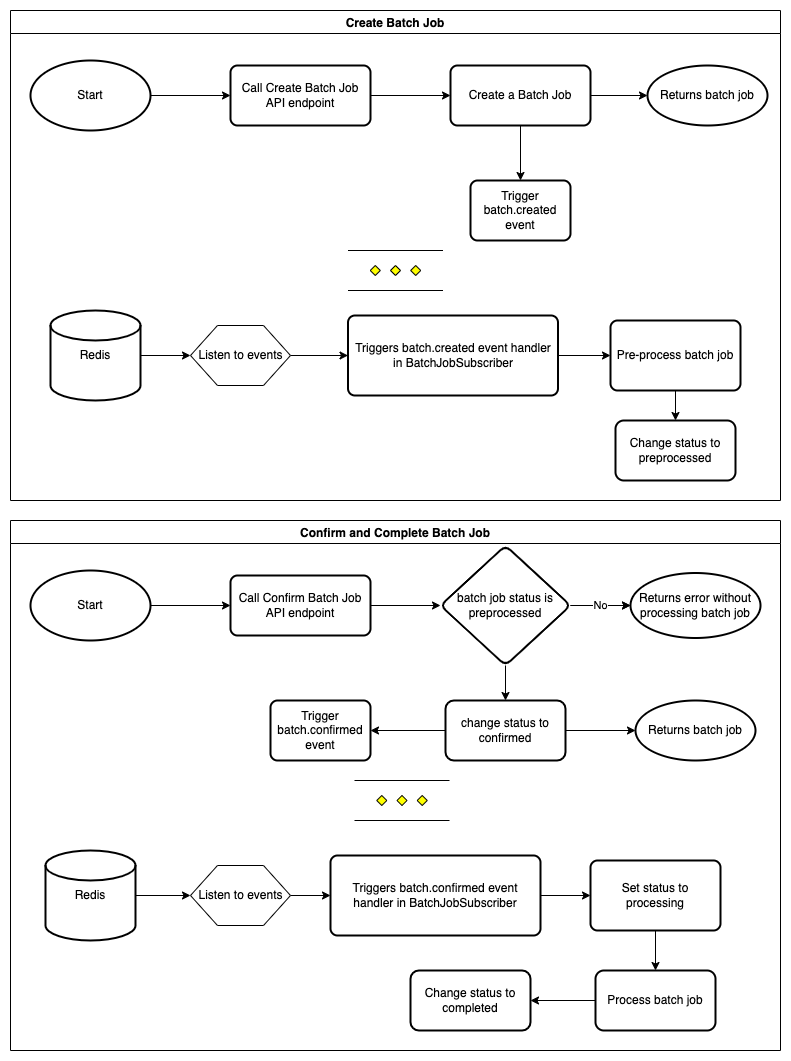
A batch job’s flow from creation to completion is:
|
||
|
||
1. A batch job is created using the [Create Batch Job API endpoint](/api/admin/#tag/Batch-Job/operation/PostBatchJobs).
|
||
2. Once the batch job is created, the batch job’s status is changed to `created` and the `batch.created` event is triggered by the `BatchJobService`.
|
||
3. The `BatchJobSubscriber` handles the `created` event. It resolves the batch job strategy based on the `type` of the batch job, then uses it to pre-process the batch job. After this, the batch job’s status is changed to `pre_processed`. Only when the batch job has the status `pre_processed` can be confirmed.
|
||
4. If `dry_run` is not set in the Create Batch Job request in step one or if it is set to `false`, the batch job will automatically be confirmed after processing. Otherwise, if `dry_run` is set to `true`, the batch job can be confirmed using the [Confirm Batch Job API](/api/admin/#tag/Batch-Job/operation/PostBatchJobsBatchJobConfirmProcessing) endpoint.
|
||
5. Once the batch job is confirmed, the batch job’s status is changed to `confirmed` and the `batch.confirmed` event is triggered by the `BatchJobService`.
|
||
6. The `BatchJobSubscriber` handles the `confirmed` event. It resolves the batch job strategy, then uses it to process the batch job.
|
||
7. Once the batch job is processed succesfully, the batch job has the status `completed`.
|
||
|
||
You can track the progress of the batch job at any point using the [Retrieve Batch Job](/api/admin/#tag/Batch-Job/operation/GetBatchJobsBatchJob) endpoint.
|
||
|
||
:::info
|
||
|
||
If the batch job fails at any point in this flow, its status is changed to `failed`.
|
||
|
||
:::
|
||
|
||
|
||
|
||
---
|
||
|
||
## Custom Development
|
||
|
||
Developers can create custom batch jobs in the Medusa backend, a plugin, or in a Commerce Module. Developers can also customize existing batch job strategies in the core, such as the import strategy.
|
||
|
||
<DocCardList colSize={6} items={[
|
||
{
|
||
type: 'link',
|
||
href: '/development/batch-jobs/create',
|
||
label: 'Create a Batch Job Strategy',
|
||
customProps: {
|
||
icon: Icons['academic-cap-solid'],
|
||
description: 'Learn how to create a batch job strategy in Medusa.'
|
||
}
|
||
},
|
||
{
|
||
type: 'link',
|
||
href: '/development/batch-jobs/customize-import',
|
||
label: 'Customize Import Strategy',
|
||
customProps: {
|
||
icon: Icons['academic-cap-solid'],
|
||
description: 'Learn how to customize the import strategy in Medusa.'
|
||
}
|
||
},
|
||
]} /> |