 Shahed Nasser
40e73c6ea2
Shahed Nasser
40e73c6ea2
* fix broken links

* update broken links utility

* add missing payment evens

* generate llms

* fix segment link
228 lines
6.6 KiB
Plaintext
228 lines
6.6 KiB
Plaintext
import { Table } from "docs-ui"
|
||
|
||
export const metadata = {
|
||
title: `Promotion Concepts`,
|
||
}
|
||
|
||
# {metadata.title}
|
||
|
||
In this guide, you’ll learn about the main promotion and rule concepts in the Promotion Module.
|
||
|
||
<Note title="Looking for no-code docs?">
|
||
|
||
Refer to this [Medusa Admin User Guide](!user-guide!/promotions) to learn how to manage promotions using the dashboard.
|
||
|
||
</Note>
|
||
|
||
## What is a Promotion?
|
||
|
||
A promotion, represented by the [Promotion data model](/references/promotion/models/Promotion), is a discount that can be applied on cart items, shipping methods, or entire orders.
|
||
|
||
A promotion has two types:
|
||
|
||
- `standard`: A standard promotion with rules.
|
||
- `buyget`: “A buy X get Y” promotion with rules.
|
||
|
||
<Table>
|
||
<Table.Header>
|
||
<Table.Row>
|
||
<Table.HeaderCell>
|
||
|
||
`standard` Promotion Examples
|
||
|
||
</Table.HeaderCell>
|
||
<Table.HeaderCell>
|
||
|
||
`buyget` Promotion Examples
|
||
|
||
</Table.HeaderCell>
|
||
</Table.Row>
|
||
</Table.Header>
|
||
<Table.Body>
|
||
<Table.Row>
|
||
<Table.Cell>
|
||
|
||
A coupon code that gives customers 10% off their entire order.
|
||
|
||
</Table.Cell>
|
||
<Table.Cell>
|
||
|
||
Buy two shirts and get another for free.
|
||
|
||
</Table.Cell>
|
||
</Table.Row>
|
||
<Table.Row>
|
||
<Table.Cell>
|
||
|
||
A coupon code that gives customers $15 off any shirt in their order.
|
||
|
||
</Table.Cell>
|
||
<Table.Cell>
|
||
|
||
Buy two shirts and get 10% off the entire order.
|
||
|
||
</Table.Cell>
|
||
</Table.Row>
|
||
<Table.Row>
|
||
<Table.Cell>
|
||
|
||
A discount applied automatically for VIP customers that removes 10% off their shipping method’s amount.
|
||
|
||
</Table.Cell>
|
||
<Table.Cell>
|
||
|
||
Spend $100 and get free shipping.
|
||
|
||
</Table.Cell>
|
||
</Table.Row>
|
||
</Table.Body>
|
||
</Table>
|
||
|
||
<Note>
|
||
|
||
The Medusa Admin UI may not provide a way to create each of these promotion examples. However, they are supported by the Promotion Module and Medusa's workflows and API routes.
|
||
|
||
</Note>
|
||
|
||
---
|
||
|
||
## Promotion Rules
|
||
|
||
A promotion can be restricted by a set of rules, each rule is represented by the [PromotionRule data model](/references/promotion/models/PromotionRule).
|
||
|
||
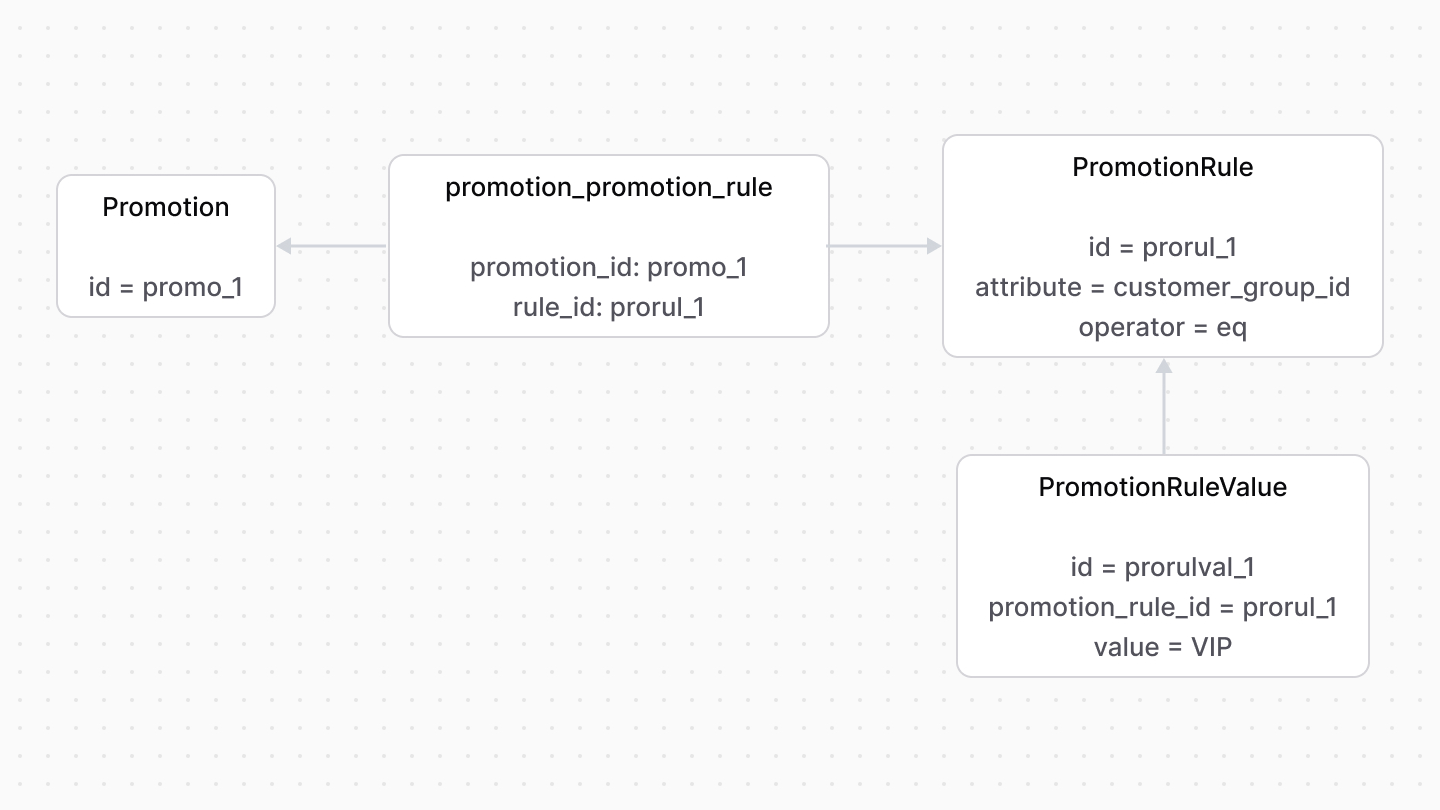
For example, you can create a promotion that only customers of the `VIP` customer group can use.
|
||
|
||
|
||
|
||
A `PromotionRule`'s `attribute` property indicates the property's name to which this rule is applied. For example, `customer_group_id`.
|
||
|
||
The expected value for the attribute is stored in the `PromotionRuleValue` data model. So, a rule can have multiple values.
|
||
|
||
When testing whether a promotion can be applied to a cart, the rule's `attribute` property and its values are tested on the cart itself.
|
||
|
||
For example, the cart's customer must be part of the customer group(s) indicated in the promotion rule's value.
|
||
|
||
### Flexible Rules
|
||
|
||
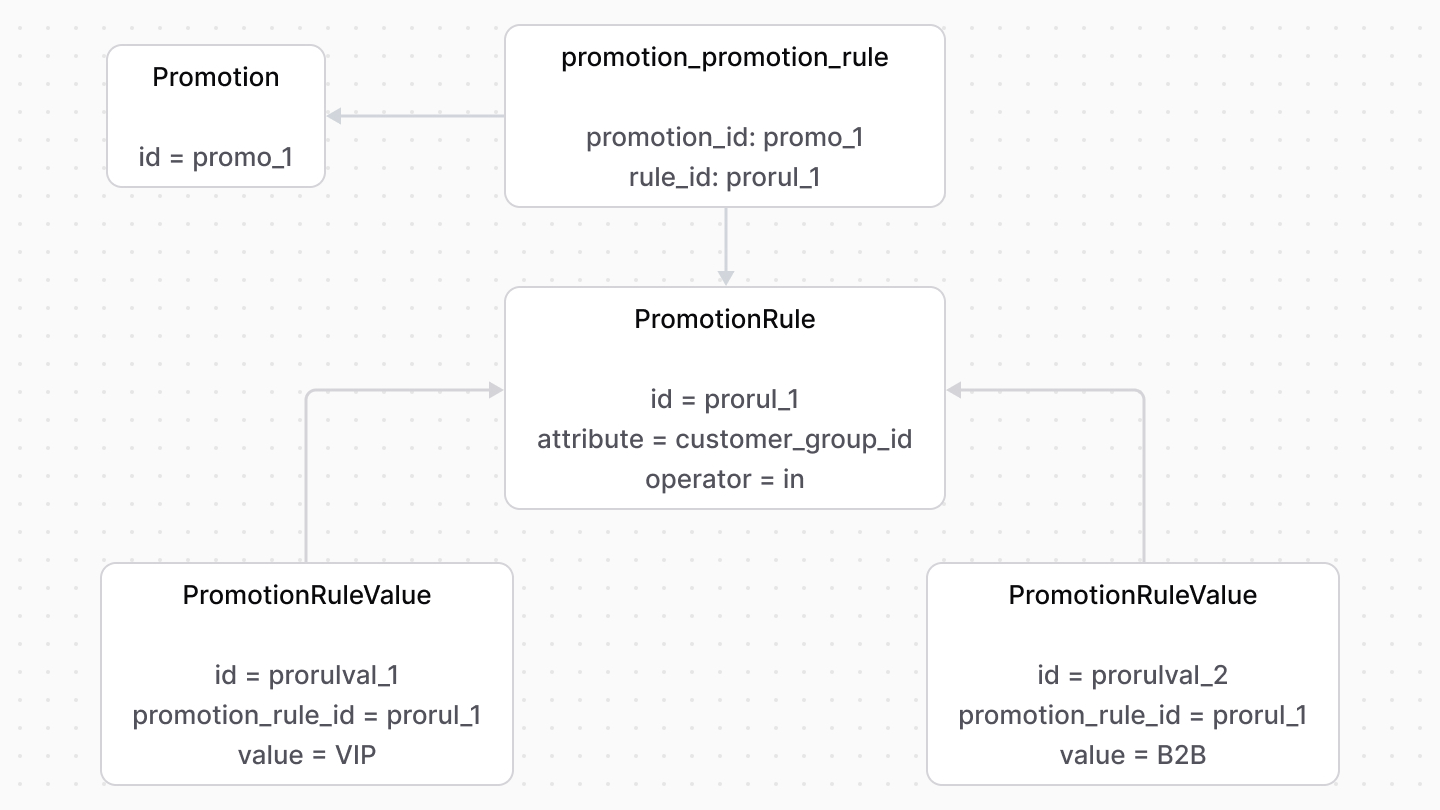
The `PromotionRule`'s `operator` property adds more flexibility to the rule’s condition rather than simple equality (`eq`).
|
||
|
||
For example, to restrict the promotion to only `VIP` and `B2B` customer groups:
|
||
|
||
- Add a `PromotionRule` record with its `attribute` property set to `customer_group_id` and `operator` property to `in`.
|
||
- Add two `PromotionRuleValue` records associated with the rule: one with the value `VIP` and the other `B2B`.
|
||
|
||
|
||
|
||
In this case, a customer’s group must be in the `VIP` and `B2B` set of values to use the promotion.
|
||
|
||
---
|
||
|
||
## How to Apply Rules on a Promotion?
|
||
|
||
### Using Workflows
|
||
|
||
If you're managing promotions using [Medusa's workflows](../../../medusa-workflows-reference/page.mdx) or the API routes that use them, you can specify rules for the promotion or its [application method](../application-method/page.mdx).
|
||
|
||
For example, if you're creating a promotion using the [createPromotionsWorkflow](/references/medusa-workflows/createPromotionsWorkflow):
|
||
|
||
```ts
|
||
const { result } = await createPromotionsWorkflow(container)
|
||
.run({
|
||
input: {
|
||
promotionsData: [{
|
||
code: "10OFF",
|
||
type: "standard",
|
||
status: "active",
|
||
application_method: {
|
||
type: "percentage",
|
||
target_type: "items",
|
||
allocation: "across",
|
||
value: 10,
|
||
currency_code: "usd",
|
||
},
|
||
rules: [
|
||
{
|
||
attribute: "customer.group.id",
|
||
operator: "eq",
|
||
values: [
|
||
"cusgrp_123",
|
||
],
|
||
},
|
||
],
|
||
}],
|
||
},
|
||
})
|
||
```
|
||
|
||
In this example, the promotion is restricted to customers with the `cusgrp_123` customer group.
|
||
|
||
### Using Promotion Module's Service
|
||
|
||
<Note>
|
||
|
||
For most use cases, it's recommended to use [workflows](#using-workflows) instead of directly using the module's service.
|
||
|
||
</Note>
|
||
|
||
If you're managing promotions using the Promotion Module's service, you can specify rules for the promotion or its [application method](../application-method/page.mdx) in its methods.
|
||
|
||
For example, if you're creating a promotion with the [createPromotions](/references/promotion/createPromotions) method:
|
||
|
||
```ts
|
||
const promotions = await promotionModuleService.createPromotions([
|
||
{
|
||
code: "50OFF",
|
||
type: "standard",
|
||
status: "active",
|
||
application_method: {
|
||
type: "percentage",
|
||
target_type: "items",
|
||
value: 50,
|
||
},
|
||
rules: [
|
||
{
|
||
attribute: "customer.group.id",
|
||
operator: "eq",
|
||
values: [
|
||
"cusgrp_123",
|
||
],
|
||
},
|
||
],
|
||
},
|
||
])
|
||
```
|
||
|
||
In this example, the promotion is restricted to customers with the `cusgrp_123` customer group.
|
||
|
||
### How is the Promotion Rule Applied?
|
||
|
||
A promotion is applied on a resource if its attributes match the promotion's rules.
|
||
|
||
For example, consider you have the following promotion with a rule that restricts the promotion to a specific customer:
|
||
|
||
```json
|
||
{
|
||
"code": "10OFF",
|
||
"type": "standard",
|
||
"status": "active",
|
||
"application_method": {
|
||
"type": "percentage",
|
||
"target_type": "items",
|
||
"allocation": "across",
|
||
"value": 10,
|
||
"currency_code": "usd"
|
||
},
|
||
"rules": [
|
||
{
|
||
"attribute": "customer_id",
|
||
"operator": "eq",
|
||
"values": [
|
||
"cus_123"
|
||
]
|
||
}
|
||
]
|
||
}
|
||
```
|
||
|
||
When you try to apply this promotion on a cart, the cart's `customer_id` is compared to the promotion rule's value based on the specified operator. So, the promotion will only be applied if the cart's `customer_id` is equal to `cus_123`.
|