6f1b49af03
* Fix issue on fixed total amount discount when using includes tax (#3472)

The calculation of the fixed discount amount breaks when having includes_tax setting active, due to the line item totals are incorrect and returning everything as 0, thus the totalItemPercentage will be Infinitiy due to the division by a subtotal of 0

* chore: Add missing changeset for @medusajs/medusa

* feat(medusa): Improve performance of Products domain (#3417)

* feat(medusa): Improve product update performances

* fix tests and update

* update mock repo

* improve repo

* cleanup

* fix

* cleanup + bulk emit + unit test fix

* improvements

* improve

* fix unit tests

* fix export

* fix product update handler

* enhance mock repo

* fix import integration

* fix end point tests

* revert mock repo product variant

* fix unit

* cleanup

* cleanup

* address feedback

* fix quotes in tests

* address feedback

* Create new-tips-mate.md

* use types

* chore: Remove integration-tests from changeset

* chore(release): v1.7.14

* chore(docs): Generated Docs Announcement Bar (automated) (#3489)

Co-authored-by: olivermrbl <olivermrbl@users.noreply.github.com>

* fix(medusa): EventBusService.emit using Redis mock (#3491)

* Fix eventBusService.emit using redis mock

* revert gitignore

* enqueuer

* unit test add redis_url

* fix test

* chore(docs): Generated Services Reference (automated) (#3490)

Co-authored-by: olivermrbl <olivermrbl@users.noreply.github.com>

* docs: publish restructure (#3496)

* docs: added features and guides overview page

* added image

* added version 2

* added version 3

* added version 4

* docs: implemented new color scheme

* docs: redesigned sidebar (#3193)

* docs: redesigned navbar for restructure (#3199)

* docs: redesigned footer (#3209)

* docs: redesigned cards (#3230)

* docs: redesigned admonitions (#3231)

* docs: redesign announcement bar (#3236)

* docs: redesigned large cards (#3239)

* docs: redesigned code blocks (#3253)

* docs: redesigned search modal and page (#3264)

* docs: redesigned doc footer (#3268)

* docs: added new sidebars + refactored css and assets (#3279)

* docs: redesigned api reference sidebar

* docs: refactored css

* docs: added code tabs transition

* docs: added new sidebars

* removed unused assets

* remove unusued assets

* Fix deploy errors

* fix incorrect link

* docs: fixed code responsivity + missing icons (#3283)

* docs: changed icons (#3296)

* docs: design fixes to the sidebar (#3297)

* redesign fixes

* docs: small design fixes

* docs: several design fixes after restructure (#3299)

* docs: bordered icon fixes

* docs: desgin fixes

* fixes to code blocks and sidebar scroll

* design adjustments

* docs: restructured homepage (#3305)

* docs: restructured homepage

* design fixes

* fixed core concepts icon

* docs: added core concepts page (#3318)

* docs: restructured homepage

* design fixes

* docs: added core concepts page

* changed text of different components

* docs: added architecture link

* added missing prop for user guide

* docs: added regions overview page (#3327)

* docs: added regions overview

* moved region pages to new structure

* docs: fixed description of regions architecture page

* small changes

* small fix

* docs: added customers overview page (#3331)

* docs: added regions overview

* moved region pages to new structure

* docs: fixed description of regions architecture page

* small changes

* small fix

* docs: added customers overview page

* fix link

* resolve link issues

* docs: updated regions architecture image

* docs: second-iteration fixes (#3347)

* docs: redesigned document

* design fixes

* docs: added products overview page (#3354)

* docs: added carts overview page (#3363)

* docs: added orders overview (#3364)

* docs: added orders overview

* added links in overview

* docs: added vercel redirects

* docs: added soon badge for cards (#3389)

* docs: resolved feedback changes + organized troubleshooting pages (#3409)

* docs: resolved feedback changes

* added extra line

* docs: changed icons for restructure (#3421)

* docs: added taxes overview page (#3422)

* docs: added taxes overview page

* docs: fix sidebar label

* added link to taxes overview page

* fixed link

* docs: fixed sidebar scroll (#3429)

* docs: added discounts overview (#3432)

* docs: added discounts overview

* fixed links

* docs: added gift cards overview (#3433)

* docs: added price lists overview page (#3440)

* docs: added price lists overview page

* fixed links

* docs: added sales channels overview page (#3441)

* docs: added sales overview page

* fixed links

* docs: added users overview (#3443)

* docs: fixed sidebar border height (#3444)

* docs: fixed sidebar border height

* fixed svg markup

* docs: added possible solutions to feedback component (#3449)

* docs: added several overview pages + restructured files (#3463)

* docs: added several overview pages

* fixed links

* docs: added feature flags + PAK overview pages (#3464)

* docs: added feature flags + PAK overview pages

* fixed links

* fix link

* fix link

* fixed links colors

* docs: added strategies overview page (#3468)

* docs: automated upgrade guide (#3470)

* docs: automated upgrade guide

* fixed vercel redirect

* docs: restructured files in docs codebase (#3475)

* docs: restructured files

* docs: fixed eslint exception

* docs: finished restructure loose-ends (#3493)

* fixed uses of backend

* docs: finished loose ends

* eslint fixes

* fixed links

* merged master

* added update instructions for v1.7.12

* docs: fixed discount details (#3499)

* docs: fix trailing slash causing 404 (#3508)

* docs: fix error during navigation (#3509)

* docs: removed the gatsby storefront guide (#3527)

* docs: removed the gatsby storefront guide

* docs: fixed query value

* chore(docs): Removed Docs Announcement Bar (automated) (#3536)

Co-authored-by: shahednasser <shahednasser@users.noreply.github.com>

* fix(medusa): Variant update should include the id for the listeners to be able to identify the entity (#3539)

* fix(medusa): Variant update should include the id for the listeners to be able to identify the entity

* fix unit tests

* Create brave-seahorses-film.md

* docs: fix admin redirects (#3548)

* chore(release): v1.7.15

* chore(docs): Generated Docs Announcement Bar (automated) (#3550)

Co-authored-by: olivermrbl <olivermrbl@users.noreply.github.com>

* chore(docs): Generated Services Reference (automated) (#3551)

Automated changes by [create-pull-request](https://github.com/peter-evans/create-pull-request) GitHub action

Co-authored-by: Oliver Windall Juhl <59018053+olivermrbl@users.noreply.github.com>

* chore: updated READMEs of plugins (#3546)

* chore: updated READMEs of plugins

* added notice to plugins

* docs: added a deploy guide for next.js storefront (#3558)

* docs: added a deploy next.js guide

* docs: fix image zoom

* docs: fixes to next.js deployment guide to vercel (#3562)

* chore(workflows): Enable manual workflow in pre-release mode (#3566)

* chore(docs): Removed Docs Announcement Bar (automated) (#3598)

Co-authored-by: shahednasser <shahednasser@users.noreply.github.com>

* fix(medusa): Rounding issues on line item adjustments (#3446)

* chores(medusa): Attempt to fix discount rounding issues

* add migration

* update entities

* apply multipler factor properly

* fix discount service

* WIP

* fix rounding issues in discounts

* fix some tests

* Exclude raw_discount_total from responses

* fix adjustments

* cleanup response

* fix

* fix draft order integration

* fix order integration

* fix order integration

* address feedback

* fix test

* Create .changeset/polite-llamas-sit.md

* remove comment

---------

Co-authored-by: Oliver Windall Juhl <59018053+olivermrbl@users.noreply.github.com>

* chore(workflows): Add release notification (#3629)

---------

Co-authored-by: pepijn-vanvlaanderen <pepijn@webbers.com>
Co-authored-by: olivermrbl <oliver@mrbltech.com>
Co-authored-by: Adrien de Peretti <adrien.deperetti@gmail.com>
Co-authored-by: github-actions[bot] <41898282+github-actions[bot]@users.noreply.github.com>
Co-authored-by: olivermrbl <olivermrbl@users.noreply.github.com>
Co-authored-by: Carlos R. L. Rodrigues <37986729+carlos-r-l-rodrigues@users.noreply.github.com>
Co-authored-by: shahednasser <shahednasser@users.noreply.github.com>
Co-authored-by: Oliver Windall Juhl <59018053+olivermrbl@users.noreply.github.com>
18 KiB
description, addHowToData
| description | addHowToData |
|---|---|
| Learn step-by-step. | true |
Deploy Your Medusa Backend on Qovery
In this document, you'll learn how to deploy your Medusa backend on Qovery with the help of Terraform.
Qovery is a Continuous Deployment Platform that provides you with the developer experience of Heroku on top of your cloud provider (For example, AWS, DigitalOcean).
Terraform is an open source infrastructure as code software (IaC) tool that allows you to easily deploy apps like Medusa and the resources it needs to Qovery using a single script.
:::note
This tutorial explains how to deploy Medusa to a Qovery organization with an AWS cluster. If you want to use a cloud provider other than AWS, you need to make changes to some of the keys and variables used in the tutorial.
:::
Prerequisites
Medusa Backend
It is assumed that you already have a Medusa backend installed locally. If you don’t, please follow the quickstart guide.
Furthermore, your Medusa backend should be configured to work with PostgreSQL and Redis. You can follow the Configure your Backend documentation to learn how to do that.
Needed Accounts
- A Qovery account with a created organization. Qovery provides a free plan that you can use.
- An AWS account that you’ll connect to a Qovery cluster.
- A GitHub account to create a repository to host your backend's codebase.
:::tip
If you want to use another Git Provider supported by Qovery, it’s possible to follow along with this guide but you’ll have to perform the equivalent steps in your Git Provider.
:::
Required Tools
- Git’s CLI tool. You can follow this documentation to learn how to install it for your operating system.
- Terraform’s CLI tool. You can follow this guide to install it based on your operating system.
- Qovery’s CLI tool. You can follow this guide to install it based on your operating system.
Create GitHub Repository
Before you can deploy your Medusa backend you need to create a GitHub repository and push the code base to it.
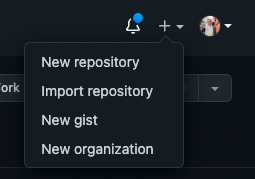
On GitHub, click the plus icon at the top right, then click New Repository.
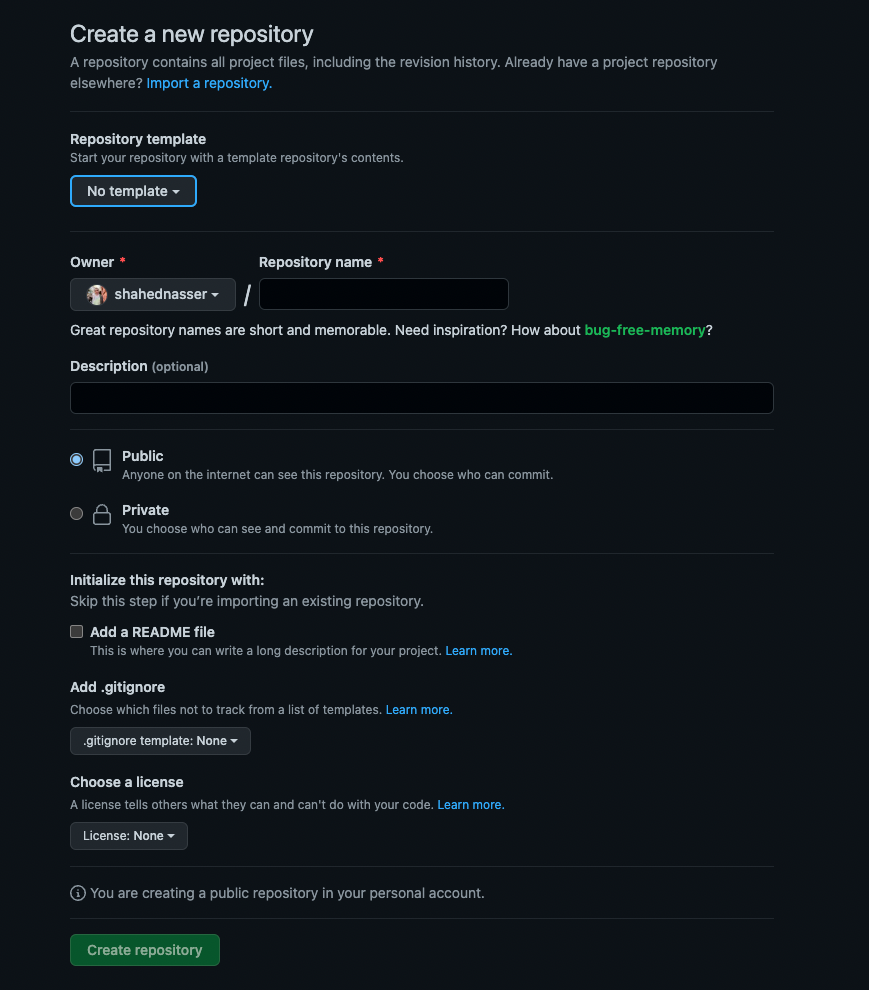
You’ll then be redirected to a new page with a form. In the form, enter the Repository Name then scroll down and click Create repository.
Push Code to GitHub Repository
The next step is to push the code to the GitHub repository you just created.
After creating the repository, you’ll be redirected to the repository’s page. On that page, you should see a URL that you can copy to connect your repository to a local directory.

Copy the link. Then, open your terminal in the directory that holds your Medusa backend codebase and run the following commands:
git init
git remote add origin <GITHUB_URL>
Where <GITHUB_URL> is the URL you just copied.
Then, add, commit, and push the changes into the repository:
git add .
git commit -m "initial commit"
git push origin master
After pushing the changes, you can find the files in your GitHub repository.
Deploy to Qovery
In this section, you’ll learn how to deploy your Medusa backend to Qovery with the help of Terraform.
Sign in Using Qovery CLI
If you haven’t logged in to your Qovery account using the Qovery CLI tool yet, run the following command:
qovery auth
This opens a new page in your browser to log in to Qovery.
Retrieve Qovery Access Token
Terraform needs an access token from Qovery so that it can deploy to your Qovery organization.
Run the following command to retrieve a Qovery access token:
qovery token
You’ll be prompted to choose an organization and add a name and description for the token. Once the command finishes executing, you’ll be given an access token. Save it to use in the next steps.
Add Terraform Variables
You need to add some variables to use for your Medusa deployment to Qovery.
In the root directory of your Medusa backend, create the file variables.tf with the following content:
variable "qovery_organization_id" {
  type = string
  nullable = false
  description = "ID of Qovery organization"
}

variable "qovery_create_cluster" {
  type = bool
  nullable = false
  default = true
  description = "Whether to create a new cluster or not"
}

variable "qovery_cluster_id" {
  type = string
  nullable = true
  default = ""
  description = "The ID of the cluster you want to use if you don't want to create a new one. You can get the Cluster ID using this endpoint: https://api-doc.qovery.com/#tag/Clusters/operation/listOrganizationCluster"
}

variable "qovery_access_token" {
  type = string
  sensitive = true
  nullable = false
  description = "Qovery's access token generated with the command 'qovery token'"
}

variable "aws_access_key_id" {
  type = string
  sensitive = true
  nullable = true
  description = "Necessary only if creating a new cluster"
}

variable "aws_secret_access_key" {
  type = string
  sensitive = true
  nullable = true
  description = "Necessary only if creating a new cluster"
}

variable "aws_region" {
  type = string
  nullable = false
  default = "us-east-2"
  description = "Necessary only if creating a new cluster"
}

variable "medusa_jwt_secret" {
  type    = string
  default = "your-super-secret" # TO CHANGE FOR PRODUCTION
  sensitive = true
  nullable = false
  description = "The JWT Secret to use in Medusa"
}

variable "medusa_cookie_secret" {
  type    = string
  default = "your-super-secret-pt2" # TO CHANGE FOR PRODUCTION
  sensitive = true
  nullable = false
  description = "The Cookie Secret to use in Medusa"
}

variable "git_url" {
  type = string
  nullable = false
  description = "The Git repo associated with the qovery app. Make sure it ends with '.git'."
}

variable "git_branch" {
  type = string
  nullable = false
  default = "master"
  description = "The branch of the Git repo. Default is master"
}

variable "git_root_path" {
  type = string
  nullable = false
  default = "/"
  description = "The base directory to run the app from. Default is /"
}
This defines the required variables and sets some of them as secret to ensure their values aren’t printed in the console during deployment.
Next, to set the values of these variables, create the file terraform.tfvars with the following content:
qovery_organization_id = ""

# Optional
qovery_create_cluster = true

# Optional
qovery_cluster_id = null

qovery_access_token = ""

# Optional
aws_access_key_id = null

# Optional
aws_secret_access_key = null

# Optional
aws_region = null

# Optional
medusa_jwt_secret = "secret"

# Optional
medusa_cookie_secret = "secret"

git_url = ""

# Optional
git_branch = "master"

# Optional
git_root_path = "/"
Here’s an explanation of each of the variables and how to retrieve their variables:
qovery_organization_id: The ID of the Qovery organization to deploy the backend to. It can be found by logging into your Qovery Console. You’ll be redirected to the organization’s main page with a URL of the formathttps://console.qovery.com/platform/organization/<ORGANIZATION_ID>/projects. Copy the<ORGANIZATION_ID>in the URL to use as the value of this field.qovery_create_cluster: A boolean value indicating whether a new cluster should be created or not. If you already have a cluster that you want to use, you can set the value tofalseand set the value ofqovery_cluster_id. Otherwise, set the value totrueand set the values ofaws_access_key_id,aws_secret_access_key, andaws_region.qovery_cluster_id: The ID of the existing cluster to use (ifqovery_create_clusteris set tofalse). You can use Qovery’s REST API to retrieve the cluster ID. You can use the token you generated earlier for the Bearer authorization token as explained here.aws_access_key_id,aws_secret_access_key, andaws_region: The credentials used to create the cluster (ifqovery_create_clusteris set totrue). You can refer to this guide to learn how to retrieve theaws_access_key_idandaws_secret_access_key.medusa_jwt_secret: The value of the JSON Web Token (JWT) Secret on your Medusa backend. It’s recommended to use a strong randomly generated string.medusa_cookie_secret: The value of the Cookie Secret on your Medusa backend. It’s recommended to use a strong randomly generated string.git_url: The URL of the Git repository you created earlier. Make sure it ends with.git.git_branch: The branch to use in the GitHub repo. By default it’smaster.git_root_path: The root path of the Medusa backend. By default, it’s/. If you are hosting your Medusa backend in a monorepo in a nested directory, you need to change the value of this variable.
Add Terraform Configuration File
In the root directory of your Medusa backend, create the file main.tf with the following content:
# Install the Qovery Terraform provider
terraform {
  required_providers {
    qovery = {
      source = "qovery/qovery"
    }
  }
}

# Set the access token
provider "qovery" {
  token = var.qovery_access_token
}

# Create the AWS credentials if qovery_create_cluster is true
resource "qovery_aws_credentials" "my_aws_creds" {
  organization_id   = var.qovery_organization_id
  name              = "My AWS Creds"
  access_key_id     = var.aws_access_key_id
  secret_access_key = var.aws_secret_access_key
  count = var.qovery_create_cluster ? 1 : 0
}

# Create a new cluster if qovery_create_cluster is true
resource "qovery_cluster" "my_cluster" {
  organization_id   = var.qovery_organization_id
  credentials_id    = qovery_aws_credentials.my_aws_creds[0].id
  name              = "Demo Medusa cluster"
  description       = "Terraform medusa cluster"
  cloud_provider    = "AWS"
  region            = var.aws_region
  instance_type     = "T3A_MEDIUM"
  min_running_nodes = 3
  max_running_nodes = 4
  state             = "RUNNING"
  count = var.qovery_create_cluster ? 1 : 0

  depends_on = [
    qovery_aws_credentials.my_aws_creds
  ]
}

# Create a new project
resource "qovery_project" "my_project" {
  organization_id = var.qovery_organization_id
  name            = "Medusa"

  depends_on = [
    qovery_cluster.my_cluster
  ]
}

# Create a new environment in the project
resource "qovery_environment" "production" {
  project_id = qovery_project.my_project.id
  name       = "production"
  mode       = "PRODUCTION"
  cluster_id = !var.qovery_create_cluster && var.qovery_cluster_id != "" ? var.qovery_cluster_id : qovery_cluster.my_cluster[0].id

  depends_on = [
    qovery_project.my_project
  ]
}

# Create a PostgreSQL database in the environment
resource "qovery_database" "my_psql_database" {
  environment_id = qovery_environment.production.id
  name           = "medusa psql db"
  type           = "POSTGRESQL"
  version        = "13"
  mode           = "MANAGED" # Use AWS RDS for PostgreSQL (backup and PITR automatically configured by Qovery)
  storage        = 10 # 10GB of storage
  accessibility  = "PRIVATE" # do not make it publicly accessible
  state          = "RUNNING"

  depends_on = [
    qovery_environment.production,
  ]
}

# Create a Redis database in the environment
resource "qovery_database" "my_redis_database" {
  environment_id = qovery_environment.production.id
  name           = "medusa redis db"
  type           = "REDIS"
  version        = "6"
  mode           = "CONTAINER"
  storage        = 10 # 10GB of storage
  accessibility  = "PRIVATE"
  state          = "RUNNING"

  depends_on = [
    qovery_environment.production,
    qovery_database.my_psql_database,
  ]
}

# Create the Medusa application with all the configuration needed
resource "qovery_application" "medusa_app" {
  environment_id = qovery_environment.production.id
  name           = "medusa app"
  cpu            = 1000
  memory         = 512
  state          = "RUNNING"
  git_repository = {
    url       = var.git_url
    branch    = var.git_branch
    root_path = var.git_root_path
  }
  build_mode            = "DOCKER"
  dockerfile_path       = "Dockerfile"
  min_running_instances = 1
  max_running_instances = 1
  ports                 = [
    {
      internal_port       = 9000
      external_port       = 443
      protocol            = "HTTP"
      publicly_accessible = true
    }
  ]
  environment_variables = [
    {
      key   = "PORT"
      value = "9000"
    },
    {
      key   = "NODE_ENV"
      value = "production"
    },
    {
      key   = "NPM_CONFIG_PRODUCTION"
      value = "false"
    }
  ]
  secrets = [
    {
      key   = "JWT_SECRET"
      value = var.medusa_jwt_secret
    },
    {
      key   = "COOKIE_SECRET"
      value = var.medusa_cookie_secret
    },
    {
      key   = "DATABASE_URL"
      value = "postgresql://${qovery_database.my_psql_database.login}:${qovery_database.my_psql_database.password}@${qovery_database.my_psql_database.internal_host}:${qovery_database.my_psql_database.port}/postgres"
    },
    {
      key   = "REDIS_URL"
      value = "redis://${qovery_database.my_redis_database.login}:${qovery_database.my_redis_database.password}@${qovery_database.my_redis_database.internal_host}:${qovery_database.my_redis_database.port}"
    }
  ]

  depends_on = [
    qovery_environment.production,
    qovery_database.my_psql_database,
    qovery_database.my_redis_database,
  ]
}
This is a Terraform configuration file that creates all the resources necessary to deploy Medusa to Qovery. If you set qovery_create_cluster to true, it will create new credentials and a cluster in your Qovery organization using the AWS credentials you set in the variables.
Next, it creates a new project, environment, PostgreSQL database, and a Redis database in your Qovery organization.
Finally, it creates the Medusa app and sets all the necessary environment variables needed to run it.
:::tip
This deployment uses Docker. By default, you should have the files Dockerfile and docker-compose.yml` in the root of your Medusa backend.
:::
Change develop.sh
The Dockerfile runs the file develop.sh to start the backend. Change the content of develop.sh to the following:
#!/bin/bash

# Run migrations to ensure the database is updated
medusa migrations run

# Run backend
medusa start
This makes sure the production backend is started and not a development backend.
Initialize Terraform
In your terminal, run the following command to initialize Terraform:
terraform init
This will install the Qovery Terraform provider and have everything ready before the deployment.
Deploy the Medusa App
Finally, run the following command to deploy your Medusa app:
terraform apply
You’ll be asked to confirm creating all the necessary resources in Qovery. Enter yes and the deployment will start.
The deployment can take up to thirty minutes to finish. You’ll be able to track its status both in your terminal and in the Qovery Console.
:::tip
If you run into any errors while running this command, you can just re-run it after fixing the errors and it will pick up from where it left off. For example, if an error occurred after the creation of the PostgreSQL database, terraform continues from the next task and does not recreate the PostgreSQL database.
:::
Test the Backend
Once the command finishes and the deployment is successful, you can access your backend in the Qovery Console. Go to the project, environment, then the app that you created using Terraform and Qovery. In the app, click the Open button at the top right to open your website in a new tab.
You can access any of the endpoints on your backend using the backend URL. For example, you can get the list of products using the endpoint /store/products.
Run Commands on the Backend
To run commands on the backend, run the following command:
qovery shell
You’ll be asked to either confirm the existing context or choose a new context.
After choosing your Medusa app in the context, you should be able to execute any command in the directory of your Medusa backend. For example, you can run the user command using Medusa’s CLI tool to create a new user:
npm install @medusajs/medusa-cli -g
medusa user --email <EMAIL> --password <PASSWORD>
Add Environment Variables
You’ll likely need to add environment variables later such as Admin Cross-Origin Resource Sharing (CORS) and Store CORS variables.
To add environment variables, in your Qovery Console go to the Medusa app and choose Environment Variables from the sidebar. You can add environment variables here at any point later on.