 76f9da5ef4
* standard docs for caching module + deprecated cache module

* added guides for creating + using, and overall changes from cache to caching

* fix details related to redis provider

* fix build errors

* fix build error

* fixes

* add guides to sidebar

* add sidebar util

* document query + index

* moved cache tag conventions

* fix build errors

* added migration guide

* added memcached guide

* fixes

* general fixes and updates

* updated reference

* document medusa cache

* small fix

* fixes

* remove cloud cache

* revert edit dates changes

* revert edit dates

* small update
318 lines
11 KiB
Plaintext
318 lines
11 KiB
Plaintext
import { CardList, Card, Table, CodeTabs, CodeTab } from "docs-ui"
|
|
|
|
export const metadata = {
|
|
title: `Caching Module`,
|
|
}
|
|
|
|
# {metadata.title}
|
|
|
|
In this guide, you'll learn about the Caching Module and its providers.
|
|
|
|
<Note>
|
|
|
|
The Caching Module is available starting [Medusa v2.11.0](https://github.com/medusajs/medusa/releases/tag/v2.11.0). It replaces the deprecated [Cache Module](../cache/page.mdx).
|
|
|
|
</Note>
|
|
|
|
## What is the Caching Module?
|
|
|
|
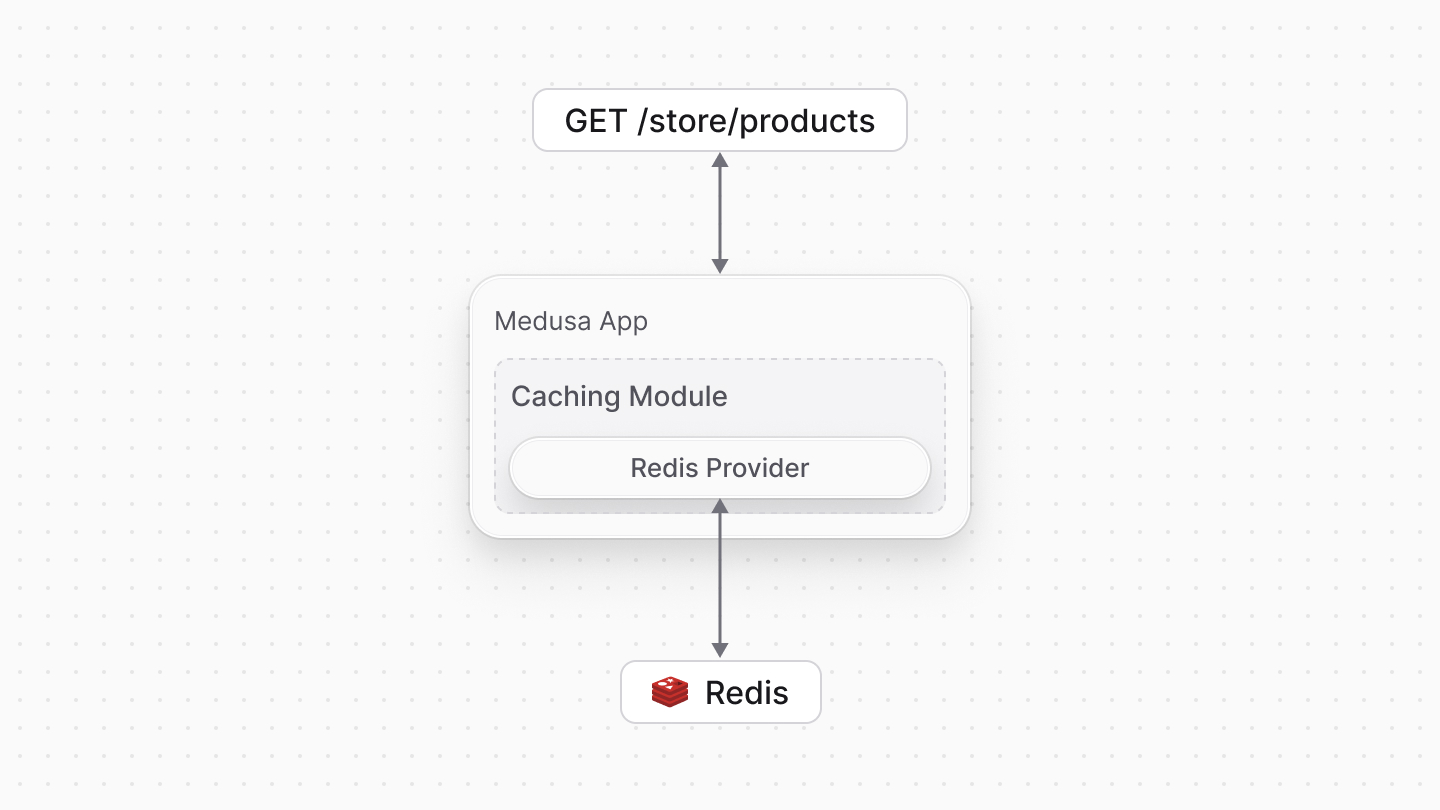
The Caching Module provides functionality to cache data in your Medusa application, improving performance and reducing latency for frequently accessed data.
|
|
|
|
For example, Medusa uses the Caching Module to cache product information, and you can cache custom data such as brand information.
|
|
|
|
The Caching Module stores and retrieves cached data using the caching service you integrate, such as [Redis](./providers/redis/page.mdx) or [Memcached](./guides/memcached/page.mdx). This provides flexibility in customizing your Medusa application's infrastructure to meet your performance and scalability requirements.
|
|
|
|
|
|
|
|
### Caching Module vs Cache Module
|
|
|
|
Before Medusa v2.11.0, you used the [Cache Module](../cache/page.mdx) to cache data. The Cache Module is now deprecated and has been replaced by the Caching Module.
|
|
|
|
If you're using the Cache Module in your application, refer to the [migrate to the Caching Module](./migrate-cache/page.mdx).
|
|
|
|
---
|
|
|
|
## Install the Caching Module
|
|
|
|
The Caching Module is installed by default in your application. To use it, enable the caching feature flag and register the module in your `medusa-config.ts` file.
|
|
|
|
{/* <Note title="Cloud user?">
|
|
|
|
Caching features are enabled by default for Cloud users. Learn more in the [Medusa Cache](!cloud!/cache) guide.
|
|
|
|
</Note> */}
|
|
|
|
### 1. Enable Caching Feature Flag
|
|
|
|
The caching feature is currently behind a feature flag. To enable it, set the `MEDUSA_FF_CACHING` environment variable to `true` in your `.env` file:
|
|
|
|
```bash
|
|
MEDUSA_FF_CACHING=true
|
|
```
|
|
|
|
This enables you to use the Caching Module and activates caching features in Medusa's core.
|
|
|
|
### 2. Register the Caching Module
|
|
|
|
Next, add the Caching Module to the `modules` property of the exported object in `medusa-config.ts`:
|
|
|
|
```ts title="medusa-config.ts"
|
|
module.exports = defineConfig({
|
|
// ...
|
|
modules: [
|
|
{
|
|
resolve: "@medusajs/medusa/caching",
|
|
options: {
|
|
providers: [
|
|
{
|
|
resolve: "@medusajs/caching-redis",
|
|
id: "caching-redis",
|
|
// Optional, makes this the default caching provider
|
|
is_default: true,
|
|
options: {
|
|
redisUrl: process.env.CACHE_REDIS_URL,
|
|
// more options...
|
|
},
|
|
},
|
|
]
|
|
}
|
|
}
|
|
]
|
|
})
|
|
```
|
|
|
|
This registers the Caching Module in your application with the [Redis Caching Module Provider](./providers/redis/page.mdx).
|
|
|
|
<Note>
|
|
|
|
The Caching Module requires at least one Caching Module Provider to be registered. If you do not register any providers, the Caching Module throws an error when your application starts.
|
|
|
|
</Note>
|
|
|
|
### What is a Caching Module Provider?
|
|
|
|
A Caching Module Provider implements the underlying logic for caching data, such as integrating third-party caching services. The Caching Module then uses the registered Caching Module Provider to handle caching operations.
|
|
|
|
Refer to the [Caching Module Providers guide](./providers/page.mdx) to learn more about Caching Module Providers in Medusa, and how to configure the default provider.
|
|
|
|
<CardList
|
|
items={[
|
|
{
|
|
title: "Redis",
|
|
href: "/infrastructure-modules/caching/providers/redis",
|
|
badge: {
|
|
variant: "green",
|
|
children: "For Production"
|
|
}
|
|
},
|
|
{
|
|
title: "Memcached",
|
|
href: "/infrastructure-modules/caching/guides/memcached",
|
|
badge: {
|
|
variant: "blue",
|
|
children: "Tutorial"
|
|
}
|
|
}
|
|
]}
|
|
/>
|
|
|
|
### What Data is Cached by Default?
|
|
|
|
After you enable the Caching Module, Medusa automatically caches data for several business-critical APIs to boost performance and throughput. This includes all cart-related operations, where the following data is cached:
|
|
|
|
- Regions
|
|
- Promotion codes
|
|
- Variant price sets
|
|
- Variants
|
|
- Shipping options
|
|
- Sales channels
|
|
- Customers
|
|
|
|
---
|
|
|
|
## How to Use the Caching Module
|
|
|
|
You can cache data with the Caching Module in two ways: by caching data retrieved with [Query](!docs!/learn/fundamentals/module-links/query) or the [Index Module](!docs!/learn/fundamentals/module-links/index-module), or by directly using the [Caching Module's service](/references/caching-service).
|
|
|
|
### 1. Caching with Query or Index Module
|
|
|
|
You can cache results from Query and the Index Module by passing the `cache` option to the `query.graph` and `query.index` methods, or to the `useQueryGraphStep` in workflows.
|
|
|
|
For example:
|
|
|
|
```ts highlights={[["14"], ["15"], ["16"]]}
|
|
import {
|
|
createWorkflow,
|
|
WorkflowResponse
|
|
} from "@medusajs/framework/workflows-sdk"
|
|
import { useQueryGraphStep } from "@medusajs/medusa/core-flows"
|
|
|
|
export const workflow = createWorkflow(
|
|
"workflow-1",
|
|
() => {
|
|
const { data: products } = useQueryGraphStep({
|
|
entity: "product",
|
|
fields: ["id", "title"],
|
|
options: {
|
|
cache: {
|
|
enable: true,
|
|
},
|
|
},
|
|
})
|
|
|
|
return new WorkflowResponse(products)
|
|
}
|
|
)
|
|
```
|
|
|
|
The `useQueryGraphStep` accepts an `options.cache` property that enables and configures caching of the results.
|
|
|
|
When caching is enabled, the Caching Module stores the results in the underlying caching service (for example, Redis). Subsequent calls to the same query retrieve the results from the cache, improving performance.
|
|
|
|
Query and the Index Module accept other caching options. Learn more in the [Query](!docs!/learn/fundamentals/module-links/query#cache-query-results) and [Index Module](!docs!/learn/fundamentals/module-links/index-module#cache-index-module-results) guides.
|
|
|
|
### 2. Caching with the Caching Module's Service
|
|
|
|
You can also use the Caching Module's service directly to cache custom data in your Medusa application.
|
|
|
|
For example, resolve the Caching Module's service in a workflow step and use its methods to cache brand information:
|
|
|
|
export const cachingHighlights = [
|
|
["14", "computeKey", "Compute the cache key."],
|
|
["15", "get", "Retrieve the cached value for the `brand` tag."],
|
|
["19", "cachedValue", "If a cached value exists, return it."],
|
|
["23", "getBrand", "Fetch the brand data if not cached."],
|
|
["25", "set", "Cache the fetched brand data with the `brand` tag."]
|
|
]
|
|
|
|
```ts highlights={cachingHighlights}
|
|
import { Modules } from "@medusajs/framework/utils"
|
|
import { createStep, StepResponse } from "@medusajs/framework/workflows-sdk"
|
|
|
|
type StepInput = {
|
|
filters: Record<string, unknown>
|
|
}
|
|
|
|
export const getBrandStep = createStep(
|
|
"get-brand-step",
|
|
async (input: StepInput, { container }) => {
|
|
const cachingModuleService = container.resolve(Modules.CACHING)
|
|
const brandModuleService = container.resolve("brand")
|
|
|
|
const cacheKey = await cachingModuleService.computeKey(input.filters)
|
|
const cachedValue = await cachingModuleService.get({
|
|
tags: ["brand"]
|
|
})
|
|
|
|
if (cachedValue) {
|
|
return new StepResponse(cachedValue)
|
|
}
|
|
|
|
const brand = await brandModuleService.getBrand(input.filters)
|
|
|
|
await cachingModuleService.set({
|
|
key: cacheKey,
|
|
tags: [`Brand:${brand.id}`],
|
|
data: brand
|
|
})
|
|
|
|
return new StepResponse(brand)
|
|
}
|
|
)
|
|
```
|
|
|
|
In the example above, you create a step that resolves the Caching Module's service from the [Medusa container](!docs!/learn/fundamentals/medusa-container).
|
|
|
|
Then, you use the `get` method of the service to retrieve a cached value with the tag `"brand"`. You can also use other methods such as `set` to cache a value and `clear` to remove a cached value.
|
|
|
|
Learn about other methods and options of the Caching Module in the [Use Caching Module](/references/caching-service) guide.
|
|
|
|
### Which Caching Method Should You Use?
|
|
|
|
<Table>
|
|
<Table.Header>
|
|
<Table.Row>
|
|
<Table.HeaderCell>
|
|
Caching Method
|
|
</Table.HeaderCell>
|
|
<Table.HeaderCell>
|
|
When to Use
|
|
</Table.HeaderCell>
|
|
</Table.Row>
|
|
</Table.Header>
|
|
<Table.Body>
|
|
<Table.Row>
|
|
<Table.Cell>
|
|
Query or Index Module
|
|
</Table.Cell>
|
|
<Table.Cell>
|
|
Ideal for standard data retrieval scenarios, such as fetching products or custom data.
|
|
</Table.Cell>
|
|
</Table.Row>
|
|
<Table.Row>
|
|
<Table.Cell>
|
|
Caching Module's Service
|
|
</Table.Cell>
|
|
<Table.Cell>
|
|
Suitable for caching computed values, external API responses, or to control caching behavior.
|
|
</Table.Cell>
|
|
</Table.Row>
|
|
</Table.Body>
|
|
</Table>
|
|
|
|
Caching data with Query or the Index Module is ideal when retrieving standard data, such as products or custom entities. The Caching Module automatically handles cache keys and invalidation for you.
|
|
|
|
If you need to cache custom data like computed values or external API responses, or you want finer control over caching behavior, use the Caching Module's service directly. In this case, you must manage cache keys yourself, though you can still enable automatic invalidation using the service's `set` method.
|
|
|
|
---
|
|
|
|
## Caching Module Options
|
|
|
|
You can pass the following options to the Caching Module when registering it in your `medusa-config.ts` file:
|
|
|
|
<Table>
|
|
<Table.Header>
|
|
<Table.Row>
|
|
<Table.HeaderCell>
|
|
Option
|
|
</Table.HeaderCell>
|
|
<Table.HeaderCell>
|
|
Description
|
|
</Table.HeaderCell>
|
|
<Table.HeaderCell>
|
|
Default
|
|
</Table.HeaderCell>
|
|
</Table.Row>
|
|
</Table.Header>
|
|
<Table.Body>
|
|
<Table.Row>
|
|
<Table.Cell>
|
|
`ttl`
|
|
</Table.Cell>
|
|
<Table.Cell>
|
|
A number indicating the default time-to-live (TTL) in seconds for cached items. After this period, cached items will be removed from the cache.
|
|
This number is passed to the underlying caching provider if no TTL is specified when caching data.
|
|
</Table.Cell>
|
|
<Table.Cell>
|
|
`3600` (1 hour)
|
|
</Table.Cell>
|
|
</Table.Row>
|
|
<Table.Row>
|
|
<Table.Cell>
|
|
`providers`
|
|
</Table.Cell>
|
|
<Table.Cell>
|
|
An array of caching providers to use. This allows you to configure multiple caching providers for different use cases.
|
|
</Table.Cell>
|
|
<Table.Cell>
|
|
No providers by default
|
|
</Table.Cell>
|
|
</Table.Row>
|
|
</Table.Body>
|
|
</Table>
|
|
|
|
---
|
|
|
|
## Caching Concepts
|
|
|
|
To learn more about caching concepts such as cache keys, cache tags, and automatic cache invalidation, refer to the [Caching Module Concepts guide](./concepts/page.mdx). |