 2e16949979
* docs: update imports and package names across docs
+ reference configs

* generate files

* fix import

* change preview to rc
253 lines
9.1 KiB
Plaintext
253 lines
9.1 KiB
Plaintext
import { BetaBadge } from "docs-ui"
|
||
|
||
export const metadata = {
|
||
title: `${pageNumber} Data Model Relationships`,
|
||
}
|
||
|
||
# {metadata.title} <BetaBadge text="Beta" tooltipText="Data model relationships are in active development and may change." />
|
||
|
||
In this chapter, you’ll learn how to define relationships between data models in your module.
|
||
|
||
## What is a Relationship Property?
|
||
|
||
A relationship property defines an association in the database between two models. It's created using methods on the `models` utility, such as `hasOne` or `belongsTo`.
|
||
|
||
When you generate a migration for these data models, the migrations include foreign key columns or pivot tables, based on the relationship's type.
|
||
|
||
<Note title="Use data model relationships when" type="success">
|
||
|
||
You want to create a relation between data models in the same module.
|
||
|
||
</Note>
|
||
|
||
<Note title="Don't use data model relationships if" type="error">
|
||
|
||
You want to create a relationship between data models in different modules. Use module links instead.
|
||
|
||
</Note>
|
||
|
||
---
|
||
|
||
## One-to-One Relationship
|
||
|
||
A one-to-one relationship indicates that one record of a data model belongs to or is associated with another.
|
||
|
||
To define a one-to-one relationship, create relationship properties in the data models using the following methods:
|
||
|
||
1. `hasOne`: indicates that the model has one record of the specified model.
|
||
2. `belongsTo`: indicates that the model belongs to one record of the specified model.
|
||
|
||
For example:
|
||
|
||
export const oneToOneHighlights = [
|
||
["5", "hasOne", "A user has one email."],
|
||
["10", "belongsTo", "An email belongs to a user."],
|
||
["11", `"email"`, "The relationship's name in the `User` data model."]
|
||
]
|
||
|
||
```ts highlights={oneToOneHighlights}
|
||
import { model } from "@medusajs/framework/utils"
|
||
|
||
const User = model.define("user", {
|
||
id: model.id().primaryKey(),
|
||
email: model.hasOne(() => Email),
|
||
})
|
||
|
||
const Email = model.define("email", {
|
||
id: model.id().primaryKey(),
|
||
user: model.belongsTo(() => User, {
|
||
mappedBy: "email",
|
||
}),
|
||
})
|
||
```
|
||
|
||
In the example above, a user has one email, and an email belongs to one user.
|
||
|
||
The `hasOne` and `belongsTo` methods accept a function as a first parameter. The function returns the associated data model.
|
||
|
||
The `belongsTo` method also requires passing as a second parameter an object with the property `mappedBy`. Its value is the name of the relationship property in the other data model.
|
||
|
||
### Optional Relationship
|
||
|
||
To make the relationship optional on the `hasOne` or `belongsTo` side, use the `nullable` method on either properties as explained in [this chapter](../configure-properties/page.mdx#nullable-property).
|
||
|
||
### One-to-One Relationship in the Database
|
||
|
||
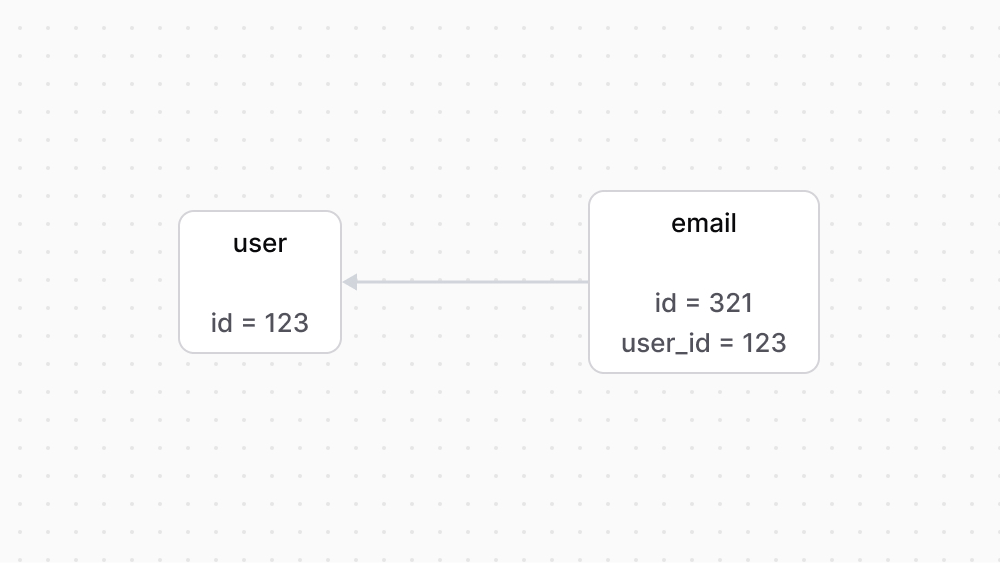
When you generate the migrations of data models that have a one-to-one relationship, the migration adds to the table of the data model that has the `belongsTo` property:
|
||
|
||
1. A column of the format `{relation_name}_id` to store the ID of the record of the related data model. For example, the `email` table will have a `user_id` column.
|
||
2. A foreign key on the `{relation_name}_id` column to the table of the related data model.
|
||
|
||
|
||
|
||
---
|
||
|
||
## One-to-Many Relationship
|
||
|
||
A one-to-many relationship indicates that one record of a data model has many records of another data model.
|
||
|
||
To define a one-to-many relationship, create relationship properties in the data models using the following methods:
|
||
|
||
1. `hasMany`: indicates that the model has more than one records of the specified model.
|
||
2. `belongsTo`: indicates that the model belongs to one record of the specified model.
|
||
|
||
For example:
|
||
|
||
export const oneToManyHighlights = [
|
||
["5", "hasMany", "A store has many products"],
|
||
["10", "belongsTo", "A product has one store."],
|
||
["11", `"products"`, "The relationship's name in the `Store` data model."]
|
||
]
|
||
|
||
```ts highlights={oneToManyHighlights}
|
||
import { model } from "@medusajs/framework/utils"
|
||
|
||
const Store = model.define("store", {
|
||
id: model.id().primaryKey(),
|
||
products: model.hasMany(() => Product),
|
||
})
|
||
|
||
const Product = model.define("product", {
|
||
id: model.id().primaryKey(),
|
||
store: model.belongsTo(() => Store, {
|
||
mappedBy: "products",
|
||
}),
|
||
})
|
||
```
|
||
|
||
In this example, a store has many products, but a product belongs to one store.
|
||
|
||
### Optional Relationship
|
||
|
||
To make the relationship optional on the `belongsTo` side, use the `nullable` method on the property as explained in [this chapter](../configure-properties/page.mdx#nullable-property).
|
||
|
||
### One-to-Many Relationship in the Database
|
||
|
||
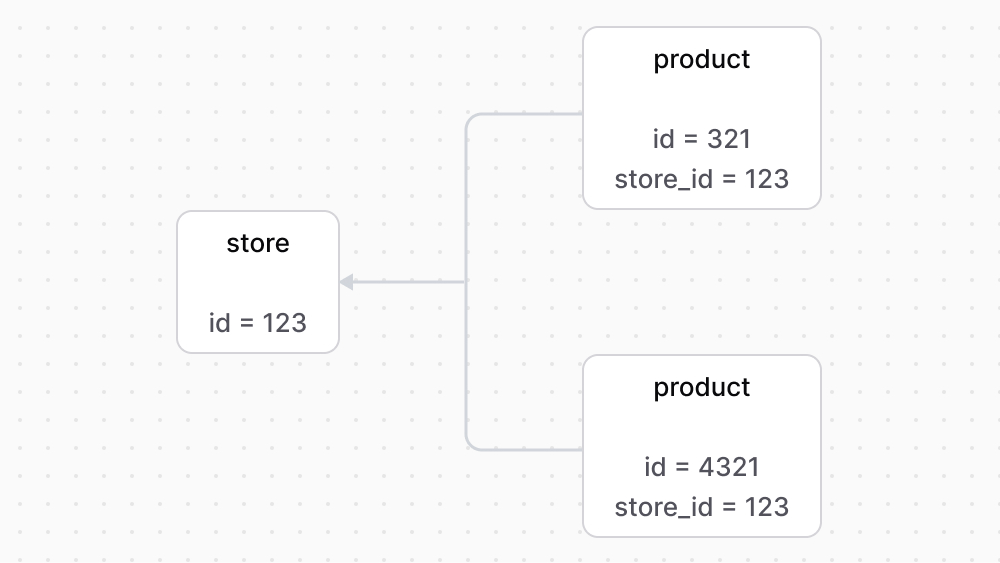
When you generate the migrations of data models that have a one-to-many relationship, the migration adds to the table of the data model that has the `belongsTo` property:
|
||
|
||
1. A column of the format `{relation_name}_id` to store the ID of the record of the related data model. For example, the `product` table will have a `store_id` column.
|
||
2. A foreign key on the `{relation_name}_id` column to the table of the related data model.
|
||
|
||
|
||
|
||
---
|
||
|
||
## Many-to-Many Relationship
|
||
|
||
A many-to-many relationship indicates that many records of a data model can be associated to many records of another data model.
|
||
|
||
To define a many-to-many relationship, create relationship properties in the data models using the `manyToMany` method.
|
||
|
||
For example:
|
||
|
||
export const manyToManyHighlights = [
|
||
["5", "manyToMany", "An order is associated with many products."],
|
||
["12", "manyToMany", "A product is associated with many orders."]
|
||
]
|
||
|
||
```ts highlights={manyToManyHighlights}
|
||
import { model } from "@medusajs/framework/utils"
|
||
|
||
const Order = model.define("order", {
|
||
id: model.id().primaryKey(),
|
||
products: model.manyToMany(() => Product, {
|
||
mappedBy: "orders",
|
||
}),
|
||
})
|
||
|
||
const Product = model.define("product", {
|
||
id: model.id().primaryKey(),
|
||
orders: model.manyToMany(() => Order, {
|
||
mappedBy: "products",
|
||
}),
|
||
})
|
||
```
|
||
|
||
At least one side of the many-to-many relationship must have the `mappedBy` property set in the second object parameter of the `manyToMany` object. Its value is the name of the relationship property in the other data model.
|
||
|
||
In this example, an order is associated with many products, and a product is associated with many orders.
|
||
|
||
### Many-to-Many Relationship in the Database
|
||
|
||
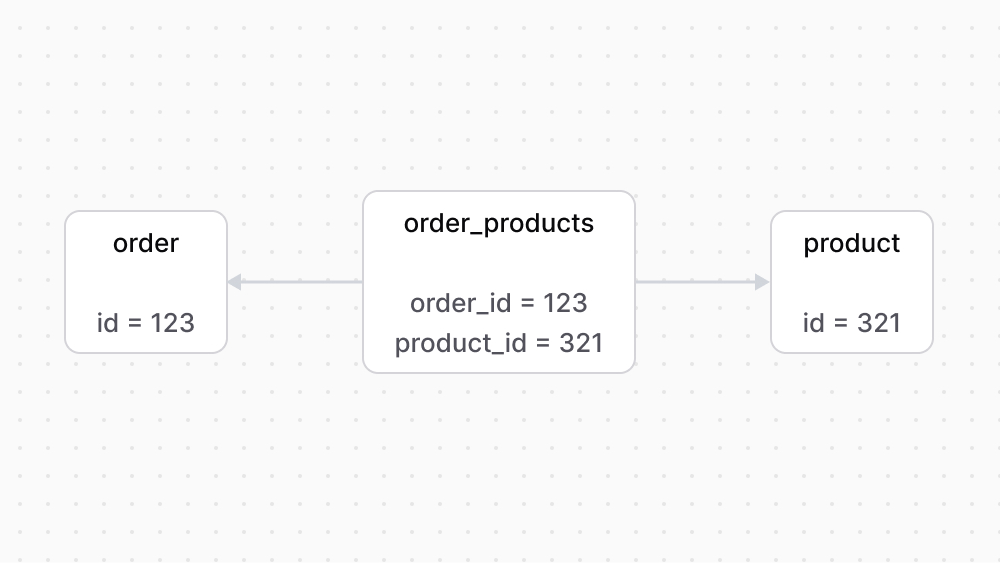
When you generate the migrations of data models that have a many-to-many relationship, the migration adds a new pivot table.
|
||
|
||
The pivot table has a column with the name `{data_model}_id` for each of the data model's tables. It also has foreign keys on each of these columns to their respective tables.
|
||
|
||
|
||
|
||
---
|
||
|
||
## Set Relationship Name in the Other Model
|
||
|
||
The relationship property methods accept as a second parameter an object of options. The `mappedBy` property defines the name of the relationship in the other data model.
|
||
|
||
This is useful if the relationship property’s name is different than that of the associated data model.
|
||
|
||
As seen in previous examples, the `mappedBy` option is required for the `belongsTo` method.
|
||
|
||
For example:
|
||
|
||
export const relationNameHighlights = [
|
||
["6", `"owner"`, "The relationship's name in the `Email` data model."],
|
||
["13", `"email"`, "The relationship's name in the `User` data model."]
|
||
]
|
||
|
||
```ts highlights={relationNameHighlights}
|
||
import { model } from "@medusajs/framework/utils"
|
||
|
||
const User = model.define("user", {
|
||
id: model.id().primaryKey(),
|
||
email: model.hasOne(() => Email, {
|
||
mappedBy: "owner",
|
||
}),
|
||
})
|
||
|
||
const Email = model.define("email", {
|
||
id: model.id().primaryKey(),
|
||
owner: model.belongsTo(() => User, {
|
||
mappedBy: "email",
|
||
}),
|
||
})
|
||
```
|
||
|
||
In this example, you specify in the `User` data model’s relationship property that the name of the relationship in the `Email` data model is `owner`.
|
||
|
||
---
|
||
|
||
## Cascades
|
||
|
||
When an operation is performed on a data model, such as record deletion, the relationship cascade specifies what related data model records should be affected by it.
|
||
|
||
For example, if a store is deleted, its products should also be deleted.
|
||
|
||
The `cascades` method used on a data model configures which child records an operation is cascaded to.
|
||
|
||
For example:
|
||
|
||
export const highlights = [
|
||
["8", "", "When a store is deleted, delete its associated products."]
|
||
]
|
||
|
||
```ts highlights={highlights}
|
||
import { model } from "@medusajs/framework/utils"
|
||
|
||
const Store = model.define("store", {
|
||
id: model.id().primaryKey(),
|
||
products: model.hasMany(() => Product),
|
||
})
|
||
.cascades({
|
||
delete: ["products"],
|
||
})
|
||
|
||
const Product = model.define("product", {
|
||
id: model.id().primaryKey(),
|
||
store: model.belongsTo(() => Store, {
|
||
mappedBy: "products",
|
||
}),
|
||
})
|
||
```
|
||
|
||
The `cascades` method accepts an object. Its key is the operation’s name, such as `delete`. The value is an array of relationship property names that the operation is cascaded to.
|
||
|
||
In the example above, when a store is deleted, its associated products are also deleted.
|