
243 lines
9.4 KiB
Plaintext
243 lines
9.4 KiB
Plaintext
export const metadata = {
|
||
title: `${pageNumber} Define Module Link`,
|
||
}
|
||
|
||
# {metadata.title}
|
||
|
||
In this chapter, you’ll learn what a module link is and how to define one.
|
||
|
||
## What is a Module Link?
|
||
|
||
Medusa's modular architecture isolates modules from one another to ensure they can be integrated into your application without side effects. Module isolation has other benefits, which you can learn about in the [Module Isolation chapter](../modules/isolation/page.mdx). Since modules are isolated, you can't access another module's data models to add a relation to it or extend it. Instead, you use a module link.
|
||
|
||
A module link forms an association between two data models of different modules while maintaining module isolation. Using module links, you can build virtual relations between your custom data models and data models in the Commerce Modules, which is useful as you extend the features provided by the Commerce Modules. Then, Medusa creates a link table in the database to store the IDs of the linked records. You'll learn more about link tables later in this chapter.
|
||
|
||
For example, the [Brand Customizations Tutorial](../../customization/extend-features/page.mdx) shows how to create a Brand Module that adds the concept of brands to your application, then link those brands to a product.
|
||
|
||
---
|
||
|
||
## How to Define a Module Link?
|
||
|
||
### 1. Create Link File
|
||
|
||
Module links are defined in a TypeScript or JavaScript file under the `src/links` directory. The file defines the link using `defineLink` from the Modules SDK and exports it.
|
||
|
||
For example:
|
||
|
||
export const highlights = [
|
||
["6", "linkable", "Special `linkable` property that holds the linkable data models of `BlogModule`."],
|
||
["7", "linkable", "Special `linkable` property that holds the linkable data models of `ProductModule`."],
|
||
]
|
||
|
||
```ts title="src/links/blog-product.ts" highlights={highlights}
|
||
import BlogModule from "../modules/blog"
|
||
import ProductModule from "@medusajs/medusa/product"
|
||
import { defineLink } from "@medusajs/framework/utils"
|
||
|
||
export default defineLink(
|
||
ProductModule.linkable.product,
|
||
BlogModule.linkable.post
|
||
)
|
||
```
|
||
|
||
The `defineLink` function accepts as parameters the link configurations of each module's data model. A module has a special `linkable` property that holds these configurations for its data models.
|
||
|
||
In this example, you define a module link between the `blog` module's `post` data model and the Product Module's `Product` data model.
|
||
|
||
### 2. Sync Links
|
||
|
||
After defining the link, run the `db:sync-links` command:
|
||
|
||
```bash
|
||
npx medusa db:sync-links
|
||
```
|
||
|
||
The Medusa application creates a new table for your module link to store the IDs of linked records.
|
||
|
||
You can also use the `db:migrate` command, which runs both the migrations and syncs the links.
|
||
|
||
Use either of these commands whenever you make changes to your link definitions. For example, run this command if you remove your link definition file.
|
||
|
||
---
|
||
|
||
### Module Link's Database Table
|
||
|
||
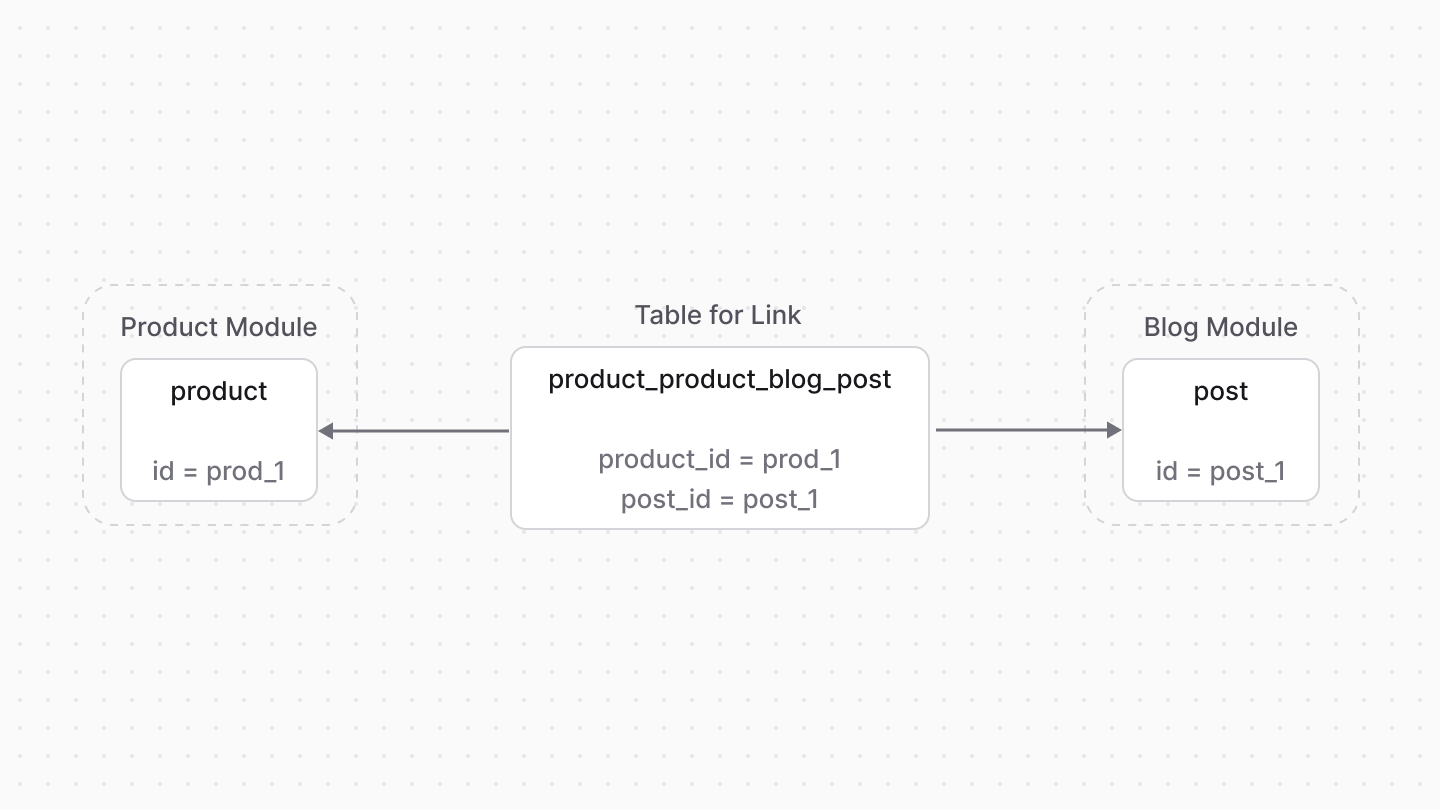
When you define a module link, the Medusa application creates a table in the database for that module link. The table's name is a combination of the names of the two data models linked in the format `module1_table1_module2_table2`, where:
|
||
|
||
- `module1` and `module2` are the names of the modules.
|
||
- `table1` and `table2` are the table names of the data models.
|
||
|
||
For example, if you define a link between the `Product` data model from the [Product Module](!resources!/commerce-modules/product) and a `Post` data model from a Blog Module, the table name would be `product_product_blog_post`.
|
||
|
||
The table has two columns, each storing the ID of a record from the linked data models. For example, the `product_product_blog_post` table would have columns `product_id` and `post_id`. These columns store only the IDs of the linked records and do not hold a foreign key constraint.
|
||
|
||
Then, when you create links between records of the data models, the IDs of these data models are stored as a new record in the link's table.
|
||
|
||
<Note title="Tip">
|
||
|
||
You can also add custom columns in the link table as explained in the [Add Columns to Link Table chapter](./custom-columns/page.mdx).
|
||
|
||
</Note>
|
||
|
||
|
||
|
||
---
|
||
|
||
## When to Use Module Links
|
||
|
||
<Note title="Use module links when" type="success">
|
||
|
||
- You want to create a relation between data models from different modules.
|
||
- You want to extend the data model of another module.
|
||
|
||
</Note>
|
||
|
||
<Note title="Don't use module links if" type="error">
|
||
|
||
You want to create a relationship between data models in the same module. Use data model relationships instead.
|
||
|
||
</Note>
|
||
|
||
---
|
||
|
||
## Define a List Module Link
|
||
|
||
By default, a module link establishes a one-to-one relation: a record of a data model is linked to one record of the other data model.
|
||
|
||
To specify that a data model can have multiple of its records linked to the other data model's record, use the `isList` option.
|
||
|
||
For example:
|
||
|
||
```ts
|
||
import BlogModule from "../modules/blog"
|
||
import ProductModule from "@medusajs/medusa/product"
|
||
import { defineLink } from "@medusajs/framework/utils"
|
||
|
||
export default defineLink(
|
||
ProductModule.linkable.product,
|
||
{
|
||
linkable: BlogModule.linkable.post,
|
||
isList: true,
|
||
}
|
||
)
|
||
```
|
||
|
||
In this case, you pass an object of configuration as a parameter instead. The object accepts the following properties:
|
||
|
||
- `linkable`: The data model's link configuration.
|
||
- `isList`: Whether multiple records can be linked to one record of the other data model.
|
||
|
||
In this example, a record of `product` can be linked to more than one record of `post`.
|
||
|
||
### Many-to-Many Module Link
|
||
|
||
Your module link can also establish a many-to-many relation between the linked data models. To do this, enable `isList` on both sides of the link.
|
||
|
||
For example:
|
||
|
||
```ts
|
||
import BlogModule from "../modules/blog"
|
||
import ProductModule from "@medusajs/medusa/product"
|
||
import { defineLink } from "@medusajs/framework/utils"
|
||
|
||
export default defineLink(
|
||
{
|
||
linkable: ProductModule.linkable.product,
|
||
isList: true,
|
||
},
|
||
{
|
||
linkable: BlogModule.linkable.post,
|
||
isList: true,
|
||
}
|
||
)
|
||
```
|
||
|
||
---
|
||
|
||
## Set Delete Cascades on Link
|
||
|
||
To enable delete cascade on a link so that when a record is deleted with [link.delete](./link/page.mdx#cascade-delete-linked-records), its linked records are also deleted, pass the `deleteCascade` property in the object passed to `defineLink`.
|
||
|
||
For example:
|
||
|
||
```ts
|
||
import BlogModule from "../modules/blog"
|
||
import ProductModule from "@medusajs/medusa/product"
|
||
import { defineLink } from "@medusajs/framework/utils"
|
||
|
||
export default defineLink(
|
||
ProductModule.linkable.product,
|
||
{
|
||
linkable: BlogModule.linkable.post,
|
||
deleteCascade: true,
|
||
}
|
||
)
|
||
```
|
||
|
||
In this example, when a product is deleted with [link.delete](./link/page.mdx#cascade-delete-linked-records), all linked blog posts are also deleted.
|
||
|
||
---
|
||
|
||
## Renaming Participants in a Module Link
|
||
|
||
As mentioned in the [Module Link's Database Table](#module-links-database-table) section, the name of a link's table consists of the names of the modules and the data models' table names.
|
||
|
||
So, if you rename a module or a data model's table, then run the `db:sync-links` or `db:migrate` commands, you'll be asked to delete the old link table and create a new one.
|
||
|
||
<Note title="Tip">
|
||
|
||
A data model's table name is passed in the first parameter of `model.define`, and a module's name is passed in the first parameter of `Module` in the module's `index.ts` file.
|
||
|
||
</Note>
|
||
|
||
For example, if you have the link table `product_product_blog_post` and you rename the Blog Module from `blog` to `article`, Medusa considers the old link definition deleted. Then, when you run the `db:sync-links` or `db:migrate` command, Medusa will ask if you want to delete the old link table, and will create a new one with the new name `product_product_article_post`.
|
||
|
||
To resolve this, you can rename the link table in the link definition.
|
||
|
||
### Rename Link Table
|
||
|
||
If you need to rename a module or its data model's table, you can persist the old name by passing a third parameter to `defineLink`. This parameter is an object of additional configurations. It accepts a `database` property that allows you to configure the link's table name.
|
||
|
||
For example, after renaming the Blog Module to `article`, you can persist the old name `blog` in the link table name:
|
||
|
||
export const renameHighlights = [
|
||
["13", `"product_product_blog_post"`, "Specify the old link table name to persist when renaming a module or data model's table."]
|
||
]
|
||
|
||
```ts highlights={renameHighlights}
|
||
import ArticleModule from "../modules/article"
|
||
import ProductModule from "@medusajs/medusa/product"
|
||
import { defineLink } from "@medusajs/framework/utils"
|
||
|
||
export default defineLink(
|
||
ProductModule.linkable.product,
|
||
{
|
||
linkable: ArticleModule.linkable.post,
|
||
isList: true,
|
||
},
|
||
{
|
||
database: {
|
||
table: "product_product_blog_post",
|
||
},
|
||
}
|
||
)
|
||
```
|
||
|
||
In this example, you set the `table` property in the `database` object to the old link table name `product_product_blog_post`, ensuring that the old link table is not deleted.
|
||
|
||
This is enough to rename the link table when you rename a module. If you renamed a data model's table, you need to also run the `db:sync-links` or `db:migrate` commands, which will update the column names in the link table automatically:
|
||
|
||
```bash
|
||
npx medusa db:migrate
|
||
```
|
||
|
||
---
|
||
|
||
## Delete Module Link Definition
|
||
|
||
To delete a module link definition, remove the link file from the `src/links` directory. Then, run the `db:sync-links` or `db:migrate` command to delete the link table from the database:
|
||
|
||
```bash
|
||
npx medusa db:migrate
|
||
```
|