914d773d3a
* initialized next.js project

* finished markdown sections

* added operation schema component

* change page metadata

* eslint fixes

* fixes related to deployment

* added response schema

* resolve max stack issue

* support for different property types

* added support for property types

* added loading for components

* added more loading

* type fixes

* added oneOf type

* removed console

* fix replace with push

* refactored everything

* use static content for description

* fixes and improvements

* added code examples section

* fix path name

* optimizations

* fixed tag navigation

* add support for admin and store references

* general enhancements

* optimizations and fixes

* fixes and enhancements

* added search bar

* loading enhancements

* added loading

* added code blocks

* added margin top

* add empty response text

* fixed oneOf parameters

* added path and query parameters

* general fixes

* added base path env variable

* small fix for arrays

* enhancements

* design enhancements

* general enhancements

* fix isRequired

* added enum values

* enhancements

* general fixes

* general fixes

* changed oas generation script

* additions to the introduction section

* added copy button for code + other enhancements

* fix response code block

* fix metadata

* formatted store introduction

* move sidebar logic to Tags component

* added test env variables

* fix code block bug

* added loading animation

* added expand param + loading

* enhance operation loading

* made responsive + improvements

* added loading provider

* fixed loading

* adjustments for small devices

* added sidebar label for endpoints

* added feedback component

* fixed analytics

* general fixes

* listen to scroll for other headings

* added sample env file

* update api ref files + support new fields

* fix for external docs link

* added new sections

* fix last item in sidebar not showing

* move docs content to www/docs

* change redirect url

* revert change

* resolve build errors

* configure rewrites

* changed to environment variable url

* revert changing environment variable name

* add environment variable for API path

* fix links

* fix tailwind settings

* remove vercel file

* reconfigured api route

* move api page under api

* fix page metadata

* fix external link in navigation bar

* update api spec

* updated api specs

* fixed google lint error

* add max-height on request samples

* add padding before loading

* fix for one of name

* fix undefined types

* general fixes

* remove response schema example

* redesigned navigation bar

* redesigned sidebar

* fixed up paddings

* added feedback component + report issue

* fixed up typography, padding, and general styling

* redesigned code blocks

* optimization

* added error timeout

* fixes

* added indexing with algolia + fixes

* fix errors with algolia script

* redesign operation sections

* fix heading scroll

* design fixes

* fix padding

* fix padding + scroll issues

* fix scroll issues

* improve scroll performance

* fixes for safari

* optimization and fixes

* fixes to docs + details animation

* padding fixes for code block

* added tab animation

* fixed incorrect link

* added selection styling

* fix lint errors

* redesigned details component

* added detailed feedback form

* api reference fixes

* fix tabs

* upgrade + fixes

* updated documentation links

* optimizations to sidebar items

* fix spacing in sidebar item

* optimizations and fixes

* fix endpoint path styling

* remove margin

* final fixes

* change margin on small devices

* generated OAS

* fixes for mobile

* added feedback modal

* optimize dark mode button

* fixed color mode useeffect

* minimize dom size

* use new style system

* radius and spacing design system

* design fixes

* fix eslint errors

* added meta files

* change cron schedule

* fix docusaurus configurations

* added operating system to feedback data

* change content directory name

* fixes to contribution guidelines

* revert renaming content

* added api-reference to documentation workflow

* fixes for search

* added dark mode + fixes

* oas fixes

* handle bugs

* added code examples for clients

* changed tooltip text

* change authentication to card

* change page title based on selected section

* redesigned mobile navbar

* fix icon colors

* fix key colors

* fix medusa-js installation command

* change external regex in algolia

* change changeset

* fix padding on mobile

* fix hydration error

* update depedencies
7.5 KiB
description
| description |
|---|
| Learn about the discount architecture in the Medusa backend. Discounts are used to offer promotions to the user for marketing purposes. |
Discounts Architecture
In this document, you’ll learn about Discounts architecture and how it works.
What are Discounts
Discounts allow you to offer promotions to your users generally for marketing purposes. Customers can apply a discount code to their checkout flow to use the discount if it’s valid for them.
Discounts can be limited by a set of configurations and conditions. For example, you can indicate how many times a discount can be used or by which customer group. You can also specify which products this discount can be used with, among other conditions.
Discount Types
There are three types of discounts:
- Percentage discount: remove a percentage of the price every product in the cart that the discount can be applied to.
- Fixed discount: remove a fixed amount either of the customer’s total checkout amount or of the price every product in the cart that the discount can be applied to.
- Free shipping discount: remove any shipping amount from the customer’s order during checkout.
Example Use Cases
Discounts can be used in many use cases including:
- Applying discounted amounts for wholesale or B2B customers.
- Creating a sale within a specific period of time (for example, a summer sale).
- Give your customers free shipping for a limited time.
Discount Entity Overview
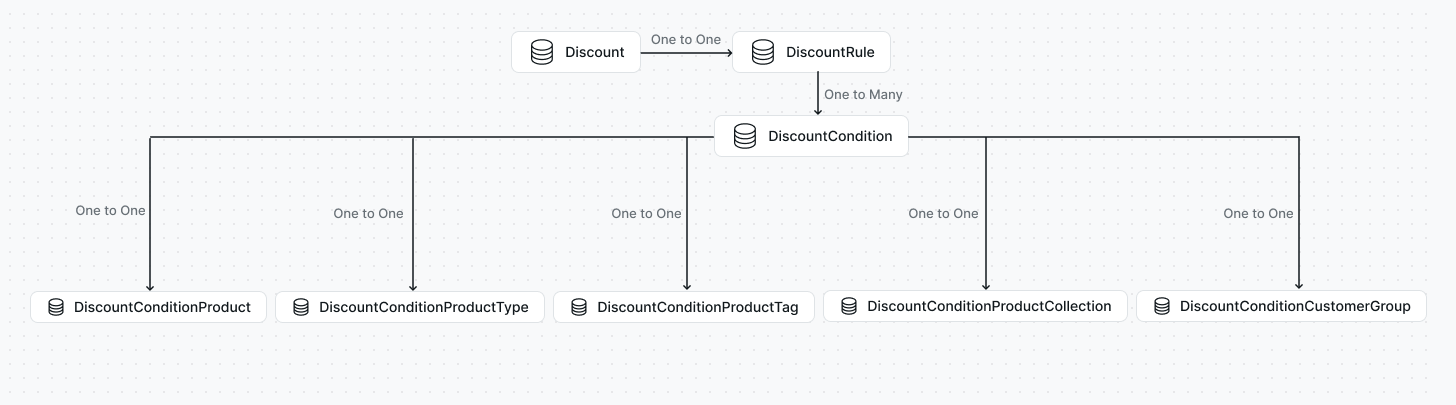
A discount is represented by the Discount entity. Some of its important attributes are:
codeis a unique code that you specify when you create the discount. Customers use this code to apply the discount during checkout. The code can only include upper-case letters and numbers.rule_idis the ID of the rule of this discount. Theruleattribute is the expanded object of theDiscountRuleentity. You can use theruleattribute to get details regarding the discount type. You can learn more about this in theDiscountRuleentity overview later.is_disabledis a boolean value that indicates whether this discount is published or not.regionsare the regions this discount can be used in.starts_atandends_atare timestamps that indicate when the discount starts and ends. If no expiry date is set for the discount,ends_atwill benull.usage_limitis the number of times the discount can be used. If there is no limit the value will benull.usage_countis the number of times the discount has been used.
Dynamic Discounts
Dynamic discounts are a set of discount conditions and configurations that you can reuse across many discounts.
After creating a dynamic discount, you can use it to create “child” discounts. Child discounts have the same conditions and configurations as the “parent” dynamic discount but with a different discount code.
The is_dynamic attribute in the Discount entity is a boolean value that determines whether the discount is dynamic or not. Child discounts are related to the parent discount using the parent_discount_id attribute which is a foreign key to the same Discount entity.
DiscountRule Entity Overview
Every Discount entity belongs to a DiscountRule entity. DiscountRule includes details such as the type of discount, the amount to be discounted, and more.
Some of the DiscountRule entity’s important attributes are:
typeis an enum string indicating the type of the discount. It must be eitherfixed,percentage, orfree_shipping.valueis the value to be discounted. The value of this depends on the value oftype:- If
typeisfixed,valuewill be the amount to be removed either from the total or from each product this discount is applied to. - If
typeispercentage,valuewill be the percentage to be removed from each product this discount is applied to. - If
typeisfree_shipping,valuewill be 0.
- If
conditionsis an array of all discount conditions, if there are any.
DiscountCondition Entity Overview
A discount can optionally have discount conditions. Discount conditions are used to further add limitations on when the discount can be applied.
A DiscountCondition belongs to a DiscountRule entity. The discount_rule_id attribute indicates the ID of the DiscountRule it belongs to.
Discount conditions have an attribute type that indicates the condition’s type. Its value must be one of the following:
productsmeans the condition applies to products.product_typesmeans the condition applies to product types.product_collectionsmeans the condition applies to product collections.product_tagsmeans the condition applies to product tags.customer_groupsmeans the condition applies to customer groups.
Each condition type can be used for one condition in a discount. For example, you can add only one product discount condition to a discount.
Discount conditions also have an attribute operator that indicates how the condition should be applied. It must have one of the following values:
inmeans the discount can be applied only for the items specified in the condition. For example, if thetypeisproductand theoperatorisin, it means this condition defines which products must be available in the customer’s cart for the discount to apply.not_inmeans the discount can be applied for all items except those specified in the condition. For example, if thetypeisproductand theoperatorisnot_in, it means that the discount can be applied to any item in the cart that's not specified in the condition.
Condition Type Relations
Based on the value of type, one of the following relations can be used to retrieve the condition’s items:
productsis an array of products that this condition applies to if the condition’stypeisproducts. Each item of the array would be aDiscountConditionProduct.product_typesis an array of product types that this condition applies to if the condition’stypeisproduct_types. Each item of the array would be aDiscountConditionProductType.product_collectionsis an array of product collections that this condition applies to if the condition’stypeisproduct_collections. Each item of the array would be aDiscountConditionProductCollection.product_tagsis an array of product tags that this condition applies to if the condition’stypeisproduct_tags. Each item of the array would be aDiscountConditionProductTag.customer_groupsis an array of customer groups that this condition applies to if the condition’stypeiscustomer_groups. Each item of the array would be aDiscountConditionCustomerGroup.