 28b0d08591
* add locking docs

* fix main navbar

* added implementation example links

* generate refs

* update architecture

* fix vale error
92 lines
5.7 KiB
Plaintext
92 lines
5.7 KiB
Plaintext
export const metadata = {
|
|
title: `${pageNumber} Medusa's Architecture`,
|
|
}
|
|
|
|
# {metadata.title}
|
|
|
|
In this chapter, you'll learn about the architectural layers in Medusa.
|
|
|
|
<Note title="Tip">
|
|
|
|
Find the full architectural diagram at the [end of this chapter](#full-diagram-of-medusas-architecture).
|
|
|
|
</Note>
|
|
|
|
## HTTP, Workflow, and Module Layers
|
|
|
|
Medusa is a headless commerce platform. So, storefronts, admin dashboards, and other clients consume Medusa's functionalities through its API routes.
|
|
|
|
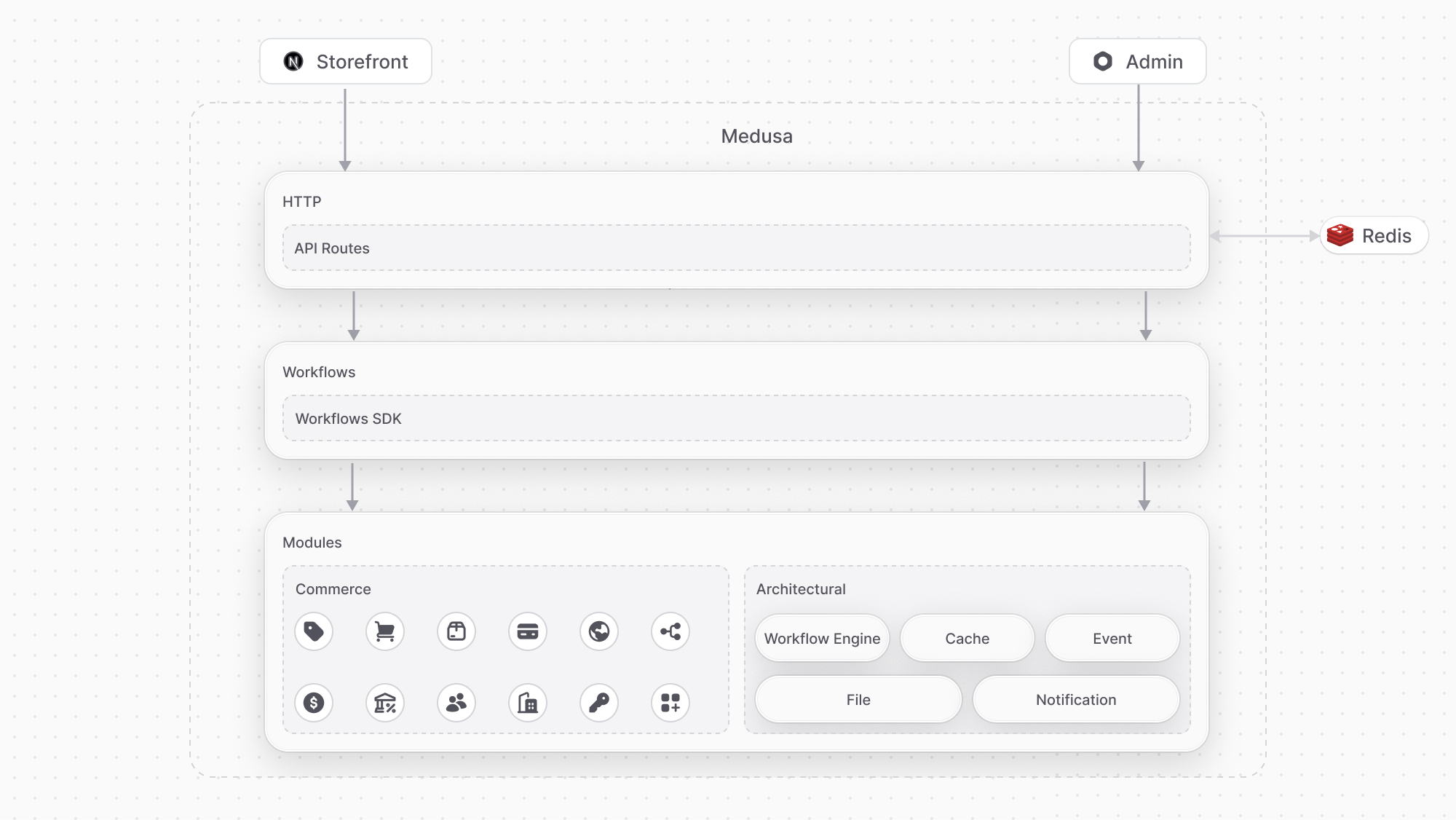
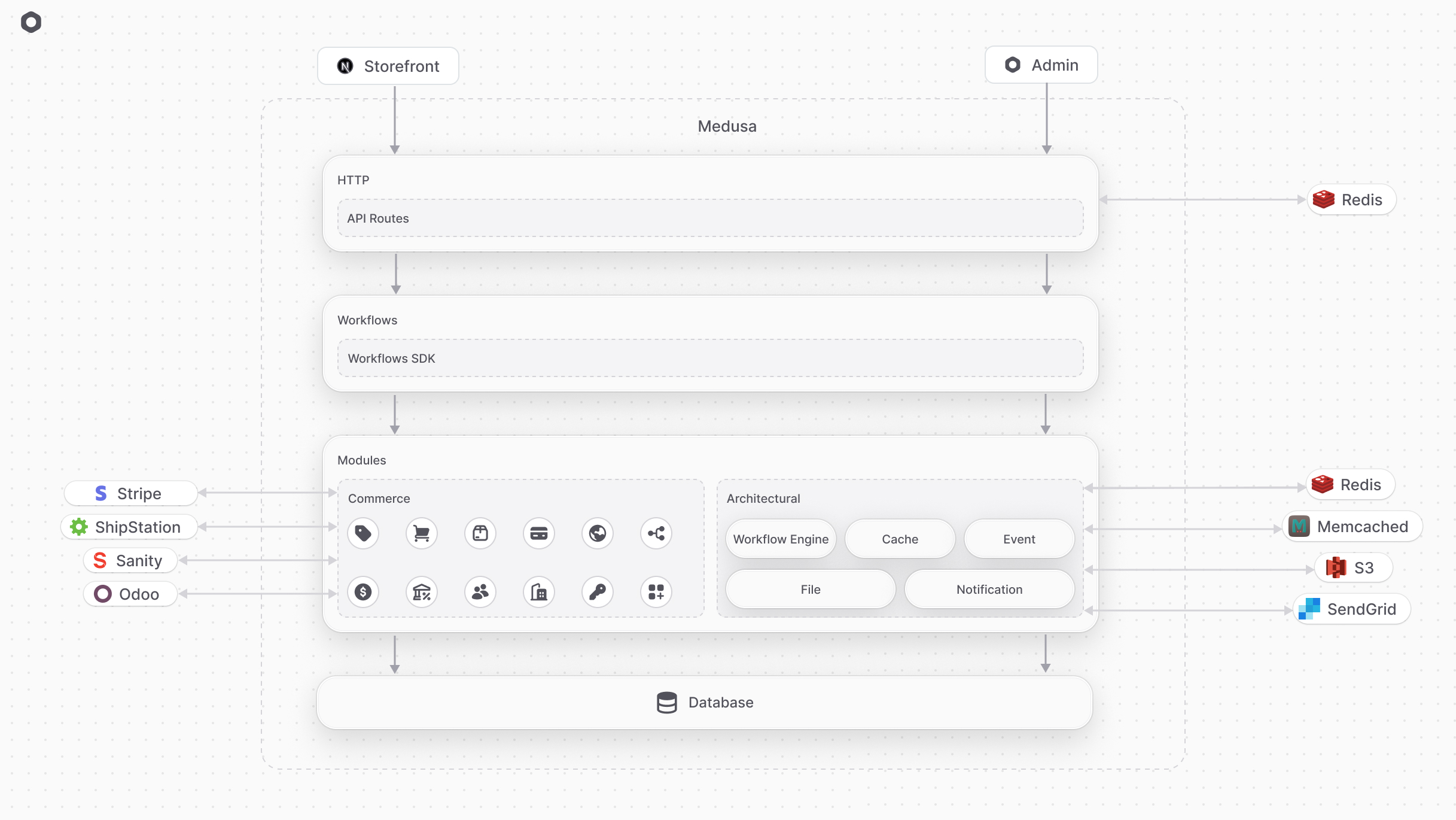
In a common Medusa application, requests go through four layers in the stack. In order of entry, those are:
|
|
|
|
1. API Routes (HTTP): Our API Routes are the typical entry point. The Medusa server is based on Express.js, which handles incoming requests. It can also connect to a Redis database that stores the server session data.
|
|
2. Workflows: API Routes consume workflows that hold the opinionated business logic of your application.
|
|
3. Modules: Workflows use domain-specific modules for resource management.
|
|
3. Data store: Modules query the underlying datastore, which is a PostgreSQL database in common cases.
|
|
|
|
<Note>
|
|
|
|
These layers of stack can be implemented within [plugins](../../fundamentals/plugins/page.mdx).
|
|
|
|
</Note>
|
|
|
|
|
|
|
|
---
|
|
|
|
## Database Layer
|
|
|
|
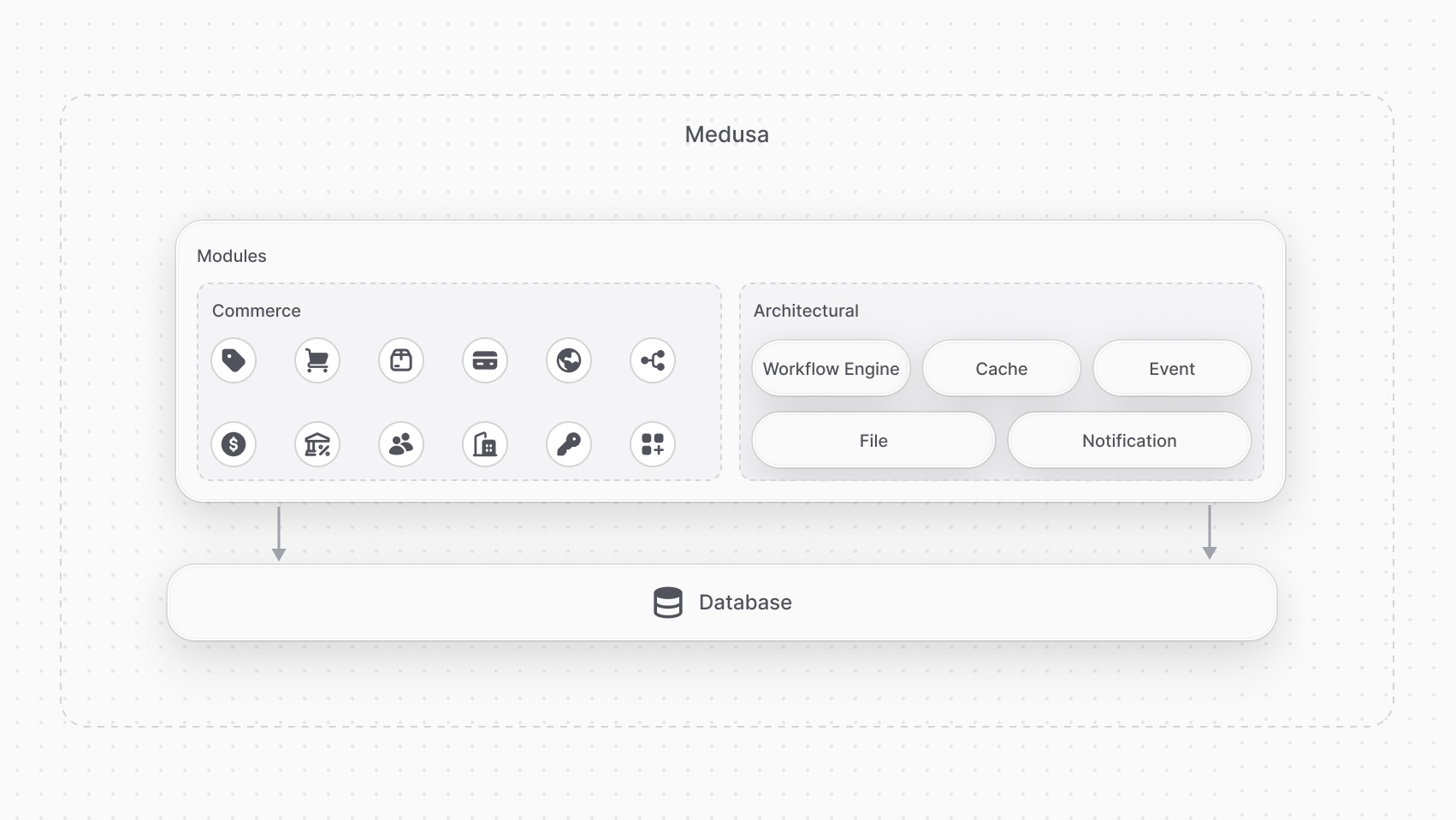
The Medusa application injects into each module, including your [custom modules](../../fundamentals/modules/page.mdx), a connection to the configured PostgreSQL database. Modules use that connection to read and write data to the database.
|
|
|
|
<Note>
|
|
|
|
Modules can be implemented within [plugins](../../fundamentals/plugins/page.mdx).
|
|
|
|
</Note>
|
|
|
|
|
|
|
|
---
|
|
|
|
## Third-Party Integrations Layer
|
|
|
|
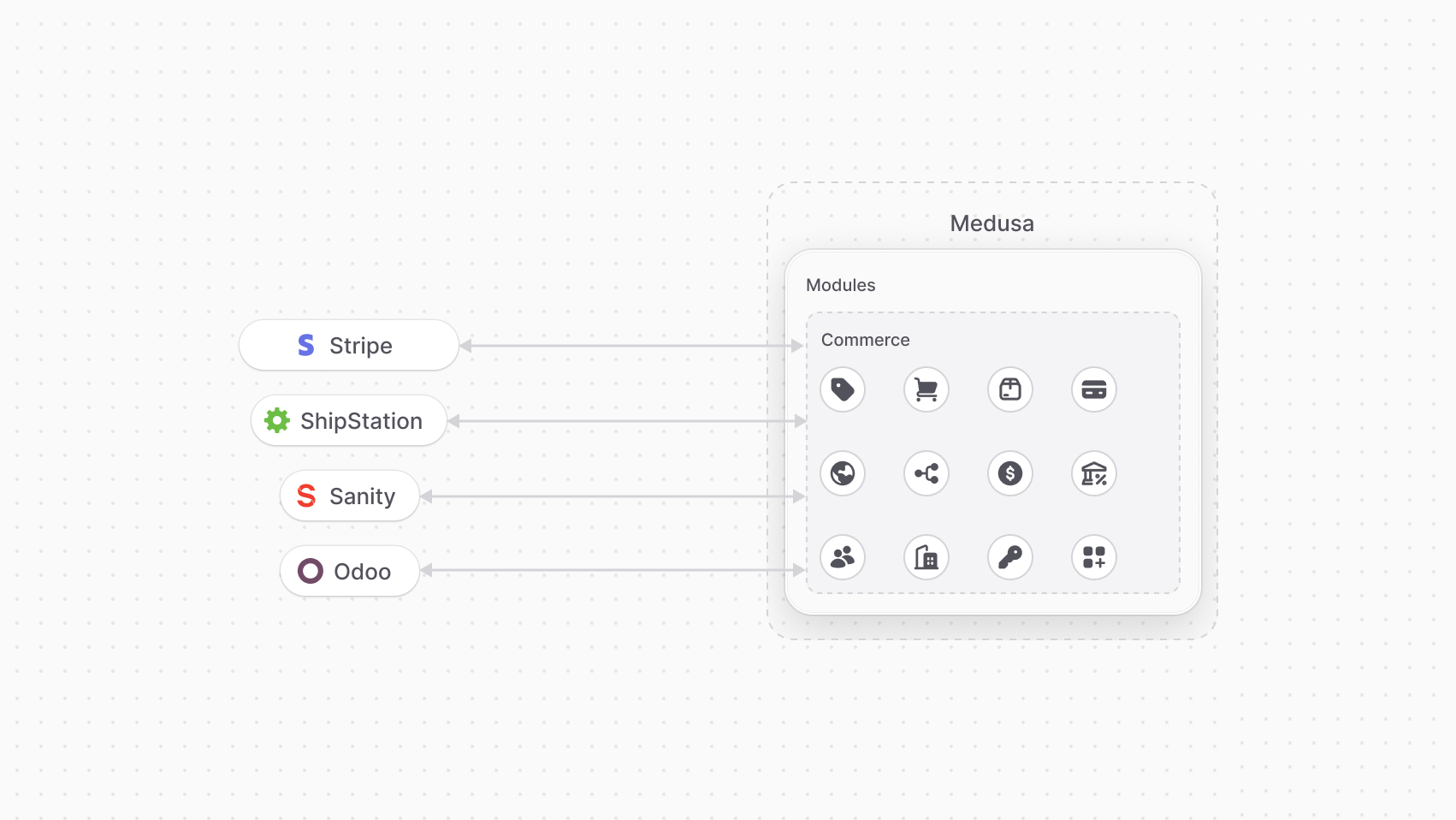
Third-party services and systems are integrated through Medusa's Commerce and Architectural modules. You also create custom third-party integrations through a [custom module](../../fundamentals/modules/page.mdx).
|
|
|
|
<Note>
|
|
|
|
Modules can be implemented within [plugins](../../fundamentals/plugins/page.mdx).
|
|
|
|
</Note>
|
|
|
|
### Commerce Modules
|
|
|
|
[Commerce modules](!resources!/commerce-modules) integrate third-party services relevant for commerce or user-facing features. For example, you can integrate [Stripe](!resources!/commerce-modules/payment/payment-provider/stripe) through a Payment Module Provider, or [ShipStation](!resources!/integrations/guides/shipstation) through a Fulfillment Module Provider.
|
|
|
|
You can also integrate third-party services for custom functionalities. For example, you can integrate [Sanity](!resources!/integrations/guides/sanity) for rich CMS capabilities, or [Odoo](!resources!/recipes/erp/odoo) to sync your Medusa application with your ERP system.
|
|
|
|
You can replace any of the third-party services mentioned above to build your preferred commerce ecosystem.
|
|
|
|
|
|
|
|
### Architectural Modules
|
|
|
|
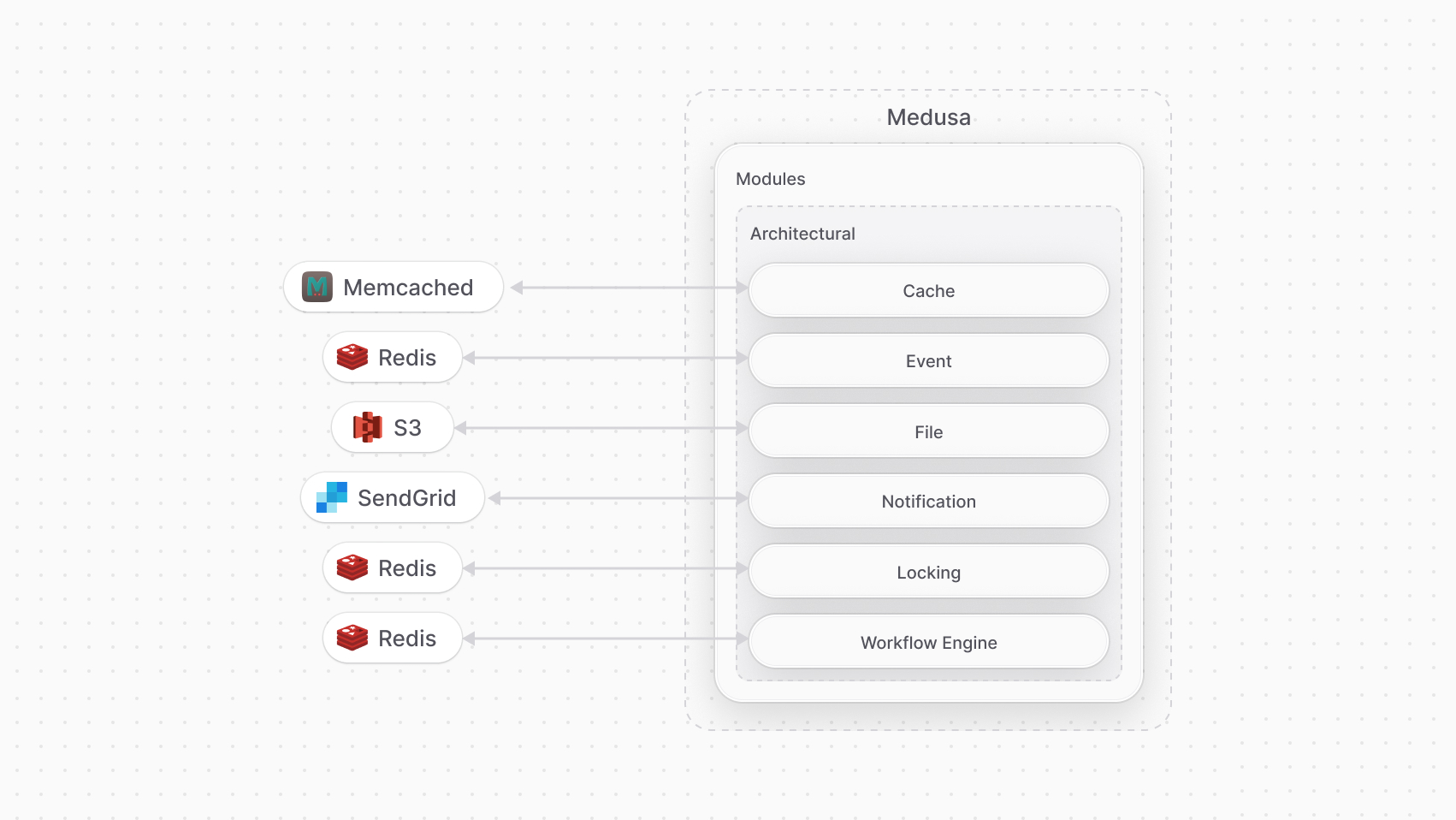
[Architectural modules](!resources!/architectural-modules) integrate third-party services and systems for architectural features. Medusa has the following Architectural modules:
|
|
|
|
- [Cache Module](!resources!/architectural-modules/cache): Caches data that require heavy computation. You can integrate a custom module to handle the caching with services like Memcached, or use the existing [Redis Cache Module](!resources!/architectural-modules/cache/redis).
|
|
- [Event Module](!resources!/architectural-modules/event): A pub/sub system that allows you to subscribe to events and trigger them. You can integrate [Redis](!resources!/architectural-modules/event/redis) as the pub/sub system.
|
|
- [File Module](!resources!/architectural-modules/file): Manages file uploads and storage, such as upload of product images. You can integrate [AWS S3](!resources!/architectural-modules/file/s3) for file storage.
|
|
- [Locking Module](!resources!/architectural-modules/locking): Manages access to shared resources by multiple processes or threads, preventing conflict between processes and ensuring data consistency. You can integrate [Redis](!resources!/architectural-modules/locking/redis) for locking.
|
|
- [Notification Module](!resources!/architectural-modules/notification): Sends notifications to customers and users, such as for order updates or newsletters. You can integrate [SendGrid](!resources!/architectural-modules/notification/sendgrid) for sending emails.
|
|
- [Workflow Engine Module](!resources!/architectural-modules/workflow-engine): Orchestrates workflows that hold the business logic of your application. You can integrate [Redis](!resources!/architectural-modules/workflow-engine/redis) to orchestrate workflows.
|
|
|
|
All of the third-party services mentioned above can be replaced to help you build your preferred architecture and ecosystem.
|
|
|
|
|
|
|
|
---
|
|
|
|
## Full Diagram of Medusa's Architecture
|
|
|
|
The following diagram illustrates Medusa's architecture including all its layers.
|
|
|
|
|