 938f3bd934
* update next

* updated react

* update eslint

* finish updating eslint

* fix content lint errors

* fix docs test

* fix vale action

* fix installation errors
192 lines
5.4 KiB
Plaintext
192 lines
5.4 KiB
Plaintext
---
|
|
sidebar_label: "Header"
|
|
---
|
|
|
|
import { TypeList } from "docs-ui"
|
|
|
|
export const metadata = {
|
|
title: `Header - Admin Components`,
|
|
}
|
|
|
|
# {metadata.title}
|
|
|
|
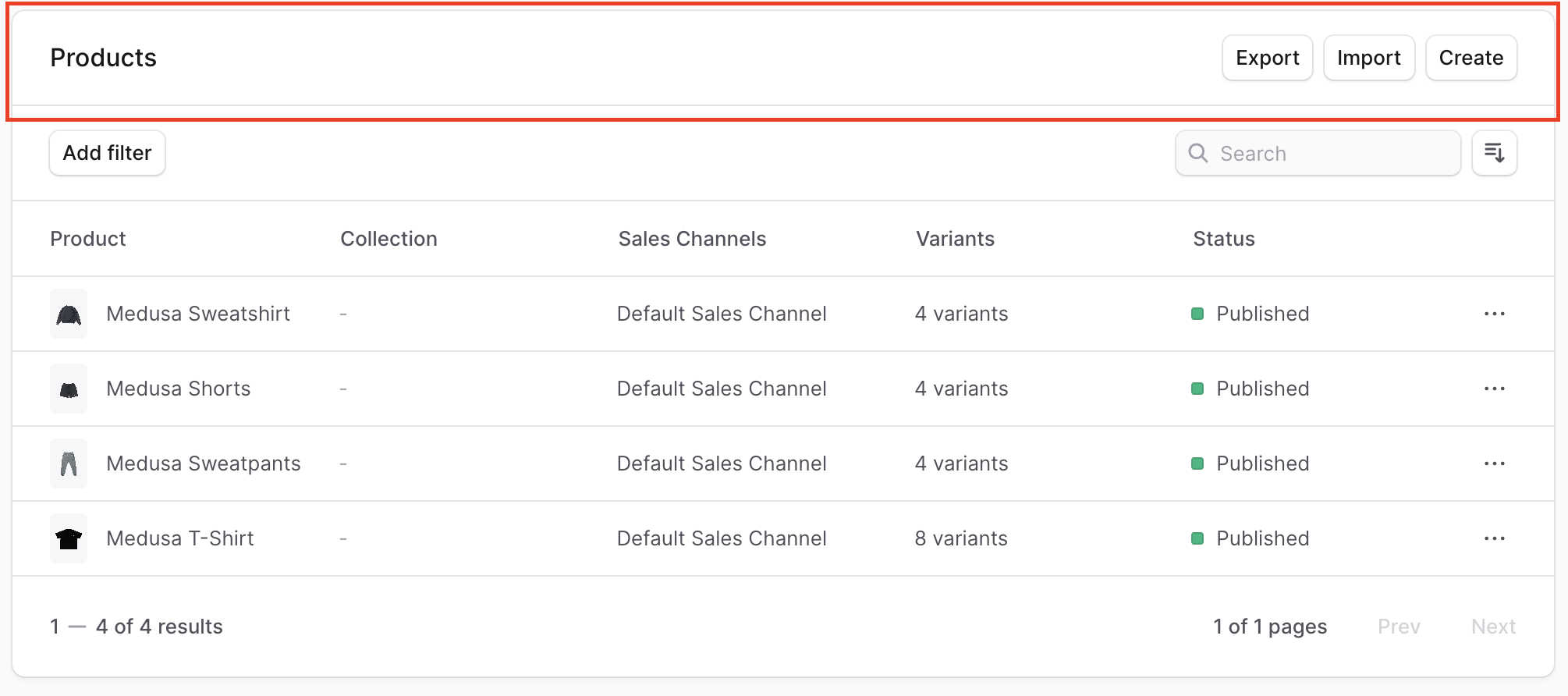
Each section in the Medusa Admin has a header with a title, and optionally a subtitle with buttons to perform an action.
|
|
|
|
|
|
|
|
To create a component that uses the same header styling and structure, create the file `src/admin/components/header.tsx` with the following content:
|
|
|
|
```tsx title="src/admin/components/header.tsx"
|
|
import { Heading, Button, Text } from "@medusajs/ui"
|
|
import React from "react"
|
|
import { Link, LinkProps } from "react-router-dom"
|
|
import { ActionMenu, ActionMenuProps } from "./action-menu"
|
|
|
|
export type HeadingProps = {
|
|
title: string
|
|
subtitle?: string
|
|
actions?: (
|
|
{
|
|
type: "button",
|
|
props: React.ComponentProps<typeof Button>
|
|
link?: LinkProps
|
|
} |
|
|
{
|
|
type: "action-menu"
|
|
props: ActionMenuProps
|
|
} |
|
|
{
|
|
type: "custom"
|
|
children: React.ReactNode
|
|
}
|
|
)[]
|
|
}
|
|
|
|
export const Header = ({
|
|
title,
|
|
subtitle,
|
|
actions = [],
|
|
}: HeadingProps) => {
|
|
return (
|
|
<div className="flex items-center justify-between px-6 py-4">
|
|
<div>
|
|
<Heading level="h2">{title}</Heading>
|
|
{subtitle && (
|
|
<Text className="text-ui-fg-subtle" size="small">
|
|
{subtitle}
|
|
</Text>
|
|
)}
|
|
</div>
|
|
{actions.length > 0 && (
|
|
<div className="flex items-center justify-center gap-x-2">
|
|
{actions.map((action, index) => (
|
|
<>
|
|
{action.type === "button" && (
|
|
<Button
|
|
{...action.props}
|
|
size={action.props.size || "small"}
|
|
key={index}
|
|
>
|
|
<>
|
|
{action.props.children}
|
|
{action.link && <Link {...action.link} />}
|
|
</>
|
|
</Button>
|
|
)}
|
|
{action.type === "action-menu" && (
|
|
<ActionMenu {...action.props} />
|
|
)}
|
|
{action.type === "custom" && action.children}
|
|
</>
|
|
))}
|
|
</div>
|
|
)}
|
|
</div>
|
|
)
|
|
}
|
|
```
|
|
|
|
The `Header` component shows a title, and optionally a subtitle and action buttons.
|
|
|
|
<Note>
|
|
|
|
The component also uses the [Action Menu](../action-menu/page.mdx) custom component.
|
|
|
|
</Note>
|
|
|
|
It accepts the following props:
|
|
|
|
<TypeList
|
|
types={[
|
|
{
|
|
name: "title",
|
|
type: "`string`",
|
|
optional: false,
|
|
description: "The section's title."
|
|
},
|
|
{
|
|
name: "subtitle",
|
|
type: "`string`",
|
|
optional: true,
|
|
description: "The section's subtitle."
|
|
},
|
|
{
|
|
name: "actions",
|
|
type: "`object[]`",
|
|
optional: true,
|
|
description: "An array of actions to show.",
|
|
children: [
|
|
{
|
|
name: "type",
|
|
type: "`button` \\| `action-menu` \\| `custom`",
|
|
optional: false,
|
|
description: "The type of action to add.\n\n- If its value is `button`, it'll show a button that can have a link or an on-click action.\n\n- If its value is `action-menu`, it'll show a three dot icon with a dropdown of actions.\n\n- If its value is `custom`, you can pass any React nodes to render.",
|
|
},
|
|
{
|
|
name: "props",
|
|
type: "object",
|
|
optional: false,
|
|
description: `This property is only accepted if \`type\` is \`button\` or \`action-menu\`. If \`type\` is \`button\`, it accepts the [props to pass to the UI Button component](https://docs.medusajs.com/components/button). If \`type\` is \`action-menu\`, it accepts the props to pass to the action menu, explaind in [this guide](../action-menu/page.mdx).`,
|
|
},
|
|
{
|
|
name: "link",
|
|
type: `[LinkProps](https://reactrouter.com/en/main/components/link)`,
|
|
optional: true,
|
|
description: "This property is only accepted if `type` is `button`. If provided, a link is rendered inside the button. Its value is the props to pass the `Link` component of `react-router-dom`."
|
|
},
|
|
{
|
|
name: "children",
|
|
type: "React.ReactNode",
|
|
optional: true,
|
|
description: "This property is only accepted if `type` is `custom`. Its content is rendered as part of the actions."
|
|
}
|
|
]
|
|
}
|
|
]}
|
|
/>
|
|
|
|
---
|
|
|
|
## Example
|
|
|
|
Use the `Header` component in any widget or UI route.
|
|
|
|
For example, create the widget `src/admin/widgets/product-widget.tsx` with the following content:
|
|
|
|
```tsx title="src/admin/widgets/product-widget.tsx"
|
|
import { defineWidgetConfig } from "@medusajs/admin-sdk"
|
|
import { Container } from "../components/container"
|
|
import { Header } from "../components/header"
|
|
|
|
const ProductWidget = () => {
|
|
return (
|
|
<Container>
|
|
<Header
|
|
title="Product Widget"
|
|
subtitle="This is my custom product widget"
|
|
actions={[
|
|
{
|
|
type: "button",
|
|
props: {
|
|
children: "Click me",
|
|
variant: "secondary",
|
|
onClick: () => {
|
|
alert("You clicked the button.")
|
|
},
|
|
},
|
|
},
|
|
]}
|
|
/>
|
|
</Container>
|
|
)
|
|
}
|
|
|
|
export const config = defineWidgetConfig({
|
|
zone: "product.details.before",
|
|
})
|
|
|
|
export default ProductWidget
|
|
```
|
|
|
|
This widget also uses a [Container](../container/page.mdx) custom component.
|