 Shahed Nasser
490 lines
11 KiB
Plaintext
490 lines
11 KiB
Plaintext
import { CodeTabs, CodeTab, Table } from "docs-ui"
|
|
|
|
export const metadata = {
|
|
title: `Links between Payment Module and Other Modules`,
|
|
}
|
|
|
|
# {metadata.title}
|
|
|
|
This document showcases the module links defined between the Payment Module and other commerce modules.
|
|
|
|
## Summary
|
|
|
|
The Payment Module has the following links to other modules:
|
|
|
|
<Table>
|
|
<Table.Header>
|
|
<Table.Row>
|
|
<Table.HeaderCell>
|
|
First Data Model
|
|
</Table.HeaderCell>
|
|
<Table.HeaderCell>
|
|
Second Data Model
|
|
</Table.HeaderCell>
|
|
<Table.HeaderCell>
|
|
Type
|
|
</Table.HeaderCell>
|
|
<Table.HeaderCell>
|
|
Description
|
|
</Table.HeaderCell>
|
|
</Table.Row>
|
|
</Table.Header>
|
|
<Table.Body>
|
|
<Table.Row>
|
|
<Table.Cell>
|
|
[Cart](/references/cart/models/Cart) in [Cart Module](../../cart/page.mdx)
|
|
</Table.Cell>
|
|
<Table.Cell>
|
|
[PaymentCollection](/references/payment/models/PaymentCollection)
|
|
</Table.Cell>
|
|
<Table.Cell>
|
|
Stored
|
|
</Table.Cell>
|
|
<Table.Cell>
|
|
[Learn more](#cart-module)
|
|
</Table.Cell>
|
|
</Table.Row>
|
|
<Table.Row>
|
|
<Table.Cell>
|
|
[Customer](/references/customer/models/Customer) in [Customer Module](../../customer/page.mdx)
|
|
</Table.Cell>
|
|
<Table.Cell>
|
|
[AccountHolder](/references/payment/models/AccountHolder)
|
|
</Table.Cell>
|
|
<Table.Cell>
|
|
Stored
|
|
</Table.Cell>
|
|
<Table.Cell>
|
|
[Learn more](#customer-module)
|
|
</Table.Cell>
|
|
</Table.Row>
|
|
<Table.Row>
|
|
<Table.Cell>
|
|
[Order](/references/order/models/Order) in [Order Module](../../order/page.mdx)
|
|
</Table.Cell>
|
|
<Table.Cell>
|
|
[PaymentCollection](/references/payment/models/PaymentCollection)
|
|
</Table.Cell>
|
|
<Table.Cell>
|
|
Stored
|
|
</Table.Cell>
|
|
<Table.Cell>
|
|
[Learn more](#order-module)
|
|
</Table.Cell>
|
|
</Table.Row>
|
|
<Table.Row>
|
|
<Table.Cell>
|
|
[OrderClaim](/references/order/models/OrderClaim) in [Order Module](../../order/page.mdx)
|
|
</Table.Cell>
|
|
<Table.Cell>
|
|
[PaymentCollection](/references/payment/models/PaymentCollection)
|
|
</Table.Cell>
|
|
<Table.Cell>
|
|
Stored
|
|
</Table.Cell>
|
|
<Table.Cell>
|
|
[Learn more](#order-module)
|
|
</Table.Cell>
|
|
</Table.Row>
|
|
<Table.Row>
|
|
<Table.Cell>
|
|
[OrderExchange](/references/order/models/OrderExchange) in [Order Module](../../order/page.mdx)
|
|
</Table.Cell>
|
|
<Table.Cell>
|
|
[PaymentCollection](/references/payment/models/PaymentCollection)
|
|
</Table.Cell>
|
|
<Table.Cell>
|
|
Stored
|
|
</Table.Cell>
|
|
<Table.Cell>
|
|
[Learn more](#order-module)
|
|
</Table.Cell>
|
|
</Table.Row>
|
|
<Table.Row>
|
|
<Table.Cell>
|
|
[Region](/references/region/models/Region) in [Region Module](../../region/page.mdx)
|
|
</Table.Cell>
|
|
<Table.Cell>
|
|
[PaymentProvider](/references/payment/models/PaymentProvider)
|
|
</Table.Cell>
|
|
<Table.Cell>
|
|
Stored
|
|
</Table.Cell>
|
|
<Table.Cell>
|
|
[Learn more](#region-module)
|
|
</Table.Cell>
|
|
</Table.Row>
|
|
</Table.Body>
|
|
</Table>
|
|
|
|
---
|
|
|
|
## Cart Module
|
|
|
|
The Cart Module provides cart-related features, but not payment processing.
|
|
|
|
Medusa defines a link between the `Cart` and `PaymentCollection` data models. A cart has a payment collection which holds all the authorized payment sessions and payments made related to the cart.
|
|
|
|
Learn more about this relation in [this documentation](../payment-collection/page.mdx#usage-with-the-cart-module).
|
|
|
|
### Retrieve with Query
|
|
|
|
To retrieve the cart associated with the payment collection with [Query](!docs!/learn/fundamentals/module-links/query), pass `cart.*` in `fields`:
|
|
|
|
<CodeTabs group="relation-query">
|
|
<CodeTab label="query.graph" value="method">
|
|
|
|
```ts
|
|
const { data: paymentCollections } = await query.graph({
|
|
entity: "payment_collection",
|
|
fields: [
|
|
"cart.*",
|
|
],
|
|
})
|
|
|
|
// paymentCollections.cart
|
|
```
|
|
|
|
</CodeTab>
|
|
<CodeTab label="useQueryGraphStep" value="step">
|
|
|
|
```ts
|
|
import { useQueryGraphStep } from "@medusajs/medusa/core-flows"
|
|
|
|
// ...
|
|
|
|
const { data: paymentCollections } = useQueryGraphStep({
|
|
entity: "payment_collection",
|
|
fields: [
|
|
"cart.*",
|
|
],
|
|
})
|
|
|
|
// paymentCollections.cart
|
|
```
|
|
|
|
</CodeTab>
|
|
</CodeTabs>
|
|
|
|
### Manage with Link
|
|
|
|
To manage the payment collection of a cart, use [Link](!docs!/learn/fundamentals/module-links/link):
|
|
|
|
<CodeTabs group="relation-link">
|
|
<CodeTab label="link.create" value="method">
|
|
|
|
```ts
|
|
import { Modules } from "@medusajs/framework/utils"
|
|
|
|
// ...
|
|
|
|
await link.create({
|
|
[Modules.CART]: {
|
|
cart_id: "cart_123",
|
|
},
|
|
[Modules.PAYMENT]: {
|
|
payment_collection_id: "paycol_123",
|
|
},
|
|
})
|
|
```
|
|
|
|
</CodeTab>
|
|
<CodeTab label="createRemoteLinkStep" value="step">
|
|
|
|
```ts
|
|
import { createRemoteLinkStep } from "@medusajs/medusa/core-flows"
|
|
|
|
// ...
|
|
|
|
createRemoteLinkStep({
|
|
[Modules.CART]: {
|
|
cart_id: "cart_123",
|
|
},
|
|
[Modules.PAYMENT]: {
|
|
payment_collection_id: "paycol_123",
|
|
},
|
|
})
|
|
```
|
|
|
|
</CodeTab>
|
|
</CodeTabs>
|
|
|
|
---
|
|
|
|
## Customer Module
|
|
|
|
Medusa defines a link between the `Customer` and `AccountHolder` data models, allowing payment providers to save payment methods for a customer, if the payment provider supports it.
|
|
|
|
<Note>
|
|
|
|
This link is available starting from Medusa `v2.5.0`.
|
|
|
|
</Note>
|
|
|
|
### Retrieve with Query
|
|
|
|
To retrieve the customer associated with an account holder with [Query](!docs!/learn/fundamentals/module-links/query), pass `customer.*` in `fields`:
|
|
|
|
<CodeTabs group="relation-query">
|
|
<CodeTab label="query.graph" value="method">
|
|
|
|
```ts
|
|
const { data: accountHolders } = await query.graph({
|
|
entity: "account_holder",
|
|
fields: [
|
|
"customer.*",
|
|
],
|
|
})
|
|
|
|
// accountHolders.customer
|
|
```
|
|
|
|
</CodeTab>
|
|
<CodeTab label="useQueryGraphStep" value="step">
|
|
|
|
```ts
|
|
import { useQueryGraphStep } from "@medusajs/medusa/core-flows"
|
|
|
|
// ...
|
|
|
|
const { data: accountHolders } = useQueryGraphStep({
|
|
entity: "account_holder",
|
|
fields: [
|
|
"customer.*",
|
|
],
|
|
})
|
|
|
|
// accountHolders.customer
|
|
```
|
|
|
|
</CodeTab>
|
|
</CodeTabs>
|
|
|
|
### Manage with Link
|
|
|
|
To manage the account holders of a customer, use [Link](!docs!/learn/fundamentals/module-links/link):
|
|
|
|
<CodeTabs group="relation-link">
|
|
<CodeTab label="link.create" value="method">
|
|
|
|
```ts
|
|
import { Modules } from "@medusajs/framework/utils"
|
|
|
|
// ...
|
|
|
|
await link.create({
|
|
[Modules.CUSTOMER]: {
|
|
customer_id: "cus_123",
|
|
},
|
|
[Modules.PAYMENT]: {
|
|
account_holder_id: "acchld_123",
|
|
},
|
|
})
|
|
```
|
|
|
|
</CodeTab>
|
|
<CodeTab label="createRemoteLinkStep" value="step">
|
|
|
|
```ts
|
|
import { createRemoteLinkStep } from "@medusajs/medusa/core-flows"
|
|
|
|
// ...
|
|
|
|
createRemoteLinkStep({
|
|
[Modules.CUSTOMER]: {
|
|
customer_id: "cus_123",
|
|
},
|
|
[Modules.PAYMENT]: {
|
|
account_holder_id: "acchld_123",
|
|
},
|
|
})
|
|
```
|
|
|
|
</CodeTab>
|
|
</CodeTabs>
|
|
|
|
---
|
|
|
|
## Order Module
|
|
|
|
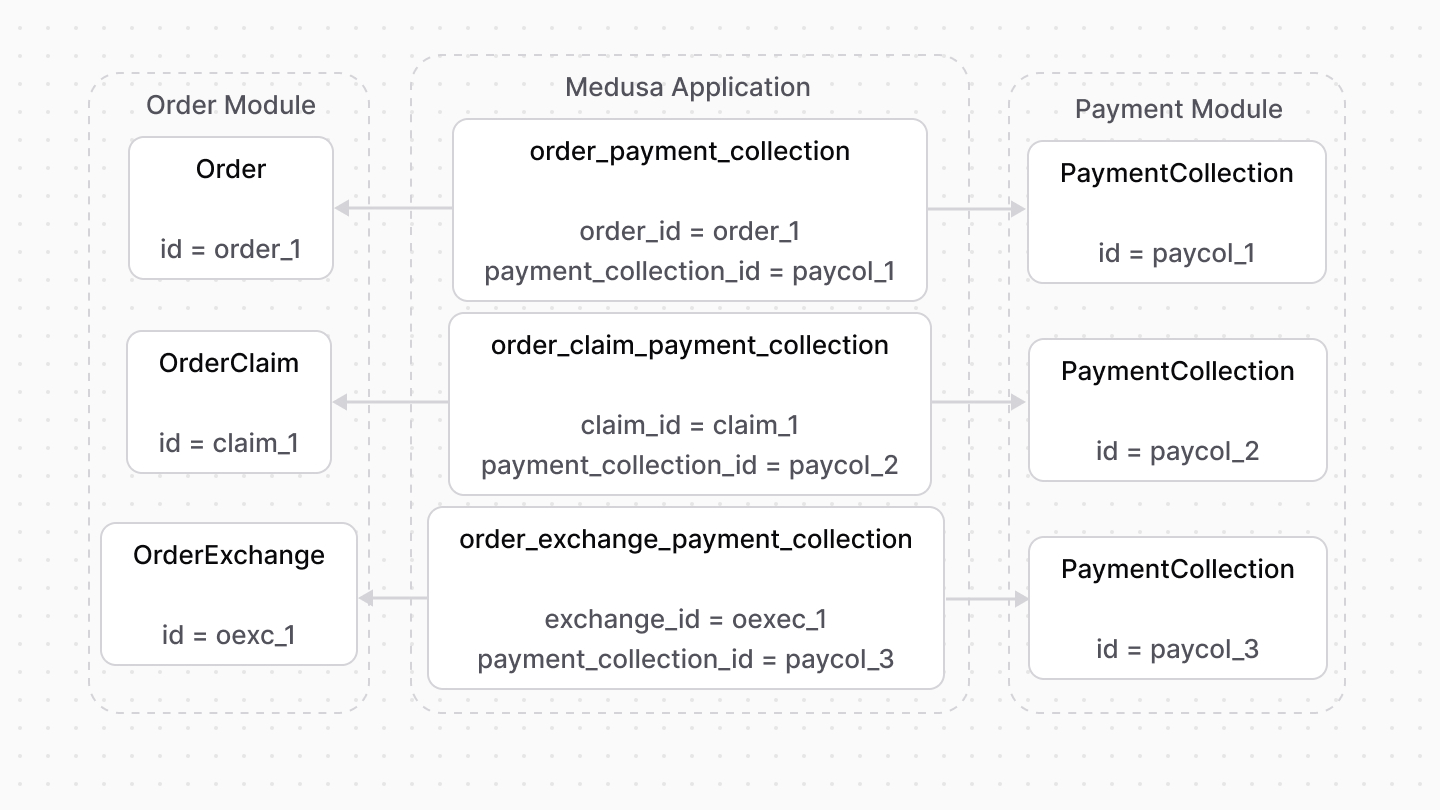
An order's payment details are stored in a payment collection. This also applies for claims and exchanges.
|
|
|
|
So, Medusa defines links between the `PaymentCollection` data model and the `Order`, `OrderClaim`, and `OrderExchange` data models.
|
|
|
|
|
|
|
|
### Retrieve with Query
|
|
|
|
To retrieve the order of a payment collection with [Query](!docs!/learn/fundamentals/module-links/query), pass `order.*` in `fields`:
|
|
|
|
<CodeTabs group="relation-query">
|
|
<CodeTab label="query.graph" value="method">
|
|
|
|
```ts
|
|
const { data: paymentCollections } = await query.graph({
|
|
entity: "payment_collection",
|
|
fields: [
|
|
"order.*",
|
|
],
|
|
})
|
|
|
|
// paymentCollections.order
|
|
```
|
|
|
|
</CodeTab>
|
|
<CodeTab label="useQueryGraphStep" value="step">
|
|
|
|
```ts
|
|
import { useQueryGraphStep } from "@medusajs/medusa/core-flows"
|
|
|
|
// ...
|
|
|
|
const { data: paymentCollections } = useQueryGraphStep({
|
|
entity: "payment_collection",
|
|
fields: [
|
|
"order.*",
|
|
],
|
|
})
|
|
|
|
// paymentCollections.order
|
|
```
|
|
|
|
</CodeTab>
|
|
</CodeTabs>
|
|
|
|
### Manage with Link
|
|
|
|
To manage the payment collections of an order, use [Link](!docs!/learn/fundamentals/module-links/link):
|
|
|
|
<CodeTabs group="relation-link">
|
|
<CodeTab label="link.create" value="method">
|
|
|
|
```ts
|
|
import { Modules } from "@medusajs/framework/utils"
|
|
|
|
// ...
|
|
|
|
await link.create({
|
|
[Modules.ORDER]: {
|
|
order_id: "order_123",
|
|
},
|
|
[Modules.PAYMENT]: {
|
|
payment_collection_id: "paycol_123",
|
|
},
|
|
})
|
|
```
|
|
|
|
</CodeTab>
|
|
<CodeTab label="createRemoteLinkStep" value="step">
|
|
|
|
```ts
|
|
import { Modules } from "@medusajs/framework/utils"
|
|
import { createRemoteLinkStep } from "@medusajs/medusa/core-flows"
|
|
|
|
// ...
|
|
|
|
createRemoteLinkStep({
|
|
[Modules.ORDER]: {
|
|
order_id: "order_123",
|
|
},
|
|
[Modules.PAYMENT]: {
|
|
payment_collection_id: "paycol_123",
|
|
},
|
|
})
|
|
```
|
|
|
|
</CodeTab>
|
|
</CodeTabs>
|
|
|
|
---
|
|
|
|
## Region Module
|
|
|
|
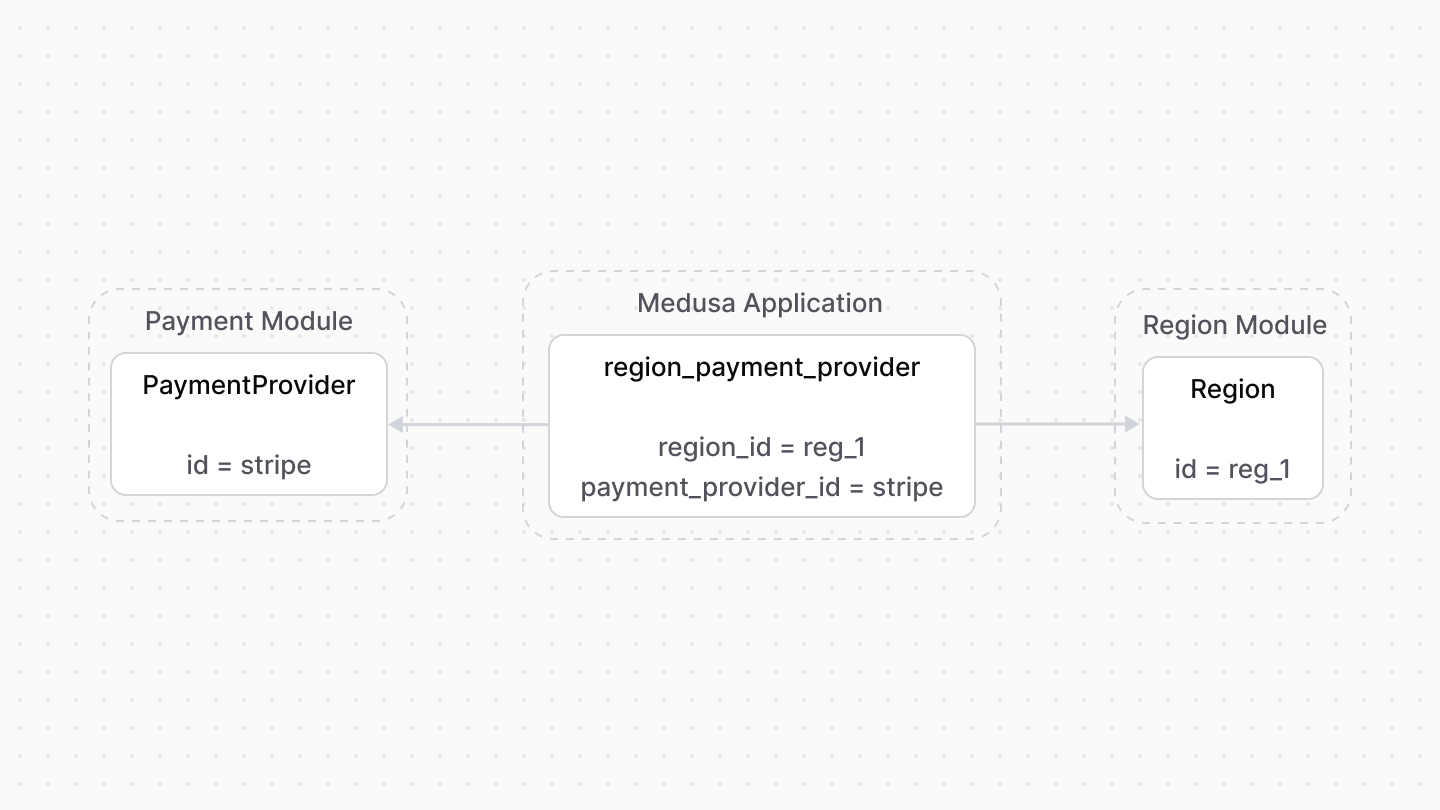
You can specify for each region which payment providers are available. The Medusa application defines a link between the `PaymentProvider` and the `Region` data models.
|
|
|
|
|
|
|
|
This increases the flexibility of your store. For example, you only show during checkout the payment providers associated with the cart's region.
|
|
|
|
### Retrieve with Query
|
|
|
|
To retrieve the regions of a payment provider with [Query](!docs!/learn/fundamentals/module-links/query), pass `regions.*` in `fields`:
|
|
|
|
<CodeTabs group="relation-query">
|
|
<CodeTab label="query.graph" value="method">
|
|
|
|
```ts
|
|
const { data: paymentProviders } = await query.graph({
|
|
entity: "payment_provider",
|
|
fields: [
|
|
"regions.*",
|
|
],
|
|
})
|
|
|
|
// paymentProviders.regions
|
|
```
|
|
|
|
</CodeTab>
|
|
<CodeTab label="useQueryGraphStep" value="step">
|
|
|
|
```ts
|
|
import { useQueryGraphStep } from "@medusajs/medusa/core-flows"
|
|
|
|
// ...
|
|
|
|
const { data: paymentProviders } = useQueryGraphStep({
|
|
entity: "payment_provider",
|
|
fields: [
|
|
"regions.*",
|
|
],
|
|
})
|
|
|
|
// paymentProviders.regions
|
|
```
|
|
|
|
</CodeTab>
|
|
</CodeTabs>
|
|
|
|
### Manage with Link
|
|
|
|
To manage the payment providers in a region, use [Link](!docs!/learn/fundamentals/module-links/link):
|
|
|
|
<CodeTabs group="relation-link">
|
|
<CodeTab label="link.create" value="method">
|
|
|
|
```ts
|
|
import { Modules } from "@medusajs/framework/utils"
|
|
|
|
// ...
|
|
|
|
await link.create({
|
|
[Modules.REGION]: {
|
|
region_id: "reg_123",
|
|
},
|
|
[Modules.PAYMENT]: {
|
|
payment_provider_id: "pp_stripe_stripe",
|
|
},
|
|
})
|
|
```
|
|
|
|
</CodeTab>
|
|
<CodeTab label="createRemoteLinkStep" value="step">
|
|
|
|
```ts
|
|
import { Modules } from "@medusajs/framework/utils"
|
|
import { createRemoteLinkStep } from "@medusajs/medusa/core-flows"
|
|
|
|
// ...
|
|
|
|
createRemoteLinkStep({
|
|
[Modules.REGION]: {
|
|
region_id: "reg_123",
|
|
},
|
|
[Modules.PAYMENT]: {
|
|
payment_provider_id: "pp_stripe_stripe",
|
|
},
|
|
})
|
|
```
|
|
|
|
</CodeTab>
|
|
</CodeTabs> |