 914d773d3a
* initialized next.js project

* finished markdown sections

* added operation schema component

* change page metadata

* eslint fixes

* fixes related to deployment

* added response schema

* resolve max stack issue

* support for different property types

* added support for property types

* added loading for components

* added more loading

* type fixes

* added oneOf type

* removed console

* fix replace with push

* refactored everything

* use static content for description

* fixes and improvements

* added code examples section

* fix path name

* optimizations

* fixed tag navigation

* add support for admin and store references

* general enhancements

* optimizations and fixes

* fixes and enhancements

* added search bar

* loading enhancements

* added loading

* added code blocks

* added margin top

* add empty response text

* fixed oneOf parameters

* added path and query parameters

* general fixes

* added base path env variable

* small fix for arrays

* enhancements

* design enhancements

* general enhancements

* fix isRequired

* added enum values

* enhancements

* general fixes

* general fixes

* changed oas generation script

* additions to the introduction section

* added copy button for code + other enhancements

* fix response code block

* fix metadata

* formatted store introduction

* move sidebar logic to Tags component

* added test env variables

* fix code block bug

* added loading animation

* added expand param + loading

* enhance operation loading

* made responsive + improvements

* added loading provider

* fixed loading

* adjustments for small devices

* added sidebar label for endpoints

* added feedback component

* fixed analytics

* general fixes

* listen to scroll for other headings

* added sample env file

* update api ref files + support new fields

* fix for external docs link

* added new sections

* fix last item in sidebar not showing

* move docs content to www/docs

* change redirect url

* revert change

* resolve build errors

* configure rewrites

* changed to environment variable url

* revert changing environment variable name

* add environment variable for API path

* fix links

* fix tailwind settings

* remove vercel file

* reconfigured api route

* move api page under api

* fix page metadata

* fix external link in navigation bar

* update api spec

* updated api specs

* fixed google lint error

* add max-height on request samples

* add padding before loading

* fix for one of name

* fix undefined types

* general fixes

* remove response schema example

* redesigned navigation bar

* redesigned sidebar

* fixed up paddings

* added feedback component + report issue

* fixed up typography, padding, and general styling

* redesigned code blocks

* optimization

* added error timeout

* fixes

* added indexing with algolia + fixes

* fix errors with algolia script

* redesign operation sections

* fix heading scroll

* design fixes

* fix padding

* fix padding + scroll issues

* fix scroll issues

* improve scroll performance

* fixes for safari

* optimization and fixes

* fixes to docs + details animation

* padding fixes for code block

* added tab animation

* fixed incorrect link

* added selection styling

* fix lint errors

* redesigned details component

* added detailed feedback form

* api reference fixes

* fix tabs

* upgrade + fixes

* updated documentation links

* optimizations to sidebar items

* fix spacing in sidebar item

* optimizations and fixes

* fix endpoint path styling

* remove margin

* final fixes

* change margin on small devices

* generated OAS

* fixes for mobile

* added feedback modal

* optimize dark mode button

* fixed color mode useeffect

* minimize dom size

* use new style system

* radius and spacing design system

* design fixes

* fix eslint errors

* added meta files

* change cron schedule

* fix docusaurus configurations

* added operating system to feedback data

* change content directory name

* fixes to contribution guidelines

* revert renaming content

* added api-reference to documentation workflow

* fixes for search

* added dark mode + fixes

* oas fixes

* handle bugs

* added code examples for clients

* changed tooltip text

* change authentication to card

* change page title based on selected section

* redesigned mobile navbar

* fix icon colors

* fix key colors

* fix medusa-js installation command

* change external regex in algolia

* change changeset

* fix padding on mobile

* fix hydration error

* update depedencies
8.1 KiB
description
| description |
|---|
| In this document, you’ll learn about the inventory module, how it works, and its relation to other processes in your commerce application. |
Inventory Module
In this document, you’ll learn about the inventory module and how it works.
Overview
The inventory module includes all functionalities related to product inventory. It implements inventory management for a product, confirming whether a product is available across inventory levels, and updating the inventory availability of a product variant at different points in the order lifecycle.
Medusa's Inventory module is a standalone module that can be used in any commerce application, not just in a Medusa backend. This document gives a general overview of how the inventory module is designed, then explains how the Medusa core orchestrates relations and processes around this module when it's used with the Medusa backend.
Entities Overview
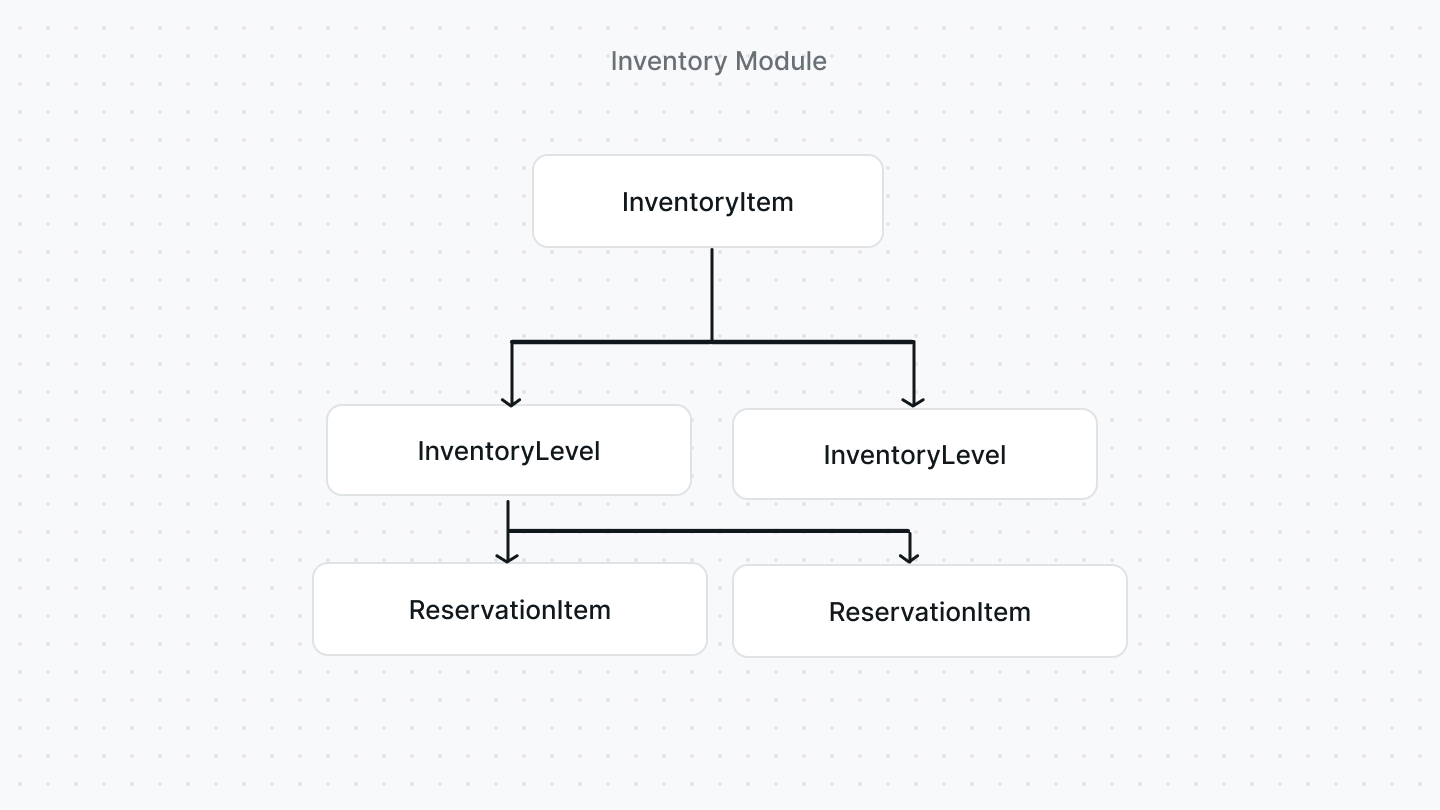
InventoryItem
The InventoryItem entity represents a stock-kept item. It holds inventory details, such as origin_country or hs_code. It's not associated with any entity that represents a stock-kept item, enabling you to choose how you integrate it with your existing commerce application.
The InventoryItem entity doesn’t hold data regarding where the item is stored or its available quantity. This data is stored in the InventoryLevel entity.
InventoryLevel
The InventoryLevel entity represents the quantity of an inventory item in a stock location. This ensures that an inventory item can be located in multiple stock locations.
Among the InventoryLevel entity’s attributes, the following provide insights into the available quantity within that entity:
stocked_quantity: a number indicating the available stock of that item in the associated location.reserved_quantity: a number indicating the quantity that should be reserved from the availablestocked_quantity. It can be used to indicate a quantity that is still not removed from stock, but should be considered as unavailable which confirming that an item is in stock.incoming_quantity: a number indicating an incoming stock quantity of the item into the associated location. This attribute doesn't play into thestocked_quantityor when confirming whether a stock-kept item is in stock.
The InventoryLevel entity is associated with a location through the location_id attribute. The entity representing a location isn't implemented with this module, allowing for greater flexibility in how you choose to implement a location.
ReservationItem
The ReservationItem entity represents a quantity of an inventory item that is reserved when an order is placed but not fulfilled yet. This indicates that the stock-kept item still hasn't been moved from stock, but should be considered as unavailable.
The ReservationItem entity has the following notable attributes, among others:
line_item_id: The ID of the line item in the order that this reservation item refers to.inventory_item_id: The ID of the inventory item this reservation item refers to.location_id: The ID of the location that this item is reserved from.quantity: A number indicating the quantity to be reserved.
How the Module Integrates into Medusa
This section explains how the Medusa backend uses the inventory module along with its entities and other modules, and in its processes.
Entities Relation Overview
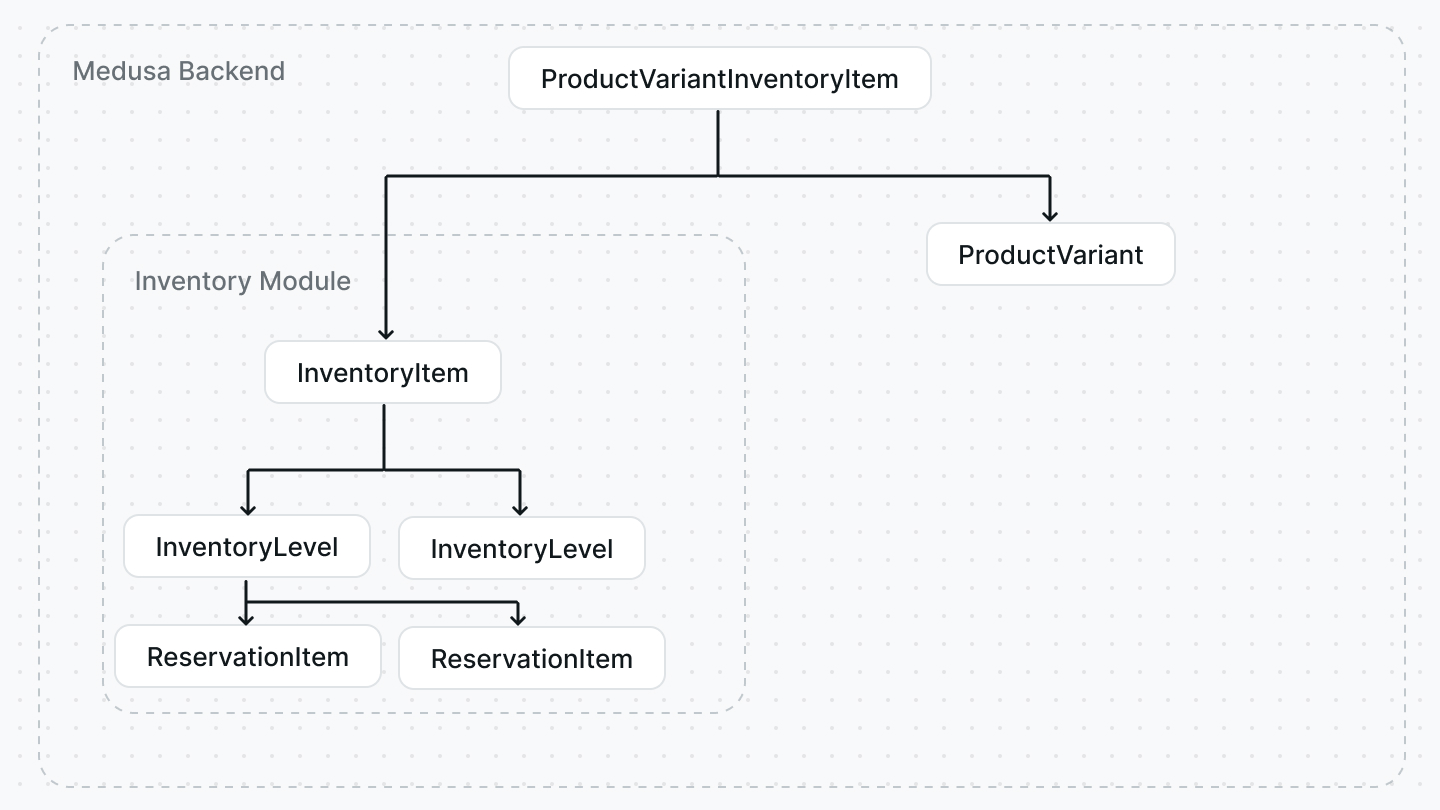
The core Medusa package contains an entity ProductVariantInventoryItem that is used to establish a relation between a product variant and an inventory item. This enables you to use inventory management features on the product variant level, while maintaining the modularity that allows you to use Medusa's inventory module or implement your custom inventory module.
When you use Medusa's Inventory Module, the Medusa backend uses the ProductVariantInventoryItem entity as a bridge between the InventoryItem entity and the ProductVariant entity.
The Medusa backend also orchestrates between the installed inventory and stock location modules. The association between an Inventory Level and a location is handled by passing the ID of a location from the stock location module to the inventory module when an Inventory Level is being created. When using Medusa's Stock Location module, the entity representing the location is StockLocation.
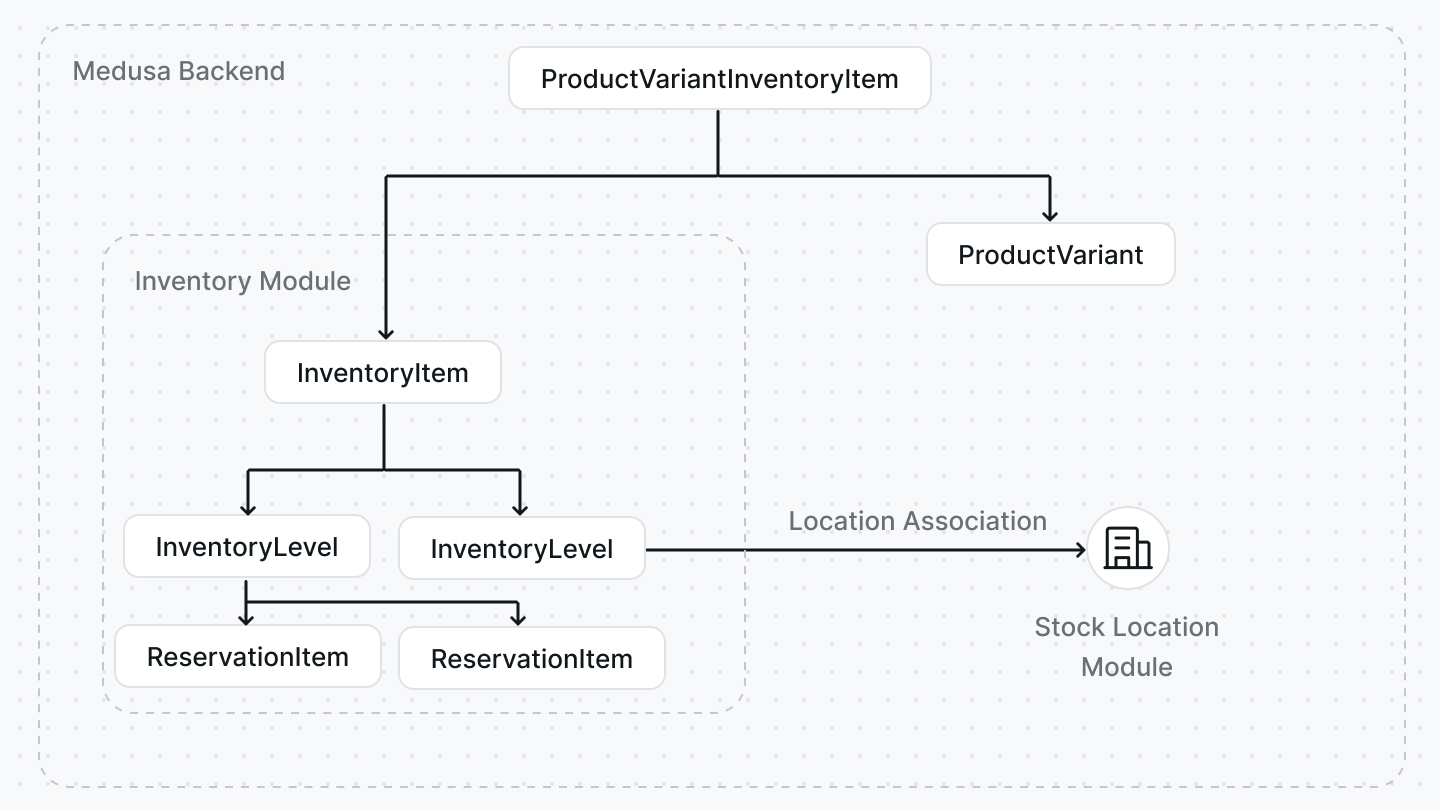
Similarly, the Medusa backend associates the ReservationItem entity with a line item and a location by passing the IDs of each to the inventory module when a reservation item is created.
Product Variant Creation Process
In the Medusa backend, when a product variant that has an enabled manage_inventory attribute is created, the backend uses the inventory module to automatically create an inventory item along with the product variant. When the inventory item is created, the Medusa backend attaches it to the product variant using the ProductVariantInventoryItem entity as explained earlier.
The Medusa backend uses the inventory module to create Inventory Levels when the admin sets the available quantity of a product variant in a stock location.
Cart and Checkout
During the cart and checkout workflow, for example when a product variant is added to the cart or during cart validation, the Medusa backend uses the inventory module to confirm that items in the cart have sufficient stock to be purchased in the desired quantity. If a product variant doesn't have an inventory item, which is the case when the manage_inventory attribute of the variant is disabled, the variant is assumed to be available in stock.
As an inventory item can exist in multiple locations, the inventory module checks across those locations. The Medusa backend retrieves the locations based on the sales channel of the cart, as each location is associated with a sales channel, and passes them along to the inventory module to perform the checking.
:::tip
You can learn more about the relation between Stock Locations and Sales Channels in the Stock Location documentation.
:::
Then, the inventory module confirms that the product variant has sufficient quantity across these locations by summing all the stocked_quantity of the inventory levels associated with these locations. When retrieving the stocked_quantity of each of the inventory levels, the reserved_quantity is subtracted from it to ensure accurate availability.
Order Placement
When an order is placed, the Medusa backend uses the inventory module to reserve the ordered quantity of line items that are associated with product variants having an enabled manage_inventory attribute. The reserved quantity is indicated by creating a reservation item for each line item, associating it with its inventory item and a stock location.
The Medusa backend chooses the stock location randomly from the available stock locations associated with the order’s sales channel. The admin can later change which stock location the item will be fulfilled from.
Order Fulfillment
When an item in the order is fulfilled, and the item is associated with a product variant that has an enabled manage_inventory, the Medusa backend uses the inventory module to subtract the inventory level's reserved_quantity from the stocked_quantity. The inventory module also resets the reserved_quantity to 0.
Order Return
When an item in the order is returned, and the item is associated with a product variant that has an enabled manage_inventory, the Medusa backend uses the inventory module to increment the inventory level's stocked_quantity with the returned amount.