 a1dd2de0de
* docs: document self serve

* docs: Cloud docs changes

* vale fixes

* vale error fix

* fixes

* added new sections

* generate
92 lines
4.9 KiB
Plaintext
92 lines
4.9 KiB
Plaintext
export const metadata = {
|
||
title: `${pageNumber} Medusa Deployment Overview`,
|
||
}
|
||
|
||
# {metadata.title}
|
||
|
||
In this chapter, you’ll learn the general approach to deploying the Medusa application.
|
||
|
||
<Note title="Deploy with Cloud" type="success">
|
||
|
||
Want Medusa to manage and maintain your infrastructure? [Sign up and learn more about Cloud](!cloud!)
|
||
|
||
Cloud is our managed services offering that makes deploying and operating Medusa applications possible without having to worry about configuring, scaling, and maintaining infrastructure. Cloud hosts your server, Admin dashboard, database, and Redis instance.
|
||
|
||
With Cloud, you maintain full customization control as you deploy your own modules and customizations directly from GitHub:
|
||
|
||
- Push to deploy.
|
||
- Multiple testing environments.
|
||
- Preview environments for new PRs.
|
||
- Test on production-like data.
|
||
|
||
</Note>
|
||
|
||
## Medusa Project Components
|
||
|
||
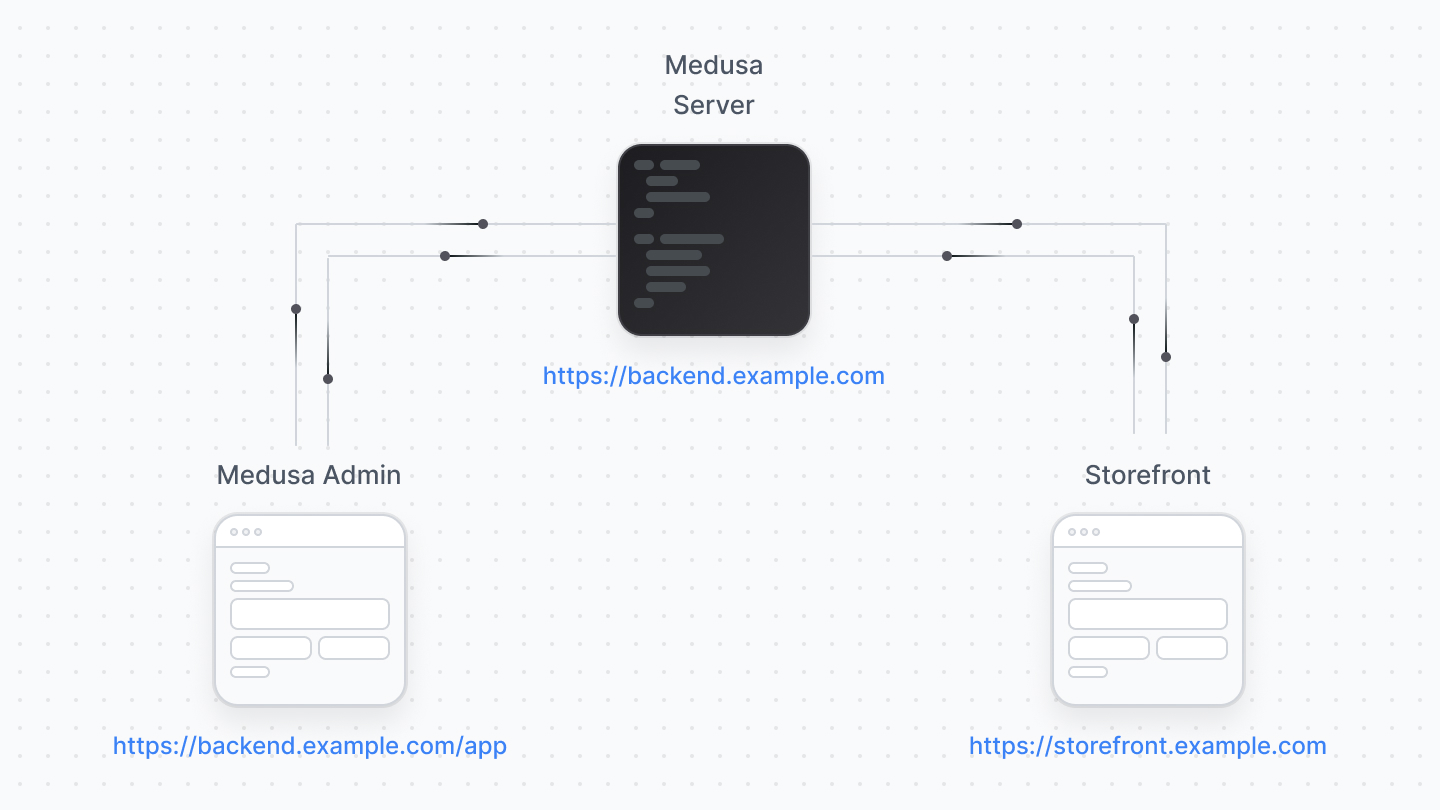
A standard Medusa project is made up of:
|
||
|
||
- Medusa application: The Medusa server and the Medusa Admin.
|
||
- One or more storefronts
|
||
|
||
|
||
|
||
You deploy the Medusa application, with the server and admin, separately from the storefront.
|
||
|
||
---
|
||
|
||
## Deploying the Medusa Application
|
||
|
||
You must deploy the Medusa application before the storefront, as it connects to the server and won’t work without a deployed Medusa server URL.
|
||
|
||
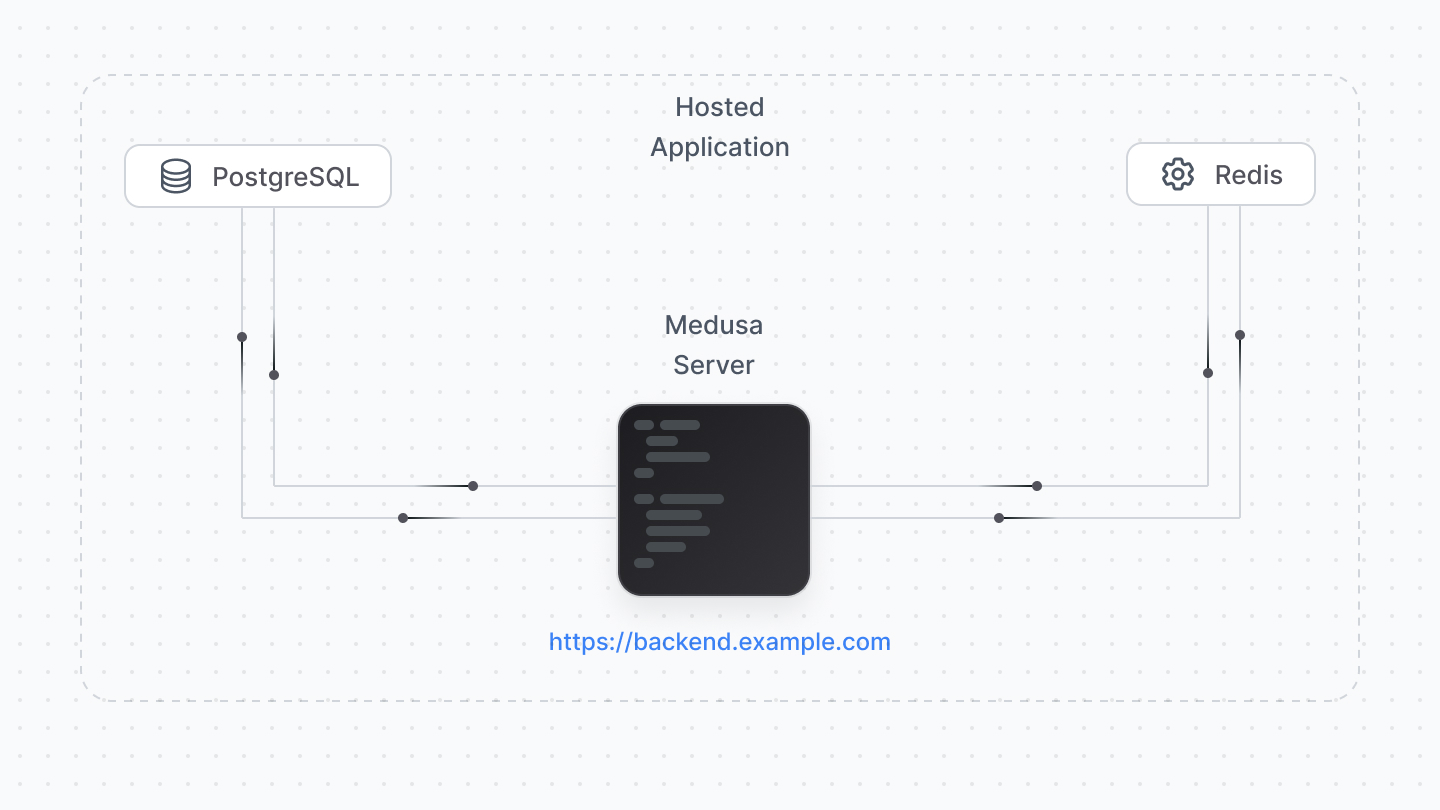
The Medusa application must be deployed to a hosting provider supporting Node.js server deployments.
|
||
|
||
|
||
|
||
Your server connects to a PostgreSQL database, Redis, and other services relevant for your setup. Most hosting providers support deploying and managing these databases along with your Medusa server.
|
||
|
||
When you deploy your Medusa application, you also deploy the Medusa Admin. For optimal experience, your hosting provider and plan must offer at least 2GB of RAM.
|
||
|
||
### Deploy Server and Worker Instances
|
||
|
||
By default, Medusa runs all processes in a single instance. This includes the server that handles incoming requests and the worker that processes background tasks. While this works for development, it’s not optimal for production environments as many background tasks can be long-running or resource-heavy.
|
||
|
||
Instead, you should deploy two instances:
|
||
|
||
- A server instance, which handles incoming requests to the application’s API routes.
|
||
- A worker instance, which processes background tasks, including scheduled jobs and subscribers.
|
||
|
||
You don’t need to set up different projects for each instance. Instead, you can configure the Medusa application to run in different modes based on environment variables.
|
||
|
||
Learn more about worker modes and how to configure them in the [Worker Mode chapter](../production/worker-mode/page.mdx).
|
||
|
||
### How to Deploy Medusa?
|
||
|
||
Cloud is our managed services offering that makes deploying and operating Medusa applications possible without having to worry about configuring, scaling, and maintaining infrastructure. Cloud hosts your server, Admin dashboard, database, and Redis instance.
|
||
|
||
With Cloud, you maintain full customization control as you deploy your own modules and customizations directly from GitHub:
|
||
|
||
- Push to deploy.
|
||
- Multiple testing environments.
|
||
- Preview environments for new PRs.
|
||
- Test on production-like data.
|
||
|
||
[Sign up and learn more about Cloud](!cloud!)
|
||
|
||
To self-host Medusa, the [next chapter](./general/page.mdx) explains the general steps to deploy your Medusa application. Refer to [this reference](!resources!/deployment) to find how-to deployment guides for general and specific hosting providers.
|
||
|
||
---
|
||
|
||
## Deploying the Storefront
|
||
|
||
The storefront is deployed separately from the Medusa application, and the hosting options depend on the tools and frameworks you use to create the storefront.
|
||
|
||
If you’re using the Next.js Starter storefront, you may deploy the storefront to any hosting provider that supports frontend frameworks, such as Vercel.
|
||
|
||
<Note title="Important">
|
||
|
||
Per Vercel’s [license and plans](https://vercel.com/pricing), their free plan can only be used for personal, non-commercial projects. So, you can deploy the storefront on the free plan for development purposes, but for commercial projects, you must update your Vercel plan.
|
||
|
||
</Note>
|
||
|
||
Refer to [this reference](!resources!/deployment) to find how-to deployment guides for specific hosting providers.
|