 589cb18f98
* docs: added description to documentation pages

* docs: added more descriptions

* docs: finished improving meta description

* docs: added searchbox structured data

* docs: added breadcrumbs structured data

* docs: added how to structured data

* docs: improved 404 page

* docs: added how-to frontmatter option
6.6 KiB
description, addHowToData
| description | addHowToData |
|---|---|
| Learn how to integrate Mailchimp with the Medusa server. Learn how to install the plugin on the Medusa server and how to add a subscription form. | true |
Mailchimp
In this document, you’ll learn about the Mailchimp plugin, what it does, and how to use it.
Overview
Mailchimp is an email marketing service that can be used to create newsletters and subscriptions.
By integrating Mailchimp with Medusa, customers will be able to subscribe from Medusa to your Mailchimp newsletter and will be automatically added to your Mailchimp subscribers list.
:::note
This plugin is only used to allow your customers to subscribe but does not actually do any email sending. If you want to send emails to customers based on specific events, for example, when an order is placed, you should check out the SendGrid plugin instead.
:::
Prerequisites
Before going further with this guide make sure you have a Medusa server set up. You can follow the Quickstart guide.
You also need a Mailchimp account, so please create one before you start.
Obtain Mailchimp Keys
To integrate the plugin into Medusa you need two keys: The API Key and the Newsletter list or Audience ID. The API Key acts as a credential for your account, whereas the Newsletter list ID determines which audience should the subscribed customers be added to.
You can follow this guide from Mailchimp’s documentation to obtain an API Key.
You can follow this guide from Mailchimp’s documentation to obtain your Newsletter list or Audience ID.
Install the Plugin
In the directory of your Medusa server, run the following command to install the Mailchimp plugin:
npm install medusa-plugin-mailchimp
Add Keys
Open .env and add the following keys:
MAILCHIMP_API_KEY=<YOUR_API_KEY>
MAILCHIMP_NEWSLETTER_LIST_ID=<YOUR_NEWSLETTER_LIST_ID>
Make sure to replace <YOUR_API_KEY> with your API Key and <YOUR_NEWSLETTER_LIST_ID> with your Newsletter list or Audience ID.
Add Plugin to Medusa Config
Open medusa-config.js and add the new plugin into the plugins array:
const plugins = [
  // ...,
  {
    resolve: `medusa-plugin-mailchimp`,
    options: {
      api_key: process.env.MAILCHIMP_API_KEY,
      newsletter_list_id: process.env.MAILCHIMP_NEWSLETTER_LIST_ID,
    },
  },
]
Test it Out
This plugin adds a new POST endpoint at /mailchimp/subscribe. This endpoint requires in the body of the request an email field. You can also optionally include a data object that holds any additional data you want to send to Mailchimp. You can check out Mailchimp’s subscription documentation for more details on the data you can send.
Without Additional Data
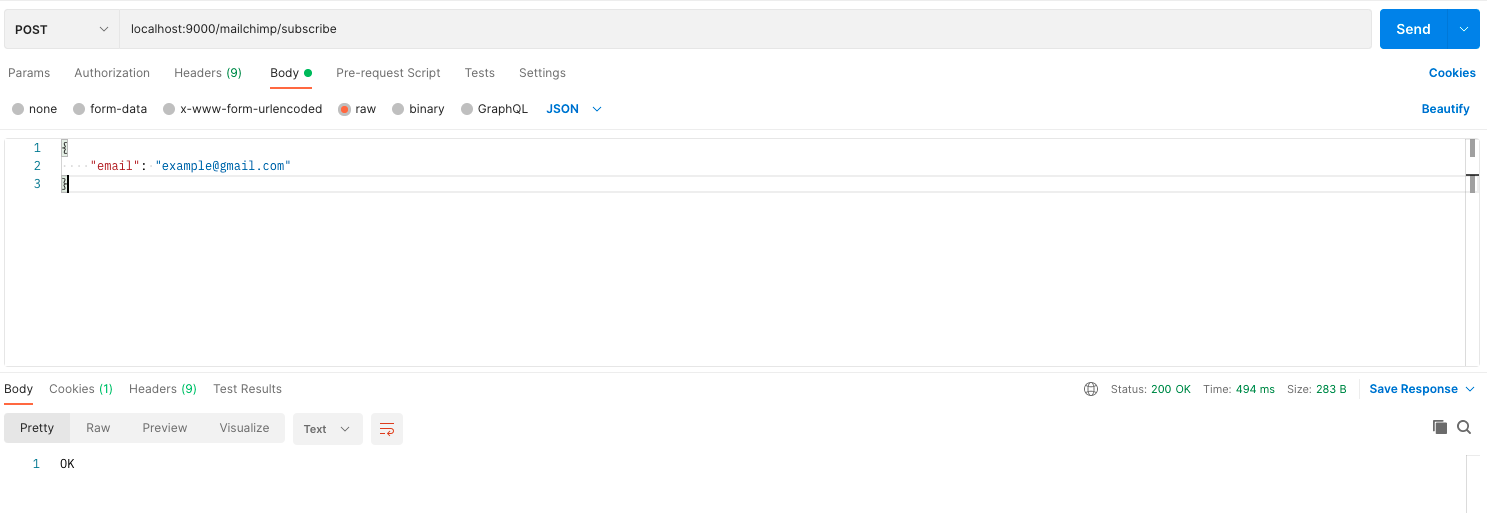
Try sending a POST request to /mailchimp/subscribe with the following JSON body:
{
  "email": "example@gmail.com"
}
If the subscription is successful, a 200 response code will be returned with OK message.
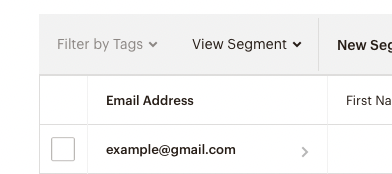
If you check your Mailchimp dashboard, you should find the email added to your Audience list.
With Additional Data
Here’s an example of sending additional data with the subscription:
{
    "email": "example@gmail.com",
    "data": {
        "tags": ["customer"]
    }
}
All fields inside data will be sent to Mailchimp’s API along with the email.
Use Mailchimp Service
If you want to subscribe to users without using this endpoint or at a specific place in your code, you can use Mailchimp’s service mailchimpService in your endpoints, services, or subscribers. This service has a method subscribeNewsletter which lets you use the subscribe functionality.
Here’s an example of using the mailchimpService inside an endpoint:
const mailchimpService = req.scope.resolve("mailchimpService")

mailchimpService.subscribeNewsletter(
  "example@gmail.com",
  { tags: ["customer"] } // optional
)
:::tip
You can learn more about how you can use services in your endpoints, services, and subscribers in the Services documentation.
:::
Add Subscription Form
This section has a simple example of adding a subscription form in your storefront. The code is for React-based frameworks but you can use the same logic for your storefronts regardless of the framework you are using.
You’ll need to use axios to send API requests, so if you don’t have it installed make sure you install it first:
npm install axios
Then, in the component you want to add the subscription form add the following code:
import axios from "axios"
import { useState } from "react"

export default function NewsletterForm() {
  const [email, setEmail] = useState("")

  function subscribe(e) {
    e.preventDefault()
    if (!email) {
      return
    }

    axios.post("http://localhost:9000/mailchimp/subscribe", {
      email,
    })
      .then((e) => {
        alert("Subscribed sucessfully!")
        setEmail("")
      })
      .catch((e) => {
        console.error(e)
        alert("An error occurred")
      })
  }

  return (
    <form onSubmit={subscribe}>
      <h2>Sign Up for our newsletter</h2>
      <input
        type="email" name="email" id="email"
        placeholder="example@gmail.com"
        value={email} onChange={(e) => setEmail(e.target.value)} />
      <button type="submit">Subscribe</button>
    </form>
  )
}
This will result in a subscription form similar to the following:
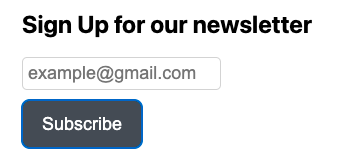
If you try entering an email and clicking Subscribe, the email will be subscribed to your Mailchimp newsletter successfully.
See Also
- Check out SendGrid plugin for more Email functionalities.
- Plugins Overview