 bb87db8342
This PR includes documentation that preps for v2 docs (but doesn't introduce new docs).

_Note: The number of file changes in the PR is due to find-and-replace within the `references` which is unavoidable. Let me know if I should move it to another PR._

## Changes

- Change Medusa version in base OAS used for v2.
- Fix to docblock generator related to not catching all path parameters.
- Added typedoc plugin that generates ER Diagrams, which will be used specifically for data model references in commerce modules.
- Changed OAS tool to output references in `www/apps/api-reference/specs-v2` directory when the `--v2` option is used.
- Added a version switcher to the API reference to switch between V1 and V2. This switcher is enabled by an environment variable, so it won't be visible/usable at the moment.
- Upgraded docusaurus to v3.0.1
- Added new Vale rules to ensure correct spelling of Medusa Admin and module names.
- Added new components to the `docs-ui` package that will be used in future documentation changes.
1982 lines
82 KiB
Plaintext
1982 lines
82 KiB
Plaintext
---
|
||
title: 'Example: How to Create Onboarding Widget'
|
||
description: 'Learn how to build the onboarding widget available in the admin dashboard the first time you install a Medusa project.'
|
||
addHowToData: true
|
||
---
|
||
|
||
In this guide, you’ll learn how to build the onboarding widget available in the admin dashboard the first time you install a Medusa project.
|
||
|
||
:::note
|
||
|
||
The onboarding widget is already implemented within the codebase of your Medusa backend. This guide is helpful if you want to understand how it was implemented or you want an example of customizing the Medusa Admin and backend.
|
||
|
||
:::
|
||
|
||
## What you’ll be Building
|
||
|
||
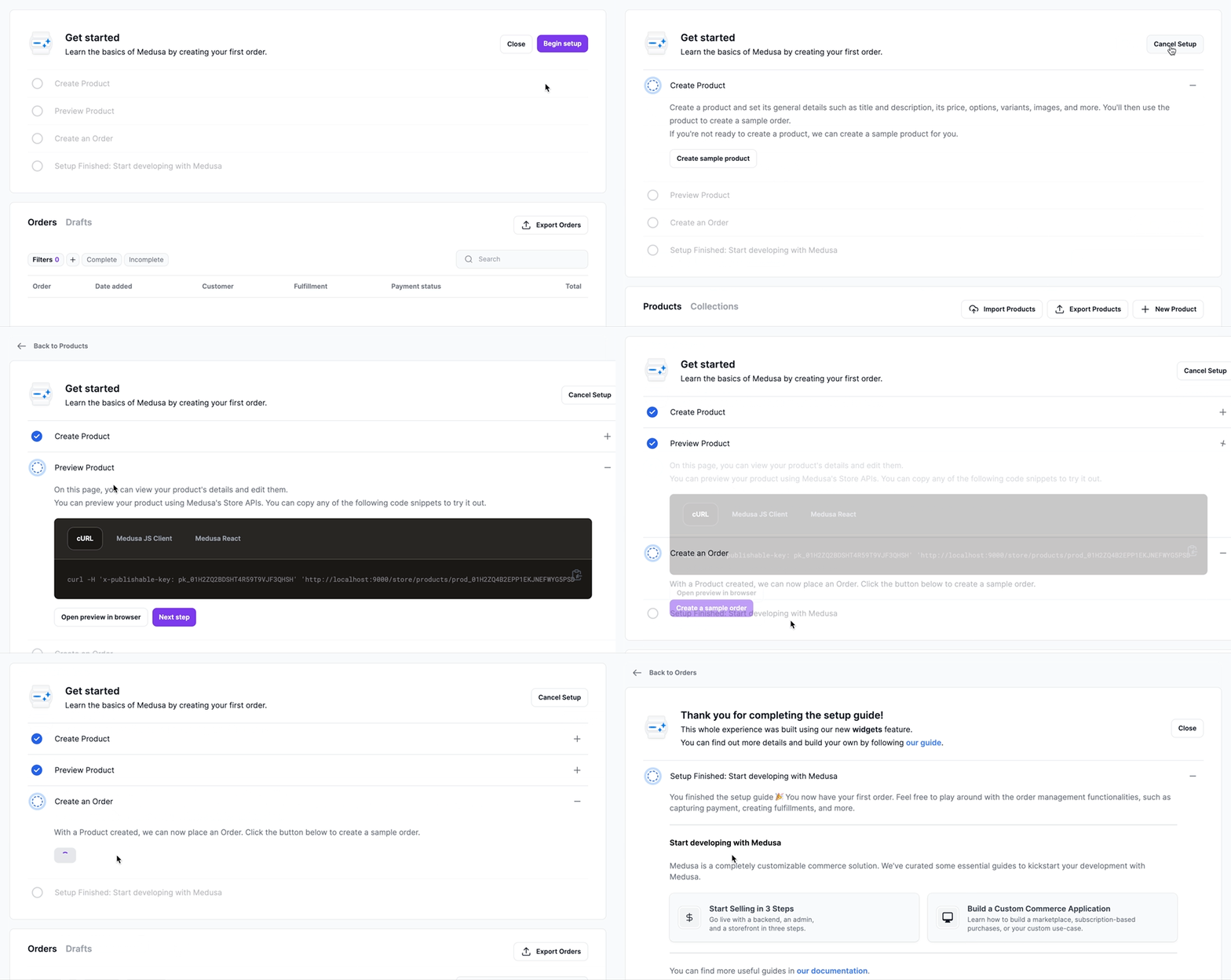
By following this tutorial, you’ll:
|
||
|
||
- Build an onboarding flow in the admin that takes the user through creating a sample product and order. This flow has four steps and navigates the user between four pages in the admin before completing the guide. This will be implemented using [Admin Widgets](./widgets.md).
|
||
- Keep track of the current step the user has reached by creating a table in the database and an API Route that the admin widget uses to retrieve and update the current step. These customizations will be applied to the backend.
|
||
|
||
|
||
|
||
---
|
||
|
||
## Prerequisites
|
||
|
||
Before you follow along this tutorial, you must have a Medusa backend installed. If not, you can use the following command to get started:
|
||
|
||
```bash
|
||
npx create-medusa-app@latest
|
||
```
|
||
|
||
Please refer to the [create-medusa-app documentation](../create-medusa-app) for more details on this command, including prerequisites and troubleshooting.
|
||
|
||
---
|
||
|
||
## Preparation Steps
|
||
|
||
The steps in this section are used to prepare for the custom functionalities you’ll be creating in this tutorial.
|
||
|
||
### (Optional) TypeScript Configurations and package.json
|
||
|
||
If you're using TypeScript in your project, it's highly recommended to setup your TypeScript configurations and package.json as mentioned in [this guide](./widgets.md#optional-typescript-preparations).
|
||
|
||
### Install Medusa React
|
||
|
||
[Medusa React](../medusa-react/overview) is a React library that facilitates using Medusa’s API Routes within your React application. It also provides the utility to register and use custom API Routes.
|
||
|
||
To install Medusa React and its required dependencies, run the following command in the root directory of the Medusa backend:
|
||
|
||
```bash npm2yarn
|
||
npm install medusa-react @tanstack/react-query@4.22
|
||
```
|
||
|
||
### Implement Helper Resources
|
||
|
||
The resources in this section are used for typing, layout, and design purposes, and they’re used in other essential components in this tutorial.
|
||
|
||
Each of the collapsible elements below hold the path to the file that you should create, and the content of that file.
|
||
|
||
<Details>
|
||
<Summary>src/admin/types/icon-type.ts</Summary>
|
||
|
||
```tsx title="src/admin/types/icon-type.ts"
|
||
import React from "react"
|
||
|
||
type IconProps = {
|
||
color?: string
|
||
size?: string | number
|
||
} & React.SVGAttributes<SVGElement>
|
||
|
||
export default IconProps
|
||
```
|
||
|
||
</Details>
|
||
|
||
<Details>
|
||
<Summary>src/admin/components/shared/icons/get-started.tsx</Summary>
|
||
|
||
<!-- eslint-disable max-len -->
|
||
|
||
```tsx title="src/admin/components/shared/icons/get-started.tsx"
|
||
import React from "react"
|
||
import IconProps from "../../../types/icon-type"
|
||
|
||
const GetStarted: React.FC<IconProps> = ({
|
||
size = "40",
|
||
color = "currentColor",
|
||
...attributes
|
||
}) => {
|
||
return (
|
||
<svg width={size} height={size} viewBox="0 0 40 40" fill="none" xmlns="http://www.w3.org/2000/svg" xmlnsXlink="http://www.w3.org/1999/xlink" {...attributes}>
|
||
<rect width={size} height={size} fill="url(#pattern0)"/>
|
||
<defs>
|
||
<pattern id="pattern0" patternContentUnits="objectBoundingBox" width="1" height="1">
|
||
<use xlinkHref="#image0_9408_244" transform="scale(0.00625)"/>
|
||
</pattern>
|
||
<image id="image0_9408_244" width="160" height="160" xlinkHref="data:image/png;base64,iVBORw0KGgoAAAANSUhEUgAAAKAAAACgCAYAAACLz2ctAAAACXBIWXMAACxLAAAsSwGlPZapAAAAAXNSR0IArs4c6QAAAARnQU1BAACxjwv8YQUAAChHSURBVHgB7X1tkOTGed7TmJndnd25u12KX7FI3lBRpJRo6o5yIiUyk1s6rlRFLpl0fjiJK9Ydk1ScpJQS+SNVqUpVbi8/Ev8KyVScpGK7eIwqin/EpmhblmXLuqUki/qwzT1KsixbNpekTIsUyf2a2ZmdD7S7ATTQ3egGGvO1M3vz3GEHaPQXuh+879tvNwCCOWLsULpaaXbrvt+tU0rrXsk7S0FWwfYp6CoI2/cpQFA350B3QckuO79LwH7Bfgm2ffgvEZ9se15lu1Zb2MIcMQhuUHCylQ4O1ynBeUaWc4xw5+3EGjm2WJnbjNTXPXibvdrS1hoJCHvD4YYhICPY6sFB8yHieed8n7JfwqVcbjrCRJhLvKJxDdhiybfg45l+xdtaq1a3cQPgRBPw4KC1Dg8XGCnW+YZjRFFyMgm5SYn/TAkLmydZbZ84ArZarXrPx0XW2ZfYxdV5lwcXyQiAiAAiTD4nyKGECyRJlXA5XrAflUFt+RTIW0nD7EiP4pOlEnmiesIk44kgIFev+83mJc8rPYhA0sndT7Vel8Ncel+cE3la4qTy0MuW0ouylWMtA0rNLCbYpL7/1Ola7SpOAGaagIG0Ay6iTx9hNt0ql2JMdUk00WUUIF+ynVIm2ZWXJq88e57pPBBdhyxL1RowabvNfjZLHq7MslScSQIetJhtR3GZUKzrggzasX5OhxA8epxUnkgTz5Z3Nkkt+WvCmDrkRZJEV2eViDNFQE48RrrLbHfdKBwEsno3Dot+nXpai+sSX1azRQfGNgbmM3vmiDgTBOSqtk/xJDjxhgKJ+rDQaLRQ/HQ6o+yE5c5BWgUXByHeVQ/+TBDRwxSDDy4ah+3HGPlehAP5SHQ/kYwRhejUQH25gKh56+WY9kVJYk+/z4klDxS8MZK0Wt2YB4C3WaPZepLfvJhiTK0EPGy3P+b3scF4sloooclmB9yF0KDluMYvqs5d4mSr6W3q0yu1WvUqphBTR8BGo3HeK5UfYybbuqmzYoeu5mlJIkhpdKedhswBComyLkIaYolD9GuIstMHynpdo3RBPfVzWTDUjQVtE0IfmDa1PFUquNU6ukxK5ecpEvKJUWqgMoMDmnQYiVSO0EKqv0xVyUTLR87Dco7CkKeWNlW2dixUPf8Vaamct0kEkISkIBqXpPxFfZV6m9qEBM7sug/yIm9jTBGmQgJyO4US72nwBQEy8nwoSUQkosLkf4nO6/GVeBZd7VwHS52sx1nxddGZl7ZIngG2mR6ZCml47BIwsPWo9zxrm/OyGIl9XMQmbmIxkGQm91HsBrGIJkSSIxZFQi5J+UnkJFpeybFFhKV+qSG+TXyKMpJq2MWuaZPL1NKGmfEb/nnW9o/gmHFsEpCPcFtHPaYO/LARTDabqXZRuFEm6PyBZjsRcxhy8wlT0az8LektctWah7F+WdccxYvvJZ1zNhsyzpc8Xl2sXCHHtBzsWAjIVS7xSk9TXeU6wdoNA8CkiotmMWC6oTHKdsA2qH8sKnniKrjV6q5z8Z9Nviy1ljS6sy/PmqfUga4kImYV7VK+PCDJi5ufZ5496VKlOF4dxLvW6XQGEAjDYaIE7HR6F0HoNY8vbc/sBL1TzXd7ijN6noRkdDaJRqZES2KPL5RxfCyWcDn1dyJpqTxQksqNyyZSfOm8/CtFjEbBqv1C9BvFlJeab73v0+fbE7YLJ6aCj7rdy8whuqGH62M9OVygCFXTearktZVnx0hVndUXDdivw3bsWoarLI2HKh7ZWKxUrmACmAgBbeTLw5BL3I8t72lH4sy326+TIuHYVXC7031MJl+e/VP0jjDlRzTVZjo3CPnc1bVb+rzw3PyKxJUix9duaIO4fVifccGBMWOsEnC/0XxyoVK5FLqxSOLXM1x46BEg+YMB4ROT8kqp1egO11Wtoo5y6gNDGkVVxemT+uiqDHJZgLLsX7lmcRzblFH9pTL0tYLy8v+4CKqWpzyCoLWVfG1Uy1eux1Gnc/V0beVhjAljI+DBQfOyD2wsLS6kCrwxFV+IcVz/ONu0fdQBGzQ+fqq2/CjGgLGo4INmKyCfOFbuckuaYBSYcS7eBxxHnVDSjBLDlG8aFJCMfIlDuYOQT803+4J8Sh85OGiNRR2PnIC8or7vb4jjUDVQpZFDh4a0RW4HoQJEOKJfoU5j1UENeSBxK8hpRaH6ebkc47FWBzWMWK4jbXvKKi6VJ0k0eHhh6g2mly+ft10/bPWBRny5DKl9bTe4D39jHCQkGCEajcOP9Sl9XA6rchUs94IOYzjRTlJzmpCxUqC2S/SC9Xko+bShHFvcon4OWOLKZWv2ZKpOprKtdZXzMJwX7ZaKo4Wx3RZTwUoM4l06Xas+hRFhZATc4ev4KHleD68uLWoh1l4w7idjhDR5kifgbKa1iGWiVhYxTSn0c6qEU/MB7Ndoq0e63nod1Sf+8vLNKksNy8q31T5K5eLDe2DtVHUTI8BIVPAOm9v1QJ52i03U2SypI9XGifapHI9IeRBJ0KXTyatXqJpjqiyRd/JXnE82YsqB6HnLaSCpUrXTVTVHtDim8sL99E2kt6VWhiF++iidb7x20QIP/tM7I1rqPzQB+Ut+vL5/jV1F3XQ+tleI2p2yjSLbPPoGov7G4dS8r9JULReWc0HeWkcqm6V+Sh1SNmVyHoa66XWO0xNzGlOd5DL0NhI7Snz9ujPClbqn2bjq9RgJd3aKPS5hwNAELDeYYWohH0e8Ojc8CDYq9rUeIibrGnDskex0xtXDchw45GVhAdGZYGCsXG5qBbOU3rSa2VonZNRTO6/ki3QadR5ajWtx2p8vVxYvY0gMRUA+6PBBlclrNgIONl7pYNMnxgMkjk411Byuw+6wKRbHFM/09Js9HkVYa72D0rYgjWwtfT8+1kbQWWWLMD2OKSwLyUjdZANGe6Ifo00Gd8/s7R0OtXjBrZcMCOy+Xp8NOogihgPy8Z2orqdWlvjIKV0qxeAYJL0pjR6Wd5yV56SuyRavaLgtnhSf92Wz1VYmjEqllMza9cvefYO+Tm5gCRjYfRr5OHglaSABQynY6fXVCC4NoqlHiwA13z7Eco6a89FWMbnVyxR/UPIR5cd4TtnPI5mpjgTGAohJXUtt0gu0WSj5OBktFxnYgxgQAxGQT7NlDTo4Cf1IZHe7PaudEhvS+gb1V7it5HSq/aKmle0Z2d6ihvgUhvINdVXyJhh606/BWA9k1EW6NuWpP1jKMKSnUjiR7gQaXWer3WH9GJpUPjXdwTHO7x00NzAASMH4ker1X8yKwyaw4xuPY7m6FDqkrVUYRHxI6RJnoXTaFgaYdTEkKaPposxqyOVkialUwqiIPLvAkjbr2jPzs5Wrgs8Bc/UrY6FSybTPfULvW6vVCr1Ms7AEDFWvA3waiG++NQ/b6PW5Ks4QAdFGiKsYQZJWvpXjMMlZTAy3vLJFJ4IxhaFjSEYdqFyuCNCui+jXHJVp4wBJt4u1zaRrildVS6qFSCIxHm1TCnubEtZXoe3nx33IXM/Mjs8bHJao9xgKohAB9/cbl5DhchHgd0rYl5H9wMT47n6DP4IJVZ0hxSdFTQoY+iNMmzhMScrhmBSiq16jyo7DSJKv6FAKi7lApLAkTeocTV8z0Z2QJLno+K9+vZDSQsovSkGVRoTSnglXiVRHldM8X95Hu/sH6Pd9ZeRbKpeQBxZ7veiomLhGDFRvhsNZB7f9jrqdqBASV9HzPNRWllEpl9mWf1GTg2DKNEKu2+jr2WcSjqvcI751u0qpHAsLC0F/OWLX73XuXltbc3rM0znXUt+/TB3Jx1GplIO756jTZc3lx+E+7WN37yA8MLYrvy1pMvKIjV9NZcXnkB4Bpky/5H0ygc/LlC5vH2qYvHDTlk5e+h4GUUkkpUkk19NYhiWpsS5SO+iLTJV9EY9QrRgSDDwWi5GPYzVyUDutH3SSgC4DDxs67I7id5e8spfoNaDmmilxDXxTohOkVw0jzU05rzhc6zAq5ZlSZ1p0YrqOjLoQQ/5KPrDfC7Z6QDvnrNakAijU6yUeCcjHzalBwHyDd7v4Bp2oHUg/DAZ+AeVSKSBhJxLvSl62jDUyCMOZWpqYGohCU9lFaZW4nAHmLjOORwBJnofpQ6mqBCq7chq5/vINZbouuc5UqwOFrenCGol984oh+QKTuJSGOZeZxFteWgrMpUFR6tEn2c8DefFyb5ZhpJ8OPprq9nqBfdjr91IdLBaeyiOQ+NkIC0zn9TD5WOzLv0mRhjTK2jxbfQSxKZDybKt5hmURERCLHbUYmRQwtElESa0sSpGum9F/p9aLE63ENi4oFpm7LG+06wqXZVu5EnAY6aeDXygX63yb4+SjBHqZ/Wxmxcmk+iil3xw3JvKkYKaS59IPc8wxBCIpaIWVgFz6MfPhEuY48fjEN32c/bk+3vsLPXzqO6MyuEJw53TW6mkrAefS78bBzz7nY++I4uV94N98po9Rg5lxl6znbCfo0N/kmGMW8MXvhsQT2DsKw0aMj9mW7xsJ6DrnO8fsQ1a5YkT6xVdGTsBVr7J4yXTCLAEJLmKOGwJfeCWer4ud5V8YPQH5TN+DxnA9YBjXC3e09nod9Pv9aFX06C9kjtHhlQOCD3xiKdhX50SAb19q4/Ri4jgngaO6DI9vA86QmKbnUjl5vX7hh0z48vt2+xCtwwa6nQ58TsA5+aYeX3o16X5ZEvH933wpWakULKljfdrpHKHdaqJz1I6W6BeDaTCSpjIhRlFpA5d47dZhUME5Zguf2U4mwnRx8dyr9qVyvV4XR0zg8L4vBINppxCQv16jyOCj2z1id8PRXNrNKL70F4nc022xT7+YPR8cPHDG+p5zwBmMWzsHrXU5SJkL9gq4Xjj7ubrVwVe/LC0tsUntRZRK07TgdA4Zm9s97B8dpk9ECzD2OwR/1Hob1utl1td8AUkXjWYzsO9lcA5wG7Fcdpvf9+CvQ5ofViSgbaSig9t8Ovk8VonTp07hpptuwvLy8px8U46nXugFv/LStUDmSdpMxOHLs6rVKm65+eagjz1ttUxg9zvahGw4c0E9jlBk9MuNUG4HCPAKceKVi62cneOYsL3r4x3/rWE9LyjIpdPv/0wN529ThwpcIr711lvho5oiLhM4S0vLcIHf66yJJftxzqVu1+kjJVz6yeTjqNVqc/LNCHbbFA/8n0T16qsXhSQUi14ffqYVpJHB+5r3uYwino9SpfKQ2E+o7ZWc1G+/11MzY8znKneO6UdIviZe2g3VpSCZgOwHFNv17/XxI4ywOgl5ny9o6zp7XbdRMQ0+TBnCMwVmga9kllFbWcEc048XXuvjb/x8kxEqsdUsj+IoG8cWI+H7f6GJl/dUO29pUX35aN93dMVJrr6gDD5R7JUXdlzScmezLGpvftvb5up3ivGl7/bwf1/o4up15rvrBe8LUCE/HpAB/gTtItsunlvAT91bxgfvKAcj4u+/8YaUlYfqsptAEnZgwBxGoPOufm1dz8/JN104OKL43HYXz73Sx6e+08Ubh5QRLyRZ8Dw61R8Kc7PbaJTu/32jg1/51hHecZOH++8s4z2nSjh/i49bl2kwPnBGaWGd/f1kwB4f3jrmmFm88FoPf8DU5O+92sOX/7wXSLpgCzSi6Um7NLIe9TThu/s+nv6jDn6jXAkk4/sYCd/Lth/6AR/vuTl/rtgjgckXEpD5Zs5RzGczZg3Xtjv4+efbeItJuU4/Ilz0FF385o8IxmeZLefFcSoulR8HlR5qZvjGWx7+ZN/Dr2/38fZaHz/9gyXcd2sGEaMxhxfu0zrmmDn8/2+10exQyG81IPpbEfizwRKLPPU0xFsbUvtIj5JVJE8bU8mbzQXZ91sUT369h0x4OBf+hJj4h4rnGB6cfCR6DJ3or34gapiQiLqVFr5GOT4QqcNDpP2EIn8q25IkTdRqOUeZ83lhPvgNFiDMMZO4dI5Nj62YllSpdDBRwcs4p8fRc6TajpCAIny5QvDj73RYM1hZqZdLvl+nZD5vO4tYry8EGx+EfOGVLr72ah/ffL2v2H82ey81Byy/XCc6pob3nSiDZiJelQLcc5OPczezQcjbl3DPzY5DGb9bL1PPq8/HH7ON995WDjaOVxs+vsZGwr/1Z1188eU+3ujJijMin0S2mCo0sek8qO42xayMDk4vePjQu7gbpon72ch3pRLGX15xHUfzN2WQenn+8NHJwg/UPDz47oVg43iOOaI/8fUunrqezN/H7+ARx1Alpi4dqXTin9xTwT+9t4IP3hkS/nuv7WNgUL/OTEXv7NwFc3Lxt9mMBd/+3QcX8aMfP8R33vJTallXwSaf4NnTHp7+R1Wcu2105hohpTNM2vpDf25pjunHXayrv/ovVnDudsvggCZPx+mLEs7dXsIf/MuVkZIvKpPZgIZvfYwDDeYy+OVvdZjHvoevMhuly5ymXZ9/iyL8DY77/JiEx35y3JcmMG2O1JQRLUFPw7+1UmFtycwYlKP9SvRb9mhyHIeF++9mHv5/+NcX8ffuns23e60uEVz7yAru+9/JihgOpX0027C+6rE0y0HaUYMSynKnGDsBX2v6+OinD/Dxr7exxQjIL4VNxQSbsvoi8F0lH0/2omOj01QHVUkq/xJLdPHpFRo5UIVPjL+oMbz7STx5z3/+dMfH4185xM98ah+vHxZ/KmwawIn05INL6ROWdwJ+bkzkE9XxWBuPnYD/4XMNvN70NaJp+zIhierRjw1karBWDQ2nuyCEKhH7PpWIJ+37kMmYjARjp2v0y69lY7OBw+5s2s7rZ8u4eC559a6+FF+Ar3zhEnCc4LmPlYB8vvKNSFoYiYZgLjpFTl6xQEp60oohQJk2CgPVhtOlH5BIWEi/CvmgEVIK9yVi+lKc77Nr+o3vFHgibMpw8XxoRujtJd+sl86NeaUT88CMl94MQSdppBNISEgjdYvwKXxocUwZSyM2k9tAT0MNx+FElk46NUwuTiEs+/OH38+Z75xirJ8tBapVvzFFe59lku9CffxL7cZOwJd2+5J0o5JtZ9gAZW7TRFqOlHTTIujki0kcvycasYrlS9jM6leSgH5aQvL435xhAnI8+G6JYFobcoJOAmMnoEfSNl8cjmSwAchxqGojanmaXsRtHR0DymS7ooKjc4lqJSkpJ9LLYX4sdm0lzgYu1NXXbwS//A9r3/X6ZBYaj52A77mlHBQSfscsIZxOLlUqkiiNOiCRiaRDlnBKXEu4TCpBpkT6kZho6QFLJEXZ712nx958Y8VD79YGIgLsQi+cFAnICSjsvJS0IyoJCZXUsCApVQcmHLLdp0CbvxT2oImwoFBI5is2XvztdslNg9T+h/7aImYZ3AYMJB1JvkNCIuk37tGvAPcDbmOM+NA7F3HrsidJMqr6/+SRsWILplV33EiwK7+YdFAHJYBKWmHfycfxIMTX7EFoJGRxbq4SPFAfv0OaP0TOX6OhPxY5KgSSTjJNJin9GHbHTnO+NmzjQg23rXiRBCSaC0ZVxzFRNTUdN5AyjCbK3cvhI03OrLVvqnuFxM7olPqV4vIb6j//SA3jxpVnj4I3GPAHyd/HZi+2d0fv/DaNdC+cndCDZoQTkP3BmMEXTf6vHzuNRz6wjHeseVHZMI524zAYSMlB1RW8+soOWeLF0WBGWq3SWMLJkUQcPhf6kXsX8XP/oIZbV8Z773KycQJykOj40c+0MWoId4wAV73r9clJwDK753fphEZzfA51VudRJ43rr0nSLprnfval8byD8b/+/UX8p893mJoHLl+YnF1LKNkts+t6aca9CScSn/y25GOMBlHcDuRvKTh/+2gl1CU2K3Lp/OQFA9NeexNRwXMUB38nC4c+gBqXFDwWELrNCbiNOaYK3N7biggYu6ii32e+PduzLwqIt+0R39/GHFMFvnxel3zid5wumUnD95kE7HvedpFE6rwU5hgxuPTjBNQln2ymX/n8FK3CGYYPXoWp4G53u0gaqv2bY7Tgrhajv0/yfz7x5Q6e2upiGjAMH9ZqC1te8KrUArMhNPK9iW2O0WCPqdV/9qutxMbTHOz6dOI//7UW/vvXCn4mYQwYmA8EW/wn8Kay+b8t13RzAo4eX3qlhx9+somPvyBJNXnljggTy8mi7d9/to2PfroVvKnquDAwH3zm/kP0mQaW9Dr7ecgl3Zxzw+OgQ/HtN/r47Rd7gbtlk7lWWl3VzhPz2JB+4weGSDjfw49+6ZtdJjU7+PC7KvjhO8v4m28v4V03Te5NFwPzIZKA4evZaH/L+fUccwYODE6Uz7/cxVe+20OLaVpOOv6rry2UF1HIv0kECl08fvbPuvjdV7qoVtjUZ5UERPxXP1Qd+5ThoHzw4W3y36B2/X5/0zmlF66b86Ot1ztBfqkxYnO7g198/jB4jwvSK2zln3jBrSwBU+sbqTzwlMjLAhpdii8zkv/HMT841eHfB5G4UGhGrddObMAiAxGPeKDSIrpWq4U58vHsy2LAoFJGXpQRw7bgVj4vsVJeVCFHfP2Qderu+GZO+NeT5AWVnueoRZn6TX0nhOnhZ1zS8ndCy8PuwzkBnXDXmVK0ukd6EKjoHLyWQF4VFJ+nyVpGvnPLGFXw7t6ewoVypeKUjtUyHvTGtSMUTiPhxaWq8nBOq9XG/v4B5sjGT75nSbXHSKRqibouUocyEyJJRmqSfprg/Ml7lnDL8ngIuL+/zyRgT+HCwoLbSpq+j1jYxddc5FMN+3u7ofiNwD9g/Fduvy314ZI50rjObMA/frOP32GDhuuv+3i9SaPBCAkGJEc988DDNCBZLPM3kSIYeFTLFO+8ycMH7yixAUgZf/euClYWxrPMidt+f/G915Tvwy0uLaFWO+WU3u95d6+thR+uVmq4f9C4xrxP67kZ+H3s7uwoFeAkXFtbxZnTpzGHO/hb7X/pG+Hr02QCumCBke/2FYKPvn8B//ieCu6YwENSe3v72Nnd1fqeYHXtJicbkBkgm6dPLT8gjpW110yPPwsHAvKCqsvLaB4kqpd/K+zNN95kFdzD2uoqFhYXsTiXiLn4W0xa8e0DbOMroP/4TbNTOeWKYfg7d5Xxix9eCt58NU5wTwf/VOvh4SHarfSq7OpyzXkAQgmUsYZyTTsHB+sevGtwxGGzgWazgTlGgz9vlvDhT60G3+rNk4I/emcH//PCEC+HHBFWVmpYXnF/PsYnlfv4HLA4Tl3n3n7zRRZahyNa7K5oNhpsFD6bb4uaNnzltTJ++rPZr+t5e41Z8R/awenK8U0K8M9yrdRqxT5UScj2mdry3XJQ+vEn4j/FlOxlOIKrYq5um42DyCcoPzwJ2Nfo6L5+23kX5JUFxzro+eh1yDtGRl6m8tJ5vP/WDj7Atq+8Hpkv0cvCZUnxb3+wiVPlfjQS1vPKqr8ex6UP0nH5YPP0mdXiHyWn/jO2EmLs7LTqXtl/EQOAf7zu6KiFdruNHhuiu35Few4VX329go/8zpoaGBHxjhU2gv7xNzFJlMqlgGzczbK8vBIMOAeBPPoVMJoarqPhOcaHs/+jhz3DU5j/+n0e/sv67L0SRB/9ChivRB+pzDF53HsLSZzMURj/vf8OzCT6lJt2aRgJ6He7V9nP/Gm5Y8SP/VUC8a5E2VK7/84ZfCESG3ysna5dNZ0yXk04Uew/gTmODffeSqC/bImHnZnB9yExWb5pO2e9nfxe+SrmODbcfwcJCCerX27/zSL6Xe+K7Vymv3M+GDlevMz8zD/7nI+9I8pUsoefumc8c7vjBLMirp6urTxsPZ+VuOjMyBxz6DC5XmRkyvS1U6c2s/T3HHNkgUu/LPIFcZCDUUpB7kg96nTQ7fUDJ3VRRzUhGOgRhCJzKpPA1NWHNWyJOZcXFiqolMsDO5p15Em/oGw4YFhbkBPtkM2O9PvRq0dzmZQ89RW7IOJXpNJ4VkDEhIiD8HkVIk1fxZNiWppksswwZRanJ8FKXem5yLh8eT18Ur8kV70e0MsMshB5QV1sGl1LXBZV65Z3HJQpt1dUZlAnGCCuJ4paYURcYtNtwxAxz/aL48EBw0zPdbpdNj3XAU3NiXJIc6YyMYmZGlkzsWmpYqIYVXMNmZOeEY2euRCEVkqI0sQpZBJZ6ga9XkoetqsxJVXbRqVsRjqlrvp1mcvmxSyyqbeFymBvS3WRfklpDtg7OHicmYwfQwFw8nU63ew5eNs5AVvbmns3gUGwGcvSw2GJo8cFjPeRsd62ay4CU52zysmqi96+xLIPBGp5wfFZj7hqjtJPVMkJ0ZL9F+H4aa8es/OOup2oEKEWmHhnF7PIRfziQmB3cGS1iS1MVXvusJVlKtN8PpEeSXyzPALcGtjGATNU8wTO6ezo9vvB4pHGYTtY7Q5IapzlzAnIH0ZzApv18LvkARfpF0RHAezsNR7xPPJYXjwx2JCfHuTXslKtolpdjEybqCOF5gWMkiU+Jx2HZaTTKeYUkbKxSVoHaKan9ACaZFOKcqV66mnVTNX8jGadKS9qrpeerxLHds2WdmgdHaF52EpZRHx1O3F4jM+n9GHbtJsJhW8alwEJX8Ldl0a4vOJnTq0wiSevH9NaRmnRvGqZ7n8JRsnoLmMy9WeKkXCoYxYL8tLa8tLj63na2ojk1BPBYHGv0VTe9cKfB6/k2YOGBad5KDzM6RM8mhfHD8S3F2/LS0uRuqXSBigXL54rJHqjSfEJpDj6OZHOICqUvIhWvmEjaocodZWff6TUnoeSTs8LUj1saW3HyCgLOXkgp6wQpVLYZ2H/keDXep9J4KoXBVGYgGu12hYr6ortPHe58LuFfw+Ef36hzC5mcbECe1dR9Ziqb5tT4lEqxYEhXQhTeHKOxvmF9pyhu0z5x2lMXUjcrs3hHKzx3TdodRI3uWs5PD7vs4VKKXDF8KfeeH9m+W3ZmSuudp+MwipYYO+g+Tz7Oa+H65Xkg41KefAPn1i1KU3vm2ynJB+ivj5Mz0MGdSwbhjL4yQJpMu0z08iX5qR1hS0vKbzDTCnuQkvihERM51Vc9QoM7Glkfp6fgGHNYPChQS8S3eyXi3MT9LtQDlPOm0hCzUQTT+ibiKV8DdJUGXmTrAJqigtd2iRlUL1TAeUtBrDkZwzTy6eGeFkixHIulPKWvKU8y6VSpIKTzYDdQVSvwMAE5OLW92lKFcdvdoo/yZW4LVLKVdh0UVhieVEpdrRHpVfAEjU3pXw5JUWq7HhPUfXaP0rT8VPlJecg7RHpTFI+la7MnJ+tLgTIjkPtaWE5l9DI1C+Irz/8QpVEQKThEzqQ6hUYatJv7UztcdeFq6a3Z1JNXMQkU0QhTaVJngaTwpRGJEr+1CaCTKLX4RxFuk7xmVgMR+FUShPcc5LPJtpEfqkupjqRw1ipSKm0JC7TRBuK5Kag1HIt8n1jgQ/6BBsTPI4hMLANKBA5qK/BYA9yLC+NeAmvxf4bKr1LPoPaW4lYd8unSDmu9TaVn2V7ikMm9Zoty/fpAodz9b61NTLUoxtDE5Ajmivmg5LULEnVQMBh2tiFf0Vtftt5xfGMdL+ZvHzGfiWwTtiozu10PDlfwFy3rDJI9IfmNLhmYsdotY9MlS402+Fa7lCwLduqLi3AnSpF4gEmKoYT7bDkm0UZV9E66JA2L60tDxcxnZ2v6gHQ2yq7vVvtTioPv0eZ5Ks5v9g+CyN7yIAvXuXTMKkTgS0hbCGi2hZinig+RzXbiyBuDCqHiQgaEamwYahavkgfRkjKpnIdpDIUm1Gqs5IX0epE0teplKPlq7QD1DjUUHdj3lIca30JqBKfpprGeh1UakZBPkIfHRX5RIkjBfMPbrCfy+KY+wGLIEsuKfE0vx5RdkjKuHaRPUXrCLXIlLrOSqctwbPGMapVqUAKd3VctByONvMDSm19hU2pbmCEGPljVryCfsZMiQ6SHvgZf+MXeIvwaHWNOKcIEDoqqpnrqucuypXktZoO6XRGH6MhjgniGqkWz7C21QqXcpLzNJjpGDX5OMbynB9Txxs294wucl25YvKkyNo0Nz2GR25HIZ9U48SY7rtwmm0M5OMYuQqWsbffuMpU8EWXdlGXN6nVUlRtxjk5n5SK1pfpE2KUlKF2k5e109QQIiutYj5Eqs2aD5JIVCvbBqchSdZomtjNE/3ag2V1R52nzpyuXcKYMFYCcrSOuhvsUi5jBCA5nTNJiBshrz7HXeehyifkiaWFyiMYI8b+qH11sbJBDVN2g8C9ITPuKzKaey7r22iylD7uG2bQ8tnVXRk3+Tgm8q6HanVRIaE+wBD7tnAXqPaX7t1KE8I0kEBGfWhGmam0uqsjA7brNsVzCSt63tTWvK+qi4sbmADGroJltNvtR5h1kbuknyOtOjSrRzzNptt5gDC8YkMozsvFP5GuCdxvA8nJS4T/TTfGzHXIU+k229ZUtqmtoDmi47YKC03iUPJwtbpwFRPCRAnI0Wg0zpfKladZ0XXkesvykBN3IMJNCK7zc0XTG8hmdgSpbcf2dgn1f6JarW5igpg4ATlarVYdxLvGdusYCEVIOki+48p/OsG/F039PiffNiaMYyEgxw6lq5XW0YZHSKFnjQUKCQnD1EWovjPSIUmTK6yQ5Cc/SaaXPcyiBLnuEHUj6XKtsF0zG+nygSIj4bG8kPTYCChwyOxCNsF4mdVkVVUXOqjEDMt5OW3c2jb1Y0o7WB5h50tqzyBAzQSxlAsTg03xNCjlZqUNbD1GOHpleXlpqPV8w+LYCcjBVTIFV8m0bo6RtGzSzSZSJCEkJx/1WH3Y3EAHEKta1o1/IDUYcHy4xFyu5ddF5Fmulf3fiuy9bRwzpoKAAs1Wa4NV6XKRNKYlRXon6ueyus21jFHBpT6udbZRTgW9slKtbmBKMFUE5AilIbnGbu56HCgJFpNmyrLn4vSaUBq4V+Eg0GzCuWjZprrAkHeecA7baNPv9x6t1Ua3lGoUmLqXDnO1sFxdups5Qx9mjbYdBFLEDZx6voNKYXKg3CNUCtOjGl2x0jFNx1HLo4ZsqJkQmWVr+cGSPhWF2pOE4busOo+yNn1g2sjHMXUSUAaXhn3fZyO00kV+bFKDRdWjHt+WXtiY4sGeYcqQRZS1vDzH+wBgNX+ixmahjmuE64KpJqBASERssNoGRIw7Ubbabfs6dIvedh6u5ySi6CpYSic/nuqe9wCgwfd7N1lpD0/DICMPM0FAAU7ELpOIHryLygmrDZQxUrQtSU7FQ9p+dIV9oO5WRuHyyCYl9MqpCc9mDIOZIqDADiNiiatmnYgWxBeprQnU49gUoAuPEvcIrMvjXZbhDwKW7ybt48qpU7NDPIGZJKBAQMQ+k4ied4ERqx6G2jx5Anl0Kjo8JgYvpRxHroOrqCM58QPsMgf+E70yrq7NgKq1YaYJKGO/0brELoZJRLoeBJD4D9zmqjTkeYT1OKl4GaJQKccWHv1J+3s2fdBn/JXq1bUpHly44sQQUIBLRa9PH2H9+iBhvkSdM8g4dl097CIjrbJOU8PqufSTftHRNqH0qXLZuzoLA4siOHEElLHTaJxHH+ulkvcg69h1zBD493XZqPlZH/4mf+YaJxQnmoAyuGREt3uejaAfYqLmHCzvshk3rFKWMqc7YaqVYgv9lU8O+86VWcENQ0AdOzt0FeUGJ+Q68ci5YBBDR09K40pnwlRqsAaPXvdpnxHu1OaNQjgdNywBbQjUtu8zMnp1z0OdeN5ZdrxKCVllzbXKmMRfwGT+VAUjFn+Ilk1w7jKbbRdeaZuRbM/3fSbd2OZ521hZ2T4Jg4dR4S8BDF0HboZY7CIAAAAASUVORK5CYII="/>
|
||
</defs>
|
||
</svg>
|
||
|
||
|
||
)
|
||
}
|
||
|
||
export default GetStarted
|
||
|
||
```
|
||
|
||
</Details>
|
||
|
||
<Details>
|
||
<Summary>src/admin/components/shared/icons/active-circle-dotted-line.tsx</Summary>
|
||
|
||
<!-- eslint-disable max-len -->
|
||
|
||
```tsx title="src/admin/components/shared/icons/dollar-sign-icon.tsx"
|
||
import React from "react"
|
||
import IconProps from "../../../types/icon-type"
|
||
|
||
const ActiveCircleDottedLine: React.FC<IconProps> = ({
|
||
size = "24",
|
||
color = "currentColor",
|
||
...attributes
|
||
}) => {
|
||
return (
|
||
<svg width={size} height={size} viewBox="0 0 26 26" fill="none" xmlns="http://www.w3.org/2000/svg" {...attributes}>
|
||
<g filter="url(#filter0_d_8860_2802)">
|
||
<rect x="3" y="3" width="20" height="20" rx="10" fill="white"/>
|
||
<path d="M15.5 5.93589C13.884 5.3547 12.116 5.3547 10.5 5.93589" stroke={color} strokeWidth="1.5" strokeLinecap="round" strokeLinejoin="round"/>
|
||
<path d="M5.63037 11.632C5.94283 9.94471 6.82561 8.41606 8.13082 7.30209" stroke={color} strokeWidth="1.5" strokeLinecap="round" strokeLinejoin="round"/>
|
||
<path d="M8.13082 18.6979C6.82563 17.5839 5.94286 16.0552 5.63037 14.368" stroke={color} strokeWidth="1.5" strokeLinecap="round" strokeLinejoin="round"/>
|
||
<path d="M10.5 20.0641C12.116 20.6453 13.884 20.6453 15.5 20.0641" stroke={color} strokeWidth="1.5" strokeLinecap="round" strokeLinejoin="round"/>
|
||
<path d="M20.3696 11.632C20.0571 9.94471 19.1744 8.41606 17.8691 7.30209" stroke={color} strokeWidth="1.5" strokeLinecap="round" strokeLinejoin="round"/>
|
||
<path d="M17.8691 18.6979C19.1743 17.5839 20.0571 16.0552 20.3696 14.368" stroke={color} strokeWidth="1.5" strokeLinecap="round" strokeLinejoin="round"/>
|
||
</g>
|
||
<defs>
|
||
<filter id="filter0_d_8860_2802" x="0" y="0" width="26" height="26" filterUnits="userSpaceOnUse" color-interpolation-filters="sRGB">
|
||
<feFlood flood-opacity="0" result="BackgroundImageFix"/>
|
||
<feColorMatrix in="SourceAlpha" type="matrix" values="0 0 0 0 0 0 0 0 0 0 0 0 0 0 0 0 0 0 127 0" result="hardAlpha"/>
|
||
<feMorphology radius="3" operator="dilate" in="SourceAlpha" result="effect1_dropShadow_8860_2802"/>
|
||
<feOffset/>
|
||
<feComposite in2="hardAlpha" operator="out"/>
|
||
<feColorMatrix type="matrix" values="0 0 0 0 0.231373 0 0 0 0 0.509804 0 0 0 0 0.964706 0 0 0 0.2 0"/>
|
||
<feBlend mode="normal" in2="BackgroundImageFix" result="effect1_dropShadow_8860_2802"/>
|
||
<feBlend mode="normal" in="SourceGraphic" in2="effect1_dropShadow_8860_2802" result="shape"/>
|
||
</filter>
|
||
</defs>
|
||
</svg>
|
||
|
||
)
|
||
}
|
||
|
||
export default ActiveCircleDottedLine
|
||
```
|
||
|
||
</Details>
|
||
|
||
<Details>
|
||
<Summary>src/admin/components/shared/accordion.tsx</Summary>
|
||
|
||
<!-- eslint-disable max-len -->
|
||
|
||
```tsx title="src/admin/components/shared/accordion.tsx"
|
||
import * as AccordionPrimitive from "@radix-ui/react-accordion"
|
||
import React from "react"
|
||
import { CheckCircleSolid, CircleMiniSolid } from "@medusajs/icons"
|
||
import { Heading, Text, clx } from "@medusajs/ui"
|
||
import ActiveCircleDottedLine from "./icons/active-circle-dotted-line"
|
||
|
||
type AccordionItemProps = AccordionPrimitive.AccordionItemProps & {
|
||
title: string;
|
||
subtitle?: string;
|
||
description?: string;
|
||
required?: boolean;
|
||
tooltip?: string;
|
||
forceMountContent?: true;
|
||
headingSize?: "small" | "medium" | "large";
|
||
customTrigger?: React.ReactNode;
|
||
complete?: boolean;
|
||
active?: boolean;
|
||
triggerable?: boolean;
|
||
};
|
||
|
||
const Accordion: React.FC<
|
||
| (AccordionPrimitive.AccordionSingleProps &
|
||
React.RefAttributes<HTMLDivElement>)
|
||
| (AccordionPrimitive.AccordionMultipleProps &
|
||
React.RefAttributes<HTMLDivElement>)
|
||
> & {
|
||
Item: React.FC<AccordionItemProps>;
|
||
} = ({ children, ...props }) => {
|
||
return (
|
||
<AccordionPrimitive.Root {...props}>{children}</AccordionPrimitive.Root>
|
||
)
|
||
}
|
||
|
||
const Item: React.FC<AccordionItemProps> = ({
|
||
title,
|
||
subtitle,
|
||
description,
|
||
required,
|
||
tooltip,
|
||
children,
|
||
className,
|
||
complete,
|
||
headingSize = "large",
|
||
customTrigger = undefined,
|
||
forceMountContent = undefined,
|
||
active,
|
||
triggerable,
|
||
...props
|
||
}) => {
|
||
return (
|
||
<AccordionPrimitive.Item
|
||
{...props}
|
||
className={clx(
|
||
"border-grey-20 group border-t last:mb-0",
|
||
"py-1 px-8",
|
||
className
|
||
)}
|
||
>
|
||
<AccordionPrimitive.Header className="px-1">
|
||
<div className="flex flex-col">
|
||
<div className="flex w-full items-center justify-between">
|
||
<div className="flex items-center gap-4">
|
||
<div className="flex items-center justify-center p-[10px]">
|
||
{complete ? (
|
||
<CheckCircleSolid className="text-ui-fg-interactive" />
|
||
) : (
|
||
<>
|
||
{active && (
|
||
<ActiveCircleDottedLine
|
||
size={20}
|
||
className="text-ui-fg-interactive rounded-full"
|
||
/>
|
||
)}
|
||
{!active && (
|
||
<CircleMiniSolid className="text-ui-fg-muted" />
|
||
)}
|
||
</>
|
||
)}
|
||
</div>
|
||
<Heading level="h3" className={clx("text-ui-fg-base")}>
|
||
{title}
|
||
</Heading>
|
||
</div>
|
||
<AccordionPrimitive.Trigger>
|
||
{customTrigger || <MorphingTrigger />}
|
||
</AccordionPrimitive.Trigger>
|
||
</div>
|
||
{subtitle && (
|
||
<Text as="span" size="small" className="mt-1">
|
||
{subtitle}
|
||
</Text>
|
||
)}
|
||
</div>
|
||
</AccordionPrimitive.Header>
|
||
<AccordionPrimitive.Content
|
||
forceMount={forceMountContent}
|
||
className={clx(
|
||
"radix-state-closed:animate-accordion-close radix-state-open:animate-accordion-open radix-state-closed:pointer-events-none px-1"
|
||
)}
|
||
>
|
||
<div className="inter-base-regular group-radix-state-closed:animate-accordion-close">
|
||
{description && <Text>{description}</Text>}
|
||
<div className="w-full">{children}</div>
|
||
</div>
|
||
</AccordionPrimitive.Content>
|
||
</AccordionPrimitive.Item>
|
||
)
|
||
}
|
||
|
||
Accordion.Item = Item
|
||
|
||
const MorphingTrigger = () => {
|
||
return (
|
||
<div className="btn-ghost rounded-rounded group relative p-[6px]">
|
||
<div className="h-5 w-5">
|
||
<span className="bg-grey-50 rounded-circle group-radix-state-open:rotate-90 absolute inset-y-[31.75%] left-[48%] right-1/2 w-[1.5px] duration-300" />
|
||
<span className="bg-grey-50 rounded-circle group-radix-state-open:rotate-90 group-radix-state-open:left-1/2 group-radix-state-open:right-1/2 absolute inset-x-[31.75%] top-[48%] bottom-1/2 h-[1.5px] duration-300" />
|
||
</div>
|
||
</div>
|
||
)
|
||
}
|
||
|
||
export default Accordion
|
||
```
|
||
|
||
</Details>
|
||
|
||
<Details>
|
||
<Summary>src/admin/components/shared/card.tsx</Summary>
|
||
|
||
<!-- eslint-disable max-len -->
|
||
|
||
```tsx title="src/admin/components/shared/card.tsx"
|
||
import { Text, clx } from "@medusajs/ui"
|
||
|
||
type CardProps = {
|
||
icon?: React.ReactNode
|
||
children?: React.ReactNode
|
||
className?: string
|
||
}
|
||
|
||
const Card = ({
|
||
icon,
|
||
children,
|
||
className,
|
||
}: CardProps) => {
|
||
return (
|
||
<div className={clx(
|
||
"p-4 rounded-lg gap-3",
|
||
"flex items-start shadow-elevation-card-rest",
|
||
"bg-ui-bg-subtle",
|
||
className
|
||
)}>
|
||
{icon}
|
||
<Text size="base" className="text-ui-fg-subtle">{children}</Text>
|
||
</div>
|
||
)
|
||
}
|
||
|
||
export default Card
|
||
```
|
||
|
||
</Details>
|
||
|
||
---
|
||
|
||
## Step 1: Customize Medusa Backend
|
||
|
||
:::note
|
||
|
||
If you’re not interested in learning about backend customizations, you can skip to [step 2](#step-2-create-onboarding-widget).
|
||
|
||
:::
|
||
|
||
In this step, you’ll customize the Medusa backend to:
|
||
|
||
1. Add a new table in the database that stores the current onboarding step. This requires creating a new entity, repository, and migration.
|
||
2. Add new API Routes that allow retrieving and updating the current onboarding step. This also requires creating a new service.
|
||
|
||
### Create Entity
|
||
|
||
An [entity](../development/entities/overview.mdx) represents a table in the database. It’s based on Typeorm, so it requires creating a repository and a migration to be used in the backend.
|
||
|
||
To create the entity, create the file `src/models/onboarding.ts` with the following content:
|
||
|
||
```ts title="src/models/onboarding.ts"
|
||
import { BaseEntity } from "@medusajs/medusa"
|
||
import { Column, Entity } from "typeorm"
|
||
|
||
@Entity()
|
||
export class OnboardingState extends BaseEntity {
|
||
@Column()
|
||
current_step: string
|
||
|
||
@Column()
|
||
is_complete: boolean
|
||
|
||
@Column()
|
||
product_id: string
|
||
}
|
||
```
|
||
|
||
Then, create the file `src/repositories/onboarding.ts` that holds the repository of the entity with the following content:
|
||
|
||
```ts title="src/repositories/onboarding.ts"
|
||
import {
|
||
dataSource,
|
||
} from "@medusajs/medusa/dist/loaders/database"
|
||
import { OnboardingState } from "../models/onboarding"
|
||
|
||
const OnboardingRepository = dataSource.getRepository(
|
||
OnboardingState
|
||
)
|
||
|
||
export default OnboardingRepository
|
||
```
|
||
|
||
You can learn more about entities and repositories in [this documentation](../development/entities/overview.mdx).
|
||
|
||
### Create Migration
|
||
|
||
A [migration](../development/entities/migrations/overview.mdx) is used to reflect database changes in your database schema.
|
||
|
||
To create a migration, run the following command in the root of your Medusa backend:
|
||
|
||
```bash
|
||
npx typeorm migration:create src/migrations/CreateOnboarding
|
||
```
|
||
|
||
This will create a file in the `src/migrations` directory with the name formatted as `<TIMESTAMP>-CreateOnboarding.ts`.
|
||
|
||
In that file, import the `generateEntityId` utility method at the top of the file:
|
||
|
||
```ts
|
||
import { generateEntityId } from "@medusajs/utils"
|
||
```
|
||
|
||
Then, replace the `up` and `down` methods in the migration class with the following content:
|
||
|
||
<!-- eslint-disable max-len -->
|
||
|
||
```ts
|
||
export class CreateOnboarding1685715079776 implements MigrationInterface {
|
||
public async up(queryRunner: QueryRunner): Promise<void> {
|
||
await queryRunner.query(
|
||
`CREATE TABLE "onboarding_state" ("id" character varying NOT NULL, "created_at" TIMESTAMP WITH TIME ZONE NOT NULL DEFAULT now(), "updated_at" TIMESTAMP WITH TIME ZONE NOT NULL DEFAULT now(), "current_step" character varying NULL, "is_complete" boolean, "product_id" character varying NULL)`
|
||
)
|
||
|
||
await queryRunner.query(
|
||
`INSERT INTO "onboarding_state" ("id", "current_step", "is_complete") VALUES ('${generateEntityId(
|
||
"",
|
||
"onboarding"
|
||
)}' , NULL, false)`
|
||
)
|
||
}
|
||
|
||
public async down(queryRunner: QueryRunner): Promise<void> {
|
||
await queryRunner.query(`DROP TABLE "onboarding_state"`)
|
||
}
|
||
}
|
||
```
|
||
|
||
:::warning
|
||
|
||
Don’t copy the name of the class in the code snippet above. Keep the name you have in the file.
|
||
|
||
:::
|
||
|
||
Finally, to reflect the migration in the database, run the `build` and `migration` commands:
|
||
|
||
```bash npm2yarn
|
||
npm run build
|
||
npx medusa migrations run
|
||
```
|
||
|
||
You can learn more about migrations in [this guide](../development/entities/migrations/overview.mdx).
|
||
|
||
### Create Service
|
||
|
||
A [service](../development/services/overview.mdx) is a class that holds helper methods related to an entity. For example, methods to create or retrieve a record of that entity. Services are used by other resources, such as API Routes, to perform functionalities related to an entity.
|
||
|
||
So, before you add the API Routes that allow retrieving and updating the onboarding state, you need to add the service that implements these helper functionalities.
|
||
|
||
Start by creating the file `src/types/onboarding.ts` with the following content:
|
||
|
||
<!-- eslint-disable @typescript-eslint/no-empty-interface -->
|
||
|
||
```ts title="src/types/onboarding.ts"
|
||
import { OnboardingState } from "../models/onboarding"
|
||
|
||
export type UpdateOnboardingStateInput = {
|
||
current_step?: string;
|
||
is_complete?: boolean;
|
||
product_id?: string;
|
||
};
|
||
|
||
export interface AdminOnboardingUpdateStateReq {}
|
||
|
||
export type OnboardingStateRes = {
|
||
status: OnboardingState;
|
||
};
|
||
```
|
||
|
||
This file holds the necessary types that will be used within the service you’ll create, and later in your onboarding flow widget.
|
||
|
||
Then, create the file `src/services/onboarding.ts` with the following content:
|
||
|
||
<!-- eslint-disable prefer-rest-params -->
|
||
|
||
```ts title="src/services/onboarding.ts"
|
||
import { TransactionBaseService } from "@medusajs/medusa"
|
||
import OnboardingRepository from "../repositories/onboarding"
|
||
import { OnboardingState } from "../models/onboarding"
|
||
import { EntityManager, IsNull, Not } from "typeorm"
|
||
import { UpdateOnboardingStateInput } from "../types/onboarding"
|
||
|
||
type InjectedDependencies = {
|
||
manager: EntityManager;
|
||
onboardingRepository: typeof OnboardingRepository;
|
||
};
|
||
|
||
class OnboardingService extends TransactionBaseService {
|
||
protected onboardingRepository_: typeof OnboardingRepository
|
||
|
||
constructor({ onboardingRepository }: InjectedDependencies) {
|
||
super(arguments[0])
|
||
|
||
this.onboardingRepository_ = onboardingRepository
|
||
}
|
||
|
||
async retrieve(): Promise<OnboardingState | undefined> {
|
||
const onboardingRepo = this.activeManager_.withRepository(
|
||
this.onboardingRepository_
|
||
)
|
||
|
||
const status = await onboardingRepo.findOne({
|
||
where: { id: Not(IsNull()) },
|
||
})
|
||
|
||
return status
|
||
}
|
||
|
||
async update(
|
||
data: UpdateOnboardingStateInput
|
||
): Promise<OnboardingState> {
|
||
return await this.atomicPhase_(
|
||
async (transactionManager: EntityManager) => {
|
||
const onboardingRepository =
|
||
transactionManager.withRepository(
|
||
this.onboardingRepository_
|
||
)
|
||
|
||
const status = await this.retrieve()
|
||
|
||
for (const [key, value] of Object.entries(data)) {
|
||
status[key] = value
|
||
}
|
||
|
||
return await onboardingRepository.save(status)
|
||
}
|
||
)
|
||
}
|
||
}
|
||
|
||
export default OnboardingService
|
||
```
|
||
|
||
This service class implements two methods `retrieve` to retrieve the current onboarding state, and `update` to update the current onboarding state.
|
||
|
||
You can learn more about services in [this documentation](../development/services/overview.mdx).
|
||
|
||
### Create API Routes
|
||
|
||
The last part of this step is to create the [API Routes](../development/api-routes/overview) that you’ll consume in the admin widget. There will be two API Routes: Get Onboarding State and Update Onboarding State.
|
||
|
||
To add these API Routes, create the file `src/api/admin/onboarding/route.ts` with the following content:
|
||
|
||
```ts title="src/api/admin/onboarding/route.ts"
|
||
import type {
|
||
MedusaRequest,
|
||
MedusaResponse,
|
||
} from "@medusajs/medusa"
|
||
import { EntityManager } from "typeorm"
|
||
|
||
import OnboardingService from "../../../services/onboarding"
|
||
|
||
export async function GET(
|
||
req: MedusaRequest,
|
||
res: MedusaResponse
|
||
) {
|
||
const onboardingService: OnboardingService =
|
||
req.scope.resolve("onboardingService")
|
||
|
||
const status = await onboardingService.retrieve()
|
||
|
||
res.status(200).json({ status })
|
||
}
|
||
|
||
export async function POST(
|
||
req: MedusaRequest,
|
||
res: MedusaResponse
|
||
) {
|
||
const onboardingService: OnboardingService =
|
||
req.scope.resolve("onboardingService")
|
||
const manager: EntityManager = req.scope.resolve("manager")
|
||
|
||
const status = await manager.transaction(
|
||
async (transactionManager) => {
|
||
return await onboardingService
|
||
.withTransaction(transactionManager)
|
||
.update(req.body)
|
||
}
|
||
)
|
||
|
||
res.status(200).json({ status })
|
||
}
|
||
```
|
||
|
||
Notice how these API Routes use the `OnboardingService`'s `retrieve` and `update` methods to retrieve and update the current onboarding state. They resolve the `OnboardingService` using the [Dependency Container](../development/fundamentals/dependency-injection.md).
|
||
|
||
You can learn more about API Routes in [this documentation](../development/api-routes/overview.mdx).
|
||
|
||
---
|
||
|
||
## Step 2: Create Onboarding Widget
|
||
|
||
In this step, you’ll create the onboarding widget with a general implementation. Some implementation details will be added later in the tutorial.
|
||
|
||
Create the file `src/admin/widgets/onboarding-flow/onboarding-flow.tsx` with the following content:
|
||
|
||
<!-- eslint-disable max-len -->
|
||
|
||
<!-- eslint-disable @typescript-eslint/ban-types -->
|
||
|
||
```tsx title="src/admin/widgets/onboarding-flow/onboarding-flow.tsx"
|
||
import { OrderDetailsWidgetProps, ProductDetailsWidgetProps, WidgetConfig, WidgetProps } from "@medusajs/admin"
|
||
import { useAdminCustomPost, useAdminCustomQuery, useMedusa } from "medusa-react"
|
||
import React, { useEffect, useState, useMemo, useCallback } from "react"
|
||
import { useNavigate, useSearchParams, useLocation } from "react-router-dom"
|
||
import { OnboardingState } from "../../../models/onboarding"
|
||
import {
|
||
AdminOnboardingUpdateStateReq,
|
||
OnboardingStateRes,
|
||
UpdateOnboardingStateInput,
|
||
} from "../../../types/onboarding"
|
||
import OrderDetailDefault from "../../components/onboarding-flow/default/orders/order-detail"
|
||
import OrdersListDefault from "../../components/onboarding-flow/default/orders/orders-list"
|
||
import ProductDetailDefault from "../../components/onboarding-flow/default/products/product-detail"
|
||
import ProductsListDefault from "../../components/onboarding-flow/default/products/products-list"
|
||
import { Button, Container, Heading, Text, clx } from "@medusajs/ui"
|
||
import Accordion from "../../components/shared/accordion"
|
||
import GetStarted from "../../components/shared/icons/get-started"
|
||
import { Order, Product } from "@medusajs/medusa"
|
||
import ProductsListNextjs from "../../components/onboarding-flow/nextjs/products/products-list"
|
||
import ProductDetailNextjs from "../../components/onboarding-flow/nextjs/products/product-detail"
|
||
import OrdersListNextjs from "../../components/onboarding-flow/nextjs/orders/orders-list"
|
||
import OrderDetailNextjs from "../../components/onboarding-flow/nextjs/orders/order-detail"
|
||
|
||
type STEP_ID =
|
||
| "create_product"
|
||
| "preview_product"
|
||
| "create_order"
|
||
| "setup_finished"
|
||
| "create_product_nextjs"
|
||
| "preview_product_nextjs"
|
||
| "create_order_nextjs"
|
||
| "setup_finished_nextjs"
|
||
|
||
type OnboardingWidgetProps = WidgetProps | ProductDetailsWidgetProps | OrderDetailsWidgetProps
|
||
|
||
export type StepContentProps = OnboardingWidgetProps & {
|
||
onNext?: Function;
|
||
isComplete?: boolean;
|
||
data?: OnboardingState;
|
||
};
|
||
|
||
type Step = {
|
||
id: STEP_ID;
|
||
title: string;
|
||
component: React.FC<StepContentProps>;
|
||
onNext?: Function;
|
||
};
|
||
|
||
const QUERY_KEY = ["onboarding_state"]
|
||
|
||
const OnboardingFlow = (props: OnboardingWidgetProps) => {
|
||
// create custom hooks for custom API Routes
|
||
const { data, isLoading } = useAdminCustomQuery<
|
||
undefined,
|
||
OnboardingStateRes
|
||
>("/onboarding", QUERY_KEY)
|
||
const { mutate } = useAdminCustomPost<
|
||
AdminOnboardingUpdateStateReq,
|
||
OnboardingStateRes
|
||
>("/onboarding", QUERY_KEY)
|
||
|
||
const navigate = useNavigate()
|
||
const location = useLocation()
|
||
// will be used if onboarding step
|
||
// is passed as a path parameter
|
||
const { client } = useMedusa()
|
||
|
||
// get current step from custom API Route
|
||
const currentStep: STEP_ID | undefined = useMemo(() => {
|
||
return data?.status
|
||
?.current_step as STEP_ID
|
||
}, [data])
|
||
|
||
// initialize some state
|
||
const [openStep, setOpenStep] = useState(currentStep)
|
||
const [completed, setCompleted] = useState(false)
|
||
|
||
// this method is used to move from one step to the next
|
||
const setStepComplete = ({
|
||
step_id,
|
||
extraData,
|
||
onComplete,
|
||
}: {
|
||
step_id: STEP_ID;
|
||
extraData?: UpdateOnboardingStateInput;
|
||
onComplete?: () => void;
|
||
}) => {
|
||
const next = steps[findStepIndex(step_id) + 1]
|
||
mutate({ current_step: next.id, ...extraData }, {
|
||
onSuccess: onComplete,
|
||
})
|
||
}
|
||
|
||
// this is useful if you want to change the current step
|
||
// using a path parameter. It can only be changed if the passed
|
||
// step in the path parameter is the next step.
|
||
const [ searchParams ] = useSearchParams()
|
||
|
||
// the steps are set based on the
|
||
// onboarding type
|
||
const steps: Step[] = useMemo(() => {
|
||
{
|
||
switch(process.env.MEDUSA_ADMIN_ONBOARDING_TYPE) {
|
||
case "nextjs":
|
||
return [
|
||
{
|
||
id: "create_product_nextjs",
|
||
title: "Create Products",
|
||
component: ProductsListNextjs,
|
||
onNext: (product: Product) => {
|
||
setStepComplete({
|
||
step_id: "create_product_nextjs",
|
||
extraData: { product_id: product.id },
|
||
onComplete: () => {
|
||
if (!location.pathname.startsWith(`/a/products/${product.id}`)) {
|
||
navigate(`/a/products/${product.id}`)
|
||
}
|
||
},
|
||
})
|
||
},
|
||
},
|
||
{
|
||
id: "preview_product_nextjs",
|
||
title: "Preview Product in your Next.js Storefront",
|
||
component: ProductDetailNextjs,
|
||
onNext: () => {
|
||
setStepComplete({
|
||
step_id: "preview_product_nextjs",
|
||
onComplete: () => navigate(`/a/orders`),
|
||
})
|
||
},
|
||
},
|
||
{
|
||
id: "create_order_nextjs",
|
||
title: "Create an Order using your Next.js Storefront",
|
||
component: OrdersListNextjs,
|
||
onNext: (order: Order) => {
|
||
setStepComplete({
|
||
step_id: "create_order_nextjs",
|
||
onComplete: () => {
|
||
if (!location.pathname.startsWith(`/a/orders/${order.id}`)) {
|
||
navigate(`/a/orders/${order.id}`)
|
||
}
|
||
},
|
||
})
|
||
},
|
||
},
|
||
{
|
||
id: "setup_finished_nextjs",
|
||
title: "Setup Finished: Continue Building your Ecommerce Store",
|
||
component: OrderDetailNextjs,
|
||
},
|
||
]
|
||
default:
|
||
return [
|
||
{
|
||
id: "create_product",
|
||
title: "Create Product",
|
||
component: ProductsListDefault,
|
||
onNext: (product: Product) => {
|
||
setStepComplete({
|
||
step_id: "create_product",
|
||
extraData: { product_id: product.id },
|
||
onComplete: () => {
|
||
if (!location.pathname.startsWith(`/a/products/${product.id}`)) {
|
||
navigate(`/a/products/${product.id}`)
|
||
}
|
||
},
|
||
})
|
||
},
|
||
},
|
||
{
|
||
id: "preview_product",
|
||
title: "Preview Product",
|
||
component: ProductDetailDefault,
|
||
onNext: () => {
|
||
setStepComplete({
|
||
step_id: "preview_product",
|
||
onComplete: () => navigate(`/a/orders`),
|
||
})
|
||
},
|
||
},
|
||
{
|
||
id: "create_order",
|
||
title: "Create an Order",
|
||
component: OrdersListDefault,
|
||
onNext: (order: Order) => {
|
||
setStepComplete({
|
||
step_id: "create_order",
|
||
onComplete: () => {
|
||
if (!location.pathname.startsWith(`/a/orders/${order.id}`)) {
|
||
navigate(`/a/orders/${order.id}`)
|
||
}
|
||
},
|
||
})
|
||
},
|
||
},
|
||
{
|
||
id: "setup_finished",
|
||
title: "Setup Finished: Start developing with Medusa",
|
||
component: OrderDetailDefault,
|
||
},
|
||
]
|
||
}
|
||
}
|
||
}, [location.pathname])
|
||
|
||
// used to retrieve the index of a step by its ID
|
||
const findStepIndex = useCallback((step_id: STEP_ID) => {
|
||
return steps.findIndex((step) => step.id === step_id)
|
||
}, [steps])
|
||
|
||
// used to check if a step is completed
|
||
const isStepComplete = useCallback((step_id: STEP_ID) => {
|
||
return findStepIndex(currentStep) > findStepIndex(step_id)
|
||
}, [findStepIndex, currentStep])
|
||
|
||
// this is used to retrieve the data necessary
|
||
// to move to the next onboarding step
|
||
const getOnboardingParamStepData = useCallback(async (onboardingStep: string, data?: {
|
||
orderId?: string,
|
||
productId?: string,
|
||
}) => {
|
||
switch (onboardingStep) {
|
||
case "setup_finished_nextjs":
|
||
case "setup_finished":
|
||
if (!data?.orderId && "order" in props) {
|
||
return props.order
|
||
}
|
||
const orderId = data?.orderId || searchParams.get("order_id")
|
||
if (orderId) {
|
||
return (await client.admin.orders.retrieve(orderId)).order
|
||
}
|
||
|
||
throw new Error ("Required `order_id` parameter was not passed as a parameter")
|
||
case "preview_product_nextjs":
|
||
case "preview_product":
|
||
if (!data?.productId && "product" in props) {
|
||
return props.product
|
||
}
|
||
const productId = data?.productId || searchParams.get("product_id")
|
||
if (productId) {
|
||
return (await client.admin.products.retrieve(productId)).product
|
||
}
|
||
|
||
throw new Error ("Required `product_id` parameter was not passed as a parameter")
|
||
default:
|
||
return undefined
|
||
}
|
||
}, [searchParams, props])
|
||
|
||
const isProductCreateStep = useMemo(() => {
|
||
return currentStep === "create_product" ||
|
||
currentStep === "create_product_nextjs"
|
||
}, [currentStep])
|
||
|
||
const isOrderCreateStep = useMemo(() => {
|
||
return currentStep === "create_order" ||
|
||
currentStep === "create_order_nextjs"
|
||
}, [currentStep])
|
||
|
||
// used to change the open step when the current
|
||
// step is retrieved from custom API Routes
|
||
useEffect(() => {
|
||
setOpenStep(currentStep)
|
||
|
||
if (findStepIndex(currentStep) === steps.length - 1) {setCompleted(true)}
|
||
}, [currentStep, findStepIndex])
|
||
|
||
// used to check if the user created a product and has entered its details page
|
||
// the step is changed to the next one
|
||
useEffect(() => {
|
||
if (location.pathname.startsWith("/a/products/prod_") && isProductCreateStep && "product" in props) {
|
||
// change to the preview product step
|
||
const currentStepIndex = findStepIndex(currentStep)
|
||
steps[currentStepIndex].onNext?.(props.product)
|
||
}
|
||
}, [location.pathname, isProductCreateStep])
|
||
|
||
// used to check if the user created an order and has entered its details page
|
||
// the step is changed to the next one.
|
||
useEffect(() => {
|
||
if (location.pathname.startsWith("/a/orders/order_") && isOrderCreateStep && "order" in props) {
|
||
// change to the preview product step
|
||
const currentStepIndex = findStepIndex(currentStep)
|
||
steps[currentStepIndex].onNext?.(props.order)
|
||
}
|
||
}, [location.pathname, isOrderCreateStep])
|
||
|
||
// used to check if the `onboarding_step` path
|
||
// parameter is passed and, if so, moves to that step
|
||
// only if it's the next step and its necessary data is passed
|
||
useEffect(() => {
|
||
const onboardingStep = searchParams.get("onboarding_step") as STEP_ID
|
||
const onboardingStepIndex = findStepIndex(onboardingStep)
|
||
if (onboardingStep && onboardingStepIndex !== -1 && onboardingStep !== openStep) {
|
||
// change current step to the onboarding step
|
||
const openStepIndex = findStepIndex(openStep)
|
||
|
||
if (onboardingStepIndex !== openStepIndex + 1) {
|
||
// can only go forward one step
|
||
return
|
||
}
|
||
|
||
// retrieve necessary data and trigger the next function
|
||
getOnboardingParamStepData(onboardingStep)
|
||
.then((data) => {
|
||
steps[openStepIndex].onNext?.(data)
|
||
})
|
||
.catch((e) => console.error(e))
|
||
}
|
||
}, [searchParams, openStep, getOnboardingParamStepData])
|
||
|
||
if (
|
||
!isLoading &&
|
||
data?.status?.is_complete &&
|
||
!localStorage.getItem("override_onboarding_finish")
|
||
)
|
||
{return null}
|
||
|
||
// a method that will be triggered when
|
||
// the setup is started
|
||
const onStart = () => {
|
||
mutate({ current_step: steps[0].id })
|
||
navigate(`/a/products`)
|
||
}
|
||
|
||
// a method that will be triggered when
|
||
// the setup is completed
|
||
const onComplete = () => {
|
||
setCompleted(true)
|
||
}
|
||
|
||
// a method that will be triggered when
|
||
// the setup is closed
|
||
const onHide = () => {
|
||
mutate({ is_complete: true })
|
||
}
|
||
|
||
// used to get text for get started header
|
||
const getStartedText = () => {
|
||
switch(process.env.MEDUSA_ADMIN_ONBOARDING_TYPE) {
|
||
case "nextjs":
|
||
return "Learn the basics of Medusa by creating your first order using the Next.js storefront."
|
||
default:
|
||
return "Learn the basics of Medusa by creating your first order."
|
||
}
|
||
}
|
||
|
||
return (
|
||
<>
|
||
<Container className={clx(
|
||
"text-ui-fg-subtle px-0 pt-0 pb-4",
|
||
{
|
||
"mb-4": completed,
|
||
}
|
||
)}>
|
||
<Accordion
|
||
type="single"
|
||
value={openStep}
|
||
onValueChange={(value) => setOpenStep(value as STEP_ID)}
|
||
>
|
||
<div className={clx(
|
||
"flex py-6 px-8",
|
||
{
|
||
"items-start": completed,
|
||
"items-center": !completed,
|
||
}
|
||
)}>
|
||
<div className="w-12 h-12 p-1 flex justify-center items-center rounded-full bg-ui-bg-base shadow-elevation-card-rest mr-4">
|
||
<GetStarted />
|
||
</div>
|
||
{!completed ? (
|
||
<>
|
||
<div>
|
||
<Heading level="h1" className="text-ui-fg-base">Get started</Heading>
|
||
<Text>
|
||
{getStartedText()}
|
||
</Text>
|
||
</div>
|
||
<div className="ml-auto flex items-start gap-2">
|
||
{!!currentStep ? (
|
||
<>
|
||
{currentStep === steps[steps.length - 1].id ? (
|
||
<Button
|
||
variant="primary"
|
||
size="base"
|
||
onClick={() => onComplete()}
|
||
>
|
||
Complete Setup
|
||
</Button>
|
||
) : (
|
||
<Button
|
||
variant="secondary"
|
||
size="base"
|
||
onClick={() => onHide()}
|
||
>
|
||
Cancel Setup
|
||
</Button>
|
||
)}
|
||
</>
|
||
) : (
|
||
<>
|
||
<Button
|
||
variant="secondary"
|
||
size="base"
|
||
onClick={() => onHide()}
|
||
>
|
||
Close
|
||
</Button>
|
||
<Button
|
||
variant="primary"
|
||
size="base"
|
||
onClick={() => onStart()}
|
||
>
|
||
Begin setup
|
||
</Button>
|
||
</>
|
||
)}
|
||
</div>
|
||
</>
|
||
) : (
|
||
<>
|
||
<div>
|
||
<Heading level="h1" className="text-ui-fg-base">
|
||
Thank you for completing the setup guide!
|
||
</Heading>
|
||
<Text>
|
||
This whole experience was built using our new{" "}
|
||
<strong>widgets</strong> feature.
|
||
<br /> You can find out more details and build your own by
|
||
following{" "}
|
||
<a
|
||
href="https://docs.medusajs.com/admin/onboarding?ref=onboarding"
|
||
target="_blank"
|
||
className="text-blue-500 font-semibold"
|
||
>
|
||
our guide
|
||
</a>
|
||
.
|
||
</Text>
|
||
</div>
|
||
<div className="ml-auto flex items-start gap-2">
|
||
<Button
|
||
variant="secondary"
|
||
size="base"
|
||
onClick={() => onHide()}
|
||
>
|
||
Close
|
||
</Button>
|
||
</div>
|
||
</>
|
||
)}
|
||
</div>
|
||
{
|
||
<div>
|
||
{(!completed ? steps : steps.slice(-1)).map((step) => {
|
||
const isComplete = isStepComplete(step.id)
|
||
const isCurrent = currentStep === step.id
|
||
return (
|
||
<Accordion.Item
|
||
title="{step.title}"
|
||
value={step.id}
|
||
headingSize="medium"
|
||
active={isCurrent}
|
||
complete={isComplete}
|
||
disabled={!isComplete && !isCurrent}
|
||
key={step.id}
|
||
{...(!isComplete &&
|
||
!isCurrent && {
|
||
customTrigger: <></>,
|
||
})}
|
||
>
|
||
<div className="pl-14 pb-6 pr-7">
|
||
<step.component
|
||
onNext={step.onNext}
|
||
isComplete={isComplete}
|
||
data={data?.status}
|
||
{...props}
|
||
/>
|
||
</div>
|
||
</Accordion.Item>
|
||
)
|
||
})}
|
||
</div>
|
||
}
|
||
</Accordion>
|
||
</Container>
|
||
</>
|
||
)
|
||
}
|
||
|
||
export const config: WidgetConfig = {
|
||
zone: [
|
||
"product.list.before",
|
||
"product.details.before",
|
||
"order.list.before",
|
||
"order.details.before",
|
||
],
|
||
}
|
||
|
||
export default OnboardingFlow
|
||
```
|
||
|
||
Notice that you'll see errors related to components not being defined. You'll create these components in upcoming sections.
|
||
|
||
There are three important details to ensure that Medusa reads this file as a widget:
|
||
|
||
1. The file is placed under the `src/admin/widget` directory.
|
||
2. The file exports a `config` object of type `WidgetConfig`, which is imported from `@medusajs/admin`.
|
||
3. The file default exports a React component, which in this case is `OnboardingFlow`
|
||
|
||
The extension uses `react-router-dom`, which is available as a dependency of the `@medusajs/admin` package, to navigate to other pages in the dashboard.
|
||
|
||
The `OnboardingFlow` widget also implements functionalities related to handling the steps of the onboarding flow, including navigating between them and updating the current step in the backend.
|
||
|
||
To use the custom API Routes created in a previous step, you use the `useAdminCustomQuery` and `useAdminCustomPost` hooks from the `medusa-react` package. You can learn more about these hooks in the [Medusa React](../medusa-react/overview.mdx#custom-hooks) documentation.
|
||
|
||
You can learn more about Admin Widgets in [this documentation](./widgets.md).
|
||
|
||
---
|
||
|
||
## Step 3: Create Step Components
|
||
|
||
In this section, you’ll create the components for each step in the onboarding flow. You’ll then update the `OnboardingFlow` widget to use these components.
|
||
|
||
Notice that as there are two types of flows, you'll be creating the components for the default flow and for the Next.js flow.
|
||
|
||
<Details>
|
||
<Summary>ProductsListDefault component</Summary>
|
||
|
||
The `ProductsListDefault` component is used in the first step of the onboarding widget's default flow. It allows the user to create a sample product.
|
||
|
||
Create the file `src/admin/components/onboarding-flow/default/products/products-list.tsx` with the following content:
|
||
|
||
<!-- eslint-disable max-len -->
|
||
|
||
```tsx title="src/admin/components/onboarding-flow/default/products/products-list.tsx"
|
||
import React, { useMemo } from "react"
|
||
import {
|
||
useAdminCreateProduct,
|
||
useAdminCreateCollection,
|
||
useMedusa,
|
||
} from "medusa-react"
|
||
import { StepContentProps } from "../../../../widgets/onboarding-flow/onboarding-flow"
|
||
import { Button, Text } from "@medusajs/ui"
|
||
import getSampleProducts from "../../../../utils/sample-products"
|
||
import prepareRegions from "../../../../utils/prepare-region"
|
||
|
||
const ProductsListDefault = ({ onNext, isComplete }: StepContentProps) => {
|
||
const { mutateAsync: createCollection, isLoading: collectionLoading } =
|
||
useAdminCreateCollection()
|
||
const { mutateAsync: createProduct, isLoading: productLoading } =
|
||
useAdminCreateProduct()
|
||
const { client } = useMedusa()
|
||
|
||
const isLoading = useMemo(() =>
|
||
collectionLoading || productLoading,
|
||
[collectionLoading, productLoading]
|
||
)
|
||
|
||
const createSample = async () => {
|
||
try {
|
||
const { collection } = await createCollection({
|
||
title: "Merch",
|
||
handle: "merch",
|
||
})
|
||
|
||
const regions = await prepareRegions(client)
|
||
|
||
const sampleProducts = getSampleProducts({
|
||
regions,
|
||
collection_id: collection.id,
|
||
})
|
||
const { product } = await createProduct(sampleProducts[0])
|
||
onNext(product)
|
||
} catch (e) {
|
||
console.error(e)
|
||
}
|
||
}
|
||
|
||
return (
|
||
<div>
|
||
<Text className="mb-2">
|
||
Create a product and set its general details such as title and
|
||
description, its price, options, variants, images, and more. You'll then
|
||
use the product to create a sample order.
|
||
</Text>
|
||
<Text>
|
||
You can create a product by clicking the "New Product" button below.
|
||
Alternatively, if you're not ready to create your own product, we can
|
||
create a sample one for you.
|
||
</Text>
|
||
{!isComplete && (
|
||
<div className="flex gap-2 mt-6">
|
||
<Button
|
||
variant="primary"
|
||
size="base"
|
||
onClick={() => createSample()}
|
||
isLoading={isLoading}
|
||
>
|
||
Create sample product
|
||
</Button>
|
||
</div>
|
||
)}
|
||
</div>
|
||
)
|
||
}
|
||
|
||
export default ProductsListDefault
|
||
```
|
||
|
||
</Details>
|
||
|
||
<Details>
|
||
<Summary>ProductDetailDefault component</Summary>
|
||
|
||
The `ProductDetailDefault` component is used in the second step of the onboarding's default flow. It shows the user a code snippet to preview the product created in the first step.
|
||
|
||
Create the file `src/admin/components/onboarding-flow/default/products/product-detail.tsx` with the following content:
|
||
|
||
<!-- eslint-disable max-len -->
|
||
|
||
```tsx title="src/admin/components/onboarding-flow/default/products/product-detail.tsx"
|
||
import React, { useEffect, useMemo } from "react"
|
||
import {
|
||
useAdminPublishableApiKeys,
|
||
useAdminCreatePublishableApiKey,
|
||
} from "medusa-react"
|
||
import { StepContentProps } from "../../../../widgets/onboarding-flow/onboarding-flow"
|
||
import { Button, CodeBlock, Text } from "@medusajs/ui"
|
||
|
||
const ProductDetailDefault = ({ onNext, isComplete, data }: StepContentProps) => {
|
||
const { publishable_api_keys: keys, isLoading, refetch } = useAdminPublishableApiKeys({
|
||
offset: 0,
|
||
limit: 1,
|
||
})
|
||
const createPublishableApiKey = useAdminCreatePublishableApiKey()
|
||
|
||
const api_key = useMemo(() => keys?.[0]?.id || "", [keys])
|
||
const backendUrl = process.env.MEDUSA_BACKEND_URL === "/" || process.env.MEDUSA_ADMIN_BACKEND_URL === "/" ?
|
||
location.origin :
|
||
process.env.MEDUSA_BACKEND_URL || process.env.MEDUSA_ADMIN_BACKEND_URL || "http://localhost:9000"
|
||
|
||
useEffect(() => {
|
||
if (!isLoading && !keys?.length) {
|
||
createPublishableApiKey.mutate({
|
||
"title": "Development",
|
||
}, {
|
||
onSuccess: () => {
|
||
refetch()
|
||
},
|
||
})
|
||
}
|
||
}, [isLoading, keys])
|
||
|
||
return (
|
||
<div>
|
||
<div className="flex flex-col gap-2">
|
||
<Text>On this page, you can view your product's details and edit them.</Text>
|
||
<Text>
|
||
You can preview your product using Medusa's Store APIs. You can copy any
|
||
of the following code snippets to try it out.
|
||
</Text>
|
||
</div>
|
||
<div>
|
||
{!isLoading && (
|
||
<CodeBlock snippets={[
|
||
{
|
||
label: "cURL",
|
||
language: "bash",
|
||
code: `curl "${backendUrl}/store/products/${data?.product_id}"${api_key ? ` -H "x-publishable-key: ${api_key}"` : ``}`,
|
||
},
|
||
{
|
||
label: "Medusa JS Client",
|
||
language: "js",
|
||
code: `// Install the JS Client in your storefront project: @medusajs/medusa-js\n\nimport Medusa from "@medusajs/medusa-js"\n\nconst medusa = new Medusa(${api_key ? `{ publishableApiKey: "${api_key}"}` : ``})\nconst product = await medusa.products.retrieve("${data?.product_id}")\nconsole.log(product.id)`,
|
||
},
|
||
{
|
||
label: "Medusa React",
|
||
language: "tsx",
|
||
code: `// Install the React SDK and required dependencies in your storefront project:\n// medusa-react @tanstack/react-query @medusajs/medusa\n\nimport { useProduct } from "medusa-react"\n\nconst { product } = useProduct("${data?.product_id}")\nconsole.log(product.id)`,
|
||
},
|
||
{
|
||
label: "@medusajs/product",
|
||
language: "tsx",
|
||
code: `// Install the Pricing Module in a serverless project, such as a Next.js storefront: @medusajs/product\n\nimport {\ninitialize as initializeProductModule,\n} from "@medusajs/product"\n\n// in an async function, or you can use promises\nasync () => {\n // ...\n const productService = await initializeProductModule()\n const products = await productService.list({\n id: "${data?.product_id}",\n })\n\n console.log(products[0])\n}`,
|
||
},
|
||
]} className="my-6">
|
||
<CodeBlock.Header />
|
||
<CodeBlock.Body />
|
||
</CodeBlock>
|
||
)}
|
||
</div>
|
||
<div className="flex gap-2">
|
||
<a
|
||
href={`${backendUrl}/store/products/${data?.product_id}`}
|
||
target="_blank"
|
||
>
|
||
<Button variant="secondary" size="base">
|
||
Open preview in browser
|
||
</Button>
|
||
</a>
|
||
{!isComplete && (
|
||
<Button variant="primary" size="base" onClick={() => onNext()}>
|
||
Next step
|
||
</Button>
|
||
)}
|
||
</div>
|
||
</div>
|
||
)
|
||
}
|
||
|
||
export default ProductDetailDefault
|
||
```
|
||
|
||
</Details>
|
||
|
||
<Details>
|
||
<Summary>OrdersListDefault component</Summary>
|
||
|
||
The `OrdersListDefault` component is used in the third step of the onboarding's default flow. It allows the user to create a sample order.
|
||
|
||
Create the file `src/admin/components/onboarding-flow/default/orders/orders-list.tsx` with the following content:
|
||
|
||
<!-- eslint-disable max-len -->
|
||
|
||
```tsx title="src/admin/components/onboarding-flow/default/orders/orders-list.tsx"
|
||
import React from "react"
|
||
import {
|
||
useAdminProduct,
|
||
useAdminCreateDraftOrder,
|
||
useMedusa,
|
||
} from "medusa-react"
|
||
import { StepContentProps } from "../../../../widgets/onboarding-flow/onboarding-flow"
|
||
import { Button, Text } from "@medusajs/ui"
|
||
import prepareRegions from "../../../../utils/prepare-region"
|
||
import prepareShippingOptions from "../../../../utils/prepare-shipping-options"
|
||
|
||
const OrdersListDefault = ({ onNext, isComplete, data }: StepContentProps) => {
|
||
const { product } = useAdminProduct(data.product_id)
|
||
const { mutateAsync: createDraftOrder, isLoading } =
|
||
useAdminCreateDraftOrder()
|
||
const { client } = useMedusa()
|
||
|
||
const createOrder = async () => {
|
||
const variant = product.variants[0] ?? null
|
||
try {
|
||
// check if there is a shipping option and a region
|
||
// and if not, create demo ones
|
||
const regions = await prepareRegions(client)
|
||
const shipping_options = await prepareShippingOptions(client, regions[0])
|
||
|
||
const { draft_order } = await createDraftOrder({
|
||
email: "customer@medusajs.com",
|
||
items: [
|
||
variant
|
||
? {
|
||
quantity: 1,
|
||
variant_id: variant?.id,
|
||
}
|
||
: {
|
||
quantity: 1,
|
||
title: product.title,
|
||
unit_price: 50,
|
||
},
|
||
],
|
||
shipping_methods: [
|
||
{
|
||
option_id: shipping_options[0].id,
|
||
},
|
||
],
|
||
region_id: regions[0].id,
|
||
})
|
||
|
||
const { order } = await client.admin.draftOrders.markPaid(draft_order.id)
|
||
|
||
onNext(order)
|
||
} catch (e) {
|
||
console.error(e)
|
||
}
|
||
}
|
||
return (
|
||
<>
|
||
<div className="mb-6">
|
||
<Text className="mb-2">
|
||
The last step is to create a sample order using the product you just created. You can then view your order’s details, process its payment, fulfillment, inventory, and more.
|
||
</Text>
|
||
<Text>
|
||
By clicking the “Create a Sample Order” button, we’ll generate an order using the product you created and default configurations.
|
||
</Text>
|
||
</div>
|
||
<div className="flex gap-2">
|
||
{!isComplete && (
|
||
<Button
|
||
variant="primary"
|
||
size="base"
|
||
onClick={() => createOrder()}
|
||
isLoading={isLoading}
|
||
>
|
||
Create a sample order
|
||
</Button>
|
||
)}
|
||
</div>
|
||
</>
|
||
)
|
||
}
|
||
|
||
export default OrdersListDefault
|
||
```
|
||
|
||
</Details>
|
||
|
||
<Details>
|
||
<Summary>OrderDetailDefault component</Summary>
|
||
|
||
The `OrderDetailDefault` component is used in the fourth and final step of the onboarding's default flow. It educates the user on the next steps when developing with Medusa.
|
||
|
||
Create the file `src/admin/components/onboarding-flow/default/orders/order-detail.tsx` with the following content:
|
||
|
||
<!-- eslint-disable max-len -->
|
||
|
||
```tsx title="src/admin/components/onboarding-flow/default/orders/order-detail.tsx"
|
||
import React from "react"
|
||
import {
|
||
ComputerDesktopSolid,
|
||
CurrencyDollarSolid,
|
||
ToolsSolid,
|
||
} from "@medusajs/icons"
|
||
import { IconBadge, Heading, Text } from "@medusajs/ui"
|
||
|
||
const OrderDetailDefault = () => {
|
||
return (
|
||
<>
|
||
<Text size="small" className="mb-6">
|
||
You finished the setup guide 🎉 You now have your first order. Feel free
|
||
to play around with the order management functionalities, such as
|
||
capturing payment, creating fulfillments, and more.
|
||
</Text>
|
||
<Heading
|
||
level="h2"
|
||
className="text-ui-fg-base pt-6 border-t border-ui-border-base border-solid mb-2"
|
||
>
|
||
Start developing with Medusa
|
||
</Heading>
|
||
<Text size="small">
|
||
Medusa is a completely customizable commerce solution. We've curated
|
||
some essential guides to kickstart your development with Medusa.
|
||
</Text>
|
||
<div className="grid grid-cols-3 gap-4 mt-6 pb-6 mb-6 border-b border-ui-border-base border-solid auto-rows-fr">
|
||
<a
|
||
href="https://docs.medusajs.com/starters/nextjs-medusa-starter?path=simple-quickstart"
|
||
target="_blank"
|
||
className="flex"
|
||
>
|
||
<div className="p-3 rounded-rounded flex items-start bg-ui-bg-subtle shadow-elevation-card-rest hover:shadow-elevation-card-hover">
|
||
<div className="mr-4">
|
||
<div className="bg-ui-bg-base rounded-lg border border-ui-border-strong p-1 flex justify-center items-center">
|
||
<IconBadge>
|
||
<CurrencyDollarSolid />
|
||
</IconBadge>
|
||
</div>
|
||
</div>
|
||
<div>
|
||
<Text
|
||
size="xsmall"
|
||
weight="plus"
|
||
className="mb-1 text-ui-fg-base"
|
||
>
|
||
Start Selling in 3 Steps
|
||
</Text>
|
||
<Text size="small">
|
||
Go live with a backend, an admin, and a storefront by following
|
||
these three steps.
|
||
</Text>
|
||
</div>
|
||
</div>
|
||
</a>
|
||
<a
|
||
href="https://docs.medusajs.com/recipes/?ref=onboarding"
|
||
target="_blank"
|
||
className="flex"
|
||
>
|
||
<div className="p-3 rounded-rounded items-start flex bg-ui-bg-subtle shadow-elevation-card-rest hover:shadow-elevation-card-hover">
|
||
<div className="mr-4">
|
||
<div className="bg-ui-bg-base rounded-lg border border-ui-border-strong p-1 flex justify-center items-center">
|
||
<IconBadge>
|
||
<ComputerDesktopSolid />
|
||
</IconBadge>
|
||
</div>
|
||
</div>
|
||
<div>
|
||
<Text
|
||
size="xsmall"
|
||
weight="plus"
|
||
className="mb-1 text-ui-fg-base"
|
||
>
|
||
Build Custom Use Cases
|
||
</Text>
|
||
<Text size="small">
|
||
Learn how to build a marketplace, subscription-based purchases,
|
||
or your custom use-case.
|
||
</Text>
|
||
</div>
|
||
</div>
|
||
</a>
|
||
<a
|
||
href="https://docs.medusajs.com/beta/?ref=onboarding"
|
||
target="_blank"
|
||
className="flex"
|
||
>
|
||
<div className="p-3 rounded-rounded items-start flex bg-ui-bg-subtle shadow-elevation-card-rest hover:shadow-elevation-card-hover">
|
||
<div className="mr-4">
|
||
<div className="bg-ui-bg-base rounded-lg border border-ui-border-strong p-1 flex justify-center items-center">
|
||
<IconBadge>
|
||
<ToolsSolid />
|
||
</IconBadge>
|
||
</div>
|
||
</div>
|
||
<div>
|
||
<Text
|
||
size="xsmall"
|
||
weight="plus"
|
||
className="mb-1 text-ui-fg-base"
|
||
>
|
||
Check out beta features
|
||
</Text>
|
||
<Text size="small">
|
||
Learn about hidden beta features and how to enable them in your
|
||
store.
|
||
</Text>
|
||
</div>
|
||
</div>
|
||
</a>
|
||
</div>
|
||
<div>
|
||
You can find more useful guides in{" "}
|
||
<a
|
||
href="https://docs.medusajs.com/?ref=onboarding"
|
||
target="_blank"
|
||
className="text-ui-fg-interactive hover:text-ui-fg-interactive-hover"
|
||
>
|
||
our documentation
|
||
</a>
|
||
. If you like Medusa, please{" "}
|
||
<a
|
||
href="https://github.com/medusajs/medusa"
|
||
target="_blank"
|
||
className="text-ui-fg-interactive hover:text-ui-fg-interactive-hover"
|
||
>
|
||
star us on GitHub
|
||
</a>
|
||
.
|
||
</div>
|
||
</>
|
||
)
|
||
}
|
||
|
||
export default OrderDetailDefault
|
||
|
||
```
|
||
|
||
</Details>
|
||
|
||
<Details>
|
||
<Summary>ProductsListNextjs component</Summary>
|
||
|
||
The `ProductsListNextjs` component is used in the first step of the onboarding widget's Next.js flow. It allows the user to create sample products.
|
||
|
||
Create the file `src/admin/components/onboarding-flow/nextjs/products/products-list.tsx` with the following content:
|
||
|
||
<!-- eslint-disable max-len -->
|
||
|
||
```tsx title="src/admin/components/onboarding-flow/nextjs/products/products-list.tsx"
|
||
import React from "react"
|
||
import {
|
||
useAdminCreateProduct,
|
||
useAdminCreateCollection,
|
||
useMedusa,
|
||
} from "medusa-react"
|
||
import { StepContentProps } from "../../../../widgets/onboarding-flow/onboarding-flow"
|
||
import { Button, Text } from "@medusajs/ui"
|
||
import { AdminPostProductsReq, Product } from "@medusajs/medusa"
|
||
import getSampleProducts from "../../../../utils/sample-products"
|
||
import prepareRegions from "../../../../utils/prepare-region"
|
||
|
||
const ProductsListNextjs = ({ onNext, isComplete }: StepContentProps) => {
|
||
const { mutateAsync: createCollection, isLoading: collectionLoading } =
|
||
useAdminCreateCollection()
|
||
const { mutateAsync: createProduct, isLoading: productLoading } =
|
||
useAdminCreateProduct()
|
||
const { client } = useMedusa()
|
||
|
||
const isLoading = collectionLoading || productLoading
|
||
|
||
const createSample = async () => {
|
||
try {
|
||
const { collection } = await createCollection({
|
||
title: "Merch",
|
||
handle: "merch",
|
||
})
|
||
|
||
const regions = await prepareRegions(client)
|
||
|
||
const tryCreateProduct = async (sampleProduct: AdminPostProductsReq): Promise<Product | null> => {
|
||
try {
|
||
return (await createProduct(sampleProduct)).product
|
||
} catch {
|
||
// ignore if product already exists
|
||
return null
|
||
}
|
||
}
|
||
|
||
let product: Product
|
||
const sampleProducts = getSampleProducts({
|
||
regions,
|
||
collection_id: collection.id,
|
||
})
|
||
await Promise.all(
|
||
sampleProducts.map(async (sampleProduct, index) => {
|
||
const createdProduct = await tryCreateProduct(sampleProduct)
|
||
if (index === 0 && createProduct) {
|
||
product = createdProduct
|
||
}
|
||
})
|
||
)
|
||
onNext(product)
|
||
} catch (e) {
|
||
console.error(e)
|
||
}
|
||
}
|
||
|
||
return (
|
||
<div>
|
||
<Text className="mb-2">
|
||
Products in Medusa represent the products you sell. You can set their general details including a
|
||
title and description. Each product has options and variants, and you can set a price for each variant.
|
||
</Text>
|
||
<Text>
|
||
Click the button below to create sample products.
|
||
</Text>
|
||
{!isComplete && (
|
||
<div className="flex gap-2 mt-6">
|
||
<Button
|
||
variant="primary"
|
||
size="base"
|
||
onClick={() => createSample()}
|
||
isLoading={isLoading}
|
||
>
|
||
Create sample products
|
||
</Button>
|
||
</div>
|
||
)}
|
||
</div>
|
||
)
|
||
}
|
||
|
||
export default ProductsListNextjs
|
||
```
|
||
|
||
</Details>
|
||
|
||
<Details>
|
||
<Summary>ProductDetailNextjs component</Summary>
|
||
|
||
The `ProductDetailNextjs` component is used in the second step of the onboarding's Next.js flow. It shows the user a button to preview the product created in the first step using the Next.js starter.
|
||
|
||
Create the file `src/admin/components/onboarding-flow/nextjs/products/product-detail.tsx` with the following content:
|
||
|
||
<!-- eslint-disable max-len -->
|
||
|
||
```tsx title="src/admin/components/onboarding-flow/nextjs/products/product-detail.tsx"
|
||
import { useAdminProduct } from "medusa-react"
|
||
import { StepContentProps } from "../../../../widgets/onboarding-flow/onboarding-flow"
|
||
import { Button, Text } from "@medusajs/ui"
|
||
|
||
const ProductDetailNextjs = ({ onNext, isComplete, data }: StepContentProps) => {
|
||
const { product, isLoading: productIsLoading } = useAdminProduct(data?.product_id)
|
||
return (
|
||
<div>
|
||
<div className="flex flex-col gap-2">
|
||
<Text>
|
||
We have now created a few sample products in your Medusa store. You can scroll down to see what the Product Detail view looks like in the Admin dashboard.
|
||
This is also the view you use to edit existing products.
|
||
</Text>
|
||
<Text>
|
||
To view the products in your store, you can visit the Next.js Storefront that was installed with <code>create-medusa-app</code>.
|
||
</Text>
|
||
<Text>
|
||
The Next.js Storefront Starter is a template that helps you start building an ecommerce store with Medusa.
|
||
You control the code for the storefront and you can customize it further to fit your specific needs.
|
||
</Text>
|
||
<Text>
|
||
Click the button below to view the products in your Next.js Storefront.
|
||
</Text>
|
||
<Text>
|
||
Having trouble? Click{" "}
|
||
<a
|
||
href="https://docs.medusajs.com/starters/nextjs-medusa-starter#troubleshooting-nextjs-storefront-not-working"
|
||
target="_blank"
|
||
className="text-ui-fg-interactive hover:text-ui-fg-interactive-hover"
|
||
>
|
||
here
|
||
</a>.
|
||
</Text>
|
||
</div>
|
||
<div className="flex gap-2 mt-6">
|
||
<a
|
||
href={`http://localhost:8000/products/${product?.handle}?onboarding=true`}
|
||
target="_blank"
|
||
>
|
||
<Button variant="primary" size="base" isLoading={productIsLoading}>
|
||
Open Next.js Storefront
|
||
</Button>
|
||
</a>
|
||
{!isComplete && (
|
||
<Button variant="secondary" size="base" onClick={() => onNext()}>
|
||
Next step
|
||
</Button>
|
||
)}
|
||
</div>
|
||
</div>
|
||
)
|
||
}
|
||
|
||
export default ProductDetailNextjs
|
||
```
|
||
|
||
</Details>
|
||
|
||
<Details>
|
||
<Summary>OrdersListNextjs component</Summary>
|
||
|
||
The `OrdersListNextjs` component is used in the third step of the onboarding's Next.js flow. It links the user to the checkout flow in the Next.js storefront so that they can create an order.
|
||
|
||
Create the file `src/admin/components/onboarding-flow/nextjs/orders/orders-list.tsx` with the following content:
|
||
|
||
<!-- eslint-disable max-len -->
|
||
|
||
```tsx title="src/admin/components/onboarding-flow/nextjs/orders/orders-list.tsx"
|
||
import React from "react"
|
||
import {
|
||
useAdminProduct,
|
||
useCreateCart,
|
||
useMedusa,
|
||
} from "medusa-react"
|
||
import { StepContentProps } from "../../../../widgets/onboarding-flow/onboarding-flow"
|
||
import { Button, Text } from "@medusajs/ui"
|
||
import prepareRegions from "../../../../utils/prepare-region"
|
||
import prepareShippingOptions from "../../../../utils/prepare-shipping-options"
|
||
|
||
const OrdersListNextjs = ({ isComplete, data }: StepContentProps) => {
|
||
const { product } = useAdminProduct(data.product_id)
|
||
const { mutateAsync: createCart, isLoading: cartIsLoading } = useCreateCart()
|
||
const { client } = useMedusa()
|
||
|
||
const prepareNextjsCheckout = async () => {
|
||
const variant = product.variants[0] ?? null
|
||
try {
|
||
const regions = await prepareRegions(client)
|
||
await prepareShippingOptions(client, regions[0])
|
||
const { cart } = await createCart({
|
||
region_id: regions[0]?.id,
|
||
items: [
|
||
{
|
||
variant_id: variant?.id,
|
||
quantity: 1,
|
||
},
|
||
],
|
||
})
|
||
|
||
window.open(`http://localhost:8000/checkout?cart_id=${cart?.id}&onboarding=true`, "_blank")
|
||
} catch (e) {
|
||
console.error(e)
|
||
}
|
||
}
|
||
|
||
return (
|
||
<>
|
||
<div className="mb-6 flex flex-col gap-2">
|
||
<Text>
|
||
The last step is to create a sample order using one of your products. You can then view your order’s details, process its payment, fulfillment, inventory, and more.
|
||
</Text>
|
||
<Text>
|
||
You can use the button below to experience hand-first the checkout flow in the Next.js storefront. After placing the order in the storefront, you’ll be directed back here to view the order’s details.
|
||
</Text>
|
||
</div>
|
||
<div className="flex gap-2">
|
||
{!isComplete && (
|
||
<>
|
||
<Button
|
||
variant="primary"
|
||
size="base"
|
||
onClick={() => prepareNextjsCheckout()}
|
||
isLoading={cartIsLoading}
|
||
>
|
||
Place an order in your storefront
|
||
</Button>
|
||
</>
|
||
)}
|
||
</div>
|
||
</>
|
||
)
|
||
}
|
||
|
||
export default OrdersListNextjs
|
||
```
|
||
|
||
</Details>
|
||
|
||
<Details>
|
||
<Summary>OrderDetailNextjs component</Summary>
|
||
|
||
The `OrderDetailNextjs` component is used in the fourth and final step of the onboarding's default flow. It educates the user on the next steps when developing with Medusa.
|
||
|
||
Create the file `src/admin/components/onboarding-flow/nextjs/orders/order-detail.tsx` with the following content:
|
||
|
||
<!-- eslint-disable max-len -->
|
||
|
||
```tsx title="src/admin/components/onboarding-flow/nextjs/orders/order-detail.tsx"
|
||
import React from "react"
|
||
import { CurrencyDollarSolid, NextJs, SquaresPlusSolid } from "@medusajs/icons"
|
||
import { IconBadge, Heading, Text } from "@medusajs/ui"
|
||
|
||
const OrderDetailNextjs = () => {
|
||
const queryParams = `?ref=onboarding&type=${
|
||
process.env.MEDUSA_ADMIN_ONBOARDING_TYPE || "nextjs"
|
||
}`
|
||
return (
|
||
<>
|
||
<Text size="small" className="mb-6">
|
||
You finished the setup guide 🎉. You have now a complete ecommerce store
|
||
with a backend, admin, and a Next.js storefront. Feel free to play
|
||
around with each of these components to experience all commerce features
|
||
that Medusa provides.
|
||
</Text>
|
||
<Heading
|
||
level="h2"
|
||
className="text-ui-fg-base pt-6 border-t border-ui-border-base border-solid mb-2"
|
||
>
|
||
Continue Building your Ecommerce Store
|
||
</Heading>
|
||
<Text size="small">
|
||
Your ecommerce store provides all basic ecommerce features you need to
|
||
start selling. You can add more functionalities, add plugins for
|
||
third-party integrations, and customize the storefront’s look and feel
|
||
to support your use case.
|
||
</Text>
|
||
<div className="grid grid-cols-3 gap-4 mt-6 pb-6 mb-6 border-b border-ui-border-base border-solid auto-rows-fr">
|
||
<a
|
||
href={`https://docs.medusajs.com/plugins/overview${queryParams}`}
|
||
target="_blank"
|
||
className="flex"
|
||
>
|
||
<div className="p-3 rounded-rounded flex items-start bg-ui-bg-subtle shadow-elevation-card-rest hover:shadow-elevation-card-hover">
|
||
<div className="mr-4">
|
||
<div className="bg-ui-bg-base rounded-lg border border-ui-border-strong p-1 flex justify-center items-center">
|
||
<IconBadge>
|
||
<SquaresPlusSolid />
|
||
</IconBadge>
|
||
</div>
|
||
</div>
|
||
<div>
|
||
<Text
|
||
size="xsmall"
|
||
weight="plus"
|
||
className="mb-1 text-ui-fg-base"
|
||
>
|
||
Install Plugins
|
||
</Text>
|
||
<Text size="small">
|
||
Install plugins for payment, fulfillment, search, and more, and
|
||
integrate them in your storefront.
|
||
</Text>
|
||
</div>
|
||
</div>
|
||
</a>
|
||
<a
|
||
href={`https://docs.medusajs.com/modules/overview${queryParams}`}
|
||
target="_blank"
|
||
className="flex"
|
||
>
|
||
<div className="p-3 rounded-rounded items-start flex bg-ui-bg-subtle shadow-elevation-card-rest hover:shadow-elevation-card-hover">
|
||
<div className="mr-4">
|
||
<div className="bg-ui-bg-base rounded-lg border border-ui-border-strong p-1 flex justify-center items-center">
|
||
<IconBadge>
|
||
<CurrencyDollarSolid />
|
||
</IconBadge>
|
||
</div>
|
||
</div>
|
||
<div>
|
||
<Text
|
||
size="xsmall"
|
||
weight="plus"
|
||
className="mb-1 text-ui-fg-base"
|
||
>
|
||
Add Commerce Features
|
||
</Text>
|
||
<Text size="small">
|
||
Learn about all available commerce features in Medusa and how to
|
||
add them in your storefront
|
||
</Text>
|
||
</div>
|
||
</div>
|
||
</a>
|
||
<a
|
||
href={`https://docs.medusajs.com/starters/nextjs-medusa-starter${queryParams}`}
|
||
target="_blank"
|
||
className="flex"
|
||
>
|
||
<div className="p-3 rounded-rounded items-start flex bg-ui-bg-subtle shadow-elevation-card-rest hover:shadow-elevation-card-hover">
|
||
<div className="mr-4">
|
||
<div className="bg-ui-bg-base rounded-lg border border-ui-border-strong p-1 flex justify-center items-center">
|
||
<IconBadge>
|
||
<NextJs />
|
||
</IconBadge>
|
||
</div>
|
||
</div>
|
||
<div>
|
||
<Text
|
||
size="xsmall"
|
||
weight="plus"
|
||
className="mb-1 text-ui-fg-base"
|
||
>
|
||
Build with the Next.js Storefront
|
||
</Text>
|
||
<Text size="small">
|
||
Learn about the Next.js starter storefront’s features and how to
|
||
customize it.
|
||
</Text>
|
||
</div>
|
||
</div>
|
||
</a>
|
||
</div>
|
||
<div>
|
||
You can find more useful guides in{" "}
|
||
<a
|
||
href="https://docs.medusajs.com/?ref=onboarding"
|
||
target="_blank"
|
||
className="text-ui-fg-interactive hover:text-ui-fg-interactive-hover"
|
||
>
|
||
our documentation
|
||
</a>
|
||
. If you like Medusa, please{" "}
|
||
<a
|
||
href="https://github.com/medusajs/medusa"
|
||
target="_blank"
|
||
className="text-ui-fg-interactive hover:text-ui-fg-interactive-hover"
|
||
>
|
||
star us on GitHub
|
||
</a>
|
||
.
|
||
</div>
|
||
</>
|
||
)
|
||
}
|
||
|
||
export default OrderDetailNextjs
|
||
```
|
||
|
||
</Details>
|
||
|
||
---
|
||
|
||
## Step 4: Test it Out
|
||
|
||
You’ve now implemented everything necessary for the onboarding flow! You can test it out by building the changes and running the `develop` command:
|
||
|
||
```bash npm2yarn
|
||
npm run build
|
||
npx medusa develop
|
||
```
|
||
|
||
If you open the admin at `localhost:7001` and log in, you’ll see the onboarding widget in the Products listing page. You can try using it and see your implementation in action!
|
||
|
||
---
|
||
|
||
## Next Steps: Continue Development
|
||
|
||
- [Learn more about Admin Widgets](./widgets.md)
|
||
- [Learn how you can start custom development in your backend](../recipes/index.mdx)
|