 892d737c1f
* adjusted configurations

* enhancements to tool and configurations

* change reference in docs

* fixed issue in workflows reference

* added project name

* more optimizations

* fix context error

* added a types reference

* resolved missing types

* fix reference reflection types not having children

* add an expand url parameter

* added new option to the README

* added details about new option
265 lines
9.1 KiB
Plaintext
265 lines
9.1 KiB
Plaintext
---
|
||
addHowToData: true
|
||
---
|
||
|
||
import DocCardList from '@theme/DocCardList';
|
||
import Icons from '@theme/Icon';
|
||
|
||
# POS
|
||
|
||
This document guides you through Medusa's different features and resources to create a point-of-sale (POS) system.
|
||
|
||
## Overview
|
||
|
||
Building a POS system on top of an ecommerce engine introduces challenges related to the tech stack used, data sync across channels, and feature availability relevant to offline sales in a POS, not just online sales.
|
||
|
||
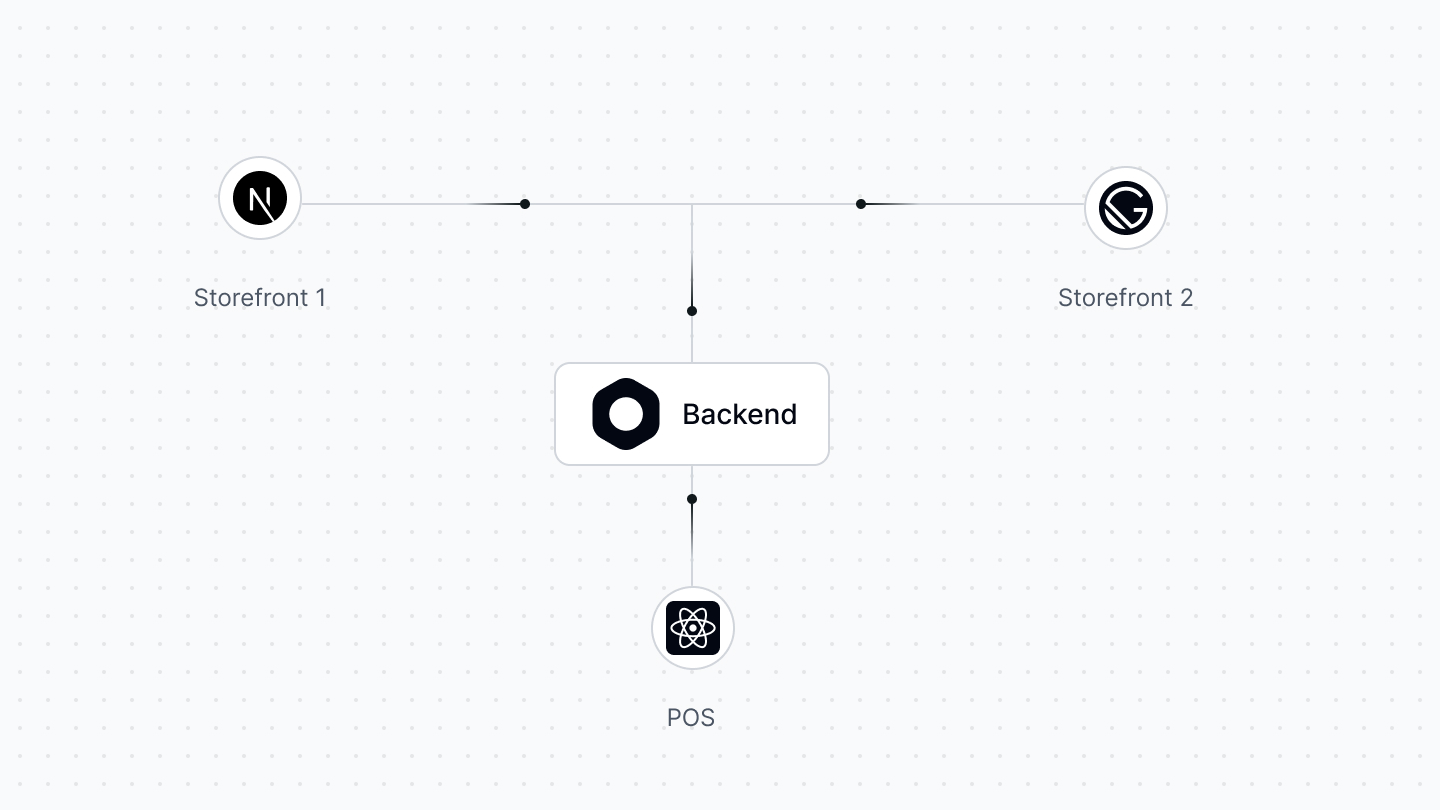
Medusa's modular architecture solves these challenges. Any frontend can utilize Medusa's commerce features through its REST APIs. Medusa's commerce features include multi-warehouse and sales channel features that facilitate integrating a POS system.
|
||
|
||
:::tip
|
||
|
||
Recommended read: [How Tekla built a POS system with Medusa](https://medusajs.com/blog/tekla-agilo-pos-case/).
|
||
|
||
:::
|
||
|
||
---
|
||
|
||
## Freedom in Choosing Your POS Tech Stack
|
||
|
||
When you build a POS system, you must choose which programming framework, language, or tool you want to use.
|
||
|
||
Medusa's modular architecture removes any restrictions you may have while making this choice. Any client or front end can connect to the Medusa backend using its headless REST APIs.
|
||
|
||
|
||
|
||
<DocCardList colSize={4} items={[
|
||
{
|
||
type: 'link',
|
||
href: '/development/fundamentals/architecture-overview',
|
||
label: 'Medusa’s Architecture',
|
||
customProps: {
|
||
icon: Icons['academic-cap-solid'],
|
||
description: 'Learn about Medusa\'s architecture and its ecosystem.',
|
||
}
|
||
},
|
||
{
|
||
type: 'link',
|
||
href: 'https://docs.medusajs.com/api/admin',
|
||
label: 'Admin REST APIs',
|
||
customProps: {
|
||
icon: Icons['academic-cap-solid'],
|
||
description: 'Check out available Admin REST APIs in Medusa.',
|
||
}
|
||
},
|
||
{
|
||
type: 'link',
|
||
href: '/js-client/overview',
|
||
label: 'JavaScript Client',
|
||
customProps: {
|
||
icon: Icons['academic-cap-solid'],
|
||
description: 'Learn about the JavaScript client and to use it.',
|
||
}
|
||
},
|
||
]} />
|
||
|
||
---
|
||
|
||
## Integrate a Barcode Scanner
|
||
|
||
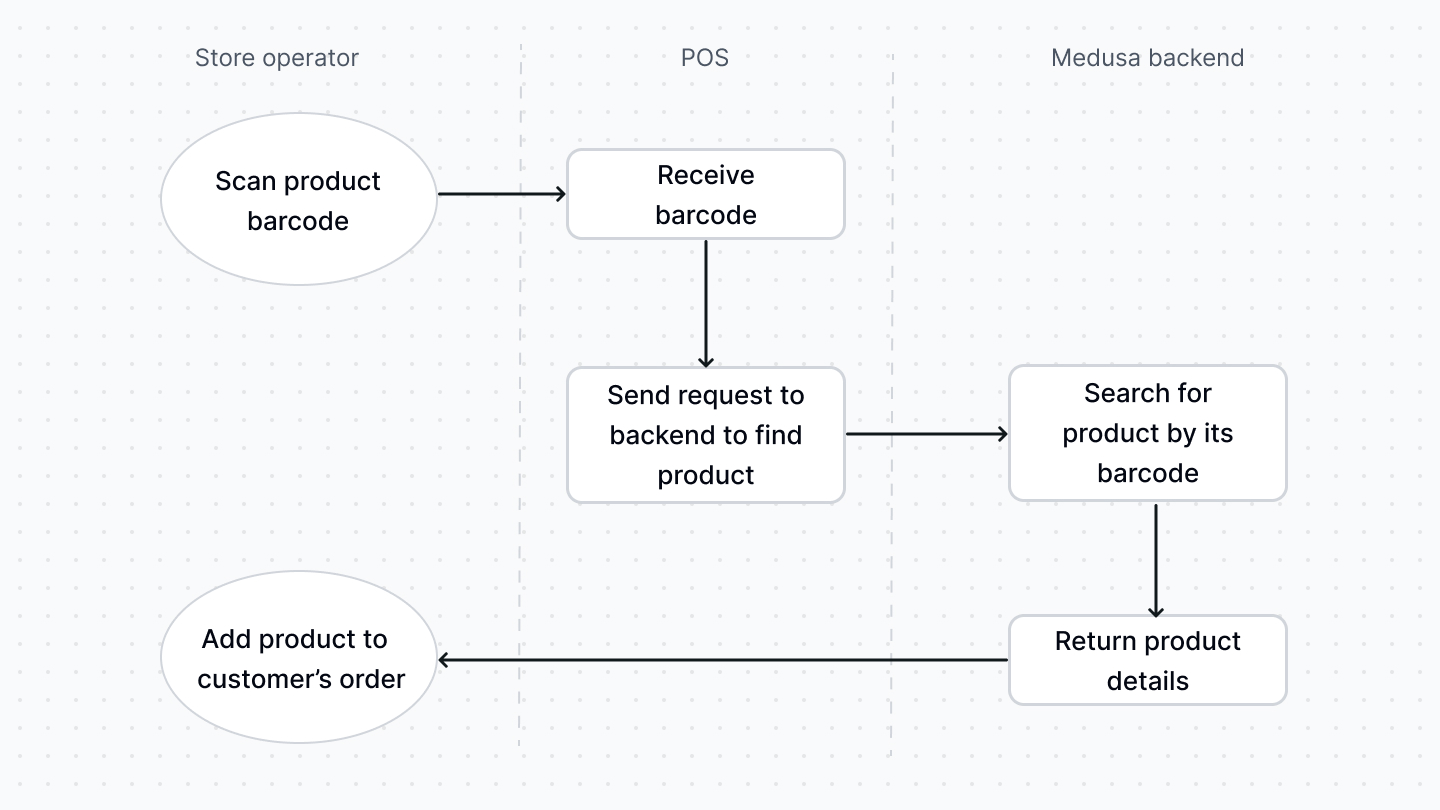
POS systems make the checkout process smoother by integrating a barcode scanner. Merchants can scan a product by its barcode to check its details or add it to the customer's purchase.
|
||
|
||
Medusa’s [Product Variant entity](../references/entities/classes/entities.ProductVariant.mdx) includes the necessary attributes to implement this integration, mainly the `barcode` attribute. Other notable attributes include `ean`, `upc`, and `hs_code`, among others.
|
||
|
||
To search through product variants by their barcode, you can create a custom API Route and call it within your POS.
|
||
|
||
|
||
|
||
<DocCardList colSize={6} items={[
|
||
{
|
||
type: 'link',
|
||
href: '/modules/products',
|
||
label: 'Products',
|
||
customProps: {
|
||
icon: Icons['academic-cap-solid'],
|
||
description: 'Learn about the Product architecture and features.',
|
||
}
|
||
},
|
||
{
|
||
type: 'link',
|
||
href: '/development/api-routes/create',
|
||
label: 'Create API Route',
|
||
customProps: {
|
||
icon: Icons['academic-cap-solid'],
|
||
description: 'Learn how to create an API Route in the Medusa backend.',
|
||
}
|
||
},
|
||
]} />
|
||
|
||
<Details>
|
||
<Summary>Example: Search Products By Barcode API Route</Summary>
|
||
|
||
Here’s an example of creating a custom API Route at `/store/pos/search-barcode` that searches product variants by a barcode:
|
||
|
||
```ts title="src/api/store/pos/search-barcode/route.ts"
|
||
import type {
|
||
MedusaRequest,
|
||
MedusaResponse,
|
||
ProductVariantService,
|
||
} from "@medusajs/medusa"
|
||
import { MedusaError } from "@medusajs/utils"
|
||
|
||
export const GET = async (
|
||
req: MedusaRequest,
|
||
res: MedusaResponse
|
||
) => {
|
||
const barcode = (req.query.barcode as string) || ""
|
||
if (!barcode) {
|
||
throw new MedusaError(
|
||
MedusaError.Types.INVALID_DATA,
|
||
"Barcode is required"
|
||
)
|
||
}
|
||
// get product service
|
||
const productVariantService = req.scope.resolve<
|
||
ProductVariantService
|
||
>("productVariantService")
|
||
|
||
// retrieve product variants by barcode
|
||
const productVariants = await productVariantService
|
||
.list({
|
||
barcode,
|
||
})
|
||
|
||
res.json({
|
||
product_variants: productVariants,
|
||
})
|
||
}
|
||
```
|
||
|
||
</Details>
|
||
|
||
---
|
||
|
||
## Access Accurate Inventory Details
|
||
|
||
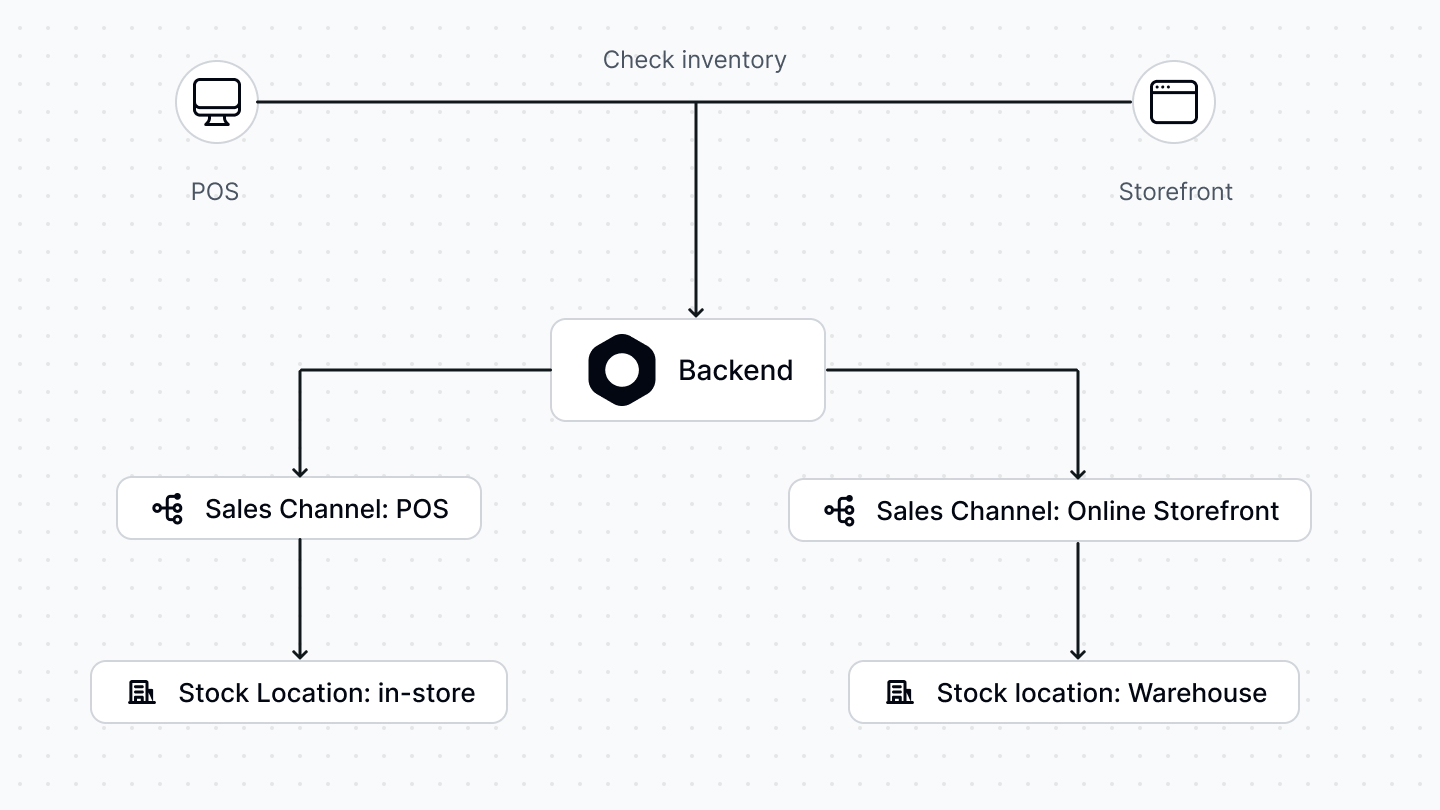
As you manage an online and offline store, it's essential to separate inventory quantity across different locations.
|
||
|
||
Using Medusa's multi-warehouse features, merchants can manage the inventory items and their availability across locations and sales channels. They can create a sales channel for their online store and a sales channel for their POS system, then manage the inventory quantity of product variants in each channel.
|
||
|
||
|
||
|
||
This also opens the door for other business opportunities, such as an endless aisle experience. Suppose a product isn't available in-store but is available in different warehouses. In that case, you can allow customers to purchase that item in-store and deliver it to their address.
|
||
|
||
<DocCardList colSize={4} items={[
|
||
{
|
||
type: 'link',
|
||
href: '/modules/multiwarehouse/overview',
|
||
label: 'Multi-Warehouse',
|
||
customProps: {
|
||
icon: Icons['academic-cap-solid'],
|
||
description: 'Learn about the Multi-warehouse architecture and features.',
|
||
}
|
||
},
|
||
{
|
||
type: 'link',
|
||
href: '/modules/sales-channels/overview',
|
||
label: 'Sales Channels',
|
||
customProps: {
|
||
icon: Icons['academic-cap-solid'],
|
||
description: 'Learn about the Sales Channel architecture and features.',
|
||
}
|
||
},
|
||
{
|
||
type: 'link',
|
||
href: '/modules/multiwarehouse/admin/manage-inventory-items',
|
||
label: 'Manage Inventory Items',
|
||
customProps: {
|
||
icon: Icons['academic-cap-solid'],
|
||
description: 'Learn how to use the Admin REST APIs to manage inventory items.',
|
||
}
|
||
},
|
||
]} />
|
||
|
||
---
|
||
|
||
## Build an Omni-channel Customer Experience
|
||
|
||
Using Medusa's Customer APIs and features, you can retrieve a customer's details from the backend and place an order on the POS under their account. The customer can then view their order details on their online profile as if they had placed the order online.
|
||
|
||
In addition, using Medusa's dynamic discounts feature, store operators can create discounts on the fly for customers using the POS system and apply them to their orders. You can also extend Medusa to provide features for a better customer experience, such as a rewards system or loyalty points.
|
||
|
||
<DocCardList colSize={6} items={[
|
||
{
|
||
type: 'link',
|
||
href: '/modules/customers/overview',
|
||
label: 'Customers',
|
||
customProps: {
|
||
icon: Icons['academic-cap-solid'],
|
||
description: 'Learn about the Customer architecture and features.',
|
||
}
|
||
},
|
||
{
|
||
type: 'link',
|
||
href: '/modules/discounts/overview',
|
||
label: 'Discounts',
|
||
customProps: {
|
||
icon: Icons['academic-cap-solid'],
|
||
description: 'Learn about the Discount architecture and features.',
|
||
}
|
||
},
|
||
]} />
|
||
|
||
---
|
||
|
||
## Accept Payment, Place Order, and Use RMA Features
|
||
|
||
Medusa's architecture allows you to integrate any third-party payment processor for your POS and online storefront. For example, you can integrate [Stripe Terminal](https://stripe.com/terminal) to accept in-store payments.
|
||
|
||
Once you accept the payment, you can place an order in the POS system using the [Draft Order APIs](https://docs.medusajs.com/api/admin#draft-orders). Draft orders provide similar features to an online checkout experience, including discounts, payment processing, and more.
|
||
|
||
Then, merchants can view all orders coming from different sales channels using the Medusa admin dashboard. This keeps logistics and order handling consistent and allows businesses to provide return and exchange features to online and in-store customers.
|
||
|
||
<DocCardList colSize={6} items={[
|
||
{
|
||
type: 'link',
|
||
href: '/modules/carts-and-checkout/backend/add-payment-provider',
|
||
label: 'Create a Payment Processor',
|
||
customProps: {
|
||
icon: Icons['academic-cap-solid'],
|
||
description: 'Learn how to create a payment processor.',
|
||
}
|
||
},
|
||
{
|
||
type: 'link',
|
||
href: '/modules/orders/draft-orders',
|
||
label: 'Draft Orders',
|
||
customProps: {
|
||
icon: Icons['academic-cap-solid'],
|
||
description: 'Learn about the Draft Order architecture and features.',
|
||
}
|
||
},
|
||
{
|
||
type: 'link',
|
||
href: '/modules/orders/returns',
|
||
label: 'Order Returns',
|
||
customProps: {
|
||
icon: Icons['academic-cap-solid'],
|
||
description: 'Learn about the Order Return architecture and features.',
|
||
}
|
||
},
|
||
{
|
||
type: 'link',
|
||
href: '/modules/orders/swaps',
|
||
label: 'Order Swaps',
|
||
customProps: {
|
||
icon: Icons['academic-cap-solid'],
|
||
description: 'Learn about the Order Swap architecture and features.',
|
||
}
|
||
},
|
||
]} />
|
||
|
||
---
|
||
|
||
## Additional Development
|
||
|
||
You can find other resources for your POS development in the [Medusa Development section](../development/overview.mdx) of this documentation.
|