
224 lines
8.6 KiB
Plaintext
224 lines
8.6 KiB
Plaintext
---
|
|
addHowToData: true
|
|
---
|
|
|
|
import DocCardList from '@theme/DocCardList';
|
|
import Icons from '@theme/Icon';
|
|
|
|
# Order Management System (OMS)
|
|
|
|
This document guides you through Medusa's different features and resources to use it as an order management system (OMS).
|
|
|
|
## Overview
|
|
|
|
When you build or integrate an OMS, you face certain challenges, such as accepting orders from different sales channels, tracking inventory across the sales channels, and integrating third-party fulfillment and payment providers with the OMS.
|
|
|
|
Medusa provides the building blocks that allow you to integrate it as an OMS within a larger commerce ecosystem. Its commerce features and modular architecture allow businesses to accept orders from any sales channel, benefit from multi-warehouse inventory features, and integrate third-party services for fulfillment, payment, and more.
|
|
|
|
:::tip
|
|
|
|
Recommended read: [How Siam Makro used Medusa an OMS](https://medusajs.com/blog/makro-omnichannel-order-orchestration/).
|
|
|
|
:::
|
|
|
|
---
|
|
|
|
## Source Orders into Medusa
|
|
|
|
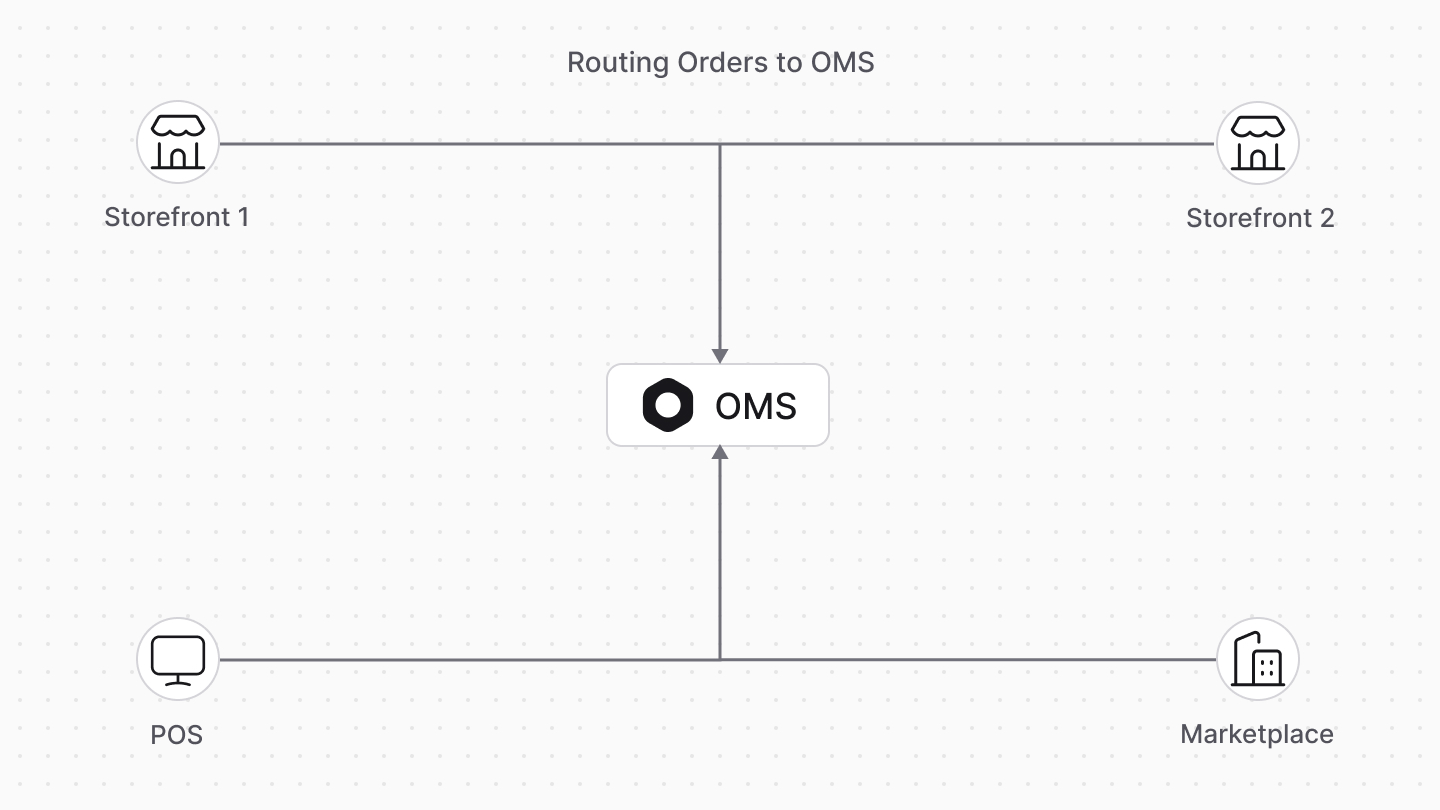
Orders from different sales channels in your commerce ecosystem must all route their orders into the OMS.
|
|
|
|
|
|
|
|
Medusa's [Store REST APIs](https://docs.medusajs.com/api/store) let you integrate a checkout experience in any storefront. Alternatively, you can use Medusa's [Draft Order APIs](https://docs.medusajs.com/api/admin#draft-orders) to place an order without direct involvement from the customer, such as when placing an order through a POS.
|
|
|
|
You can implement customizations in your backend if you accept orders through a third-party checkout system and need more flexibility over adding orders to Medusa.
|
|
|
|
You can add support for importing orders into Medusa through a custom API Route that allows batch-inserting orders. Alternatively, you can create a scheduled job that runs at a specified interval and imports orders from an external service.
|
|
|
|
<DocCardList colSize={4} items={[
|
|
{
|
|
type: 'link',
|
|
href: 'https://docs.medusajs.com/api/store#carts',
|
|
label: 'Store REST APIs',
|
|
customProps: {
|
|
icon: Icons['academic-cap-solid'],
|
|
description: 'Learn how to use the Store REST APIs to create an order.',
|
|
}
|
|
},
|
|
{
|
|
type: 'link',
|
|
href: '/development/api-routes/create',
|
|
label: 'Create API Route',
|
|
customProps: {
|
|
icon: Icons['academic-cap-solid'],
|
|
description: 'Learn how to create a custom API Route in the Medusa backend.',
|
|
}
|
|
},
|
|
{
|
|
type: 'link',
|
|
href: '/development/scheduled-jobs/create',
|
|
label: 'Create Scheduled Jobs',
|
|
customProps: {
|
|
icon: Icons['academic-cap-solid'],
|
|
description: 'Learn how to create a scheduled job in the Medusa backend.',
|
|
}
|
|
},
|
|
]} />
|
|
|
|
---
|
|
|
|
## Route Orders to Third-party Fulfillment Services
|
|
|
|
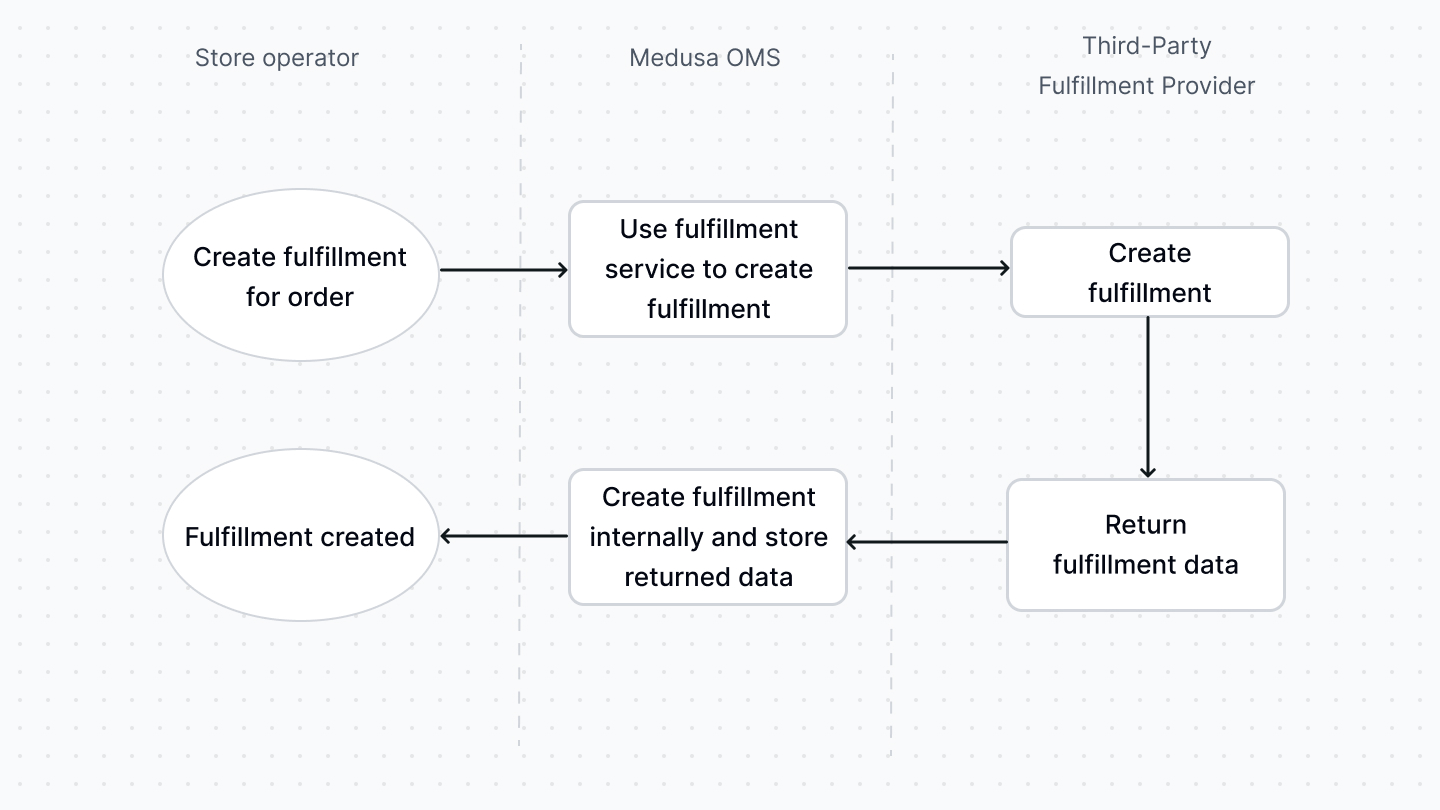
You can integrate third-party fulfillment providers with Medusa by creating a fulfillment service class or using a fulfillment plugin.
|
|
|
|
Medusa uses the fulfillment service whenever a fulfillment action is performed, such as when a fulfillment is created for items in an order. The service's methods interact with the third-party provider to handle the desired fulfillment actions.
|
|
|
|
|
|
|
|
In addition, Medusa has an event bus that allows you to listen to events and perform a task asynchronously when that event is triggered. So, you can listen to fulfillment-related events, such as the `order.fulfillment_created` event, and handle that event in the subscribed handler function.
|
|
|
|
<DocCardList colSize={6} items={[
|
|
{
|
|
type: 'link',
|
|
href: '/modules/carts-and-checkout/backend/add-fulfillment-provider',
|
|
label: 'Create a Fulfillment Provider',
|
|
customProps: {
|
|
icon: Icons['academic-cap-solid'],
|
|
description: 'Learn how to create a fulfillment provider in Medusa.',
|
|
}
|
|
},
|
|
{
|
|
type: 'link',
|
|
href: 'https://docs.medusajs.com/api/admin#draft-orders',
|
|
label: 'Events',
|
|
customProps: {
|
|
icon: Icons['academic-cap-solid'],
|
|
description: 'Learn about the event bus and how to listen to events.',
|
|
}
|
|
},
|
|
]} />
|
|
|
|
---
|
|
|
|
## Process Payment with Third-Party Providers
|
|
|
|
Like fulfillment services, you can integrate third-party payment providers with Medusa by creating a payment processor or using payment plugins.
|
|
|
|
When a payment action occurs, such as capturing payment, Medusa uses the integrated payment provider to perform these actions. Medusa also emits payment-related events, such as `order.payment_captured`, that can be handled by a subscriber.
|
|
|
|
<DocCardList colSize={6} items={[
|
|
{
|
|
type: 'link',
|
|
href: '/plugins/payment',
|
|
label: 'Payment Plugins',
|
|
customProps: {
|
|
icon: Icons['bolt-solid'],
|
|
description: 'Check out available official payment plugins.',
|
|
}
|
|
},
|
|
{
|
|
type: 'link',
|
|
href: '/modules/carts-and-checkout/backend/add-payment-provider',
|
|
label: 'Create a Payment Processor',
|
|
customProps: {
|
|
icon: Icons['academic-cap-solid'],
|
|
description: 'Learn how to create a payment processor.',
|
|
}
|
|
},
|
|
]} />
|
|
|
|
---
|
|
|
|
## Track Inventory Across Sales Channels
|
|
|
|
Medusa's multi-warehouse and sales channel features allow merchants to track inventory levels tied to sales channels across stock locations. When an order is placed, the item's quantity is reserved from the stock location associated with the order's sales channel. Once the item is fulfilled, the reserved quantity is deducted from the item's inventory quantity.
|
|
|
|
In addition, Medusa's inventory and stock location modules that power its multi-warehouse features can be replaced entirely with a custom implementation. You can then take control of how inventory functionalities are implemented in Medusa.
|
|
|
|
<DocCardList colSize={4} items={[
|
|
{
|
|
type: 'link',
|
|
href: '/modules/multiwarehouse/overview',
|
|
label: 'Multi-warehouse',
|
|
customProps: {
|
|
icon: Icons['academic-cap-solid'],
|
|
description: 'Learn about the Multi-warehouse architecture and features.',
|
|
}
|
|
},
|
|
{
|
|
type: 'link',
|
|
href: '/modules/sales-channels/overview',
|
|
label: 'Sales Channels',
|
|
customProps: {
|
|
icon: Icons['academic-cap-solid'],
|
|
description: 'Learn about the Sales Channel architecture and features.',
|
|
}
|
|
},
|
|
{
|
|
type: 'link',
|
|
href: '/development/plugins/create',
|
|
label: 'Create a Plugin',
|
|
customProps: {
|
|
icon: Icons['academic-cap-solid'],
|
|
description: 'Learn how to create a plugin that can be installed in a Medusa backend.',
|
|
}
|
|
},
|
|
]} />
|
|
|
|
---
|
|
|
|
## Handle Returns, Exchanges, and Edits
|
|
|
|
In Medusa, items in an order can be returned or exchanged; they can be created by the merchant or requested by the customer. A merchant can also edit an order to add, update, or delete items.
|
|
|
|
When changes are made to an order by any of the mentioned actions, the changes are reflected on the order's totals and associated inventory. The integrated fulfillment and payment providers are used if fulfillment or payment actions are required, such as fulfilling exchanged items.
|
|
|
|
Medusa also emits events related to these actions, such as `order.return_requested`. So, you can listen to these events and perform asynchronous actions, such as communicating with third-party services.
|
|
|
|
<DocCardList colSize={6} items={[
|
|
{
|
|
type: 'link',
|
|
href: '/modules/orders/returns',
|
|
label: 'Order Returns',
|
|
customProps: {
|
|
icon: Icons['academic-cap-solid'],
|
|
description: 'Learn about the Order Return architecture and features.',
|
|
}
|
|
},
|
|
{
|
|
type: 'link',
|
|
href: '/modules/orders/swaps',
|
|
label: 'Exchanges (Swaps)',
|
|
customProps: {
|
|
icon: Icons['academic-cap-solid'],
|
|
description: 'Learn about the Exchange or Swap architecture and features.',
|
|
}
|
|
},
|
|
{
|
|
type: 'link',
|
|
href: '/modules/orders#order-edits',
|
|
label: 'Order Edits',
|
|
customProps: {
|
|
icon: Icons['academic-cap-solid'],
|
|
description: 'Learn about the Order Edit feature and how it works.',
|
|
}
|
|
},
|
|
{
|
|
type: 'link',
|
|
href: '/development/events/events-list',
|
|
label: 'Event Reference',
|
|
customProps: {
|
|
icon: Icons['academic-cap-solid'],
|
|
description: 'Check out triggered events in Medusa and their payloads.',
|
|
}
|
|
},
|
|
]} />
|
|
|
|
---
|
|
|
|
## Additional Development and Commerce Features
|
|
|
|
Medusa provides more commerce features that you can learn about in the [Commerce Modules](../modules/overview.mdx) section of this documentation.
|
|
|
|
Medusa is also completely customizable, and you can learn more about customizing it in the [Medusa Development](../development/overview.mdx) section of this documentation.
|