 8c21243f42
* docs: add section on retrieve totals for cart items and shipping methods in storefront

* change return type

* update OAS
293 lines
9.4 KiB
Plaintext
293 lines
9.4 KiB
Plaintext
---
|
||
sidebar_label: "Authentication Flows"
|
||
---
|
||
|
||
export const metadata = {
|
||
title: `Authentication Flows with the Auth Main Service`,
|
||
}
|
||
|
||
# {metadata.title}
|
||
|
||
In this guide, you'll learn how to use the methods of the Auth Module's service to implement authentication flows and reset a user's password.
|
||
|
||
<Note>
|
||
|
||
This guide is only recommended for complex cases, where you may need to heavily customize the authentication flows and need to use the Auth Module's service methods directly. For most use cases, you should use the [auth routes](../authentication-route/page.mdx) instead.
|
||
|
||
</Note>
|
||
|
||
## Authentication Methods
|
||
|
||
### Register
|
||
|
||
The [register method of the Auth Module's service](/references/auth/register) creates an auth identity that can be authenticated later.
|
||
|
||
For example:
|
||
|
||
```ts
|
||
const data = await authModuleService.register(
|
||
"emailpass",
|
||
// passed to auth provider
|
||
{
|
||
// pass data from request parameters, such as
|
||
url: "example.com",
|
||
headers: req.headers,
|
||
query: req.query,
|
||
// pass in the body the data necessary for the authentication provider
|
||
// to register the user, such as email and password
|
||
body: {
|
||
email: "user@example.com",
|
||
password: "supersecret",
|
||
},
|
||
protocol: req.protocol,
|
||
}
|
||
)
|
||
```
|
||
|
||
This method calls the `register` method of the provider specified in the first parameter. The method passes the second parameter as input for the provider, and returns its data.
|
||
|
||
Based on the returned data, you can determine if the registration was successful, and if any further action is required to complete the registration. This is explained further in the auth flows sections below.
|
||
|
||
### Authenticate
|
||
|
||
To authenticate or log in a user, you use the [authenticate method of the Auth Module's service](/references/auth/authenticate). For example:
|
||
|
||
```ts
|
||
const data = await authModuleService.authenticate(
|
||
"emailpass",
|
||
// passed to auth provider
|
||
{
|
||
// pass data from request parameters, such as
|
||
url: "example.com",
|
||
headers: req.headers,
|
||
query: req.query,
|
||
// pass in the body the data necessary for the authentication provider
|
||
// to authenticate the user, such as email and password
|
||
body: {
|
||
email: "user@example.com",
|
||
password: "supersecret",
|
||
},
|
||
protocol: req.protocol,
|
||
}
|
||
)
|
||
```
|
||
|
||
This method calls the `authenticate` method of the provider specified in the first parameter. The method passes the second parameter as input for the provider, and returns its data.
|
||
|
||
Based on the returned data, you can determine if the authentication was successful, and if any further action is required to complete the authentication. This is explained further in the auth flows sections below.
|
||
|
||
---
|
||
|
||
## Auth Flow 1: Basic Authentication
|
||
|
||
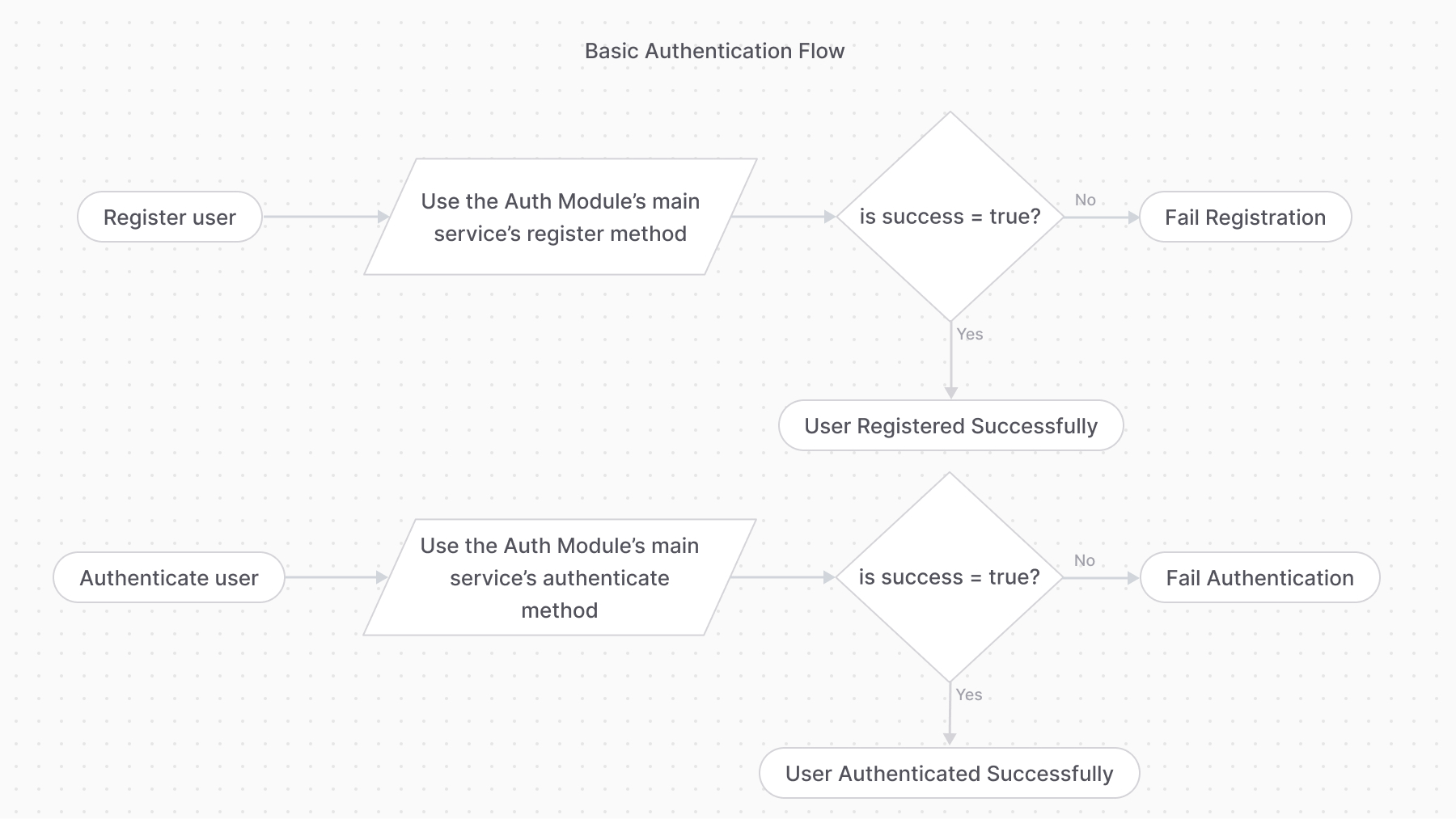
The basic authentication flow requires first using the `register` method, then the `authenticate` method.
|
||
|
||
|
||
|
||
### Step 1: Register User
|
||
|
||
```ts
|
||
const {
|
||
success,
|
||
authIdentity,
|
||
error,
|
||
} = await authModuleService.register(
|
||
"emailpass",
|
||
// passed to auth provider
|
||
{
|
||
// pass data from request parameters, such as
|
||
url: "example.com",
|
||
headers: req.headers,
|
||
query: req.query,
|
||
// pass in the body the data necessary for the authentication provider
|
||
// to register the user, such as email and password
|
||
body: {
|
||
email: "user@example.com",
|
||
password: "supersecret",
|
||
},
|
||
protocol: req.protocol,
|
||
}
|
||
)
|
||
|
||
if (error) {
|
||
// registration failed
|
||
// TODO return an error
|
||
return
|
||
}
|
||
```
|
||
|
||
If the `register` method returns an `error` property, the registration failed, and you can return an error message to the user.
|
||
|
||
Otherwise, if the `success` property is `true`, the registration was successful, and the user's authentication details are available within the `authIdentity` object.
|
||
|
||
<Note>
|
||
|
||
Check out the [AuthIdentity](/references/auth/models/AuthIdentity) reference for the received properties in `authIdentity`.
|
||
|
||
</Note>
|
||
|
||
#### Registering Auth Identities with Same Identifier
|
||
|
||
If an auth identity, such as a `customer`, tries to register with an email of another auth identity, the `register` method returns an error. This can happen either if another customer is using the same email, or an admin user has the same email.
|
||
|
||
There are two ways to handle this:
|
||
|
||
- Consider the customer authenticated if the `authenticate` method validates that the email and password are correct. This allows admin users, for example, to authenticate as customers.
|
||
- Return an error message to the customer, informing them that the email is already in use.
|
||
|
||
### Step 2: Authenticate User
|
||
|
||
```ts
|
||
// later (can be another route for login)
|
||
const {
|
||
success,
|
||
authIdentity,
|
||
location,
|
||
} = await authModuleService.authenticate(
|
||
"emailpass",
|
||
// passed to auth provider
|
||
{
|
||
// pass data from request parameters, such as
|
||
url: "example.com",
|
||
headers: req.headers,
|
||
query: req.query,
|
||
// pass in the body the data necessary for the authentication provider
|
||
// to authenticate the user, such as email and password
|
||
body: {
|
||
email: "user@example.com",
|
||
password: "supersecret",
|
||
},
|
||
protocol: req.protocol,
|
||
}
|
||
)
|
||
|
||
if (success && !location) {
|
||
// user is authenticated
|
||
}
|
||
```
|
||
|
||
If the `authenticate` method returns a `success` property that is `true`, and the `location` property is not set, the user is authenticated successfully. Their authentication details are available within the `authIdentity` object.
|
||
|
||
Otherwise, if the `location` property is set, you must follow the [third-party service authentication flow](#auth-flow-2-third-party-service-authentication) to complete the authentication.
|
||
|
||
---
|
||
|
||
## Auth Flow 2: Third-Party Service Authentication
|
||
|
||
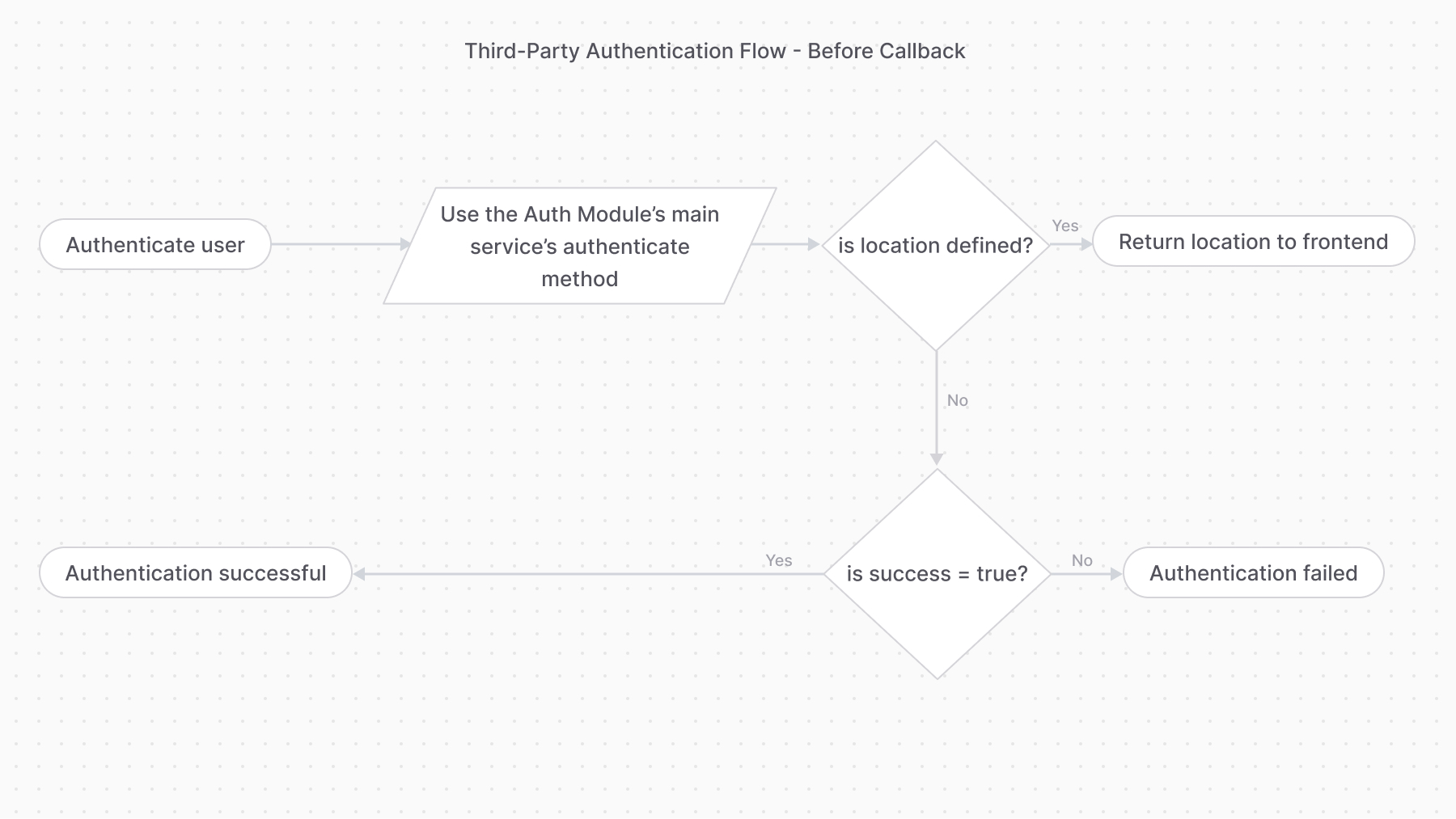
The third-party service authentication method requires using the `authenticate` method first:
|
||
|
||
```ts
|
||
const { success, authIdentity, location } = await authModuleService.authenticate(
|
||
"google",
|
||
// passed to auth provider
|
||
{
|
||
// pass data from request parameters, such as
|
||
url: "example.com",
|
||
headers: req.headers,
|
||
query: req.query,
|
||
body: req.body,
|
||
protocol: req.protocol,
|
||
}
|
||
)
|
||
|
||
if (location) {
|
||
// return the location for the frontend to redirect to
|
||
}
|
||
|
||
if (!success) {
|
||
// authentication failed
|
||
}
|
||
|
||
// authentication successful
|
||
```
|
||
|
||
If the `authenticate` method returns a `location` property, the authentication process requires the user to perform an action with a third-party service. So, you return the `location` to the frontend or client to redirect to that URL.
|
||
|
||
For example, when using the `google` provider, the `location` is the URL that the user must be redirected to in order to log in with their Google account.
|
||
|
||
|
||
|
||
### Overriding Callback URL
|
||
|
||
The Google and GitHub providers allow you to override their `callbackUrl` option during authentication. This is useful when you redirect the user after authentication to a URL based on their actor type. For example, you redirect admin users and customers to different pages.
|
||
|
||
```ts
|
||
const {
|
||
success,
|
||
authIdentity,
|
||
location,
|
||
} = await authModuleService.authenticate(
|
||
"google",
|
||
// passed to auth provider
|
||
{
|
||
// ...
|
||
callback_url: "example.com",
|
||
}
|
||
)
|
||
```
|
||
|
||
### validateCallback
|
||
|
||
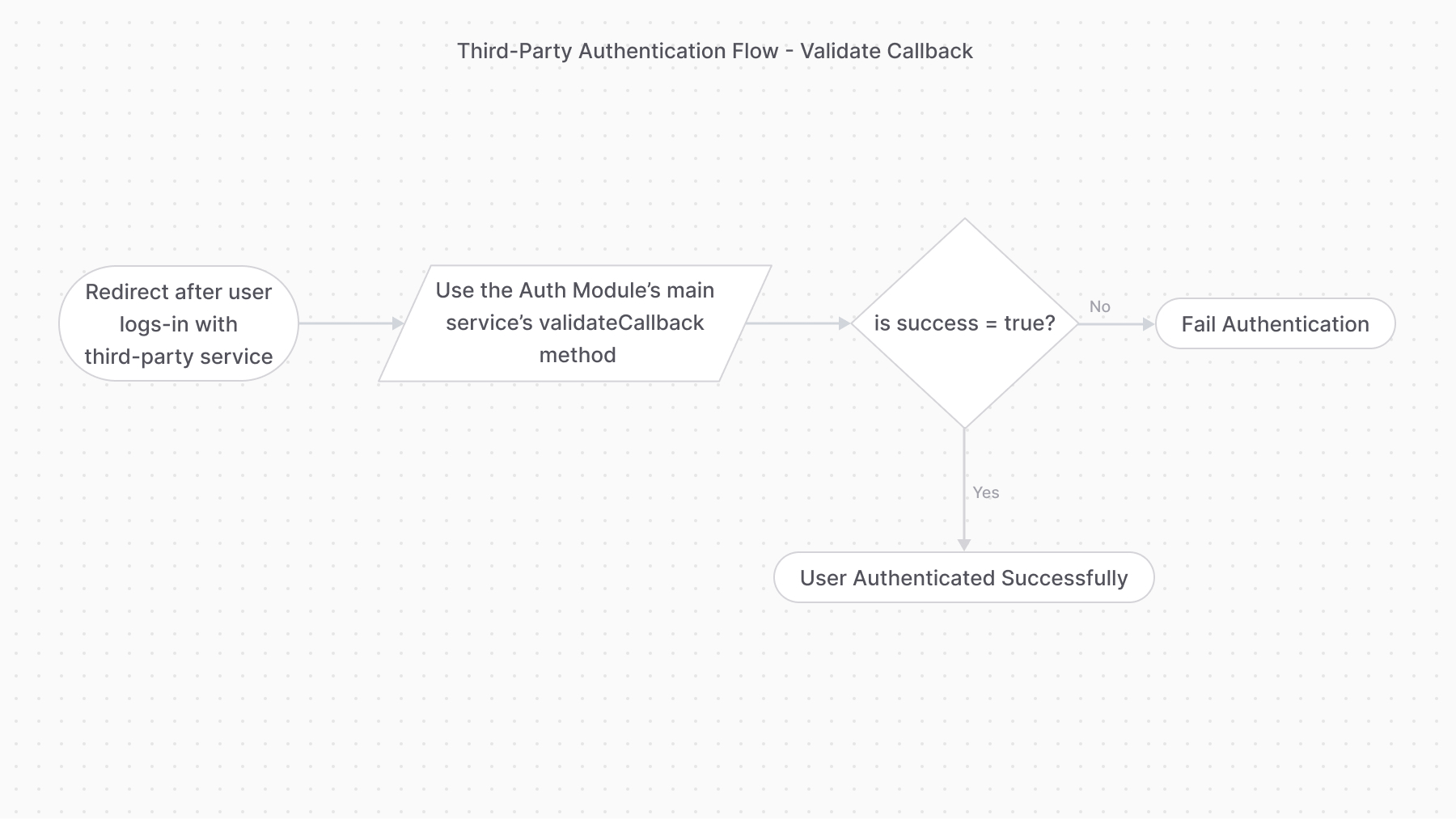
Providers handling this authentication flow must implement the `validateCallback` method. It implements the logic to validate the authentication with the third-party service.
|
||
|
||
So, once the user performs the required action with the third-party service (for example, log in with Google), the frontend must redirect to an API route that uses the [validateCallback method of the Auth Module's service](/references/auth/validateCallback).
|
||
|
||
The method calls the specified provider’s `validateCallback` method passing it the authentication details it received in the second parameter:
|
||
|
||
```ts
|
||
const { success, authIdentity } = await authModuleService.validateCallback(
|
||
"google",
|
||
// passed to auth provider
|
||
{
|
||
// request data, such as
|
||
url,
|
||
headers,
|
||
query,
|
||
body,
|
||
protocol,
|
||
}
|
||
)
|
||
|
||
if (success) {
|
||
// authentication succeeded
|
||
}
|
||
```
|
||
|
||
<Note title="Tip">
|
||
|
||
For providers like Google, the `query` object contains the query parameters from the original callback URL, such as the `code` and `state` parameters.
|
||
|
||
</Note>
|
||
|
||
If the returned `success` property is `true`, the authentication with the third-party provider was successful.
|
||
|
||
|
||
|
||
---
|
||
|
||
## Reset Password
|
||
|
||
To update a user's password or other authentication details, use the [updateProvider method of the Auth Module's service](/references/auth/updateProvider). It calls the `update` method of the specified authentication provider.
|
||
|
||
For example:
|
||
|
||
```ts
|
||
const { success } = await authModuleService.updateProvider(
|
||
"emailpass",
|
||
// passed to the auth provider
|
||
{
|
||
entity_id: "user@example.com",
|
||
password: "supersecret",
|
||
}
|
||
)
|
||
|
||
if (success) {
|
||
// password reset successfully
|
||
}
|
||
```
|
||
|
||
The method accepts as a first parameter the ID of the provider, and as a second parameter the data necessary to reset the password.
|
||
|
||
In the example above, you use the `emailpass` provider, so you have to pass an object having `entity_id` and `password` properties.
|
||
|
||
If the returned `success` property is `true`, the password has been reset successfully. |