 Shahed Nasser
009d00f27d
Shahed Nasser
009d00f27d
* implement toc

* added to projects

* fixes and adapt for references

* added product frontmatter

* remove action menu from 404 pages
87 lines
2.8 KiB
Plaintext
87 lines
2.8 KiB
Plaintext
---
|
||
products:
|
||
- tax
|
||
---
|
||
|
||
export const metadata = {
|
||
title: `Tax Lines in Cart Module`,
|
||
}
|
||
|
||
# {metadata.title}
|
||
|
||
In this document, you’ll learn about tax lines in a cart and how to retrieve tax lines with the Tax Module.
|
||
|
||
## What are Tax Lines?
|
||
|
||
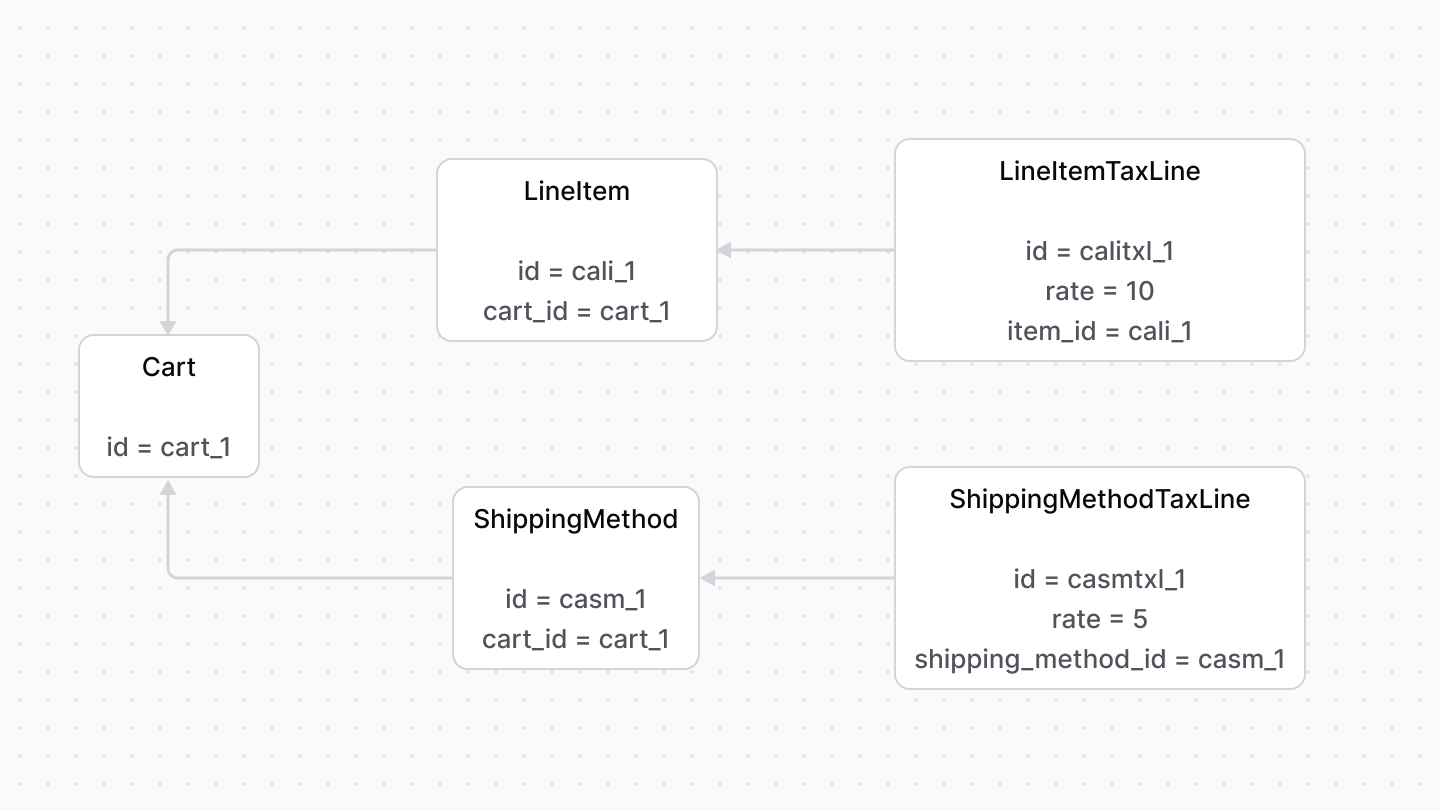
A tax line indicates the tax rate of a line item or a shipping method. The [LineItemTaxLine data model](/references/cart/models/LineItemTaxLine) represents a line item’s tax line, and the [ShippingMethodTaxLine data model](/references/cart/models/ShippingMethodTaxLine) represents a shipping method’s tax line.
|
||
|
||
|
||
|
||
---
|
||
|
||
## Tax Inclusivity
|
||
|
||
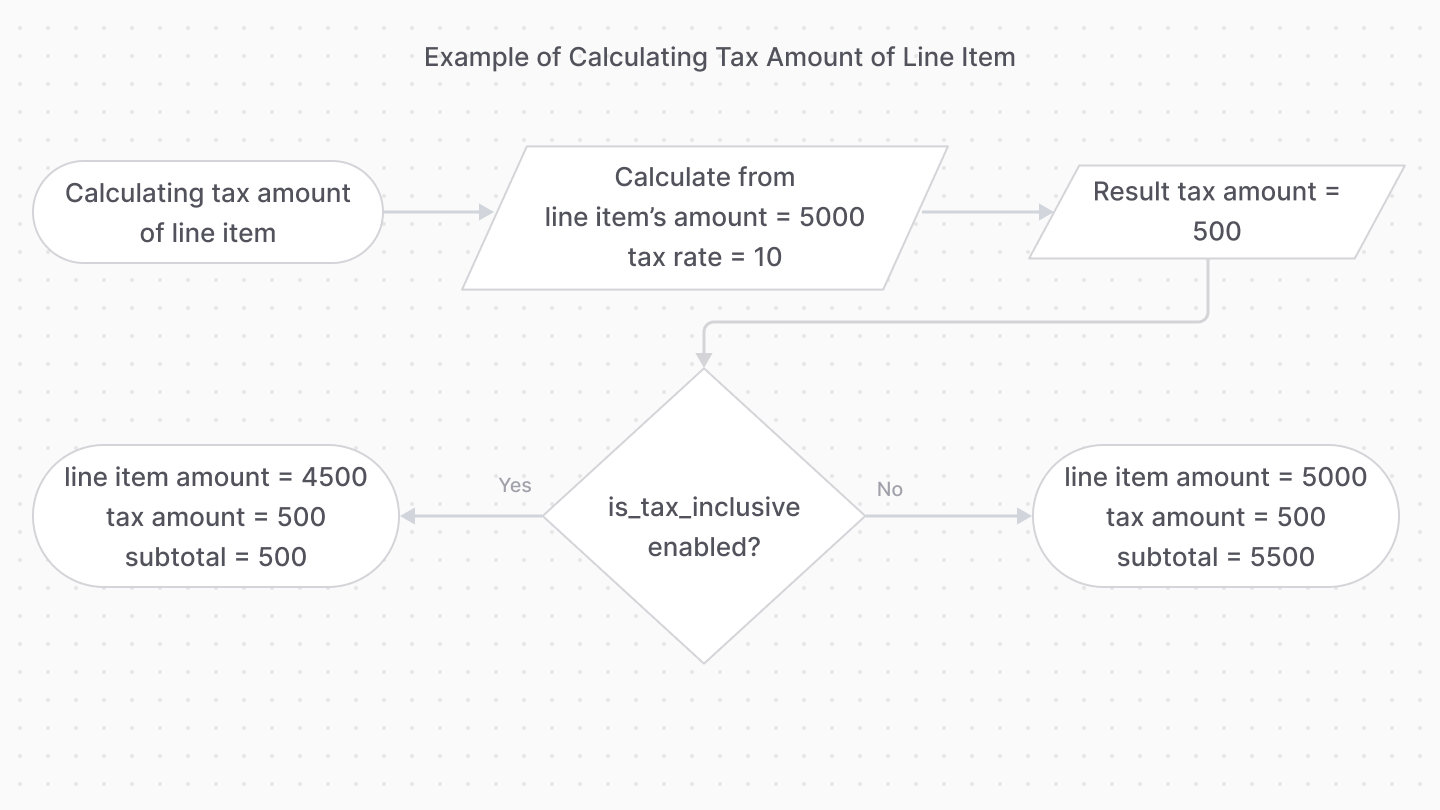
By default, the tax amount is calculated by taking the tax rate from the line item or shipping method’s amount, and then adding them to the item/method’s subtotal.
|
||
|
||
However, line items and shipping methods have an `is_tax_inclusive` property that, when enabled, indicates that the item or method’s price already includes taxes.
|
||
|
||
So, instead of calculating the tax rate and adding it to the item/method’s subtotal, it’s calculated as part of the subtotal.
|
||
|
||
<Note>
|
||
|
||
The following diagram is a simplified showcase of how a subtotal is calculated from the taxes perspective.
|
||
|
||
</Note>
|
||
|
||
|
||
|
||
For example, if a line item's amount is `5000`, the tax rate is `10`, and tax inclusivity is enabled, the tax amount is 10% of `5000`, which is `500`, making the unit price of the line item `4500`.
|
||
|
||
---
|
||
|
||
## Retrieve Tax Lines
|
||
|
||
When using the Cart and Tax modules together, you can use the `getTaxLines` method of the Tax Module’s main service. It retrieves the tax lines for a cart’s line items and shipping methods.
|
||
|
||
```ts
|
||
// retrieve the cart
|
||
const cart = await cartModuleService.retrieveCart("cart_123", {
|
||
relations: [
|
||
"items.tax_lines",
|
||
"shipping_methods.tax_lines",
|
||
"shipping_address",
|
||
],
|
||
})
|
||
|
||
// retrieve the tax lines
|
||
const taxLines = await taxModuleService.getTaxLines(
|
||
[
|
||
...(cart.items as TaxableItemDTO[]),
|
||
...(cart.shipping_methods as TaxableShippingDTO[]),
|
||
],
|
||
{
|
||
address: {
|
||
...cart.shipping_address,
|
||
country_code:
|
||
cart.shipping_address.country_code || "us",
|
||
},
|
||
}
|
||
)
|
||
```
|
||
|
||
Then, use the returned tax lines to set the line items and shipping methods’ tax lines:
|
||
|
||
```ts
|
||
// set line item tax lines
|
||
await cartModuleService.setLineItemTaxLines(
|
||
cart.id,
|
||
taxLines.filter((line) => "line_item_id" in line)
|
||
)
|
||
|
||
// set shipping method tax lines
|
||
await cartModuleService.setLineItemTaxLines(
|
||
cart.id,
|
||
taxLines.filter((line) => "shipping_line_id" in line)
|
||
)
|
||
```
|