 ed715813a5
* docs: docs for next release

* changes to opentelemetry dependencies

* document plugin env variables

* document admin changes

* fix vale error

* add version notes

* document campaign budget updates

* document campaign changes in user guide

* document chages in cluster mode cli

* documented once promotion allocation

* document multiple API keys support
262 lines
7.4 KiB
Plaintext
262 lines
7.4 KiB
Plaintext
import { Table } from "docs-ui"
|
||
|
||
export const metadata = {
|
||
title: `Application Method`,
|
||
}
|
||
|
||
# {metadata.title}
|
||
|
||
In this guide, you'll learn what an application method is in the Promotion Module.
|
||
|
||
## What is an Application Method?
|
||
|
||
The [ApplicationMethod data model](/references/promotion/models/ApplicationMethod) defines how a promotion is applied. It has the following properties that determine its behavior:
|
||
|
||
<Table>
|
||
<Table.Header>
|
||
<Table.Row>
|
||
<Table.HeaderCell>
|
||
|
||
Property
|
||
|
||
</Table.HeaderCell>
|
||
<Table.HeaderCell>
|
||
|
||
Purpose
|
||
|
||
</Table.HeaderCell>
|
||
<Table.HeaderCell>
|
||
|
||
Possible Values
|
||
|
||
</Table.HeaderCell>
|
||
</Table.Row>
|
||
</Table.Header>
|
||
<Table.Body>
|
||
<Table.Row>
|
||
<Table.Cell>
|
||
|
||
`type`
|
||
|
||
</Table.Cell>
|
||
<Table.Cell>
|
||
|
||
Does the promotion discount a fixed amount or a percentage?
|
||
|
||
</Table.Cell>
|
||
<Table.Cell>
|
||
|
||
`fixed`, `percentage`
|
||
|
||
</Table.Cell>
|
||
</Table.Row>
|
||
<Table.Row>
|
||
<Table.Cell>
|
||
|
||
`target_type`
|
||
|
||
</Table.Cell>
|
||
<Table.Cell>
|
||
|
||
Is the promotion applied to a cart item, shipping method, or the entire order?
|
||
|
||
</Table.Cell>
|
||
<Table.Cell>
|
||
|
||
`items`, `shipping_methods`, `order`
|
||
|
||
</Table.Cell>
|
||
</Table.Row>
|
||
<Table.Row>
|
||
<Table.Cell>
|
||
|
||
`allocation`
|
||
|
||
</Table.Cell>
|
||
<Table.Cell>
|
||
|
||
Is the discounted amount applied to each item, split between the applicable items, or applied on specific number of items?
|
||
|
||
</Table.Cell>
|
||
<Table.Cell>
|
||
|
||
`each`, `across`, `once`
|
||
|
||
</Table.Cell>
|
||
</Table.Row>
|
||
</Table.Body>
|
||
</Table>
|
||
|
||
## Target Promotion Rules
|
||
|
||
When the promotion is applied to a cart item or a shipping method (in other words, when `target_type` is `items` or `shipping_methods`), you can restrict which items/shipping methods the promotion is applied to.
|
||
|
||
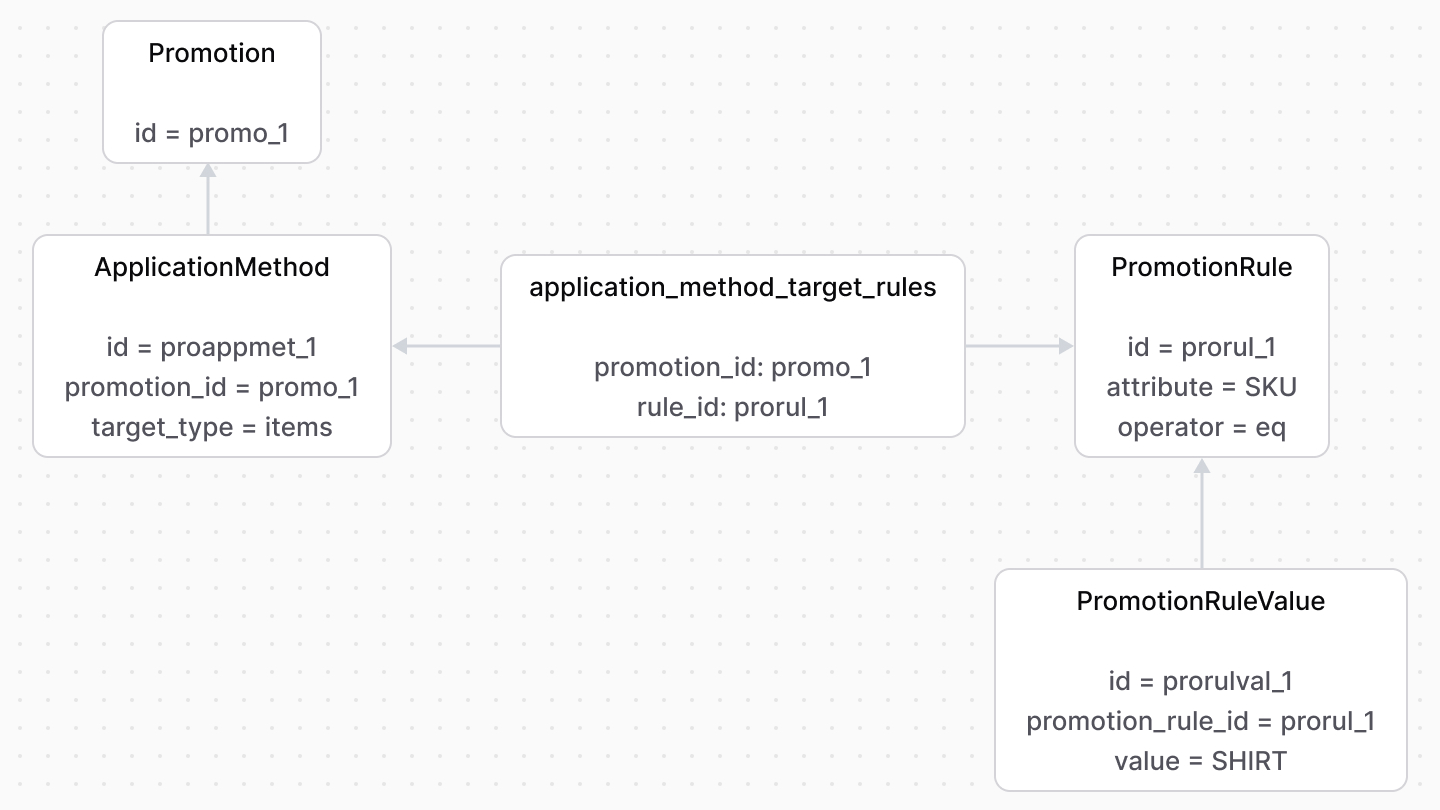
The `ApplicationMethod` data model has a collection of [PromotionRule](/references/promotion/models/PromotionRule) records to restrict which items or shipping methods the promotion applies to. The `target_rules` property in the `ApplicationMethod` represents this relation.
|
||
|
||
|
||
|
||
In this example, the promotion is only applied to product variants in the cart that have the SKU `SHIRT`.
|
||
|
||
---
|
||
|
||
## Buy Promotion Rules
|
||
|
||
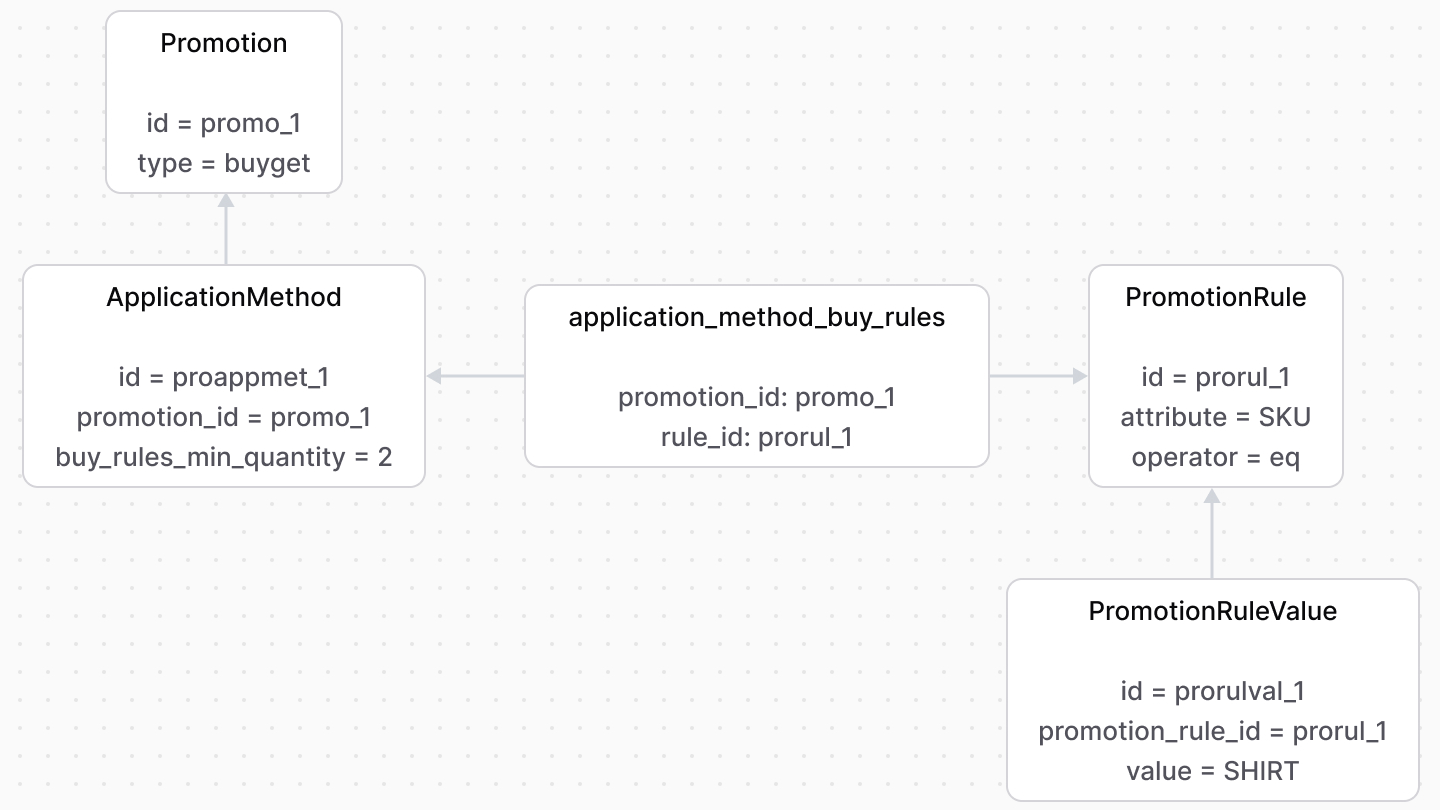
When the promotion’s type is `buyget`, you must specify the “buy X” condition. For example, a cart must have two shirts before the promotion can be applied.
|
||
|
||
The application method has a collection of `PromotionRule` items to define the “buy X” rule. The `buy_rules` property in the `ApplicationMethod` represents this relation.
|
||
|
||
|
||
|
||
In this example, the cart must have two product variants with the SKU `SHIRT` for the promotion to be applied.
|
||
|
||
---
|
||
|
||
## Maximum Quantity Restriction
|
||
|
||
You can restrict how many items the promotion is applied to either at the item level or the cart level.
|
||
|
||
### Item Level Restriction
|
||
|
||
When the `allocation` property in the `ApplicationMethod` is set to `each`, you can set the `max_quantity` property of `ApplicationMethod` to limit how many quantities of each applicable item the promotion is applied to.
|
||
|
||
For example, if the `max_quantity` property is set to `1` and the customer has a line item with quantity two in the cart, the promotion is only applied to one of them.
|
||
|
||
```json title="Example Cart"
|
||
{
|
||
"cart": {
|
||
"items": [
|
||
{
|
||
"id": "item_1",
|
||
"quantity": 2 // The promotion is applied to 1 of this item
|
||
}
|
||
]
|
||
}
|
||
}
|
||
```
|
||
|
||
This condition is applied on the quantity of every applicable item in the cart. For example, if set to `1` and the customer has two applicable items in the cart, the promotion is applied to one of each of them.
|
||
|
||
```json title="Example Cart"
|
||
{
|
||
"cart": {
|
||
"items": [
|
||
{
|
||
"id": "item_1",
|
||
"quantity": 2 // The promotion is applied to 1 of this item
|
||
},
|
||
{
|
||
"id": "item_2",
|
||
"quantity": 3 // The promotion is applied to 1 of this item
|
||
}
|
||
]
|
||
}
|
||
}
|
||
```
|
||
|
||
### Cart Level Restriction
|
||
|
||
<Note>
|
||
|
||
The `once` allocation type is available from [Medusa v2.11.0](https://github.com/medusajs/medusa/releases/tag/v2.11.0).
|
||
|
||
</Note>
|
||
|
||
When the `allocation` property in the `ApplicationMethod` is set to `once`, you must set the `max_quantity` property of `ApplicationMethod`. It limits how many items in total the promotion is applied to.
|
||
|
||
In this scenario, the Promotion Module prioritizes which applicable items the promotion is applied to based on the following rules:
|
||
|
||
1. Prioritize items with the lowest price.
|
||
2. Distribute the promotion sequentially until the `max_quantity` is reached.
|
||
|
||
#### Example 1
|
||
|
||
Consider:
|
||
|
||
- A promotion whose application method has its `allocation` property set to `once` and `max_quantity` set to `2`.
|
||
- A cart with three items having different prices, each with a quantity of `1`.
|
||
|
||
The Promotion Module will apply the promotion to the two items with the lowest price.
|
||
|
||
```json title="Example Cart"
|
||
{
|
||
"cart": {
|
||
"items": [
|
||
{
|
||
"id": "item_1",
|
||
"price": 10,
|
||
"quantity": 1 // The promotion is applied to this item
|
||
},
|
||
{
|
||
"id": "item_2",
|
||
"price": 20,
|
||
"quantity": 1 // The promotion is applied to this item
|
||
},
|
||
{
|
||
"id": "item_3",
|
||
"price": 30,
|
||
"quantity": 1 // The promotion is NOT applied to this item
|
||
}
|
||
]
|
||
}
|
||
}
|
||
```
|
||
|
||
#### Example 2
|
||
|
||
Consider:
|
||
|
||
- A promotion whose application method has its `allocation` property set to `once` and `max_quantity` set to `2`.
|
||
- A cart with two items having different prices and quantities greater than `2`.
|
||
|
||
The Promotion Module will try to apply the promotion to the item with the lowest price first:
|
||
|
||
```json title="Example Cart"
|
||
{
|
||
"cart": {
|
||
"items": [
|
||
{
|
||
"id": "item_1",
|
||
"price": 10,
|
||
"quantity": 3 // The promotion is applied to 2 of this item
|
||
},
|
||
{
|
||
"id": "item_2",
|
||
"price": 20,
|
||
"quantity": 4 // The promotion is NOT applied to this item
|
||
}
|
||
]
|
||
}
|
||
}
|
||
```
|
||
|
||
Since that item has a quantity of `3`, the promotion is applied to `2` of that item, reaching the `max_quantity` limit. The promotion is not applied to the other item.
|
||
|
||
#### Example 3
|
||
|
||
Consider:
|
||
|
||
- A promotion whose application method has its `allocation` property set to `once` and `max_quantity` set to `5`.
|
||
- A cart with two items having different prices and quantities less than `5`.
|
||
|
||
The Promotion Module will try to apply the promotion to the item with the lowest price first:
|
||
|
||
```json title="Example Cart"
|
||
{
|
||
"cart": {
|
||
"items": [
|
||
{
|
||
"id": "item_1",
|
||
"price": 10,
|
||
"quantity": 3 // The promotion is applied to all 3 of this item
|
||
},
|
||
{
|
||
"id": "item_2",
|
||
"price": 20,
|
||
"quantity": 4 // The promotion is applied to 2 of this item
|
||
}
|
||
]
|
||
}
|
||
}
|
||
```
|
||
|
||
The promotion is applied to all `3` quantities of the item with the lowest price. Since the `max_quantity` is `5`, the promotion is applied to `2` quantities of the other item, reaching the `max_quantity` limit. |