 914d773d3a
* initialized next.js project

* finished markdown sections

* added operation schema component

* change page metadata

* eslint fixes

* fixes related to deployment

* added response schema

* resolve max stack issue

* support for different property types

* added support for property types

* added loading for components

* added more loading

* type fixes

* added oneOf type

* removed console

* fix replace with push

* refactored everything

* use static content for description

* fixes and improvements

* added code examples section

* fix path name

* optimizations

* fixed tag navigation

* add support for admin and store references

* general enhancements

* optimizations and fixes

* fixes and enhancements

* added search bar

* loading enhancements

* added loading

* added code blocks

* added margin top

* add empty response text

* fixed oneOf parameters

* added path and query parameters

* general fixes

* added base path env variable

* small fix for arrays

* enhancements

* design enhancements

* general enhancements

* fix isRequired

* added enum values

* enhancements

* general fixes

* general fixes

* changed oas generation script

* additions to the introduction section

* added copy button for code + other enhancements

* fix response code block

* fix metadata

* formatted store introduction

* move sidebar logic to Tags component

* added test env variables

* fix code block bug

* added loading animation

* added expand param + loading

* enhance operation loading

* made responsive + improvements

* added loading provider

* fixed loading

* adjustments for small devices

* added sidebar label for endpoints

* added feedback component

* fixed analytics

* general fixes

* listen to scroll for other headings

* added sample env file

* update api ref files + support new fields

* fix for external docs link

* added new sections

* fix last item in sidebar not showing

* move docs content to www/docs

* change redirect url

* revert change

* resolve build errors

* configure rewrites

* changed to environment variable url

* revert changing environment variable name

* add environment variable for API path

* fix links

* fix tailwind settings

* remove vercel file

* reconfigured api route

* move api page under api

* fix page metadata

* fix external link in navigation bar

* update api spec

* updated api specs

* fixed google lint error

* add max-height on request samples

* add padding before loading

* fix for one of name

* fix undefined types

* general fixes

* remove response schema example

* redesigned navigation bar

* redesigned sidebar

* fixed up paddings

* added feedback component + report issue

* fixed up typography, padding, and general styling

* redesigned code blocks

* optimization

* added error timeout

* fixes

* added indexing with algolia + fixes

* fix errors with algolia script

* redesign operation sections

* fix heading scroll

* design fixes

* fix padding

* fix padding + scroll issues

* fix scroll issues

* improve scroll performance

* fixes for safari

* optimization and fixes

* fixes to docs + details animation

* padding fixes for code block

* added tab animation

* fixed incorrect link

* added selection styling

* fix lint errors

* redesigned details component

* added detailed feedback form

* api reference fixes

* fix tabs

* upgrade + fixes

* updated documentation links

* optimizations to sidebar items

* fix spacing in sidebar item

* optimizations and fixes

* fix endpoint path styling

* remove margin

* final fixes

* change margin on small devices

* generated OAS

* fixes for mobile

* added feedback modal

* optimize dark mode button

* fixed color mode useeffect

* minimize dom size

* use new style system

* radius and spacing design system

* design fixes

* fix eslint errors

* added meta files

* change cron schedule

* fix docusaurus configurations

* added operating system to feedback data

* change content directory name

* fixes to contribution guidelines

* revert renaming content

* added api-reference to documentation workflow

* fixes for search

* added dark mode + fixes

* oas fixes

* handle bugs

* added code examples for clients

* changed tooltip text

* change authentication to card

* change page title based on selected section

* redesigned mobile navbar

* fix icon colors

* fix key colors

* fix medusa-js installation command

* change external regex in algolia

* change changeset

* fix padding on mobile

* fix hydration error

* update depedencies
204 lines
8.4 KiB
Plaintext
204 lines
8.4 KiB
Plaintext
---
|
||
description: "Learn about development with Medusa, fundamental concepts, and more."
|
||
hide_table_of_contents: true
|
||
---
|
||
|
||
import DocCardList from '@theme/DocCardList';
|
||
import Icons from '@theme/Icon';
|
||
|
||
# Medusa Development
|
||
|
||
This part of the documentation provides you with the fundamental concepts and guides that can help you build and customize commerce applications with Medusa.
|
||
|
||
## Introduction
|
||
|
||
Medusa is a set of tools that developers can use to build digital commerce applications. Whether you want to offer unique customer experiences, create powerful automations, or build rich commerce applications like marketplaces, Medusa provides all the necessary tools.
|
||
|
||
Other ecommerce platforms offer a finite set of features accessible through an API. Medusa is different because it provides building blocks for businesses and developers to build commerce features. This means that you can extend your commerce API for your exact needs.
|
||
|
||
Medusa's building blocks ship as NPM packages of the following types:
|
||
|
||
- [Commerce modules](../modules/overview.mdx), which are isolated commerce logic for different domains. For example, an Inventory Module.
|
||
- A core package responsible for orchestrating the different commerce modules and exposing REST APIs.
|
||
|
||
---
|
||
|
||
## How Does Medusa Work
|
||
|
||
The core package is the NPM package `@medusajs/medusa`. It's a Node.js server built with Express and other tools that offer functionalities for managing events, caching, job queues, and more.
|
||
|
||
The core package has two main objectives.
|
||
|
||
### Orchestrate Commerce Modules
|
||
|
||
When you build a commerce application with Medusa, you’ll typically interact with more than one commerce module. The core package manages relationships between modules, and forwarding calls to modules at the right time during business logic execution.
|
||
|
||
For example, imagine an Inventory module that contains lightweight logic to increment and decrement stock levels for a Stock-Keeping Unit (SKU). In a commerce application, you typically want to associate the stock levels with a specific product. Medusa offers both an Inventory module and a Product module, and the core package creates associations between these modules and executing the related business logic. So, the core package contains code similar to this:
|
||
|
||
```ts
|
||
function handler(req, res) {
|
||
// ...
|
||
|
||
// associate a product with an inventory item
|
||
const product = await productService.create(data)
|
||
const inventoryItem = await inventoryService.create(
|
||
inventoryData
|
||
)
|
||
await productVariantInventoryService.associate(
|
||
product.id,
|
||
inventoryItem.id
|
||
)
|
||
|
||
// ...
|
||
}
|
||
```
|
||
|
||
### Expose REST APIs
|
||
|
||
The goal of orchestrating the modules is to expose an API that client applications, like websites or apps, can consume. By default, Medusa’s core package exposes a REST API that offers commerce functionalities similar to what other platforms give you.
|
||
|
||
The core package also holds the logic that allows developers to extend and add custom endpoints, among other available customizations.
|
||
|
||
---
|
||
|
||
## Backend First Steps
|
||
|
||
<DocCardList colSize={4} items={[
|
||
{
|
||
type: 'link',
|
||
href: '/development/backend/install',
|
||
label: 'Backend Quickstart',
|
||
customProps: {
|
||
icon: Icons['server-stack-solid'],
|
||
description: 'Learn how to install a Medusa backend and the available next steps.'
|
||
}
|
||
},
|
||
{
|
||
type: 'link',
|
||
href: '/development/backend/prepare-environment',
|
||
label: 'Prepare Environment',
|
||
customProps: {
|
||
icon: Icons['tools-solid'],
|
||
description: 'Learn how to install the necessary tools to use Medusa.'
|
||
}
|
||
},
|
||
{
|
||
type: 'link',
|
||
href: '/development/backend/configurations',
|
||
label: 'Configure Backend',
|
||
customProps: {
|
||
icon: Icons['cog-six-tooth-solid'],
|
||
description: 'Learn how to configure the Medusa backend.'
|
||
}
|
||
},
|
||
]} />
|
||
|
||
---
|
||
|
||
## Understanding Fundamental Concepts
|
||
|
||
These concepts will guide you through your development and building customization with Medusa.
|
||
|
||
<DocCardList colSize={4} items={[
|
||
{
|
||
type: 'link',
|
||
href: '/development/entities/overview',
|
||
label: 'Entities',
|
||
customProps: {
|
||
icon: Icons['academic-cap-solid'],
|
||
description: 'A class representation of database tables to handle commerce data.'
|
||
}
|
||
},
|
||
{
|
||
type: 'link',
|
||
href: '/development/endpoints/overview',
|
||
label: 'Endpoints',
|
||
customProps: {
|
||
icon: Icons['academic-cap-solid'],
|
||
description: 'REST APIs that frontends consume to communicate with the backend.'
|
||
}
|
||
},
|
||
{
|
||
type: 'link',
|
||
href: '/development/services/overview',
|
||
label: 'Services',
|
||
customProps: {
|
||
icon: Icons['academic-cap-solid'],
|
||
description: 'Utility classes associated with Entities or a specific functionality.'
|
||
}
|
||
},
|
||
{
|
||
type: 'link',
|
||
href: '/development/events',
|
||
label: 'Events and Subscribers',
|
||
customProps: {
|
||
icon: Icons['academic-cap-solid'],
|
||
description: 'Perform an asynchronous task when an action occurs.'
|
||
}
|
||
},
|
||
{
|
||
type: 'link',
|
||
href: '/development/scheduled-jobs/overview',
|
||
label: 'Scheduled Jobs',
|
||
customProps: {
|
||
icon: Icons['academic-cap-solid'],
|
||
description: 'Automate tasks to be executed at specified times.'
|
||
}
|
||
},
|
||
{
|
||
type: 'link',
|
||
href: '/development/plugins/overview',
|
||
label: 'Plugins',
|
||
customProps: {
|
||
icon: Icons['academic-cap-solid'],
|
||
description: 'Publish customizations as NPM packages to be reused.'
|
||
}
|
||
},
|
||
]} />
|
||
|
||
---
|
||
|
||
## Medusa Use Cases
|
||
|
||
To better understand how you can use Medusa, here are some common use cases that Medusa is the ideal solution for.
|
||
|
||
### Ecommerce Building Blocks
|
||
|
||
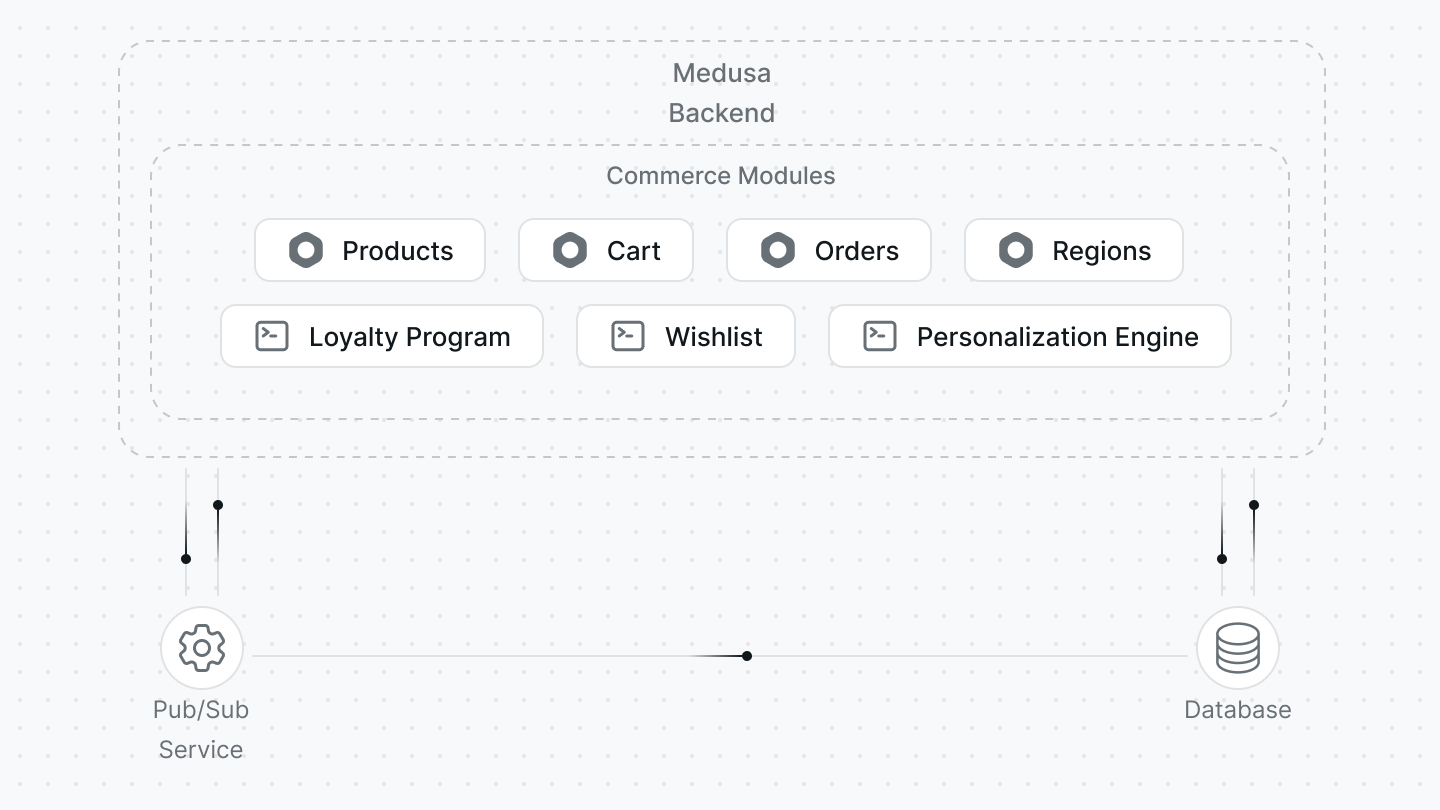
Developers can set up the core package and handpick the commerce modules they want to use. This gives them great flexibility in choosing the features they want to provide in their ecommerce store, while utilizing the powerful architecture in the core package.
|
||
|
||
|
||
|
||
Developers can modify and tailor the modules that Medusa offers to their use case. They can also create custom Modules to implement new features. All these modules become building blocks that shape their ecommerce system.
|
||
|
||
### Medusa in Microservices Architectures
|
||
|
||
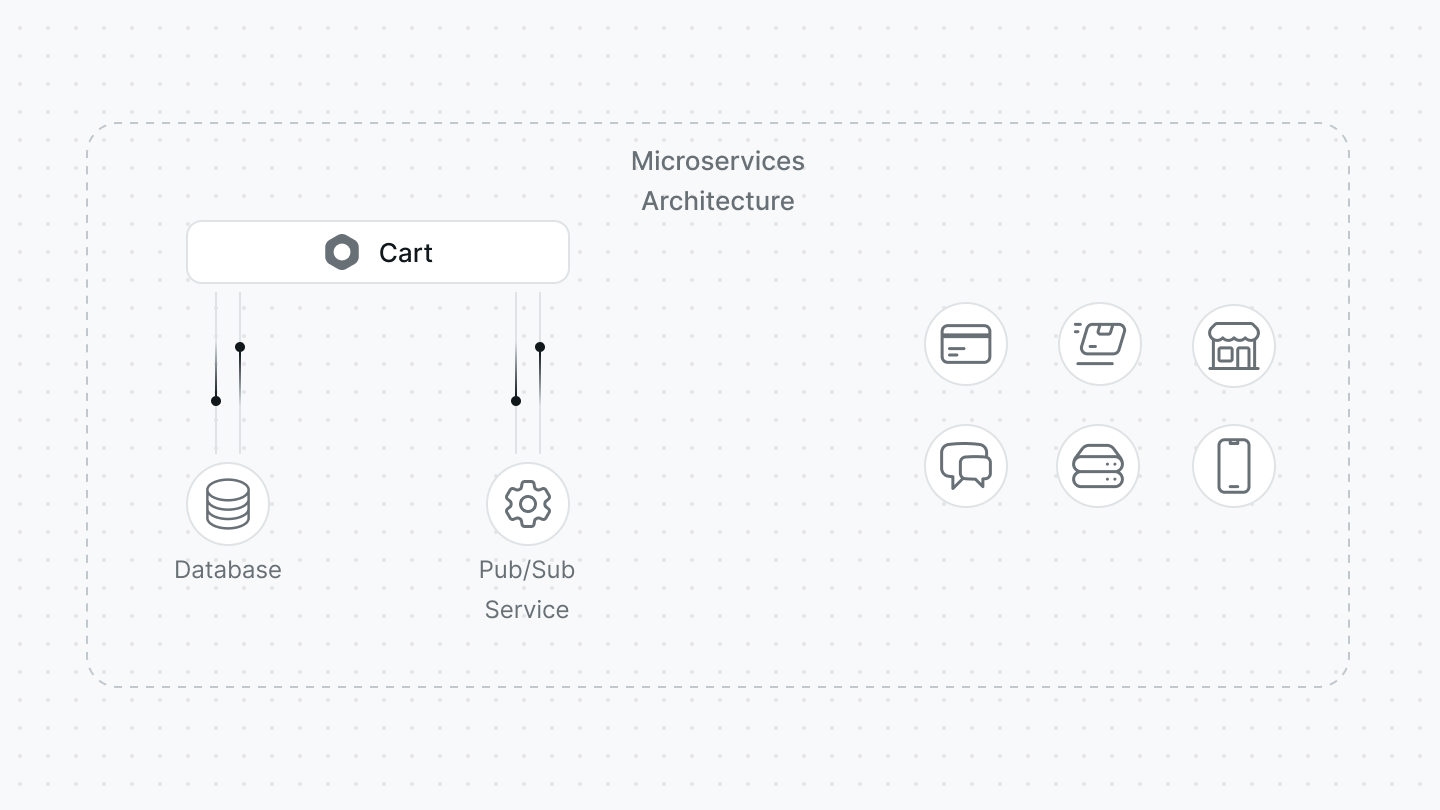
Medusa’s commerce modules can be used in isolation from the core package and within a larger ecosystem. For example, you can use Medusa’s Cart module within a blog to allow readers to buy merch.
|
||
|
||
|
||
|
||
Developers can benefit from Medusa’s Modules that provide essential ecommerce features while maintaining the ecommerce ecosystem of their choice. Commerce modules can be installed in your setup as NPM packages.
|
||
|
||
### Vertical Ecommerce Platforms
|
||
|
||
A Vertical Ecommerce Platform is a platform that provides features and functionalities specialized for a type of business sector. For example, a platform for pharmaceuticals.
|
||
|
||
Developers can use Medusa to build a vertical ecommerce platform as it provides the stepping stones that eliminate the need to reinvent the wheel for basic ecommerce features, but are customizable enough to be changed for their use case.
|
||
|
||
### Out-of-Box APIs
|
||
|
||
Since Medusa’s commerce modules are NPM packages, they can be installed and used in any JavaScript project.
|
||
|
||
By installing a Module in your project and expose its APIs based on the framework you’re using, you can get ecommerce REST APIs right from your frontend framework without having to create a separate project.
|
||
|
||
### Full-Fledged Ecommerce System
|
||
|
||
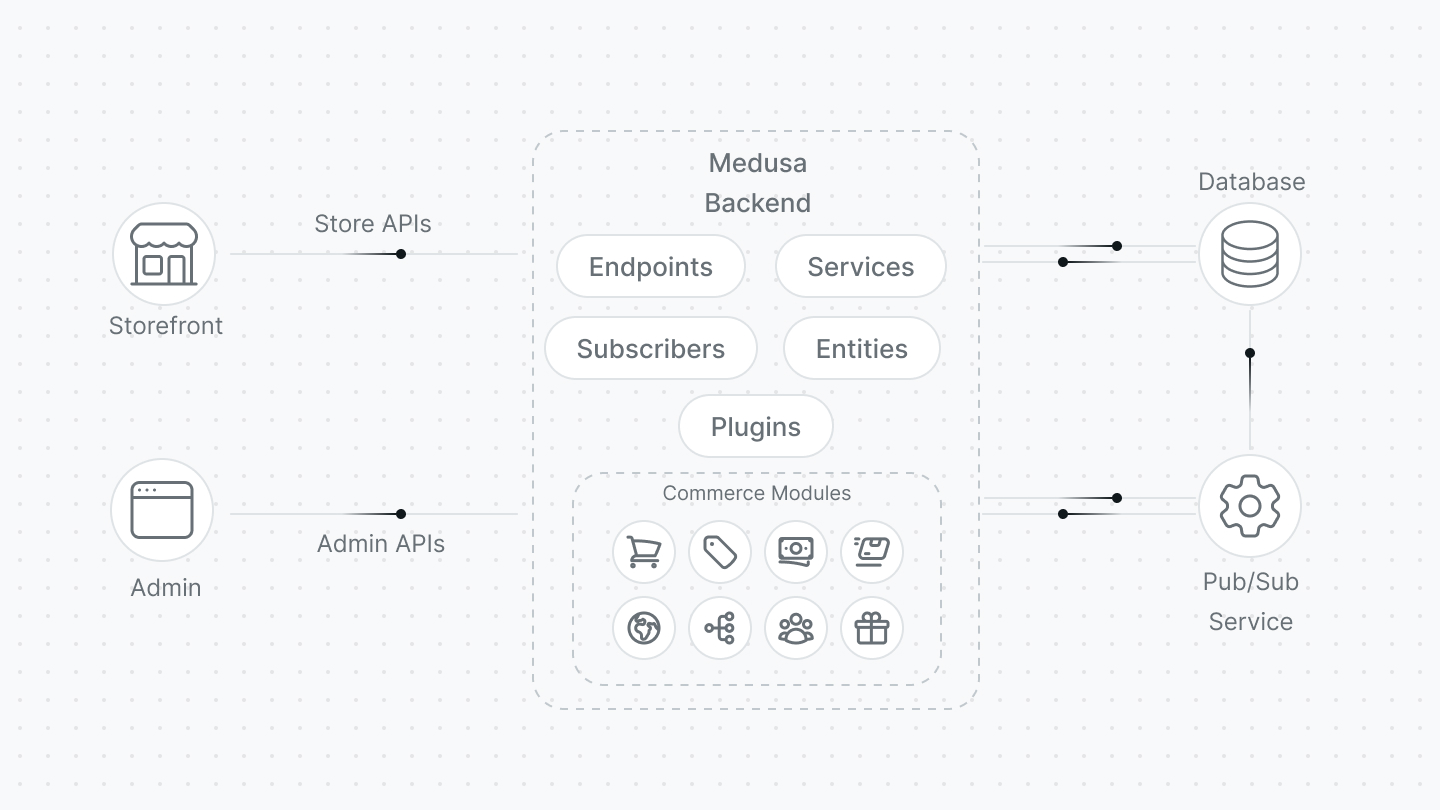
Developers can use Medusa’s toolkit to create their ecommerce system. With the use of the [create-medusa-app](../create-medusa-app.mdx) command, developers can set up a Medusa Backend, Medusa admin, and a storefront.
|
||
|
||
|
||
|
||
Developers can still benefit from customization opportunities here that Medusa provides. This includes creating resources such as endpoints and services, creating plugins, integrating third-party services, create a custom storefront, and more.
|
||
|
||
### Your Own Use Case
|
||
|
||
Medusa’s vision is to allow developers to build anything they want using it. There are no limitations to what you can build and the ideas you can come up with. If you have an idea, you can use Medusa’s tools to start building it.
|