 799b57c396
Fixed various spelling errors and grammatical issues across multiple .mdx documentation files.
935 lines
23 KiB
Plaintext
935 lines
23 KiB
Plaintext
---
|
|
tags:
|
|
- name: product
|
|
label: "Variant Price Rules"
|
|
- name: fulfillment
|
|
label: "Shipping Option Price Rules"
|
|
- concept
|
|
products:
|
|
- product
|
|
- fulfillment
|
|
---
|
|
|
|
import { CodeTabs, CodeTab } from "docs-ui"
|
|
|
|
export const metadata = {
|
|
title: `Price Tiers and Rules`,
|
|
}
|
|
|
|
# {metadata.title}
|
|
|
|
In this Pricing Module guide, you'll learn about tired prices, price rules for price sets and price lists, and how to add rules to a price.
|
|
|
|
<Note title="Looking for no-code docs?">
|
|
|
|
You can manage prices and tiers using the Medusa Admin:
|
|
|
|
- [Edit shipping option prices with conditions](!user-guide!/settings/locations-and-shipping/locations#fixed-and-conditional-shipping-option-prices).
|
|
- [Add price lists to set prices with conditions for product variants](!user-guide!/price-lists).
|
|
|
|
</Note>
|
|
|
|
## Tiered Pricing
|
|
|
|
Each price, represented by the [Price data model](/references/pricing/models/Price), has two optional properties that can be used to create tiered prices:
|
|
|
|
- `min_quantity`: The minimum quantity that must be in the cart for the price to be applied.
|
|
- `max_quantity`: The maximum quantity that can be in the cart for the price to be applied.
|
|
|
|
This is useful to set tiered pricing for resources like product variants and shipping options.
|
|
|
|
For example, you can set a variant's price to:
|
|
|
|
- `$10` by default.
|
|
- `$8` when the customer adds `10` or more of the variant to the cart.
|
|
- `$6` when the customer adds `20` or more of the variant to the cart.
|
|
|
|
These price definitions would look like this:
|
|
|
|
```json title="Example Prices"
|
|
[
|
|
// default price
|
|
{
|
|
"amount": 10,
|
|
"currency_code": "usd",
|
|
},
|
|
{
|
|
"amount": 8,
|
|
"currency_code": "usd",
|
|
"min_quantity": 10,
|
|
"max_quantity": 19,
|
|
},
|
|
{
|
|
"amount": 6,
|
|
"currency_code": "usd",
|
|
"min_quantity": 20,
|
|
},
|
|
],
|
|
```
|
|
|
|
### How to Create Tiered Prices?
|
|
|
|
When you create prices, you can specify a `min_quantity` and `max_quantity` for each price. This allows you to create tiered pricing, where the price changes based on the quantity of items in the cart.
|
|
|
|
For example:
|
|
|
|
<Note>
|
|
|
|
For most use cases where you're building customizations in the Medusa application, it's highly recommended to use [Medusa's workflows](../../../medusa-workflows-reference/page.mdx) rather than using the Pricing Module directly. Medusa's workflows already implement extensive functionalities that you can re-use in your custom flows, with reliable roll-back mechanism.
|
|
|
|
</Note>
|
|
|
|
<CodeTabs group="price-example">
|
|
<CodeTab label="Using Medusa Workflows" value="workflows">
|
|
|
|
export const tieredPricingHighlights = [
|
|
["20", "min_quantity", "The minimum quantity that must be in the cart for the price to be applied."],
|
|
["21", "max_quantity", "The maximum quantity that can be in the cart for the price to be applied."],
|
|
]
|
|
|
|
```ts highlights={tieredPricingHighlights}
|
|
import { createProductsWorkflow } from "@medusajs/medusa/core-flows"
|
|
|
|
// ...
|
|
|
|
const { result } = await createProductsWorkflow(container)
|
|
.run({
|
|
input: {
|
|
products: [{
|
|
variants: [{
|
|
id: "variant_1",
|
|
prices: [
|
|
// default price
|
|
{
|
|
amount: 10,
|
|
currency_code: "usd",
|
|
},
|
|
{
|
|
amount: 8,
|
|
currency_code: "usd",
|
|
min_quantity: 10,
|
|
max_quantity: 19,
|
|
},
|
|
{
|
|
amount: 6,
|
|
currency_code: "usd",
|
|
min_quantity: 20,
|
|
},
|
|
],
|
|
// ...
|
|
}],
|
|
}],
|
|
// ...
|
|
},
|
|
})
|
|
```
|
|
|
|
</CodeTab>
|
|
<CodeTab label="Using the Pricing Module" value="pricing-module">
|
|
|
|
```ts
|
|
const priceSet = await pricingModule.addPrices({
|
|
priceSetId: "pset_1",
|
|
prices: [
|
|
// default price
|
|
{
|
|
amount: 10,
|
|
currency_code: "usd",
|
|
},
|
|
// tiered prices
|
|
{
|
|
amount: 8,
|
|
currency_code: "usd",
|
|
min_quantity: 10,
|
|
max_quantity: 19,
|
|
},
|
|
{
|
|
amount: 6,
|
|
currency_code: "usd",
|
|
min_quantity: 20,
|
|
},
|
|
],
|
|
})
|
|
```
|
|
|
|
</CodeTab>
|
|
</CodeTabs>
|
|
|
|
In this example, you create a product with a variant whose default price is `$10`. You also add two tiered prices that set the price to `$8` when the quantity is between `10` and `19`, and to `$6` when the quantity is `20` or more.
|
|
|
|
### How are Tiered Prices Applied?
|
|
|
|
The [price calculation](../price-calculation/page.mdx) mechanism considers the cart's items as a context when choosing the best price to apply.
|
|
|
|
For example, consider the customer added the `variant_1` product variant (created in the workflow snippet of the [above section](#how-to-create-tiered-prices)) to their cart with a quantity of `15`.
|
|
|
|
The price calculation mechanism will choose the second price, which is `$8`, because the quantity of `15` is between `10` and `19`.
|
|
|
|
<Note>
|
|
|
|
If there are other rules applied to the price, they may affect the price calculation. Keep reading to learn about other price rules, and refer to the [Price Calculation](../price-calculation/page.mdx) guide for more details on the calculation mechanism.
|
|
|
|
</Note>
|
|
|
|
---
|
|
|
|
## Price Rule
|
|
|
|
You can also restrict prices by advanced rules, such as a customer's group, zip code, or a cart's total.
|
|
|
|
Each rule of a price is represented by the [PriceRule data model](/references/pricing/models/PriceRule).
|
|
|
|
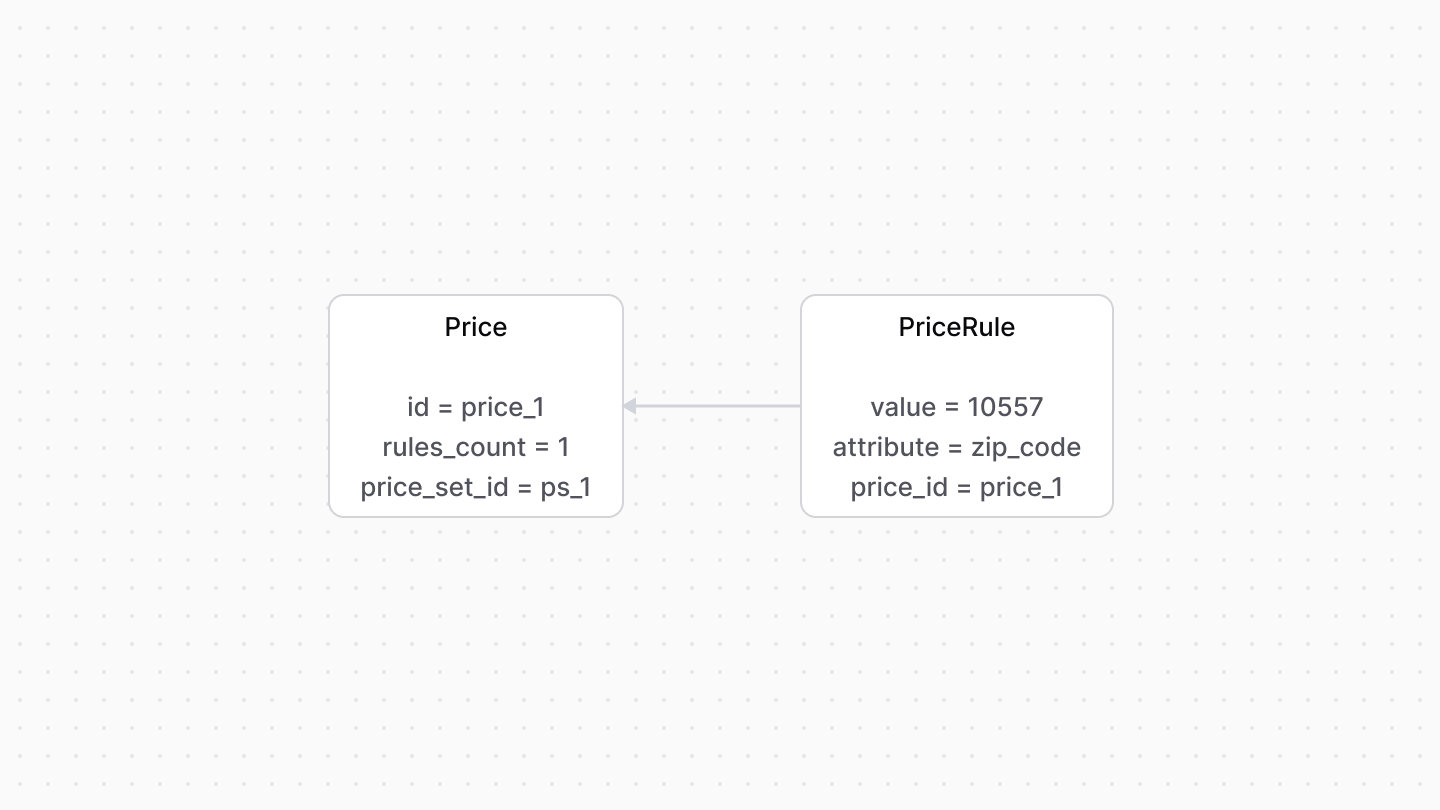
The `Price` data model has a `rules_count` property, which indicates how many rules, represented by `PriceRule`, are applied to the price.
|
|
|
|
For example, you create a price restricted to `10557` zip codes.
|
|
|
|
|
|
|
|
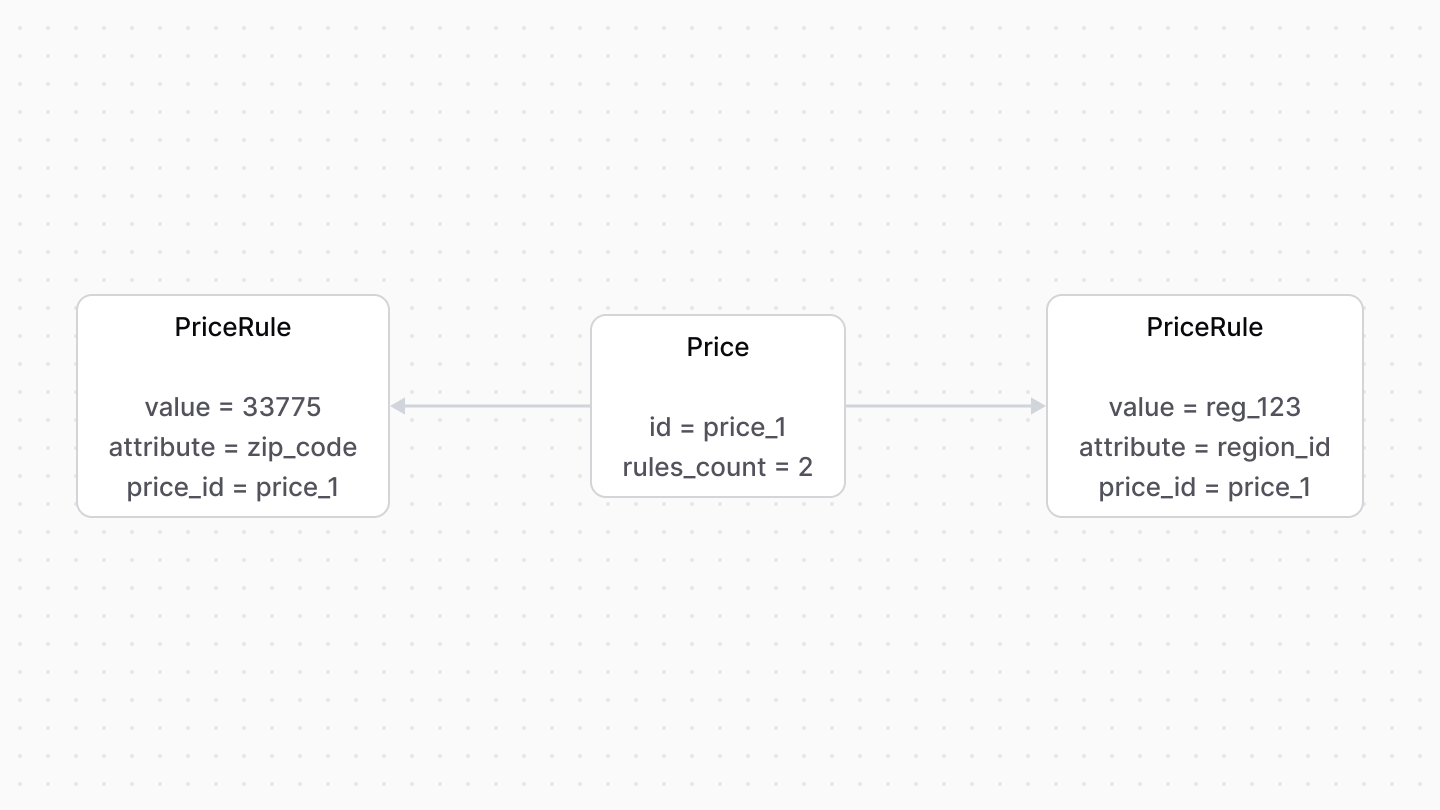
A price can have multiple price rules.
|
|
|
|
For example, a price can be restricted by a region and a zip code.
|
|
|
|
|
|
|
|
### Price List Rules
|
|
|
|
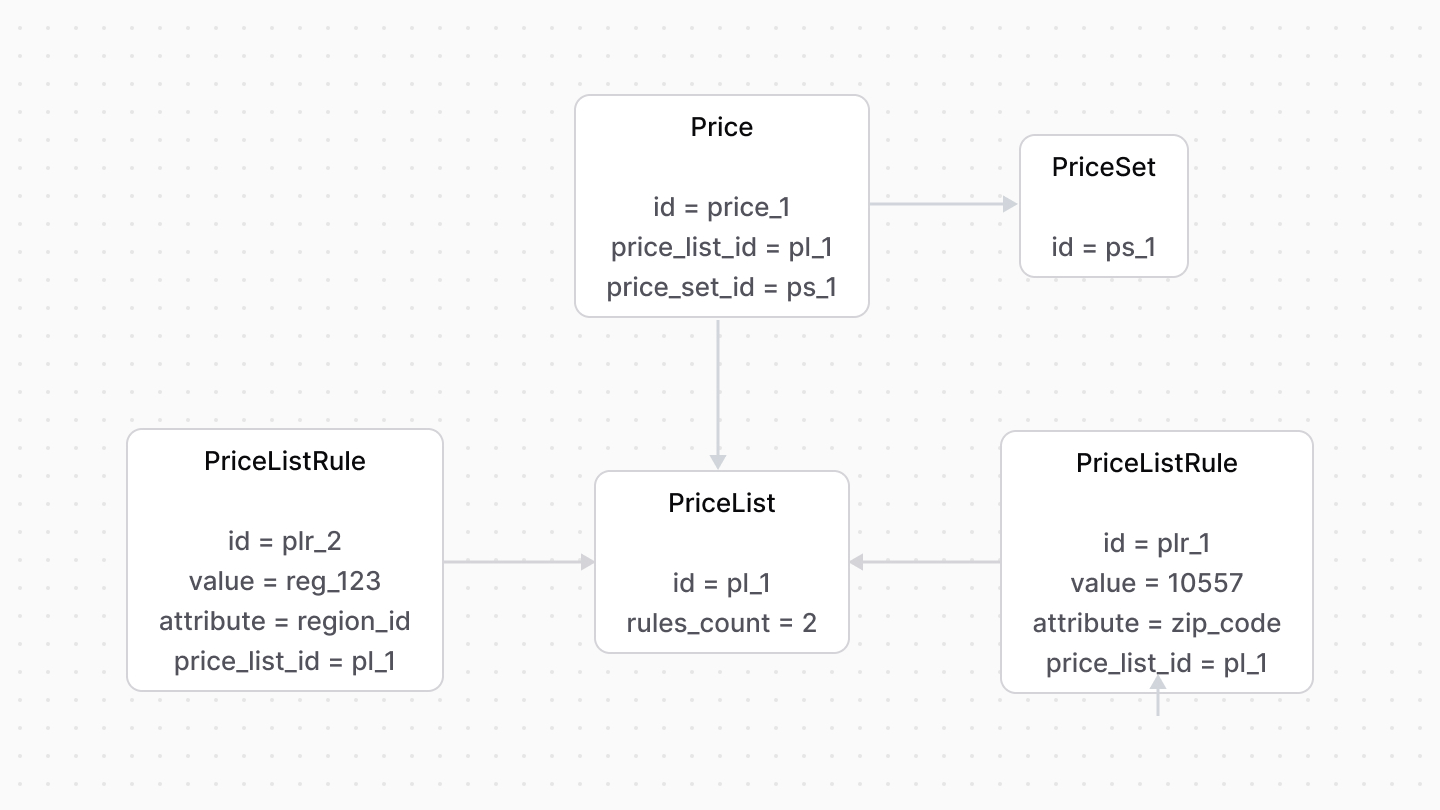
Rules applied to a price list are represented by the [PriceListRule data model](/references/pricing/models/PriceListRule).
|
|
|
|
The `rules_count` property of a `PriceList` indicates how many rules are applied to it.
|
|
|
|
|
|
|
|
### How to Create Prices with Rules?
|
|
|
|
When you create prices, you can specify rules for each price. This allows you to create complex pricing strategies based on different contexts.
|
|
|
|
For example:
|
|
|
|
<Note>
|
|
|
|
For most use cases where you're building customizations in the Medusa application, it's highly recommended to use [Medusa's workflows](../../../medusa-workflows-reference/page.mdx) rather than using the Pricing Module directly. Medusa's workflows already implement extensive functionalities that you can re-use in your custom flows, with reliable roll-back mechanism.
|
|
|
|
</Note>
|
|
|
|
<CodeTabs group="price-example">
|
|
<CodeTab label="Using Medusa Workflows" value="workflows">
|
|
|
|
export const workflowHighlights = [
|
|
["19", "rules", "The default price doesn't have rules."],
|
|
["27", "attribute", "Apply the price if the cart or order's total matches the condition."]
|
|
]
|
|
|
|
```ts highlights={workflowHighlights}
|
|
const { result } = await createShippingOptionsWorkflow(container)
|
|
.run({
|
|
input: [{
|
|
name: "Standard Shipping",
|
|
service_zone_id: "serzo_123",
|
|
shipping_profile_id: "sp_123",
|
|
provider_id: "prov_123",
|
|
type: {
|
|
label: "Standard",
|
|
description: "Standard shipping",
|
|
code: "standard",
|
|
},
|
|
price_type: "flat",
|
|
prices: [
|
|
// default price
|
|
{
|
|
currency_code: "usd",
|
|
amount: 10,
|
|
rules: [],
|
|
},
|
|
// price if cart total >= $100
|
|
{
|
|
currency_code: "usd",
|
|
amount: 0,
|
|
rules: [
|
|
{
|
|
attribute: "item_total",
|
|
operator: "gte",
|
|
value: 100,
|
|
},
|
|
],
|
|
},
|
|
],
|
|
}],
|
|
})
|
|
```
|
|
|
|
</CodeTab>
|
|
<CodeTab label="Using the Pricing Module" value="pricing-module">
|
|
|
|
```ts
|
|
const priceSet = await pricingModule.addPrices({
|
|
priceSetId: "pset_1",
|
|
prices: [
|
|
// default price
|
|
{
|
|
currency_code: "usd",
|
|
amount: 10,
|
|
rules: {},
|
|
},
|
|
// price if cart total >= $100
|
|
{
|
|
currency_code: "usd",
|
|
amount: 0,
|
|
rules: {
|
|
item_total: {
|
|
operator: "gte",
|
|
value: 100,
|
|
},
|
|
},
|
|
},
|
|
],
|
|
})
|
|
```
|
|
|
|
</CodeTab>
|
|
</CodeTabs>
|
|
|
|
In this example, you create a shipping option whose default price is `$10`. When the total of the cart or order using this shipping option is greater than `$100`, the shipping option's price becomes free.
|
|
|
|
### How is the Price Rule Applied?
|
|
|
|
The [price calculation](../price-calculation/page.mdx) mechanism considers a price applicable when the resource that this price is in matches the specified rules.
|
|
|
|
For example, a [cart object](!api!/store#carts_cart_schema) has an `item_total` property. So, if a shipping option has the following price:
|
|
|
|
```json
|
|
{
|
|
"currency_code": "usd",
|
|
"amount": 0,
|
|
"rules": {
|
|
"item_total": {
|
|
"operator": "gte",
|
|
"value": 100,
|
|
}
|
|
}
|
|
}
|
|
```
|
|
|
|
The shipping option's price is applied when the cart's `item_total` is greater than or equal to `$100`.
|
|
|
|
You can also apply the rule on nested relations and properties. For example, to apply a shipping option's price based on the customer's group, you can apply a rule on the `customer.group.id` attribute:
|
|
|
|
```json
|
|
{
|
|
"currency_code": "usd",
|
|
"amount": 0,
|
|
"rules": {
|
|
"customer.group.id": {
|
|
"operator": "eq",
|
|
"value": "cusgrp_123"
|
|
}
|
|
}
|
|
}
|
|
```
|
|
|
|
In this example, the price is only applied if a cart's customer belongs to the customer group of ID `cusgrp_123`.
|
|
|
|
<Note>
|
|
|
|
These same rules apply to product variant prices as well, or any other resource that has a price.
|
|
|
|
</Note>
|
|
|
|
---
|
|
|
|
## Examples
|
|
|
|
This section provides some examples of implementing price tiers and rules for products and shipping options.
|
|
|
|
### Product Variant Price by Quantity
|
|
|
|
<CodeTabs group="product-tier-example">
|
|
<CodeTab label="Using Medusa Workflows" value="workflows">
|
|
|
|
```ts
|
|
import { createProductsWorkflow } from "@medusajs/medusa/core-flows"
|
|
|
|
// ...
|
|
|
|
const { result } = await createProductsWorkflow(container)
|
|
.run({
|
|
input: {
|
|
products: [{
|
|
title: "Premium T-Shirt",
|
|
variants: [{
|
|
title: "Small / Black",
|
|
prices: [
|
|
// default price
|
|
{
|
|
amount: 20,
|
|
currency_code: "usd",
|
|
},
|
|
// buy 5 or more, get a small discount
|
|
{
|
|
amount: 18,
|
|
currency_code: "usd",
|
|
min_quantity: 5,
|
|
max_quantity: 9,
|
|
},
|
|
// buy 10 or more, get a bigger discount
|
|
{
|
|
amount: 15,
|
|
currency_code: "usd",
|
|
min_quantity: 10,
|
|
},
|
|
],
|
|
}],
|
|
}],
|
|
},
|
|
})
|
|
```
|
|
|
|
</CodeTab>
|
|
<CodeTab label="Using the Pricing Module" value="pricing-module">
|
|
|
|
```ts
|
|
const priceSet = await pricingModule.addPrices({
|
|
// this is the price set of the product variant
|
|
priceSetId: "pset_product_123",
|
|
prices: [
|
|
// default price: $20.00
|
|
{
|
|
amount: 20,
|
|
currency_code: "usd",
|
|
},
|
|
// buy 5-9 shirts: $18.00 each
|
|
{
|
|
amount: 18,
|
|
currency_code: "usd",
|
|
min_quantity: 5,
|
|
max_quantity: 9,
|
|
},
|
|
// buy 10+ shirts: $15.00 each
|
|
{
|
|
amount: 15,
|
|
currency_code: "usd",
|
|
min_quantity: 10,
|
|
},
|
|
],
|
|
})
|
|
```
|
|
|
|
</CodeTab>
|
|
</CodeTabs>
|
|
|
|
### Product Variant Price by Customer Group
|
|
|
|
<CodeTabs group="product-rule-example">
|
|
<CodeTab label="Using Medusa Workflows" value="workflows">
|
|
|
|
```ts
|
|
import { createProductsWorkflow } from "@medusajs/medusa/core-flows"
|
|
|
|
// ...
|
|
|
|
const { result } = await createProductsWorkflow(container)
|
|
.run({
|
|
input: {
|
|
products: [{
|
|
title: "Premium T-Shirt",
|
|
variants: [{
|
|
title: "Small / Black",
|
|
prices: [
|
|
// default price
|
|
{
|
|
amount: 40,
|
|
currency_code: "usd",
|
|
},
|
|
// discounted price for VIP customers
|
|
{
|
|
amount: 30,
|
|
currency_code: "usd",
|
|
rules: {
|
|
"customer.groups.id": "cusgrp_vip123",
|
|
},
|
|
},
|
|
// special price for wholesale customers
|
|
{
|
|
amount: 20,
|
|
currency_code: "usd",
|
|
rules: {
|
|
"customer.groups.id": "cusgrp_wholesale456",
|
|
},
|
|
},
|
|
],
|
|
}],
|
|
}],
|
|
},
|
|
})
|
|
```
|
|
|
|
</CodeTab>
|
|
<CodeTab label="Using the Pricing Module" value="pricing-module">
|
|
|
|
```ts
|
|
const priceSet = await pricingModule.addPrices({
|
|
// this is the price set of the product variant
|
|
priceSetId: "pset_product_123",
|
|
prices: [
|
|
// default price
|
|
{
|
|
amount: 40,
|
|
currency_code: "usd",
|
|
},
|
|
// discounted price for VIP customers
|
|
{
|
|
amount: 30,
|
|
currency_code: "usd",
|
|
rules: {
|
|
"customer.groups.id": "cusgrp_vip123",
|
|
},
|
|
},
|
|
// special price for wholesale customers
|
|
{
|
|
amount: 20,
|
|
currency_code: "usd",
|
|
rules: {
|
|
"customer.groups.id": "cusgrp_wholesale456",
|
|
},
|
|
},
|
|
],
|
|
})
|
|
```
|
|
|
|
</CodeTab>
|
|
</CodeTabs>
|
|
|
|
### Free Shipping for Orders Above a Certain Amount
|
|
|
|
<CodeTabs group="shipping-tier-example">
|
|
<CodeTab label="Using Medusa Workflows" value="workflows">
|
|
|
|
```ts
|
|
const { result } = await createShippingOptionsWorkflow(container)
|
|
.run({
|
|
input: [{
|
|
name: "Standard Shipping",
|
|
service_zone_id: "serzo_123",
|
|
shipping_profile_id: "sp_123",
|
|
provider_id: "prov_123",
|
|
type: {
|
|
label: "Standard",
|
|
description: "Standard shipping (2-5 business days)",
|
|
code: "standard",
|
|
},
|
|
price_type: "flat",
|
|
prices: [
|
|
// regular shipping price
|
|
{
|
|
currency_code: "usd",
|
|
amount: 10,
|
|
rules: [],
|
|
},
|
|
// free shipping for carts over $100
|
|
{
|
|
currency_code: "usd",
|
|
amount: 0,
|
|
rules: [
|
|
{
|
|
attribute: "item_total",
|
|
operator: "gte",
|
|
value: 100,
|
|
},
|
|
],
|
|
},
|
|
],
|
|
}],
|
|
})
|
|
```
|
|
|
|
</CodeTab>
|
|
<CodeTab label="Using the Pricing Module" value="pricing-module">
|
|
|
|
```ts
|
|
const priceSet = await pricingModule.addPrices({
|
|
priceSetId: "pset_shipping_123",
|
|
prices: [
|
|
// regular shipping price
|
|
{
|
|
currency_code: "usd",
|
|
amount: 10,
|
|
rules: {},
|
|
},
|
|
// free shipping for orders over $100
|
|
{
|
|
currency_code: "usd",
|
|
amount: 0,
|
|
rules: {
|
|
item_total: [
|
|
{
|
|
operator: "gte",
|
|
value: 100,
|
|
},
|
|
],
|
|
},
|
|
},
|
|
],
|
|
})
|
|
```
|
|
|
|
</CodeTab>
|
|
</CodeTabs>
|
|
|
|
### Shipping Prices Based on Customer Groups
|
|
|
|
<CodeTabs group="shipping-customer-example">
|
|
<CodeTab label="Using Medusa Workflows" value="workflows">
|
|
|
|
```ts
|
|
const { result } = await createShippingOptionsWorkflow(container)
|
|
.run({
|
|
input: [{
|
|
name: "Express Shipping",
|
|
service_zone_id: "serzo_456",
|
|
shipping_profile_id: "sp_456",
|
|
provider_id: "prov_456",
|
|
type: {
|
|
label: "Express",
|
|
description: "Express shipping (1-2 business days)",
|
|
code: "express",
|
|
},
|
|
price_type: "flat",
|
|
prices: [
|
|
// regular express shipping price
|
|
{
|
|
currency_code: "usd",
|
|
amount: 20,
|
|
rules: [],
|
|
},
|
|
// discounted express shipping for VIP customers
|
|
{
|
|
currency_code: "usd",
|
|
amount: 15,
|
|
rules: [
|
|
{
|
|
attribute: "customer.groups.id",
|
|
operator: "in",
|
|
value: ["cusgrp_vip123"],
|
|
},
|
|
],
|
|
},
|
|
// special rate for B2B customers
|
|
{
|
|
currency_code: "usd",
|
|
amount: 13,
|
|
rules: [
|
|
{
|
|
attribute: "customer.groups.id",
|
|
operator: "in",
|
|
value: ["cusgrp_b2b789"],
|
|
},
|
|
],
|
|
},
|
|
],
|
|
}],
|
|
})
|
|
```
|
|
|
|
</CodeTab>
|
|
<CodeTab label="Using the Pricing Module" value="pricing-module">
|
|
|
|
```ts
|
|
const priceSet = await pricingModule.addPrices({
|
|
priceSetId: "pset_shipping_456",
|
|
prices: [
|
|
// regular express shipping
|
|
{
|
|
currency_code: "usd",
|
|
amount: 20,
|
|
rules: {},
|
|
},
|
|
// VIP customer express shipping
|
|
{
|
|
currency_code: "usd",
|
|
amount: 15,
|
|
rules: {
|
|
"customer.groups.id": [
|
|
{
|
|
operator: "in",
|
|
value: ["cusgrp_vip123"],
|
|
},
|
|
],
|
|
},
|
|
},
|
|
// B2B customer express shipping
|
|
{
|
|
currency_code: "usd",
|
|
amount: 13,
|
|
rules: {
|
|
"customer.groups.id": [
|
|
{
|
|
operator: "in",
|
|
value: ["cusgrp_b2b789"],
|
|
},
|
|
],
|
|
},
|
|
},
|
|
],
|
|
})
|
|
```
|
|
|
|
</CodeTab>
|
|
</CodeTabs>
|
|
|
|
### Combined Tiered and Rule-Based Shipping Pricing
|
|
|
|
<CodeTabs group="shipping-combined-example">
|
|
<CodeTab label="Using Medusa Workflows" value="workflows">
|
|
|
|
```ts
|
|
const { result } = await createShippingOptionsWorkflow(container)
|
|
.run({
|
|
input: [{
|
|
name: "Bulk Shipping",
|
|
service_zone_id: "serzo_789",
|
|
shipping_profile_id: "sp_789",
|
|
provider_id: "prov_789",
|
|
type: {
|
|
label: "Bulk",
|
|
description: "Shipping for bulk orders",
|
|
code: "bulk",
|
|
},
|
|
price_type: "flat",
|
|
prices: [
|
|
// base shipping price
|
|
{
|
|
currency_code: "usd",
|
|
amount: 20,
|
|
rules: [],
|
|
},
|
|
// discounted shipping for 5-10 items
|
|
{
|
|
currency_code: "usd",
|
|
amount: 18,
|
|
min_quantity: 5,
|
|
max_quantity: 10,
|
|
rules: [],
|
|
},
|
|
// heavily discounted shipping for 10+ items
|
|
{
|
|
currency_code: "usd",
|
|
amount: 15,
|
|
min_quantity: 11,
|
|
rules: [],
|
|
},
|
|
// free shipping for VIP customers with carts over $200
|
|
{
|
|
currency_code: "usd",
|
|
amount: 0,
|
|
rules: {
|
|
"customer.groups.id": [
|
|
{
|
|
operator: "in",
|
|
value: ["cusgrp_vip123"],
|
|
},
|
|
],
|
|
item_total: [
|
|
{
|
|
operator: "gte",
|
|
value: 200,
|
|
},
|
|
],
|
|
},
|
|
},
|
|
],
|
|
}],
|
|
})
|
|
```
|
|
|
|
</CodeTab>
|
|
<CodeTab label="Using the Pricing Module" value="pricing-module">
|
|
|
|
```ts
|
|
const priceSet = await pricingModule.addPrices({
|
|
priceSetId: "pset_shipping_789",
|
|
prices: [
|
|
// base shipping price: $20.00
|
|
{
|
|
currency_code: "usd",
|
|
amount: 20,
|
|
rules: {},
|
|
},
|
|
// 5-10 items: $18.00
|
|
{
|
|
currency_code: "usd",
|
|
amount: 18,
|
|
min_quantity: 5,
|
|
max_quantity: 10,
|
|
rules: {},
|
|
},
|
|
// 11+ items: $15.00
|
|
{
|
|
currency_code: "usd",
|
|
amount: 15,
|
|
min_quantity: 11,
|
|
rules: {},
|
|
},
|
|
// VIP customers with orders over $200: FREE
|
|
{
|
|
currency_code: "usd",
|
|
amount: 0,
|
|
rules: [
|
|
{
|
|
attribute: "customer.groups.id",
|
|
operator: "in",
|
|
value: ["cusgrp_vip123"],
|
|
},
|
|
{
|
|
attribute: "item_total",
|
|
operator: "gte",
|
|
value: 200,
|
|
},
|
|
],
|
|
},
|
|
],
|
|
})
|
|
```
|
|
|
|
</CodeTab>
|
|
</CodeTabs>
|
|
|
|
### Shipping Prices Based on Geographical Rules
|
|
|
|
<CodeTabs group="shipping-geo-example">
|
|
<CodeTab label="Using Medusa Workflows" value="workflows">
|
|
|
|
```ts
|
|
const { result } = await createShippingOptionsWorkflow(container)
|
|
.run({
|
|
input: [{
|
|
name: "Regional Shipping",
|
|
service_zone_id: "serzo_geo123",
|
|
shipping_profile_id: "sp_standard",
|
|
provider_id: "prov_standard",
|
|
type: {
|
|
label: "Standard",
|
|
description: "Standard shipping with regional pricing",
|
|
code: "standard_regional",
|
|
},
|
|
price_type: "flat",
|
|
prices: [
|
|
// default shipping price
|
|
{
|
|
currency_code: "usd",
|
|
amount: 15,
|
|
rules: [],
|
|
},
|
|
// special price for specific zip codes (metropolitan areas)
|
|
{
|
|
currency_code: "usd",
|
|
amount: 10,
|
|
rules: [
|
|
{
|
|
attribute: "shipping_address.postal_code",
|
|
operator: "in",
|
|
value: ["10001", "10002", "10003", "90001", "90002", "90003"],
|
|
},
|
|
],
|
|
},
|
|
// higher price for remote areas
|
|
{
|
|
currency_code: "usd",
|
|
amount: 25,
|
|
rules: [
|
|
{
|
|
attribute: "shipping_address.postal_code",
|
|
operator: "in",
|
|
value: ["99501", "99502", "99503", "00601", "00602", "00603"],
|
|
},
|
|
],
|
|
},
|
|
// different price for a specific region
|
|
{
|
|
currency_code: "usd",
|
|
amount: 12,
|
|
rules: [
|
|
{
|
|
attribute: "region.id",
|
|
operator: "eq",
|
|
value: "reg_123",
|
|
},
|
|
],
|
|
},
|
|
// different price for a specific country
|
|
{
|
|
currency_code: "usd",
|
|
amount: 20,
|
|
rules: [
|
|
{
|
|
attribute: "shipping_address.country_code",
|
|
operator: "eq",
|
|
value: "ca",
|
|
},
|
|
],
|
|
},
|
|
],
|
|
}],
|
|
})
|
|
```
|
|
|
|
</CodeTab>
|
|
<CodeTab label="Using the Pricing Module" value="pricing-module">
|
|
|
|
```ts
|
|
const priceSet = await pricingModule.addPrices({
|
|
priceSetId: "pset_shipping_geo",
|
|
prices: [
|
|
// default shipping price: $15.00
|
|
{
|
|
currency_code: "usd",
|
|
amount: 15,
|
|
rules: {},
|
|
},
|
|
// metropolitan areas: $10.00
|
|
{
|
|
currency_code: "usd",
|
|
amount: 10,
|
|
rules: {
|
|
"shipping_address.postal_code": [
|
|
{
|
|
operator: "in",
|
|
value: ["10001", "10002", "10003", "90001", "90002", "90003"],
|
|
},
|
|
],
|
|
},
|
|
},
|
|
// remote areas: $25.00
|
|
{
|
|
currency_code: "usd",
|
|
amount: 25,
|
|
rules: {
|
|
"shipping_address.postal_code": [
|
|
{
|
|
operator: "in",
|
|
value: ["99501", "99502", "99503", "00601", "00602", "00603"],
|
|
},
|
|
],
|
|
},
|
|
},
|
|
// Northeast region: $12.00
|
|
{
|
|
currency_code: "usd",
|
|
amount: 12,
|
|
rules: {
|
|
"region.id": "reg_123",
|
|
},
|
|
},
|
|
// Canada: $20.00
|
|
{
|
|
currency_code: "usd",
|
|
amount: 20,
|
|
rules: {
|
|
"shipping_address.country_code": "ca",
|
|
},
|
|
},
|
|
],
|
|
})
|
|
```
|
|
|
|
</CodeTab>
|
|
</CodeTabs>
|