 964927b597
* docs improvements and changes

* updated module definition

* modules + dml changes

* fix build

* fix vale error

* fix lint errors

* fixes to stripe docs

* fix condition

* fix condition

* fix module defintion

* fix checkout

* disable UI action

* change oas preview action

* flatten provider module options

* fix lint errors

* add module link docs

* pr comments fixes

* fix vale error

* change node engine version

* links -> linkable

* add note about database name

* small fixes

* link fixes

* fix response code in api reference

* added migrations step
85 lines
3.6 KiB
Plaintext
85 lines
3.6 KiB
Plaintext
export const metadata = {
|
||
title: `${pageNumber} Deployment Overview`,
|
||
}
|
||
|
||
# {metadata.title}
|
||
|
||
In this chapter, you’ll learn about the different methods to deploy your Medusa application.
|
||
|
||
## Medusa Project Components
|
||
|
||
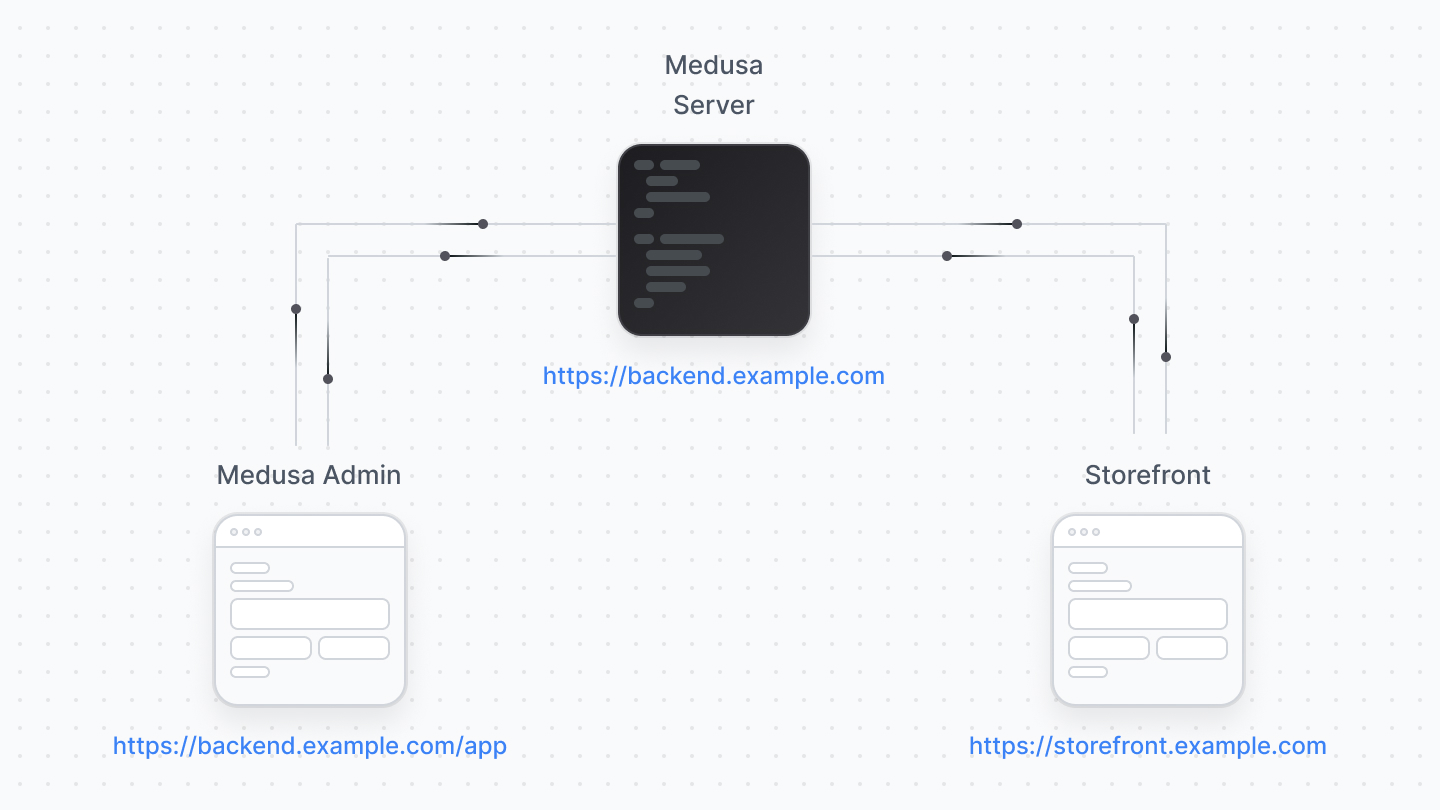
A standard Medusa project is made up of:
|
||
|
||
- Medusa application: The Medusa server and the Medusa Admin.
|
||
- One or more storefronts
|
||
|
||
|
||
|
||
You can either deploy the Medusa application fully (server along with the admin), or deploy the Medusa Admin separately. As for the storefront, it's always deployed separately.
|
||
|
||
---
|
||
|
||
## Deploying the Medusa Server
|
||
|
||
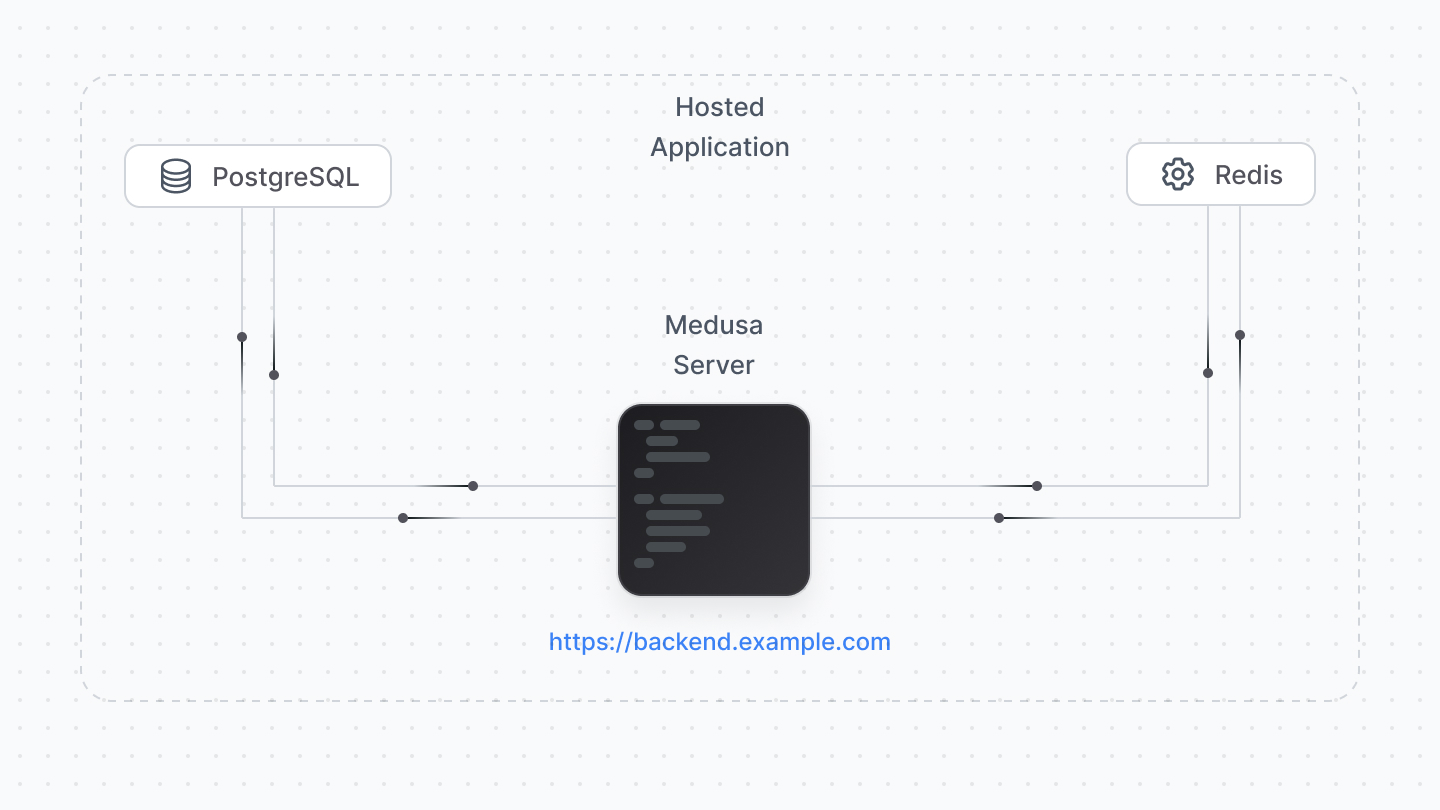
You must deploy the Medusa server before the admin or storefront, as both of them connect to it and won’t work without a deployed Medusa server URL.
|
||
|
||
|
||
|
||
The Medusa server must be deployed to a hosting provider supporting Node.js server deployments, such as Railway, DigitalOcean, AWS, Heruko, etc…
|
||
|
||
<Note title="Tip">
|
||
|
||
For optimal experience, make sure that the hosting provider and plan offer at least 2GB of RAM.
|
||
|
||
</Note>
|
||
|
||
Your server connects to a PostgreSQL database and, optionally, Redis or other services. Most hosting providers support deploying and managing these databases along with your Medusa server (such as Railway and DigitalOcean).
|
||
|
||
Refer to [this reference](!resources!/deployment) to find how-to deployment guides for specific hosting providers.
|
||
|
||
---
|
||
|
||
## Deploying the Medusa Admin
|
||
|
||
### Deploy Admin with the Server
|
||
|
||
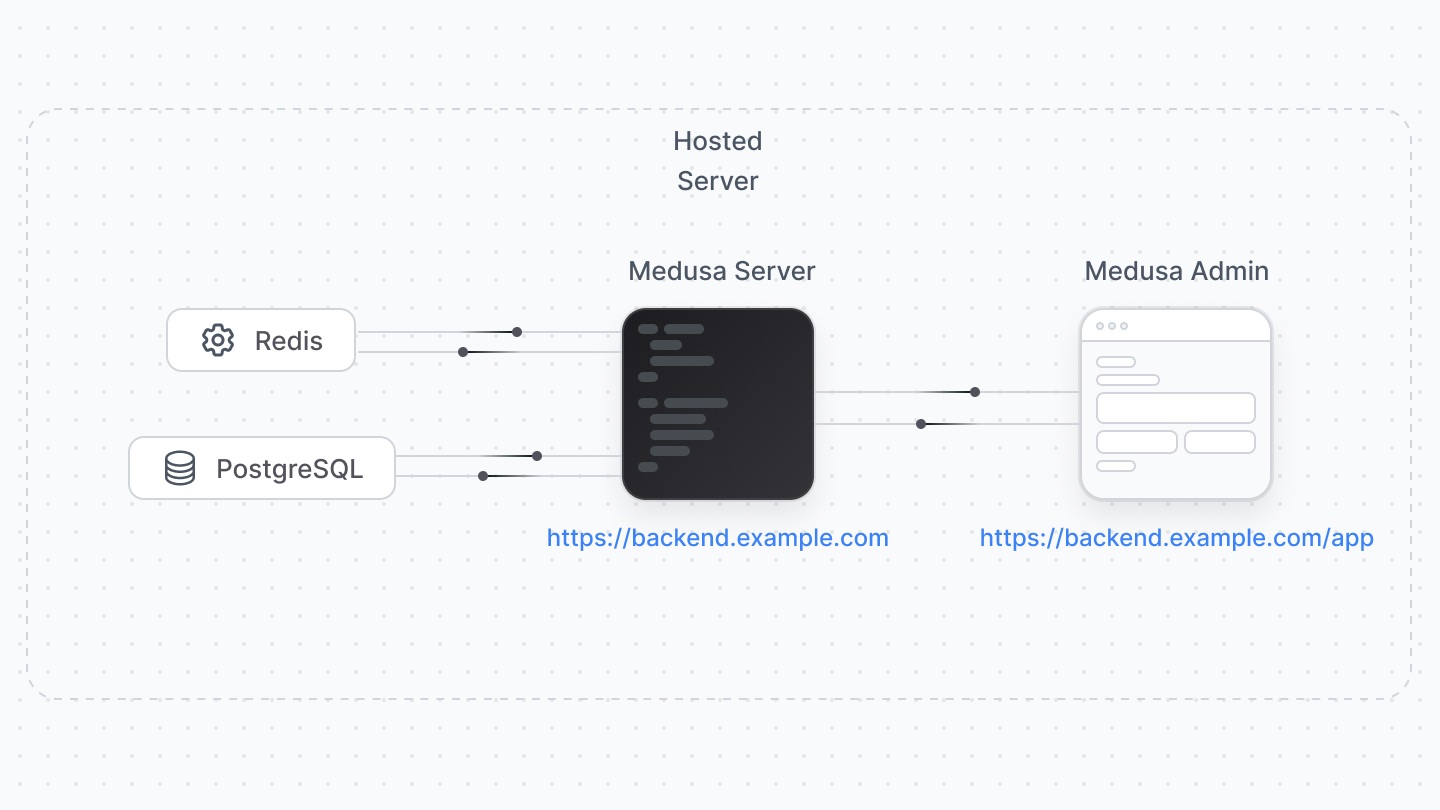
The Medusa Admin can be deployed on the same hosting with the server.
|
||
|
||
In this scenario, make sure the hosting provider and plan of your choice provide at least 2GB of RAM, as the admin build requires high RAM usage.
|
||
|
||
|
||
|
||
<Note title="Tip">
|
||
|
||
The server deployment guides mention details on how to deploy the admin along with the backend.
|
||
|
||
</Note>
|
||
|
||
### Deploy Admin Separately
|
||
|
||
You can deploy the admin into a separate hosting provider or instance. The admin can be hosted on providers that support front-end websites and frameworks, such as Vercel.
|
||
|
||
<Note title="Important">
|
||
|
||
Per Vercel’s [license and plans](https://vercel.com/pricing), their free plan can only be used for personal, non-commercial projects. So, you can deploy the Medusa Admin on the free plan for development purposes, but for commercial projects, you must update your Vercel plan.
|
||
|
||
</Note>
|
||
|
||
Refer to [this reference](!resources!/deployment) to find how-to deployment guides for specific hosting providers.
|
||
|
||
---
|
||
|
||
## Deploying the Storefront
|
||
|
||
The storefront is deployed separately from the Medusa application, and the hosting options depend on the tools and frameworks you use to create the storefront.
|
||
|
||
If you’re using the Next.js starter, you may deploy the storefront to any hosting provider that supports frontend frameworks, such as Vercel.
|
||
|
||
<Note title="Important">
|
||
|
||
Per Vercel’s [license and plans](https://vercel.com/pricing), their free plan can only be used for personal, non-commercial projects. So, you can deploy the storefront on the free plan for development purposes, but for commercial projects, you must update your Vercel plan.
|
||
|
||
</Note>
|
||
|
||
Refer to [this reference](!resoureces!/deployment) to find how-to deployment guides for specific hosting providers.
|