
170 lines
5.7 KiB
Plaintext
170 lines
5.7 KiB
Plaintext
import Tabs from '@theme/Tabs';
|
||
import TabItem from '@theme/TabItem';
|
||
|
||
# How to Implement Claim Order Flow
|
||
|
||
In this document, you’ll learn how to implement the claim order flow in a storefront to allow customers to claim their orders.
|
||
|
||
:::note
|
||
|
||
This flow was added starting from Medusa v1.7. You can learn more about upgrading in the [upgrade guide](../backend/upgrade-guides/1-7-0.md).
|
||
|
||
:::
|
||
|
||
## Flow Overview
|
||
|
||
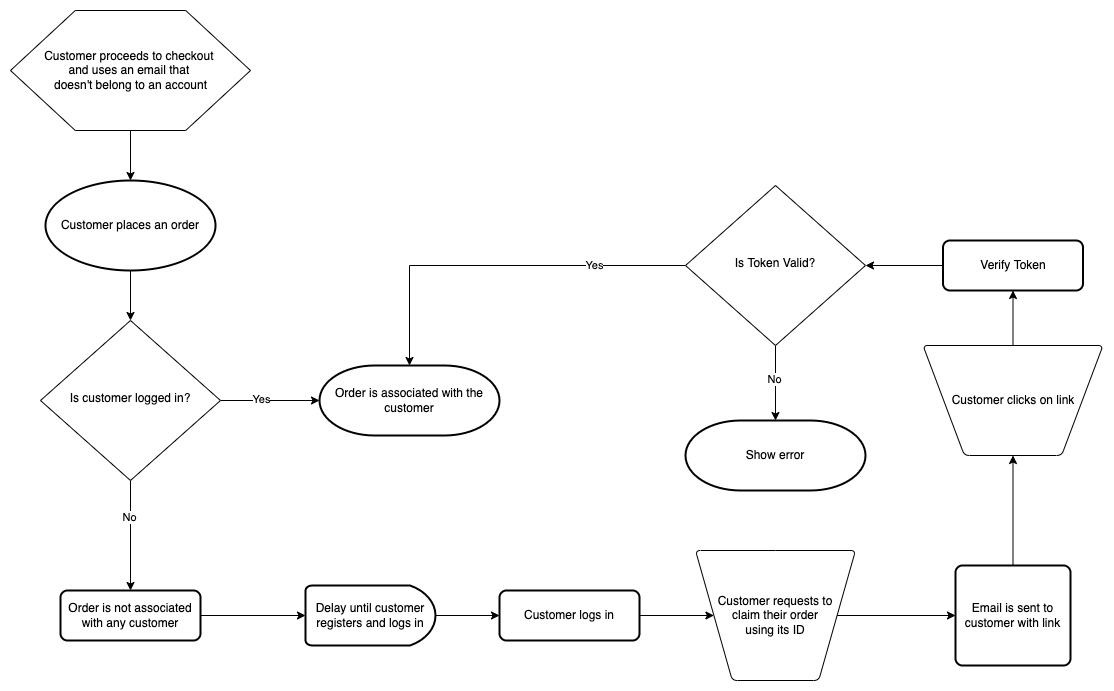
When a guest customer places an order, their order is not associated with any customer. The order is only associated with an email that the guest customer provides during checkout.
|
||
|
||
This email must be an email that isn’t used with an existing account. It can, however, be used to create another order as a guest customer.
|
||
|
||
After this customer registers with a different email and logs in, they can claim their order by providing the order’s ID. An email will then be sent to the email address associated with the order.
|
||
|
||
The email should contain a link to a page in the storefront, and the link should have a token as a parameter. This token will be used for verification.
|
||
|
||
The customer must then click the link in the email they received. If the token is valid, the order will be associated with the customer.
|
||
|
||
|
||
|
||
### What You’ll Learn
|
||
|
||
In this document, you’ll learn how to implement two parts of this flow:
|
||
|
||
1. Allow customers to claim their orders.
|
||
2. Verify a claim to an order.
|
||
|
||
## Prerequisites
|
||
|
||
### Medusa Components
|
||
|
||
It's assumed that you already have a Medusa server installed and set up. If not, you can follow the [quickstart guide](../../quickstart/quick-start.md) to get started.
|
||
|
||
It is also assumed you already have a storefront set up. It can be a custom storefront or one of Medusa’s storefronts. If you don’t have a storefront set up, you can install either the [Next.js](../../starters/nextjs-medusa-starter.md) or [Gatsby](../../starters/gatsby-medusa-starter.md) storefronts.
|
||
|
||
### JS Client
|
||
|
||
This guide includes code snippets to send requests to your Medusa server using Medusa’s JS Client and JavaScript’s Fetch API.
|
||
|
||
If you follow the JS Client code blocks, it’s assumed you already have [Medusa’s JS Client installed](../../js-client/overview.md) and have [created an instance of the client](../../js-client/overview.md#configuration).
|
||
|
||
### Handle Order Claim Request Event
|
||
|
||
When the customer requests to claim the order, an event will be triggered. You should subscribe to this event to send a confirmation email to the customer when the event is triggered.
|
||
|
||
You can learn how to implement this flow in [this documentation](../ecommerce/handle-order-claim-event.md).
|
||
|
||
### Previous Steps
|
||
|
||
It is assumed you already have an order placed by a guest customer. You can refer to the [Cart](../../guides/carts-in-medusa.mdx) and [Checkout](./how-to-implement-checkout-flow.mdx) implementation documentation to learn how to implement them in your storefront.
|
||
|
||
In addition, it is assumed you already have a logged-in customer before performing the steps in this document. You can refer to the [API reference](/api/store/#tag/Auth/operation/PostAuth) for more details on that.
|
||
|
||
## Request to Claim an Order
|
||
|
||
When the customer wants to claim an order, they must supply its ID.
|
||
|
||
To allow the customer to claim an order, send a request to the Claim an Order endpoint:
|
||
|
||
<Tabs groupId="request-type" wrapperClassName="code-tabs">
|
||
<TabItem value="client" label="Medusa JS Client" default>
|
||
|
||
```tsx
|
||
medusa.orders.claimOrders({
|
||
order_ids: [
|
||
order_id,
|
||
],
|
||
})
|
||
.then(() => {
|
||
// successful
|
||
})
|
||
.catch(() => {
|
||
// an error occurred
|
||
});
|
||
```
|
||
|
||
</TabItem>
|
||
<TabItem value="fetch" label="Fetch API">
|
||
|
||
```tsx
|
||
fetch(`<SERVER_URL>/store/orders/batch/customer/token`, {
|
||
method: 'POST',
|
||
credentials: 'include',
|
||
body: JSON.stringify({
|
||
order_ids: [
|
||
order_id,
|
||
],
|
||
}),
|
||
headers: {
|
||
'Content-Type': 'application/json'
|
||
}
|
||
})
|
||
.then(() => {
|
||
//successful
|
||
})
|
||
.catch(() => {
|
||
//display an error to the customer
|
||
});
|
||
```
|
||
|
||
</TabItem>
|
||
</Tabs>
|
||
|
||
This request accepts as a body parameter the array `order_ids`. Each item in the array is the ID of an order that the customer wants to claim. You can pass more than one ID.
|
||
|
||
If the customer’s request has been processed successfully, the request returns a response with a `200` status code.
|
||
|
||
The customer at this point will receive an email with a link to verify their claim on the order.
|
||
|
||
## Manually Verify a Claim to an Order
|
||
|
||
The link in the email that the customer receives should be a page in your storefront that accepts a `token` query parameter.
|
||
|
||
Then, you send a request to the Verify Claim Order endpoint:
|
||
|
||
<Tabs groupId="request-type" wrapperClassName="code-tabs">
|
||
<TabItem value="client" label="Medusa JS Client" default>
|
||
|
||
```tsx
|
||
medusa.orders.confirmRequest({
|
||
token
|
||
})
|
||
.then(() => {
|
||
// successful
|
||
})
|
||
.catch(() => {
|
||
// an error occurred
|
||
});
|
||
```
|
||
|
||
</TabItem>
|
||
<TabItem value="fetch" label="Fetch API">
|
||
|
||
```tsx
|
||
fetch(`<SERVER_URL>/store/orders/customer/confirm`, {
|
||
method: 'POST',
|
||
credentials: 'include',
|
||
body: JSON.stringify({
|
||
token
|
||
}),
|
||
headers: {
|
||
'Content-Type': 'application/json'
|
||
}
|
||
})
|
||
.then(() => {
|
||
//successful
|
||
})
|
||
.catch(() => {
|
||
//display an error to the customer
|
||
});
|
||
```
|
||
|
||
</TabItem>
|
||
</Tabs>
|
||
|
||
This request accepts as a body parameter the string `token`. This would be the token passed as a parameter to your storefront page through the link in the email.
|
||
|
||
If the verification is successful, the order will now be associated with the customer and the customer will be able to see it among their orders.
|
||
|
||
## See Also
|
||
|
||
- Learn [how to send a confirmation email to claim an order](../ecommerce/handle-order-claim-event.md).
|