 fb67d90b64
- Split Module and Module Links to their own chapters
- Add new docs on db operations and transactions in modules, multiple services, links with custom columns, etc...
- Added a list of registered dependencies in a module container
143 lines
4.4 KiB
Plaintext
143 lines
4.4 KiB
Plaintext
export const metadata = {
|
||
title: `${pageNumber} Module Link`,
|
||
}
|
||
|
||
# {metadata.title}
|
||
|
||
In this chapter, you’ll learn what a module link is.
|
||
|
||
## What is a Module Link?
|
||
|
||
Since modules are isolated, you can't access another module's data models to add a relation to it or extend it.
|
||
|
||
Instead, you use a module link. A module link forms an association between two data models of different modules, while maintaining module isolation.
|
||
|
||
---
|
||
|
||
## How to Define a Module Link?
|
||
|
||
### 1. Create Link File
|
||
|
||
Links are defined in a TypeScript or JavaScript file under the `src/links` directory. The file defines the link using the `defineLink` function imported from `@medusajs/framework/utils` and exports it.
|
||
|
||
For example:
|
||
|
||
export const highlights = [
|
||
["6", "linkable", "Special `linkable` property that holds the linkable data models of `HelloModule`."],
|
||
["7", "linkable", "Special `linkable` property that holds the linkable data models of `ProductModule`."],
|
||
]
|
||
|
||
```ts title="src/links/hello-product.ts" highlights={highlights}
|
||
import HelloModule from "../modules/hello"
|
||
import ProductModule from "@medusajs/medusa/product"
|
||
import { defineLink } from "@medusajs/framework/utils"
|
||
|
||
export default defineLink(
|
||
ProductModule.linkable.product,
|
||
HelloModule.linkable.myCustom
|
||
)
|
||
```
|
||
|
||
The `defineLink` function accepts as parameters the link configurations of each module's data model. A module has a special `linkable` property that holds these configurations for its data models.
|
||
|
||
In this example, you define a module link between the `hello` module's `MyCustom` data model and the Product Module's `Product` data model.
|
||
|
||
### 2. Sync Links
|
||
|
||
After defining the link, run the `db:sync-links` command:
|
||
|
||
```bash
|
||
npx medusa db:sync-links
|
||
```
|
||
|
||
The Medusa application creates a new table for your link to store the IDs of linked records.
|
||
|
||
Use this command whenever you make changes to your links. For example, run this command if you remove your link definition file.
|
||
|
||
<Note title="Tip">
|
||
|
||
You can also use the `db:migrate` command, which both runs the migrations and syncs the links.
|
||
|
||
</Note>
|
||
|
||
---
|
||
|
||
## How Module Links Work?
|
||
|
||
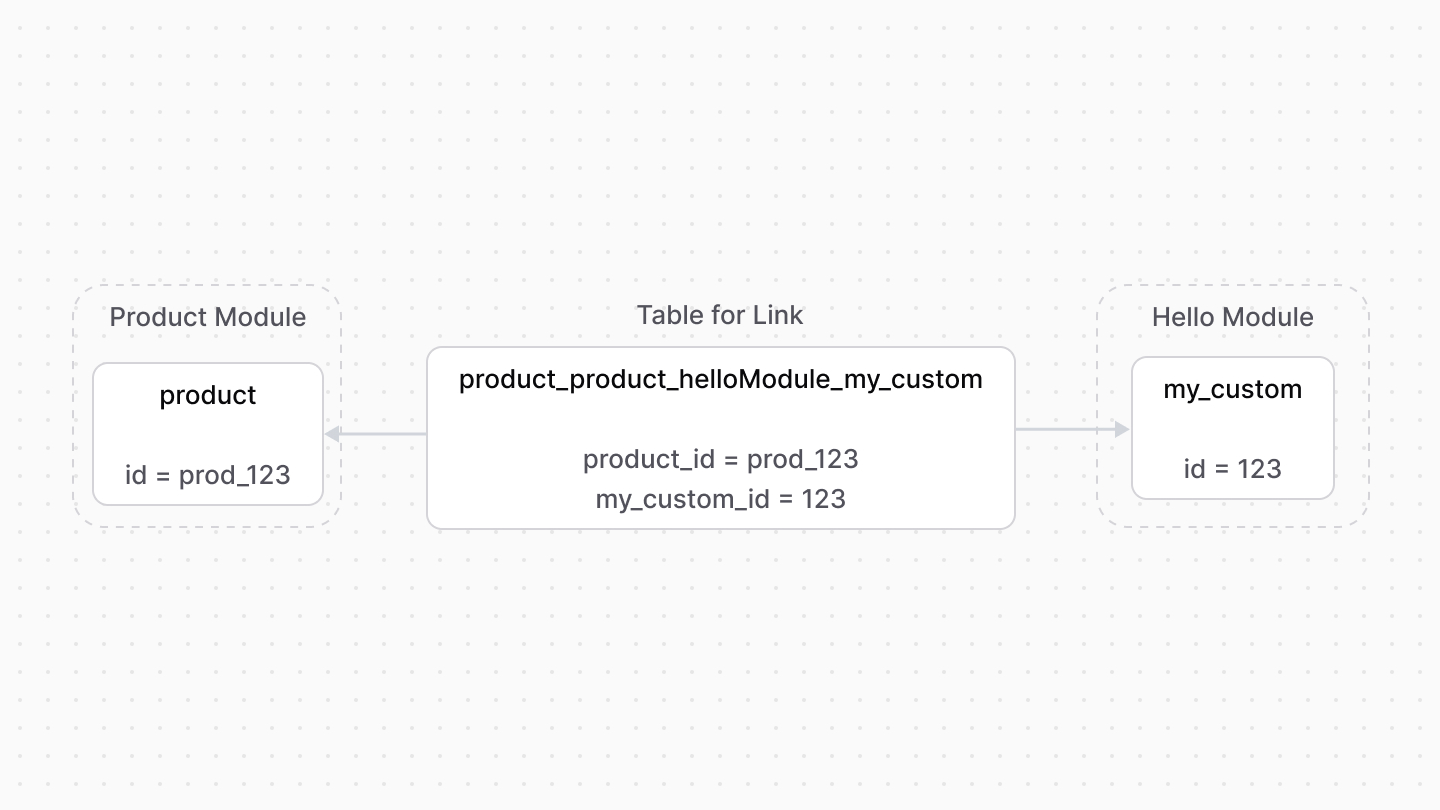
When you define a module link, the Medusa application creates a table in the database for that link.
|
||
|
||
Then, when you create links between records of the data models, the IDs of these data models are stored as a new record in the link's table.
|
||
|
||
|
||
|
||
---
|
||
|
||
## When to Use Module Links
|
||
|
||
<Note title="Use module links when" type="success">
|
||
|
||
- You want to create a relation between data models from different modules.
|
||
- You want to extend the data model of another module.
|
||
|
||
</Note>
|
||
|
||
<Note title="Don't use module links if" type="error">
|
||
|
||
You want to create a relationship between data models in the same module. Use data model relationships instead.
|
||
|
||
</Note>
|
||
|
||
---
|
||
|
||
## Define a List Link
|
||
|
||
By default, the defined link establishes a one-to-one relation: a record of a data model is linked to one record of the other data model.
|
||
|
||
To specify that a data model can have multiple of its records linked to the other data model's record, use the `isList` option.
|
||
|
||
For example:
|
||
|
||
```ts
|
||
import HelloModule from "../modules/hello"
|
||
import ProductModule from "@medusajs/medusa/product"
|
||
import { defineLink } from "@medusajs/framework/utils"
|
||
|
||
export default defineLink(
|
||
ProductModule.linkable.product,
|
||
{
|
||
linkable: HelloModule.linkable.myCustom,
|
||
isList: true,
|
||
}
|
||
)
|
||
```
|
||
|
||
In this case, you pass an object of configuration as a parameter instead. The object accepts the following properties:
|
||
|
||
- `linkable`: The data model's link configuration.
|
||
- `isList`: Whether multiple records can be linked to one record of the other data model.
|
||
|
||
In this example, a record of `product` can be linked to more than one record of `myCustom`.
|
||
|
||
---
|
||
|
||
## Set Delete Cascades on Link
|
||
|
||
To enable delete cascade on a link so that when a record is deleted, its linked records are also deleted, pass the `deleteCascades` property in the object passed to `defineLink`.
|
||
|
||
For example:
|
||
|
||
```ts
|
||
import HelloModule from "../modules/hello"
|
||
import ProductModule from "@medusajs/medusa/product"
|
||
import { defineLink } from "@medusajs/framework/utils"
|
||
|
||
export default defineLink(
|
||
ProductModule.linkable.product,
|
||
{
|
||
linkable: HelloModule.linkable.myCustom,
|
||
deleteCascades: true,
|
||
}
|
||
)
|
||
```
|
||
|
||
In this example, when a product is deleted, its linked `myCustom` record is also deleted. |