 Shahed Nasser
504 lines
12 KiB
Plaintext
504 lines
12 KiB
Plaintext
import { CodeTabs, CodeTab } from "docs-ui"
|
|
|
|
export const metadata = {
|
|
title: `Links between Cart Module and Other Modules`,
|
|
}
|
|
|
|
# {metadata.title}
|
|
|
|
This document showcases the module links defined between the Cart Module and other commerce modules.
|
|
|
|
## Summary
|
|
|
|
The Cart Module has the following links to other modules:
|
|
|
|
<Note title="Tip">
|
|
|
|
Read-only links are used to query data across modules, but the relations aren't stored in a pivot table in the database.
|
|
|
|
</Note>
|
|
|
|
- [`Cart` data model \<\> `Customer` data model of Customer Module](#customer-module). (Read-only).
|
|
- [`Order` data model of Order Module \<\> `Cart` data model](#order-module).
|
|
- [`Cart` data model \<\> `PaymentCollection` data model of Payment Module](#payment-module).
|
|
- [`LineItem` data model \<\> `Product` data model of Product Module](#product-module). (Read-only).
|
|
- [`LineItem` data model \<\> `ProductVariant` data model of Product Module](#product-module). (Read-only).
|
|
- [`Cart` data model \<\> `Promotion` data model of Promotion Module](#promotion-module).
|
|
- [`Cart` data model \<\> `Region` data model of Region Module](#region-module). (Read-only).
|
|
- [`Cart` data model \<\> `SalesChannel` data model of Sales Channel Module](#sales-channel-module). (Read-only).
|
|
|
|
---
|
|
|
|
## Customer Module
|
|
|
|
Medusa defines a read-only link between the `Cart` data model and the [Customer Module](../../customer/page.mdx)'s `Customer` data model. This means you can retrieve the details of a cart's customer, but you don't manage the links in a pivot table in the database. The customer of a cart is determined by the `customer_id` property of the `Cart` data model.
|
|
|
|
### Retrieve with Query
|
|
|
|
To retrieve the customer of a cart with [Query](!docs!/learn/fundamentals/module-links/query), pass `customer.*` in `fields`:
|
|
|
|
<CodeTabs group="relation-query">
|
|
<CodeTab label="query.graph" value="method">
|
|
|
|
```ts
|
|
const { data: carts } = await query.graph({
|
|
entity: "cart",
|
|
fields: [
|
|
"customer.*",
|
|
],
|
|
})
|
|
|
|
// carts.order
|
|
```
|
|
|
|
</CodeTab>
|
|
<CodeTab label="useQueryGraphStep" value="step">
|
|
|
|
```ts
|
|
import { useQueryGraphStep } from "@medusajs/medusa/core-flows"
|
|
|
|
// ...
|
|
|
|
const { data: carts } = useQueryGraphStep({
|
|
entity: "cart",
|
|
fields: [
|
|
"customer.*",
|
|
],
|
|
})
|
|
|
|
// carts.order
|
|
```
|
|
|
|
</CodeTab>
|
|
</CodeTabs>
|
|
|
|
---
|
|
|
|
## Order Module
|
|
|
|
The [Order Module](../../order/page.mdx) provides order-management features.
|
|
|
|
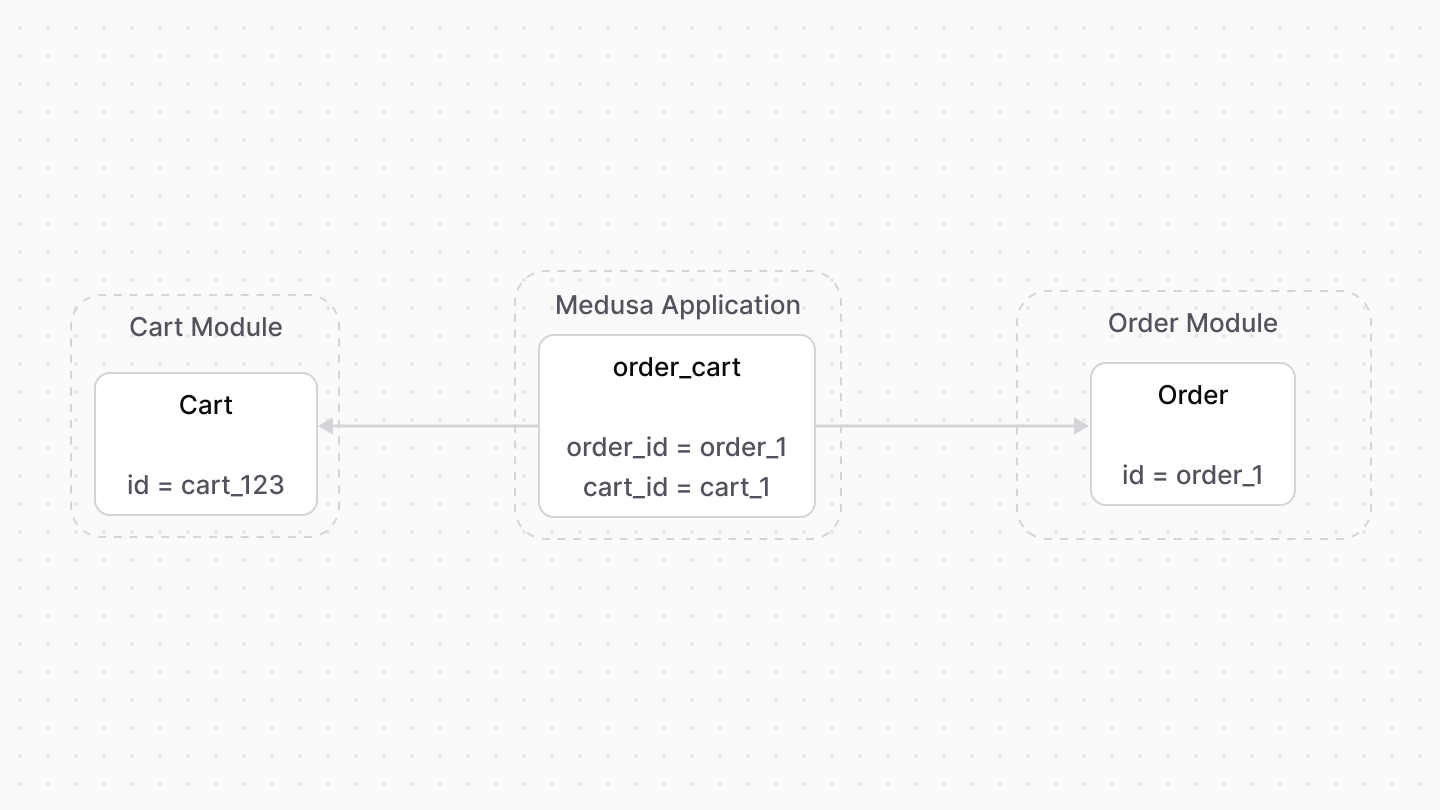
Medusa defines a link between the `Cart` and `Order` data models. The cart is linked to the order created once the cart is completed.
|
|
|
|
|
|
|
|
### Retrieve with Query
|
|
|
|
To retrieve the order of a cart with [Query](!docs!/learn/fundamentals/module-links/query), pass `order.*` in `fields`:
|
|
|
|
<CodeTabs group="relation-query">
|
|
<CodeTab label="query.graph" value="method">
|
|
|
|
```ts
|
|
const { data: carts } = await query.graph({
|
|
entity: "cart",
|
|
fields: [
|
|
"order.*",
|
|
],
|
|
})
|
|
|
|
// carts.order
|
|
```
|
|
|
|
</CodeTab>
|
|
<CodeTab label="useQueryGraphStep" value="step">
|
|
|
|
```ts
|
|
import { useQueryGraphStep } from "@medusajs/medusa/core-flows"
|
|
|
|
// ...
|
|
|
|
const { data: carts } = useQueryGraphStep({
|
|
entity: "cart",
|
|
fields: [
|
|
"order.*",
|
|
],
|
|
})
|
|
|
|
// carts.order
|
|
```
|
|
|
|
</CodeTab>
|
|
</CodeTabs>
|
|
|
|
### Manage with Link
|
|
|
|
To manage the order of a cart, use [Link](!docs!/learn/fundamentals/module-links/link):
|
|
|
|
<CodeTabs group="relation-link">
|
|
<CodeTab label="link.create" value="method">
|
|
|
|
```ts
|
|
import { Modules } from "@medusajs/framework/utils"
|
|
|
|
// ...
|
|
|
|
await link.create({
|
|
[Modules.CART]: {
|
|
cart_id: "cart_123",
|
|
},
|
|
[Modules.ORDER]: {
|
|
order_id: "order_123",
|
|
},
|
|
})
|
|
```
|
|
|
|
</CodeTab>
|
|
<CodeTab label="createRemoteLinkStep" value="step">
|
|
|
|
```ts
|
|
import { Modules } from "@medusajs/framework/utils"
|
|
import { createRemoteLinkStep } from "@medusajs/medusa/core-flows"
|
|
|
|
// ...
|
|
|
|
createRemoteLinkStep({
|
|
[Modules.CART]: {
|
|
cart_id: "cart_123",
|
|
},
|
|
[Modules.ORDER]: {
|
|
order_id: "order_123",
|
|
},
|
|
})
|
|
```
|
|
|
|
</CodeTab>
|
|
</CodeTabs>
|
|
|
|
---
|
|
|
|
## Payment Module
|
|
|
|
The [Payment Module](../../payment/page.mdx) handles payment processing and management.
|
|
|
|
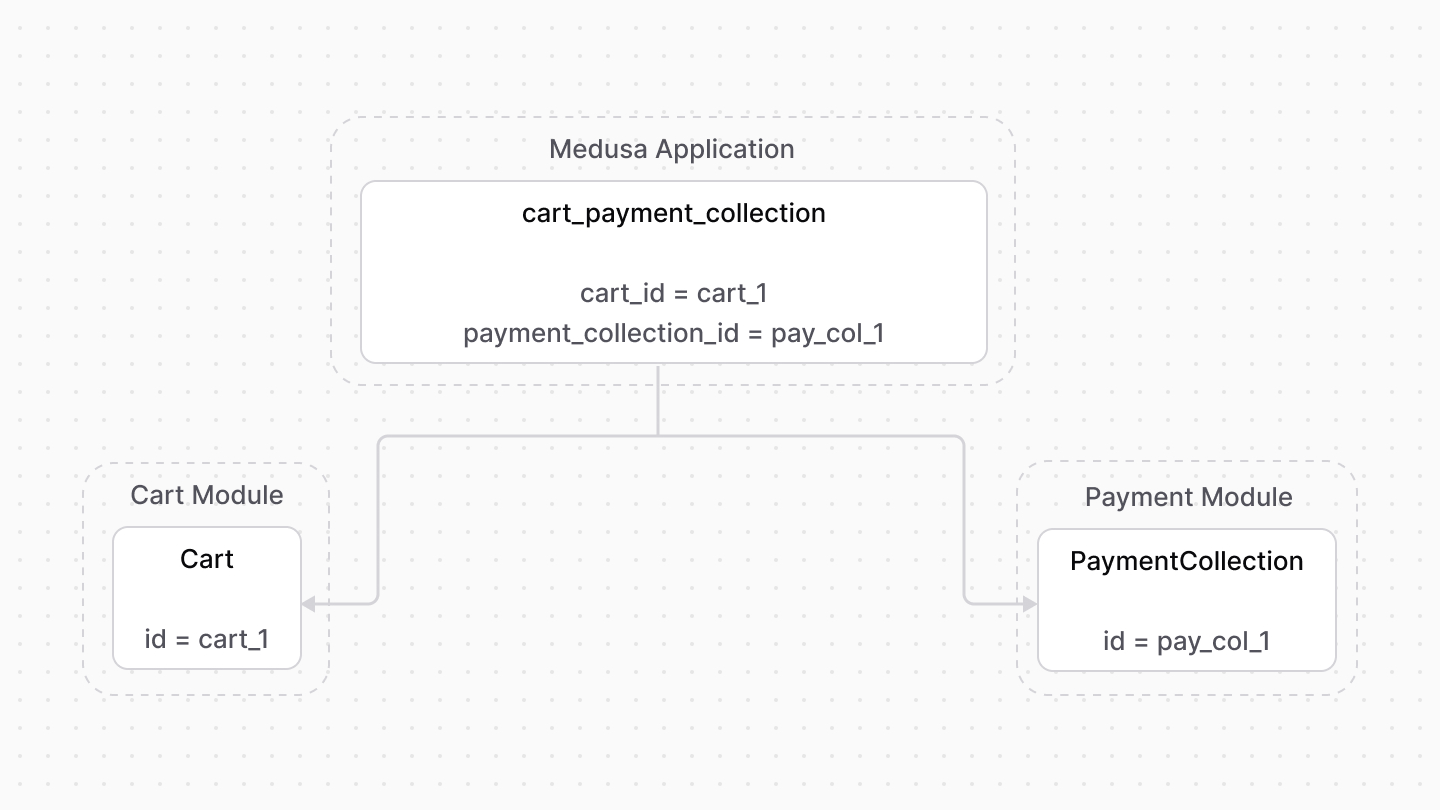
Medusa defines a link between the `Cart` and `PaymentCollection` data models. A cart has a payment collection which holds all the authorized payment sessions and payments made related to the cart.
|
|
|
|
|
|
|
|
### Retrieve with Query
|
|
|
|
To retrieve the payment collection of a cart with [Query](!docs!/learn/fundamentals/module-links/query), pass `payment_collection.*` in `fields`:
|
|
|
|
<CodeTabs group="relation-query">
|
|
<CodeTab label="query.graph" value="method">
|
|
|
|
```ts
|
|
const { data: carts } = await query.graph({
|
|
entity: "cart",
|
|
fields: [
|
|
"payment_collection.*",
|
|
],
|
|
})
|
|
|
|
// carts.payment_collection
|
|
```
|
|
|
|
</CodeTab>
|
|
<CodeTab label="useQueryGraphStep" value="step">
|
|
|
|
```ts
|
|
import { useQueryGraphStep } from "@medusajs/medusa/core-flows"
|
|
|
|
// ...
|
|
|
|
const { data: carts } = useQueryGraphStep({
|
|
entity: "cart",
|
|
fields: [
|
|
"payment_collection.*",
|
|
],
|
|
})
|
|
|
|
// carts.payment_collection
|
|
```
|
|
|
|
</CodeTab>
|
|
</CodeTabs>
|
|
|
|
### Manage with Link
|
|
|
|
To manage the payment collection of a cart, use [Link](!docs!/learn/fundamentals/module-links/link):
|
|
|
|
<CodeTabs group="relation-link">
|
|
<CodeTab label="link.create" value="method">
|
|
|
|
```ts
|
|
import { Modules } from "@medusajs/framework/utils"
|
|
|
|
// ...
|
|
|
|
await link.create({
|
|
[Modules.CART]: {
|
|
cart_id: "cart_123",
|
|
},
|
|
[Modules.PAYMENT]: {
|
|
payment_collection_id: "paycol_123",
|
|
},
|
|
})
|
|
```
|
|
|
|
</CodeTab>
|
|
<CodeTab label="createRemoteLinkStep" value="step">
|
|
|
|
```ts
|
|
import { createRemoteLinkStep } from "@medusajs/medusa/core-flows"
|
|
|
|
// ...
|
|
|
|
createRemoteLinkStep({
|
|
[Modules.CART]: {
|
|
cart_id: "cart_123",
|
|
},
|
|
[Modules.PAYMENT]: {
|
|
payment_collection_id: "paycol_123",
|
|
},
|
|
})
|
|
```
|
|
|
|
</CodeTab>
|
|
</CodeTabs>
|
|
|
|
---
|
|
|
|
## Product Module
|
|
|
|
Medusa defines read-only links between:
|
|
|
|
- the `LineItem` data model and the [Product Module](../../product/page.mdx)'s `Product` data model. This means you can retrieve the details of a line item's product, but you don't manage the links in a pivot table in the database. The product of a line item is determined by the `product_id` property of the `LineItem` data model.
|
|
- the `LineItem` data model and the [Product Module](../../product/page.mdx)'s `ProductVariant` data model. This means you can retrieve the details of a line item's variant, but you don't manage the links in a pivot table in the database. The variant of a line item is determined by the `variant_id` property of the `LineItem` data model.
|
|
|
|
### Retrieve with Query
|
|
|
|
To retrieve the variant of a line item with [Query](!docs!/learn/fundamentals/module-links/query), pass `variant.*` in `fields`:
|
|
|
|
<Note>
|
|
|
|
To retrieve the product, pass `product.*` in `fields`.
|
|
|
|
</Note>
|
|
|
|
<CodeTabs group="relation-query">
|
|
<CodeTab label="query.graph" value="method">
|
|
|
|
```ts
|
|
const { data: lineItems } = await query.graph({
|
|
entity: "line_item",
|
|
fields: [
|
|
"variant.*",
|
|
],
|
|
})
|
|
|
|
// lineItems.variant
|
|
```
|
|
|
|
</CodeTab>
|
|
<CodeTab label="useQueryGraphStep" value="step">
|
|
|
|
```ts
|
|
import { useQueryGraphStep } from "@medusajs/medusa/core-flows"
|
|
|
|
// ...
|
|
|
|
const { data: lineItems } = useQueryGraphStep({
|
|
entity: "line_item",
|
|
fields: [
|
|
"variant.*",
|
|
],
|
|
})
|
|
|
|
// lineItems.variant
|
|
```
|
|
|
|
</CodeTab>
|
|
</CodeTabs>
|
|
|
|
---
|
|
|
|
## Promotion Module
|
|
|
|
The [Promotion Module](../../promotion/page.mdx) provides discount features.
|
|
|
|
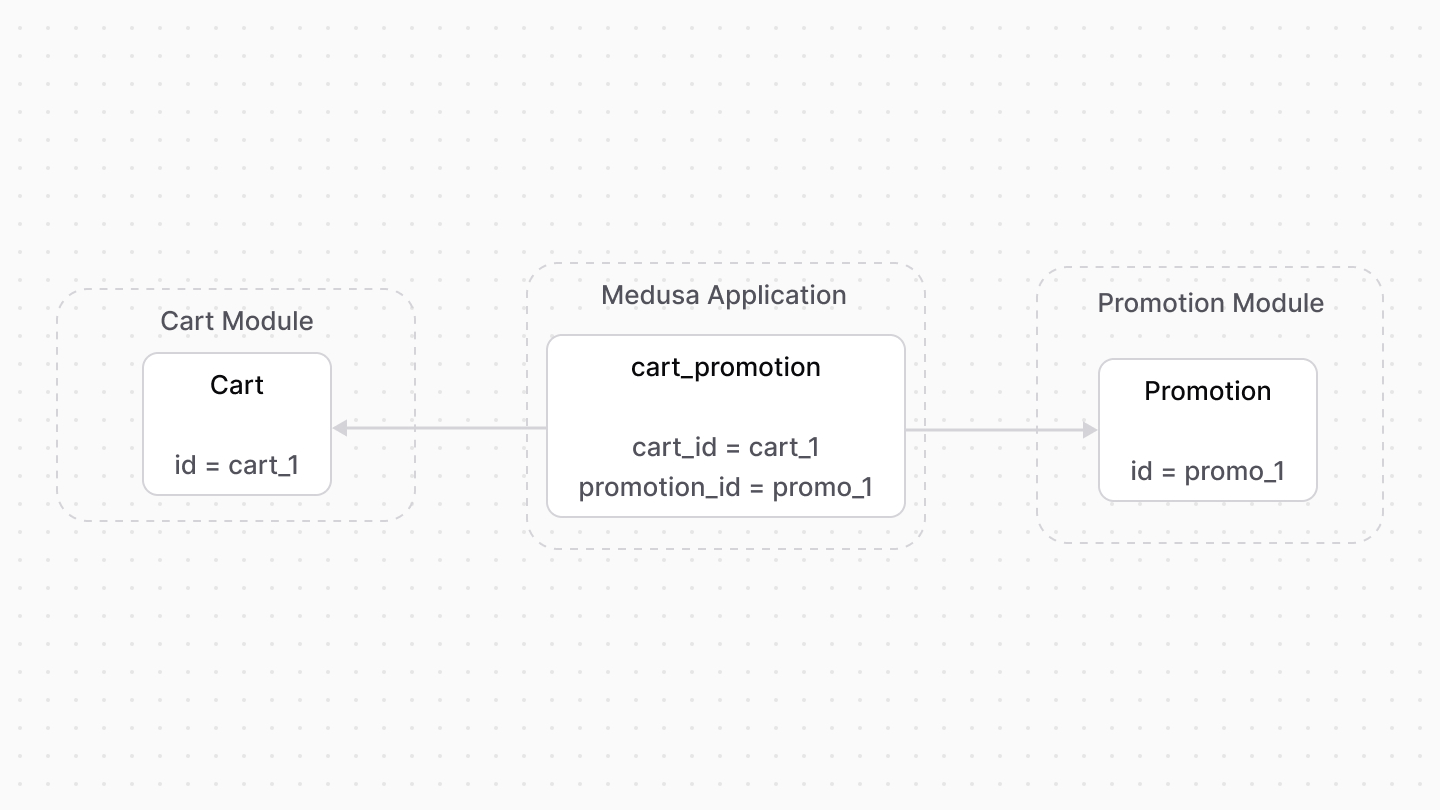
Medusa defines a link between the `Cart` and `Promotion` data models. This indicates the promotions applied on a cart.
|
|
|
|
|
|
|
|
Medusa also defines a read-only link between the `LineItemAdjustment` and `Promotion` data models. This means you can retrieve the details of the promotion applied on a line item, but you don't manage the links in a pivot table in the database. The promotion of a line item is determined by the `promotion_id` property of the `LineItemAdjustment` data model.
|
|
|
|
### Retrieve with Query
|
|
|
|
To retrieve the promotions of a cart with [Query](!docs!/learn/fundamentals/module-links/query), pass `promotions.*` in `fields`:
|
|
|
|
<Note>
|
|
|
|
To retrieve the promotion of a line item adjustment, pass `promotion.*` in `fields`.
|
|
|
|
</Note>
|
|
|
|
<CodeTabs group="relation-query">
|
|
<CodeTab label="query.graph" value="method">
|
|
|
|
```ts
|
|
const { data: carts } = await query.graph({
|
|
entity: "cart",
|
|
fields: [
|
|
"promotions.*",
|
|
],
|
|
})
|
|
|
|
// carts.promotions
|
|
```
|
|
|
|
</CodeTab>
|
|
<CodeTab label="useQueryGraphStep" value="step">
|
|
|
|
```ts
|
|
import { useQueryGraphStep } from "@medusajs/medusa/core-flows"
|
|
|
|
// ...
|
|
|
|
const { data: carts } = useQueryGraphStep({
|
|
entity: "cart",
|
|
fields: [
|
|
"promotions.*",
|
|
],
|
|
})
|
|
|
|
// carts.promotions
|
|
```
|
|
|
|
</CodeTab>
|
|
</CodeTabs>
|
|
|
|
### Manage with Link
|
|
|
|
To manage the promotions of a cart, use [Link](!docs!/learn/fundamentals/module-links/link):
|
|
|
|
<CodeTabs group="relation-link">
|
|
<CodeTab label="link.create" value="method">
|
|
|
|
```ts
|
|
import { Modules } from "@medusajs/framework/utils"
|
|
|
|
// ...
|
|
|
|
await link.create({
|
|
[Modules.CART]: {
|
|
cart_id: "cart_123",
|
|
},
|
|
[Modules.PROMOTION]: {
|
|
promotion_id: "promo_123",
|
|
},
|
|
})
|
|
```
|
|
|
|
</CodeTab>
|
|
<CodeTab label="createRemoteLinkStep" value="step">
|
|
|
|
```ts
|
|
import { Modules } from "@medusajs/framework/utils"
|
|
import { createRemoteLinkStep } from "@medusajs/medusa/core-flows"
|
|
|
|
// ...
|
|
|
|
createRemoteLinkStep({
|
|
[Modules.CART]: {
|
|
cart_id: "cart_123",
|
|
},
|
|
[Modules.PROMOTION]: {
|
|
promotion_id: "promo_123",
|
|
},
|
|
})
|
|
```
|
|
|
|
</CodeTab>
|
|
</CodeTabs>
|
|
|
|
---
|
|
|
|
## Region Module
|
|
|
|
Medusa defines a read-only link between the `Cart` data model and the [Region Module](../../region/page.mdx)'s `Region` data model. This means you can retrieve the details of a cart's region, but you don't manage the links in a pivot table in the database. The region of a cart is determined by the `region_id` property of the `Cart` data model.
|
|
|
|
### Retrieve with Query
|
|
|
|
To retrieve the region of a cart with [Query](!docs!/learn/fundamentals/module-links/query), pass `region.*` in `fields`:
|
|
|
|
<CodeTabs group="relation-query">
|
|
<CodeTab label="query.graph" value="method">
|
|
|
|
```ts
|
|
const { data: carts } = await query.graph({
|
|
entity: "cart",
|
|
fields: [
|
|
"region.*",
|
|
],
|
|
})
|
|
|
|
// carts.region
|
|
```
|
|
|
|
</CodeTab>
|
|
<CodeTab label="useQueryGraphStep" value="step">
|
|
|
|
```ts
|
|
import { useQueryGraphStep } from "@medusajs/medusa/core-flows"
|
|
|
|
// ...
|
|
|
|
const { data: carts } = useQueryGraphStep({
|
|
entity: "cart",
|
|
fields: [
|
|
"region.*",
|
|
],
|
|
})
|
|
|
|
// carts.region
|
|
```
|
|
|
|
</CodeTab>
|
|
</CodeTabs>
|
|
|
|
---
|
|
|
|
## Sales Channel Module
|
|
|
|
Medusa defines a read-only link between the `Cart` data model and the [Sales Channel Module](../../sales-channel/page.mdx)'s `SalesChannel` data model. This means you can retrieve the details of a cart's sales channel, but you don't manage the links in a pivot table in the database. The sales channel of a cart is determined by the `sales_channel_id` property of the `Cart` data model.
|
|
|
|
### Retrieve with Query
|
|
|
|
To retrieve the sales channel of a cart with [Query](!docs!/learn/fundamentals/module-links/query), pass `sales_channel.*` in `fields`:
|
|
|
|
<CodeTabs group="relation-query">
|
|
<CodeTab label="query.graph" value="method">
|
|
|
|
```ts
|
|
const { data: carts } = await query.graph({
|
|
entity: "cart",
|
|
fields: [
|
|
"sales_channel.*",
|
|
],
|
|
})
|
|
|
|
// carts.sales_channel
|
|
```
|
|
|
|
</CodeTab>
|
|
<CodeTab label="useQueryGraphStep" value="step">
|
|
|
|
```ts
|
|
import { useQueryGraphStep } from "@medusajs/medusa/core-flows"
|
|
|
|
// ...
|
|
|
|
const { data: carts } = useQueryGraphStep({
|
|
entity: "cart",
|
|
fields: [
|
|
"sales_channel.*",
|
|
],
|
|
})
|
|
|
|
// carts.sales_channel
|
|
```
|
|
|
|
</CodeTab>
|
|
</CodeTabs>
|