
206 lines
4.8 KiB
Plaintext
206 lines
4.8 KiB
Plaintext
import { CodeTabs, CodeTab } from "docs-ui"
|
||
|
||
export const metadata = {
|
||
title: `Links between Pricing Module and Other Modules`,
|
||
}
|
||
|
||
# {metadata.title}
|
||
|
||
This document showcases the module links defined between the Pricing Module and other commerce modules.
|
||
|
||
## Summary
|
||
|
||
The Pricing Module has the following links to other modules:
|
||
|
||
- [`ShippingOption` data model of Fulfillment Module \<\> `PriceSet` data model](#fulfillment-module).
|
||
- [`ProductVariant` data model of Product Module \<\> `PriceSet` data model](#product-module).
|
||
|
||
---
|
||
|
||
## Fulfillment Module
|
||
|
||
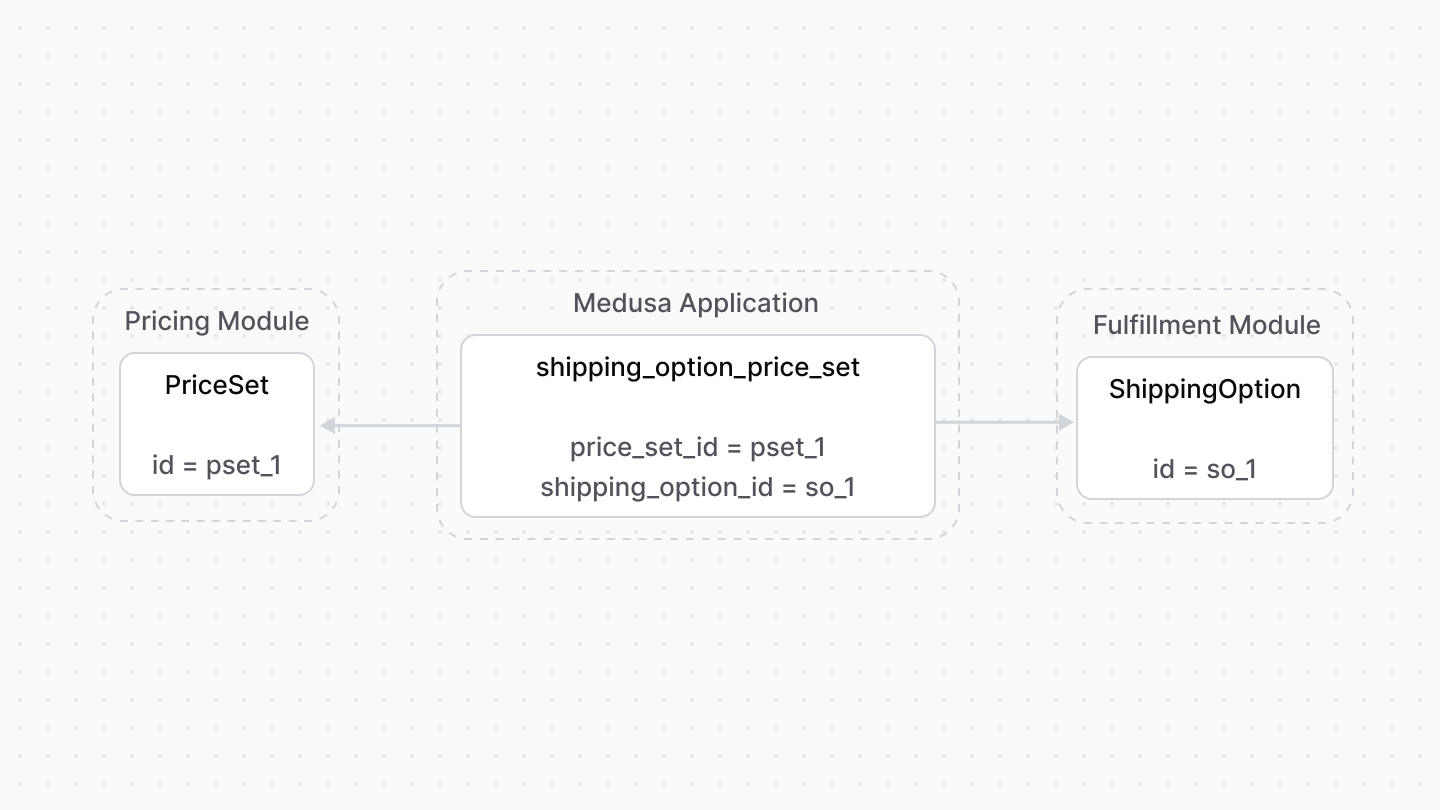
The Fulfillment Module provides fulfillment-related functionalities, including shipping options that the customer chooses from when they place their order. However, it doesn't provide pricing-related functionalities for these options.
|
||
|
||
Medusa defines a link between the `PriceSet` and `ShippingOption` data models. A shipping option's price is stored as a price set.
|
||
|
||
|
||
|
||
### Retrieve with Query
|
||
|
||
To retrieve the shipping option of a price set with [Query](!docs!/learn/fundamentals/module-links/query), pass `shipping_option.*` in `fields`:
|
||
|
||
<CodeTabs group="relation-query">
|
||
<CodeTab label="query.graph" value="method">
|
||
|
||
```ts
|
||
const { data: priceSets } = await query.graph({
|
||
entity: "price_set",
|
||
fields: [
|
||
"shipping_option.*",
|
||
],
|
||
})
|
||
|
||
// priceSets.shipping_option
|
||
```
|
||
|
||
</CodeTab>
|
||
<CodeTab label="useQueryGraphStep" value="step">
|
||
|
||
```ts
|
||
import { useQueryGraphStep } from "@medusajs/medusa/core-flows"
|
||
|
||
// ...
|
||
|
||
const { data: priceSets } = useQueryGraphStep({
|
||
entity: "price_set",
|
||
fields: [
|
||
"shipping_option.*",
|
||
],
|
||
})
|
||
|
||
// priceSets.shipping_option
|
||
```
|
||
|
||
</CodeTab>
|
||
</CodeTabs>
|
||
|
||
### Manage with Link
|
||
|
||
To manage the price set of a shipping option, use [Link](!docs!/learn/fundamentals/module-links/link):
|
||
|
||
<CodeTabs group="relation-link">
|
||
<CodeTab label="link.create" value="method">
|
||
|
||
```ts
|
||
import { Modules } from "@medusajs/framework/utils"
|
||
|
||
// ...
|
||
|
||
await link.create({
|
||
[Modules.FULFILLMENT]: {
|
||
shipping_option_id: "so_123",
|
||
},
|
||
[Modules.PRICING]: {
|
||
price_set_id: "pset_123",
|
||
},
|
||
})
|
||
```
|
||
|
||
</CodeTab>
|
||
<CodeTab label="createRemoteLinkStep" value="step">
|
||
|
||
```ts
|
||
import { Modules } from "@medusajs/framework/utils"
|
||
import { createRemoteLinkStep } from "@medusajs/medusa/core-flows"
|
||
|
||
// ...
|
||
|
||
createRemoteLinkStep({
|
||
[Modules.FULFILLMENT]: {
|
||
shipping_option_id: "so_123",
|
||
},
|
||
[Modules.PRICING]: {
|
||
price_set_id: "pset_123",
|
||
},
|
||
})
|
||
```
|
||
|
||
</CodeTab>
|
||
</CodeTabs>
|
||
|
||
---
|
||
|
||
## Product Module
|
||
|
||
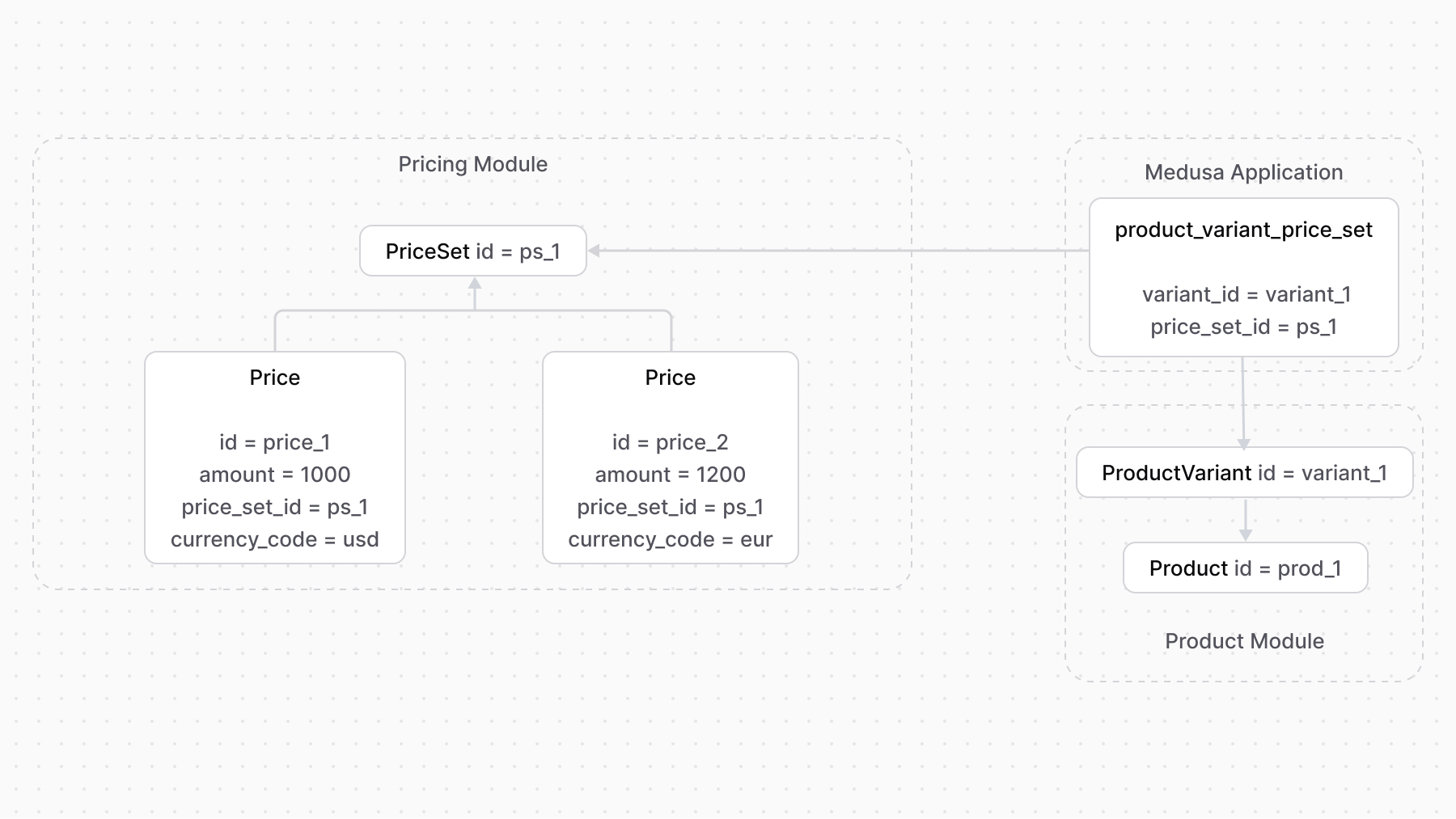
The Product Module doesn't store or manage the prices of product variants.
|
||
|
||
Medusa defines a link between the `ProductVariant` and the `PriceSet`. A product variant’s prices are stored as prices belonging to a price set.
|
||
|
||
|
||
|
||
So, when you want to add prices for a product variant, you create a price set and add the prices to it.
|
||
|
||
You can then benefit from adding rules to prices or using the `calculatePrices` method to retrieve the price of a product variant within a specified context.
|
||
|
||
### Retrieve with Query
|
||
|
||
To retrieve the variant of a price set with [Query](!docs!/learn/fundamentals/module-links/query), pass `variant.*` in `fields`:
|
||
|
||
<CodeTabs group="relation-query">
|
||
<CodeTab label="query.graph" value="method">
|
||
|
||
```ts
|
||
const { data: priceSets } = await query.graph({
|
||
entity: "price_set",
|
||
fields: [
|
||
"variant.*",
|
||
],
|
||
})
|
||
|
||
// priceSets.variant
|
||
```
|
||
|
||
</CodeTab>
|
||
<CodeTab label="useQueryGraphStep" value="step">
|
||
|
||
```ts
|
||
import { useQueryGraphStep } from "@medusajs/medusa/core-flows"
|
||
|
||
// ...
|
||
|
||
const { data: priceSets } = useQueryGraphStep({
|
||
entity: "price_set",
|
||
fields: [
|
||
"variant.*",
|
||
],
|
||
})
|
||
|
||
// priceSets.variant
|
||
```
|
||
|
||
</CodeTab>
|
||
</CodeTabs>
|
||
|
||
### Manage with Link
|
||
|
||
To manage the price set of a variant, use [Link](!docs!/learn/fundamentals/module-links/link):
|
||
|
||
<CodeTabs group="relation-link">
|
||
<CodeTab label="link.create" value="method">
|
||
|
||
```ts
|
||
import { Modules } from "@medusajs/framework/utils"
|
||
|
||
// ...
|
||
|
||
await link.create({
|
||
[Modules.PRODUCT]: {
|
||
variant_id: "variant_123",
|
||
},
|
||
[Modules.PRICING]: {
|
||
price_set_id: "pset_123",
|
||
},
|
||
})
|
||
```
|
||
|
||
</CodeTab>
|
||
<CodeTab label="createRemoteLinkStep" value="step">
|
||
|
||
```ts
|
||
import { Modules } from "@medusajs/framework/utils"
|
||
import { createRemoteLinkStep } from "@medusajs/medusa/core-flows"
|
||
|
||
// ...
|
||
|
||
createRemoteLinkStep({
|
||
[Modules.PRODUCT]: {
|
||
variant_id: "variant_123",
|
||
},
|
||
[Modules.PRICING]: {
|
||
price_set_id: "pset_123",
|
||
},
|
||
})
|
||
```
|
||
|
||
</CodeTab>
|
||
</CodeTabs> |