 1decaa27c7
* docs: added features and guides overview page

* added image

* added version 2

* added version 3

* added version 4

* docs: implemented new color scheme

* docs: redesigned sidebar (#3193)

* docs: redesigned navbar for restructure (#3199)

* docs: redesigned footer (#3209)

* docs: redesigned cards (#3230)

* docs: redesigned admonitions (#3231)

* docs: redesign announcement bar (#3236)

* docs: redesigned large cards (#3239)

* docs: redesigned code blocks (#3253)

* docs: redesigned search modal and page (#3264)

* docs: redesigned doc footer (#3268)

* docs: added new sidebars + refactored css and assets (#3279)

* docs: redesigned api reference sidebar

* docs: refactored css

* docs: added code tabs transition

* docs: added new sidebars

* removed unused assets

* remove unusued assets

* Fix deploy errors

* fix incorrect link

* docs: fixed code responsivity + missing icons (#3283)

* docs: changed icons (#3296)

* docs: design fixes to the sidebar (#3297)

* redesign fixes

* docs: small design fixes

* docs: several design fixes after restructure (#3299)

* docs: bordered icon fixes

* docs: desgin fixes

* fixes to code blocks and sidebar scroll

* design adjustments

* docs: restructured homepage (#3305)

* docs: restructured homepage

* design fixes

* fixed core concepts icon

* docs: added core concepts page (#3318)

* docs: restructured homepage

* design fixes

* docs: added core concepts page

* changed text of different components

* docs: added architecture link

* added missing prop for user guide

* docs: added regions overview page (#3327)

* docs: added regions overview

* moved region pages to new structure

* docs: fixed description of regions architecture page

* small changes

* small fix

* docs: added customers overview page (#3331)

* docs: added regions overview

* moved region pages to new structure

* docs: fixed description of regions architecture page

* small changes

* small fix

* docs: added customers overview page

* fix link

* resolve link issues

* docs: updated regions architecture image

* docs: second-iteration fixes (#3347)

* docs: redesigned document

* design fixes

* docs: added products overview page (#3354)

* docs: added carts overview page (#3363)

* docs: added orders overview (#3364)

* docs: added orders overview

* added links in overview

* docs: added vercel redirects

* docs: added soon badge for cards (#3389)

* docs: resolved feedback changes + organized troubleshooting pages (#3409)

* docs: resolved feedback changes

* added extra line

* docs: changed icons for restructure (#3421)

* docs: added taxes overview page (#3422)

* docs: added taxes overview page

* docs: fix sidebar label

* added link to taxes overview page

* fixed link

* docs: fixed sidebar scroll (#3429)

* docs: added discounts overview (#3432)

* docs: added discounts overview

* fixed links

* docs: added gift cards overview (#3433)

* docs: added price lists overview page (#3440)

* docs: added price lists overview page

* fixed links

* docs: added sales channels overview page (#3441)

* docs: added sales overview page

* fixed links

* docs: added users overview (#3443)

* docs: fixed sidebar border height (#3444)

* docs: fixed sidebar border height

* fixed svg markup

* docs: added possible solutions to feedback component (#3449)

* docs: added several overview pages + restructured files (#3463)

* docs: added several overview pages

* fixed links

* docs: added feature flags + PAK overview pages (#3464)

* docs: added feature flags + PAK overview pages

* fixed links

* fix link

* fix link

* fixed links colors

* docs: added strategies overview page (#3468)

* docs: automated upgrade guide (#3470)

* docs: automated upgrade guide

* fixed vercel redirect

* docs: restructured files in docs codebase (#3475)

* docs: restructured files

* docs: fixed eslint exception

* docs: finished restructure loose-ends (#3493)

* fixed uses of backend

* docs: finished loose ends

* eslint fixes

* fixed links

* merged master

* added update instructions for v1.7.12
5.3 KiB
description, addHowToData
| description | addHowToData |
|---|---|
| Learn how to integrate Slack with the Medusa backend. Learn how to create and configure a Slack app and install the Slack plugin on the Medusa backend. | true |
Slack
In this documentation, you'll learn how to add the Slack plugin to your Medusa backend to start receiving order notifications.
Overview
When you add this plugin, the store owner can receive order notifications into their Slack workspace.
The notification contains details about the order including:
- Customer's details and address
- Items ordered, their quantity, and the price
- Order totals including Tax amount.
- Promotion details if there are any (this is optional and can be turned off).
The plugin registers a subscriber to the order.placed event. When an order is placed, the subscriber handler method uses the ID of the order to retrieve order details mentioned above.
Then, the order notificaiton is sent to Slack using Webhooks. So, you'll need to create a Slack App, add it into your workspace, and activate Incoming Webhooks.
Prerequisites
Slack Account
To follow along with this guide, you need to have a Slack account with a connected workspace. If you don’t have one, you can create a free account on Slack.
Medusa Backend
This tutorial assumes you already have a Medusa backend installed. If you don’t, please follow along with the quickstart guide.
Redis
Medusa's event system works by pushing data into a queue that is based on Redis. This queue then notifies handlers of different events of this data that is pushed into the queue. The handlers then use this data to perform a certain action.
As the Slack plugin will listen to the order.placed event to know when to send notifications, you'll need to have Redis installed and configured with your Medusa backend.
You can read the Set up your development enviornment guideline to learn more about how you can install and setup Redis.
Create Slack App
The first step is to create a Slack app. This app will be connected to your workspace and will have Incoming Webhooks activated to receive notifications from the Medusa backend using a Webhook URL.
Go to Slack API and click Create app. This will take you to a new page with a pop-up. In the pop-up, choose From scratch.
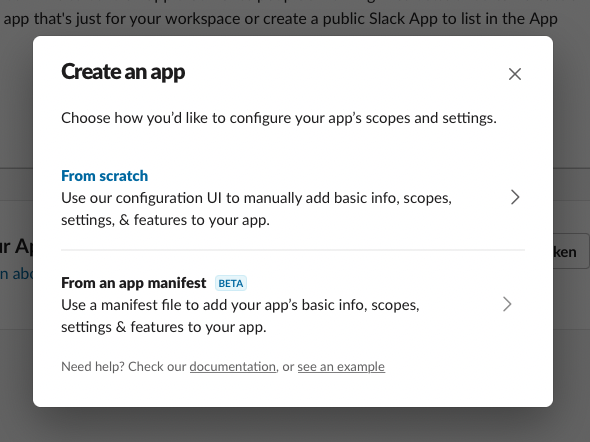
You’ll then need to enter some info like the App name and the workspace it will be connected to. Once you’re done, the app will be created.
Activate Incoming Webhooks
To activate Incoming Webhooks, choose Features > Incoming Webhooks from the sidebar. At first, it will be disabled so make sure to enable it by switching the toggle.
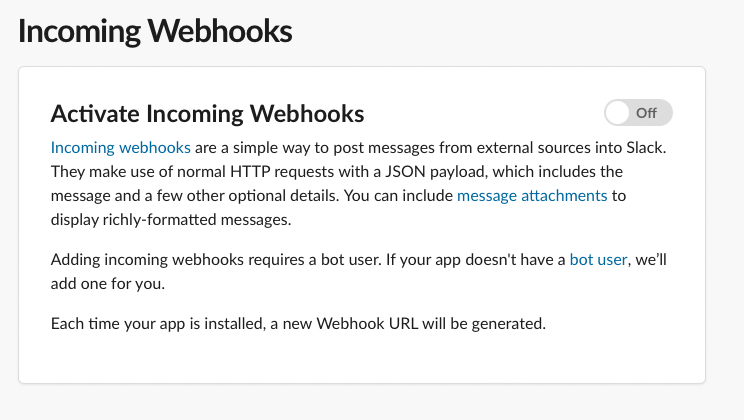
Add New Webhook
After activating Incoming Webhooks, on the same page scroll down and click on the Add New Webhook to Workspace button.
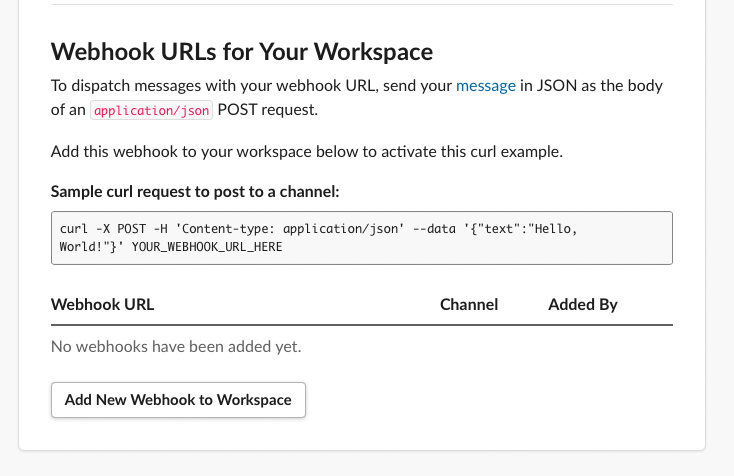
After that, choose the channel to send the notifications to. You can also choose a DM to send the notifications to. Once you’re done click Allow.
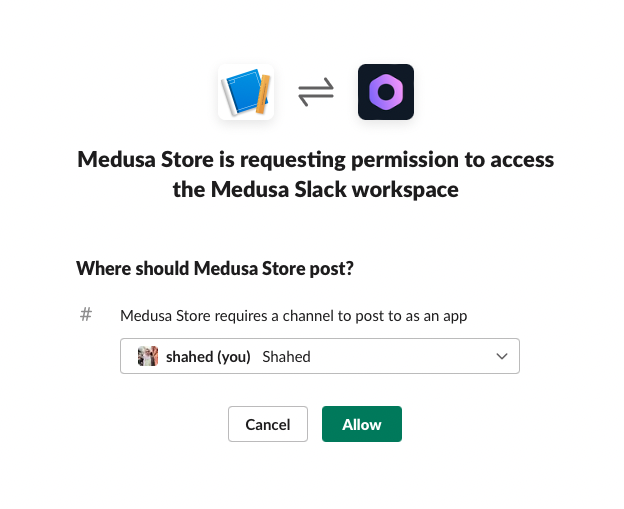
This will create a new Webhook with a URL which you can see in the table at the end of the Incoming Webhooks page. Copy the URL as you’ll use it in the next section.
Install Slack Plugin
The next step is to install Medusa’s Slack plugin into your Medusa backend.
Open the terminal in the Medusa backend’s directory and run the following command:
npm install medusa-plugin-slack-notification
After that, open medusa-config.js and add the new plugin with its configurations in the plugins array:
const plugins = [
  // ...,
  {
    resolve: `medusa-plugin-slack-notification`,
    options: {
      show_discount_code: false,
      slack_url: `<WEBHOOK_URL>`,
      admin_orders_url: `http://localhost:7001/a/orders`,
    },
  },
]
- Make sure to change
<WEBHOOK_URL>with the Webhook URL you copied after creating the Slack app. - The
show_discount_codeoption enables or disables showing the discount code in the notification sent to Slack. - The
admin_orders_urlis the prefix of the URL of the order detail pages on your admin panel. If you’re using Medusa’s Admin locally, it should behttp://localhost:7001/a/orders. This will result in a URL likehttp://localhost:7001/a/orders/order_01FYP7DM7PS43H9VQ1PK59ZR5G.
That’s all you need to do to integrate Slack into Medusa!
See Also
- Install Medusa's Admin for the full order-management experience.
- Install the Next.js or Gatsby starter storefronts.