 1decaa27c7
* docs: added features and guides overview page

* added image

* added version 2

* added version 3

* added version 4

* docs: implemented new color scheme

* docs: redesigned sidebar (#3193)

* docs: redesigned navbar for restructure (#3199)

* docs: redesigned footer (#3209)

* docs: redesigned cards (#3230)

* docs: redesigned admonitions (#3231)

* docs: redesign announcement bar (#3236)

* docs: redesigned large cards (#3239)

* docs: redesigned code blocks (#3253)

* docs: redesigned search modal and page (#3264)

* docs: redesigned doc footer (#3268)

* docs: added new sidebars + refactored css and assets (#3279)

* docs: redesigned api reference sidebar

* docs: refactored css

* docs: added code tabs transition

* docs: added new sidebars

* removed unused assets

* remove unusued assets

* Fix deploy errors

* fix incorrect link

* docs: fixed code responsivity + missing icons (#3283)

* docs: changed icons (#3296)

* docs: design fixes to the sidebar (#3297)

* redesign fixes

* docs: small design fixes

* docs: several design fixes after restructure (#3299)

* docs: bordered icon fixes

* docs: desgin fixes

* fixes to code blocks and sidebar scroll

* design adjustments

* docs: restructured homepage (#3305)

* docs: restructured homepage

* design fixes

* fixed core concepts icon

* docs: added core concepts page (#3318)

* docs: restructured homepage

* design fixes

* docs: added core concepts page

* changed text of different components

* docs: added architecture link

* added missing prop for user guide

* docs: added regions overview page (#3327)

* docs: added regions overview

* moved region pages to new structure

* docs: fixed description of regions architecture page

* small changes

* small fix

* docs: added customers overview page (#3331)

* docs: added regions overview

* moved region pages to new structure

* docs: fixed description of regions architecture page

* small changes

* small fix

* docs: added customers overview page

* fix link

* resolve link issues

* docs: updated regions architecture image

* docs: second-iteration fixes (#3347)

* docs: redesigned document

* design fixes

* docs: added products overview page (#3354)

* docs: added carts overview page (#3363)

* docs: added orders overview (#3364)

* docs: added orders overview

* added links in overview

* docs: added vercel redirects

* docs: added soon badge for cards (#3389)

* docs: resolved feedback changes + organized troubleshooting pages (#3409)

* docs: resolved feedback changes

* added extra line

* docs: changed icons for restructure (#3421)

* docs: added taxes overview page (#3422)

* docs: added taxes overview page

* docs: fix sidebar label

* added link to taxes overview page

* fixed link

* docs: fixed sidebar scroll (#3429)

* docs: added discounts overview (#3432)

* docs: added discounts overview

* fixed links

* docs: added gift cards overview (#3433)

* docs: added price lists overview page (#3440)

* docs: added price lists overview page

* fixed links

* docs: added sales channels overview page (#3441)

* docs: added sales overview page

* fixed links

* docs: added users overview (#3443)

* docs: fixed sidebar border height (#3444)

* docs: fixed sidebar border height

* fixed svg markup

* docs: added possible solutions to feedback component (#3449)

* docs: added several overview pages + restructured files (#3463)

* docs: added several overview pages

* fixed links

* docs: added feature flags + PAK overview pages (#3464)

* docs: added feature flags + PAK overview pages

* fixed links

* fix link

* fix link

* fixed links colors

* docs: added strategies overview page (#3468)

* docs: automated upgrade guide (#3470)

* docs: automated upgrade guide

* fixed vercel redirect

* docs: restructured files in docs codebase (#3475)

* docs: restructured files

* docs: fixed eslint exception

* docs: finished restructure loose-ends (#3493)

* fixed uses of backend

* docs: finished loose ends

* eslint fixes

* fixed links

* merged master

* added update instructions for v1.7.12
115 lines
5.3 KiB
Markdown
115 lines
5.3 KiB
Markdown
---
|
||
description: 'Learn how to integrate Slack with the Medusa backend. Learn how to create and configure a Slack app and install the Slack plugin on the Medusa backend.'
|
||
addHowToData: true
|
||
---
|
||
|
||
# Slack
|
||
|
||
In this documentation, you'll learn how to add the [Slack plugin](https://github.com/medusajs/medusa/tree/master/packages/medusa-plugin-slack-notification) to your Medusa backend to start receiving order notifications.
|
||
|
||
## Overview
|
||
|
||
When you add this plugin, the store owner can receive order notifications into their Slack workspace.
|
||
|
||
The notification contains details about the order including:
|
||
|
||
- Customer's details and address
|
||
- Items ordered, their quantity, and the price
|
||
- Order totals including Tax amount.
|
||
- Promotion details if there are any (this is optional and can be turned off).
|
||
|
||
The plugin registers a subscriber to the `order.placed` event. When an order is placed, the subscriber handler method uses the ID of the order to retrieve order details mentioned above.
|
||
|
||
Then, the order notificaiton is sent to Slack using Webhooks. So, you'll need to create a Slack App, add it into your workspace, and activate Incoming Webhooks.
|
||
|
||
---
|
||
|
||
## Prerequisites
|
||
|
||
### Slack Account
|
||
|
||
To follow along with this guide, you need to have a Slack account with a connected workspace. If you don’t have one, you can [create a free account on Slack](https://slack.com/).
|
||
|
||
### Medusa Backend
|
||
|
||
This tutorial assumes you already have a Medusa backend installed. If you don’t, please follow along with the [quickstart guide](../../development/backend/install.mdx).
|
||
|
||
### Redis
|
||
|
||
Medusa's event system works by pushing data into a queue that is based on [Redis](https://redis.io/). This queue then notifies handlers of different events of this data that is pushed into the queue. The handlers then use this data to perform a certain action.
|
||
|
||
As the Slack plugin will listen to the `order.placed` event to know when to send notifications, you'll need to have Redis installed and configured with your Medusa backend.
|
||
|
||
You can read the [Set up your development enviornment guideline](../../development/backend/prepare-environment.mdx#redis) to learn more about how you can install and setup Redis.
|
||
|
||
---
|
||
|
||
## Create Slack App
|
||
|
||
The first step is to create a Slack app. This app will be connected to your workspace and will have Incoming Webhooks activated to receive notifications from the Medusa backend using a Webhook URL.
|
||
|
||
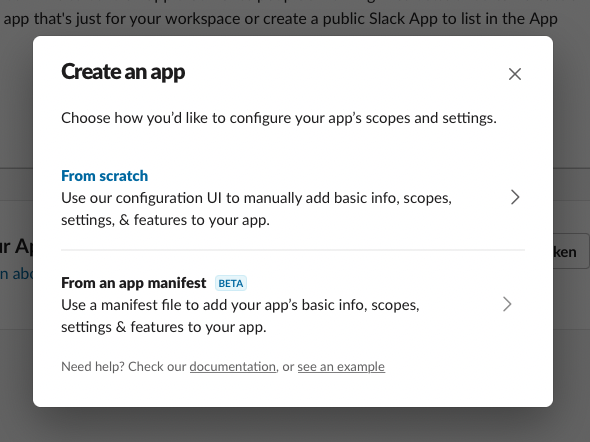
Go to [Slack API](https://api.slack.com/) and click Create app. This will take you to a new page with a pop-up. In the pop-up, choose From scratch.
|
||
|
||
|
||
|
||
You’ll then need to enter some info like the App name and the workspace it will be connected to. Once you’re done, the app will be created.
|
||
|
||
### Activate Incoming Webhooks
|
||
|
||
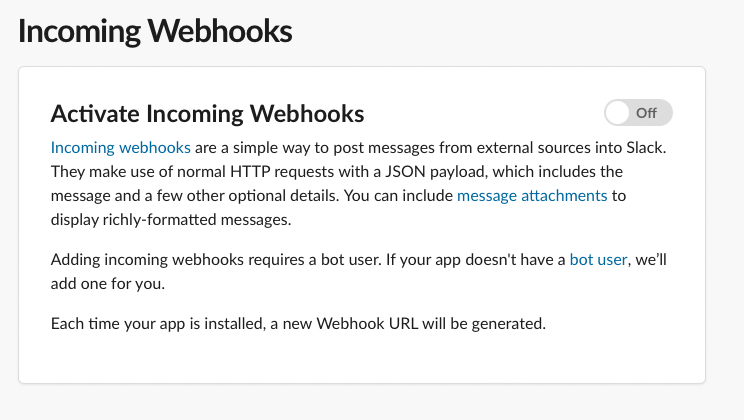
To activate Incoming Webhooks, choose Features > Incoming Webhooks from the sidebar. At first, it will be disabled so make sure to enable it by switching the toggle.
|
||
|
||
|
||
|
||
### Add New Webhook
|
||
|
||
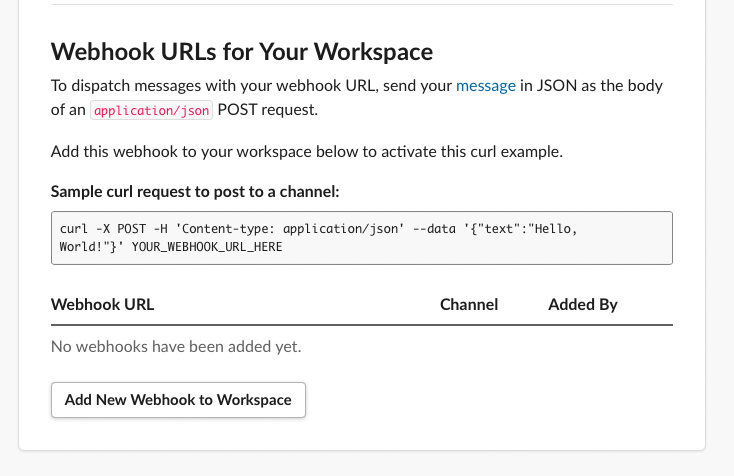
After activating Incoming Webhooks, on the same page scroll down and click on the Add New Webhook to Workspace button.
|
||
|
||
|
||
|
||
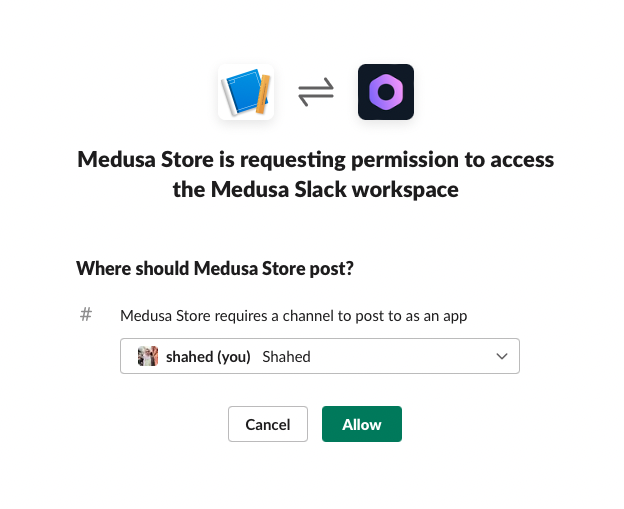
After that, choose the channel to send the notifications to. You can also choose a DM to send the notifications to. Once you’re done click Allow.
|
||
|
||
|
||
|
||
This will create a new Webhook with a URL which you can see in the table at the end of the Incoming Webhooks page. Copy the URL as you’ll use it in the next section.
|
||
|
||
---
|
||
|
||
## Install Slack Plugin
|
||
|
||
The next step is to install Medusa’s [Slack plugin](https://github.com/medusajs/medusa/tree/master/packages/medusa-plugin-slack-notification) into your Medusa backend.
|
||
|
||
Open the terminal in the Medusa backend’s directory and run the following command:
|
||
|
||
```bash npm2yarn
|
||
npm install medusa-plugin-slack-notification
|
||
```
|
||
|
||
After that, open `medusa-config.js` and add the new plugin with its configurations in the `plugins` array:
|
||
|
||
```jsx title=medusa-config.js
|
||
const plugins = [
|
||
// ...,
|
||
{
|
||
resolve: `medusa-plugin-slack-notification`,
|
||
options: {
|
||
show_discount_code: false,
|
||
slack_url: `<WEBHOOK_URL>`,
|
||
admin_orders_url: `http://localhost:7001/a/orders`,
|
||
},
|
||
},
|
||
]
|
||
```
|
||
|
||
- Make sure to change `<WEBHOOK_URL>` with the Webhook URL you copied after creating the Slack app.
|
||
- The `show_discount_code` option enables or disables showing the discount code in the notification sent to Slack.
|
||
- The `admin_orders_url` is the prefix of the URL of the order detail pages on your admin panel. If you’re using Medusa’s Admin locally, it should be `http://localhost:7001/a/orders`. This will result in a URL like `http://localhost:7001/a/orders/order_01FYP7DM7PS43H9VQ1PK59ZR5G`.
|
||
|
||
That’s all you need to do to integrate Slack into Medusa!
|
||
|
||
---
|
||
|
||
## See Also
|
||
|
||
- Install [Medusa's Admin](../../admin/quickstart.mdx) for the full order-management experience.
|
||
- Install the [Next.js](../../starters/nextjs-medusa-starter.mdx) or [Gatsby](../../starters/gatsby-medusa-starter.mdx) starter storefronts.
|