 1decaa27c7
* docs: added features and guides overview page

* added image

* added version 2

* added version 3

* added version 4

* docs: implemented new color scheme

* docs: redesigned sidebar (#3193)

* docs: redesigned navbar for restructure (#3199)

* docs: redesigned footer (#3209)

* docs: redesigned cards (#3230)

* docs: redesigned admonitions (#3231)

* docs: redesign announcement bar (#3236)

* docs: redesigned large cards (#3239)

* docs: redesigned code blocks (#3253)

* docs: redesigned search modal and page (#3264)

* docs: redesigned doc footer (#3268)

* docs: added new sidebars + refactored css and assets (#3279)

* docs: redesigned api reference sidebar

* docs: refactored css

* docs: added code tabs transition

* docs: added new sidebars

* removed unused assets

* remove unusued assets

* Fix deploy errors

* fix incorrect link

* docs: fixed code responsivity + missing icons (#3283)

* docs: changed icons (#3296)

* docs: design fixes to the sidebar (#3297)

* redesign fixes

* docs: small design fixes

* docs: several design fixes after restructure (#3299)

* docs: bordered icon fixes

* docs: desgin fixes

* fixes to code blocks and sidebar scroll

* design adjustments

* docs: restructured homepage (#3305)

* docs: restructured homepage

* design fixes

* fixed core concepts icon

* docs: added core concepts page (#3318)

* docs: restructured homepage

* design fixes

* docs: added core concepts page

* changed text of different components

* docs: added architecture link

* added missing prop for user guide

* docs: added regions overview page (#3327)

* docs: added regions overview

* moved region pages to new structure

* docs: fixed description of regions architecture page

* small changes

* small fix

* docs: added customers overview page (#3331)

* docs: added regions overview

* moved region pages to new structure

* docs: fixed description of regions architecture page

* small changes

* small fix

* docs: added customers overview page

* fix link

* resolve link issues

* docs: updated regions architecture image

* docs: second-iteration fixes (#3347)

* docs: redesigned document

* design fixes

* docs: added products overview page (#3354)

* docs: added carts overview page (#3363)

* docs: added orders overview (#3364)

* docs: added orders overview

* added links in overview

* docs: added vercel redirects

* docs: added soon badge for cards (#3389)

* docs: resolved feedback changes + organized troubleshooting pages (#3409)

* docs: resolved feedback changes

* added extra line

* docs: changed icons for restructure (#3421)

* docs: added taxes overview page (#3422)

* docs: added taxes overview page

* docs: fix sidebar label

* added link to taxes overview page

* fixed link

* docs: fixed sidebar scroll (#3429)

* docs: added discounts overview (#3432)

* docs: added discounts overview

* fixed links

* docs: added gift cards overview (#3433)

* docs: added price lists overview page (#3440)

* docs: added price lists overview page

* fixed links

* docs: added sales channels overview page (#3441)

* docs: added sales overview page

* fixed links

* docs: added users overview (#3443)

* docs: fixed sidebar border height (#3444)

* docs: fixed sidebar border height

* fixed svg markup

* docs: added possible solutions to feedback component (#3449)

* docs: added several overview pages + restructured files (#3463)

* docs: added several overview pages

* fixed links

* docs: added feature flags + PAK overview pages (#3464)

* docs: added feature flags + PAK overview pages

* fixed links

* fix link

* fix link

* fixed links colors

* docs: added strategies overview page (#3468)

* docs: automated upgrade guide (#3470)

* docs: automated upgrade guide

* fixed vercel redirect

* docs: restructured files in docs codebase (#3475)

* docs: restructured files

* docs: fixed eslint exception

* docs: finished restructure loose-ends (#3493)

* fixed uses of backend

* docs: finished loose ends

* eslint fixes

* fixed links

* merged master

* added update instructions for v1.7.12
148 lines
5.7 KiB
Markdown
148 lines
5.7 KiB
Markdown
---
|
||
description: 'Learn how to integrate Twilio SMS with the Medusa backend. Learn how to install the Twilio SMS plugin and test it out.'
|
||
addHowToData: true
|
||
---
|
||
|
||
# Twilio SMS
|
||
|
||
In this document, you’ll learn about the Twilio SMS Plugin, what it does, and how to use it in Medusa.
|
||
|
||
## Overview
|
||
|
||
[Twilio’s SMS API](https://www.twilio.com/sms) can be used to send users SMS messages instantly. It has a lot of additional features such as Whatsapp messaging and conversations.
|
||
|
||
By integrating Twilio SMS into Medusa, you’ll have easy access to Twilio’s SMS API to send SMS messages to your users and customers. You can use it to send Order confirmations, verification codes, reset password messages, and more.
|
||
|
||
:::note
|
||
|
||
This plugin only gives you access to the Twilio SMS API but does not implement sending messages at any given point. You’ll have to add this yourself where you need it. You can look at the [example later in this tutorial](#example-usage-of-the-plugin) to check how you can send an SMS for a new order.
|
||
|
||
:::
|
||
|
||
---
|
||
|
||
## Prerequisites
|
||
|
||
Before going further with this guide make sure you have a Medusa backend set up. You can follow the [Quickstart guide](../../development/backend/install.mdx) if you don’t.
|
||
|
||
You also must have a [Twilio account created](https://www.twilio.com/sms) so if you don’t already please go ahead and create one.
|
||
|
||
---
|
||
|
||
## Retrieve Credentials
|
||
|
||
For the [Twilio SMS plugin](https://github.com/medusajs/medusa/tree/master/packages/medusa-plugin-twilio-sms), you need three credentials from your Twilio account: Account SID, Auth Token, and a Twilio phone number to send from. You can find these three from your [Twilio Console’s homepage](https://console.twilio.com).
|
||
|
||
---
|
||
|
||
## Install Plugin
|
||
|
||
In the directory of your Medusa backend, run the following command to install [Twilio SMS plugin](https://github.com/medusajs/medusa/tree/master/packages/medusa-plugin-twilio-sms):
|
||
|
||
```bash npm2yarn
|
||
npm install medusa-plugin-twilio-sms
|
||
```
|
||
|
||
Then, you’ll need to add your credentials in `.env`:
|
||
|
||
```bash
|
||
TWILIO_SMS_ACCOUNT_SID=<YOUR_ACCOUNT_SID>
|
||
TWILIO_SMS_AUTH_TOKEN=<YOUR_AUTH_TOKEN>
|
||
TWILIO_SMS_FROM_NUMBER=<YOUR_TWILIO_NUMBER>
|
||
```
|
||
|
||
Make sure to replace `<YOUR_ACCOUNT_SID>`, `<YOUR_AUTH_TOKEN>`, and `<YOUR_TWILIO_NUMBER>` with the credentials you obtained from your Twilio Console.
|
||
|
||
Finally, add the plugin and its options in the `medusa-config.js` file to the `plugins` array:
|
||
|
||
```jsx title=medusa-config.js
|
||
const plugins = [
|
||
// ...
|
||
{
|
||
resolve: `medusa-plugin-twilio-sms`,
|
||
options: {
|
||
account_sid: process.env.TWILIO_SMS_ACCOUNT_SID,
|
||
auth_token: process.env.TWILIO_SMS_AUTH_TOKEN,
|
||
from_number: process.env.TWILIO_SMS_FROM_NUMBER,
|
||
},
|
||
},
|
||
]
|
||
```
|
||
|
||
---
|
||
|
||
## Example Usage of the Plugin
|
||
|
||
This plugin adds the service `twilioSmsService` to your Medusa backend. To send SMS using it, all you have to do is resolve it in your file as explained in the [Services](../../development/services/create-service.md#using-your-custom-service) documentation.
|
||
|
||
In this example, you’ll create a subscriber that listens to the `order.placed` event and sends an SMS to the customer to confirm their order.
|
||
|
||
:::tip
|
||
|
||
For this example to work, you’ll need to install and configure Redis on your backend. You can refer to the [development guide](../../development/backend/prepare-environment.mdx#redis) to learn how to do that.
|
||
|
||
:::
|
||
|
||
Create the file `src/services/sms.js` in your Medusa backend with the following content:
|
||
|
||
```jsx title=src/services/sms.js
|
||
class SmsSubscriber {
|
||
constructor({
|
||
twilioSmsService,
|
||
orderService,
|
||
eventBusService,
|
||
}) {
|
||
this.twilioSmsService_ = twilioSmsService
|
||
this.orderService = orderService
|
||
|
||
eventBusService.subscribe("order.placed", this.sendSMS)
|
||
}
|
||
|
||
sendSMS = async (data) => {
|
||
const order = await this.orderService.retrieve(data.id, {
|
||
relations: ["shipping_address"],
|
||
})
|
||
|
||
if (order.shipping_address.phone) {
|
||
this.twilioSmsService_.sendSms({
|
||
to: order.shipping_address.phone,
|
||
body: "We have received your order #" + data.id,
|
||
})
|
||
}
|
||
}
|
||
}
|
||
|
||
export default SmsSubscriber
|
||
```
|
||
|
||
In the `constructor`, you resolve the `twilioSmsService` and `orderService` using dependency injection to use it later in the `sendSMS` method.
|
||
|
||
You also subscribe to the event `order.placed` and sets the event handler to be `sendSMS`.
|
||
|
||
In `sendSMS`, you first retrieve the order with its relation to `shipping_address` which contains a `phone` field. If the phone is set, you send an SMS to the customer using the method `sendSms` in the `twilioSmsService`.
|
||
|
||
This method accepts an object of parameters. These parameters are based on Twilio’s SMS APIs. You can check their [API documentation](https://www.twilio.com/docs/sms/api/message-resource#create-a-message-resource) for more fields that you can add.
|
||
|
||
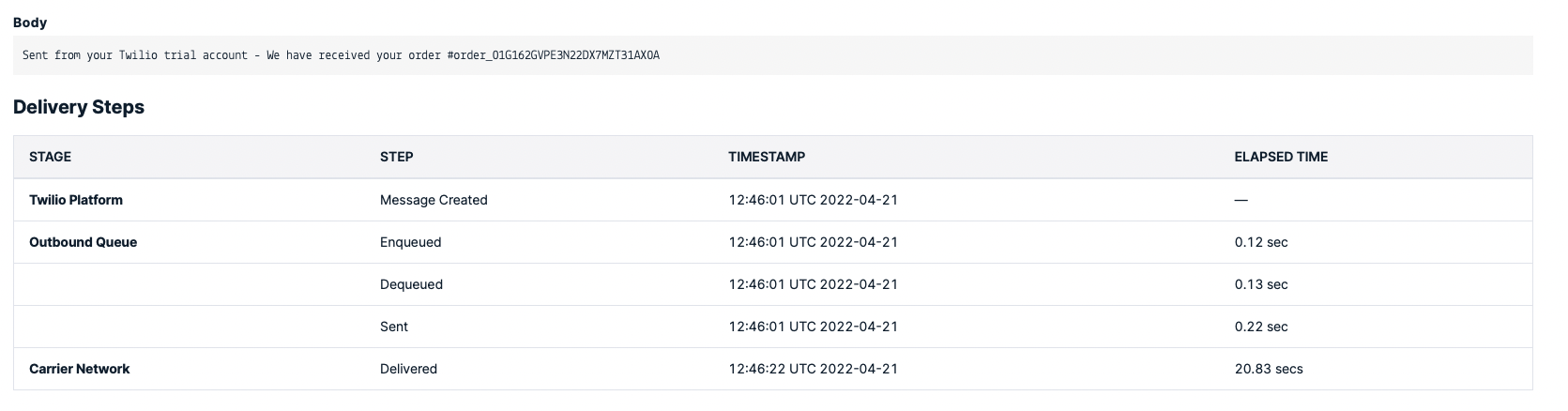
If you create an order now on your storefront, you should receive a message from Twilio on the phone number you entered in the shipping address.
|
||
|
||
:::tip
|
||
|
||
If you don’t have a storefront set up yet, you can install one of the [Next.js](../../starters/nextjs-medusa-starter.mdx) or [Gatsby](../../starters/gatsby-medusa-starter.mdx) storefronts.
|
||
|
||
:::
|
||
|
||
:::caution
|
||
|
||
If you’re on a Twilio trial make sure that the phone number you entered on checkout is a [verified Twilio number on your console](https://console.twilio.com/us1/develop/phone-numbers/manage/verified).
|
||
|
||
:::
|
||
|
||
|
||
|
||
---
|
||
|
||
## See Also
|
||
|
||
- [Notifications Overview](../../development/notification/overview.mdx).
|
||
- Install the [Medusa admin](../../admin/quickstart.mdx) for functionalities like Gift Cards creation, swaps, claims, order return requests, and more.
|