 6f1b49af03
* Fix issue on fixed total amount discount when using includes tax (#3472)

The calculation of the fixed discount amount breaks when having includes_tax setting active, due to the line item totals are incorrect and returning everything as 0, thus the totalItemPercentage will be Infinitiy due to the division by a subtotal of 0

* chore: Add missing changeset for @medusajs/medusa

* feat(medusa): Improve performance of Products domain (#3417)

* feat(medusa): Improve product update performances

* fix tests and update

* update mock repo

* improve repo

* cleanup

* fix

* cleanup + bulk emit + unit test fix

* improvements

* improve

* fix unit tests

* fix export

* fix product update handler

* enhance mock repo

* fix import integration

* fix end point tests

* revert mock repo product variant

* fix unit

* cleanup

* cleanup

* address feedback

* fix quotes in tests

* address feedback

* Create new-tips-mate.md

* use types

* chore: Remove integration-tests from changeset

* chore(release): v1.7.14

* chore(docs): Generated Docs Announcement Bar (automated) (#3489)

Co-authored-by: olivermrbl <olivermrbl@users.noreply.github.com>

* fix(medusa): EventBusService.emit using Redis mock (#3491)

* Fix eventBusService.emit using redis mock

* revert gitignore

* enqueuer

* unit test add redis_url

* fix test

* chore(docs): Generated Services Reference (automated) (#3490)

Co-authored-by: olivermrbl <olivermrbl@users.noreply.github.com>

* docs: publish restructure (#3496)

* docs: added features and guides overview page

* added image

* added version 2

* added version 3

* added version 4

* docs: implemented new color scheme

* docs: redesigned sidebar (#3193)

* docs: redesigned navbar for restructure (#3199)

* docs: redesigned footer (#3209)

* docs: redesigned cards (#3230)

* docs: redesigned admonitions (#3231)

* docs: redesign announcement bar (#3236)

* docs: redesigned large cards (#3239)

* docs: redesigned code blocks (#3253)

* docs: redesigned search modal and page (#3264)

* docs: redesigned doc footer (#3268)

* docs: added new sidebars + refactored css and assets (#3279)

* docs: redesigned api reference sidebar

* docs: refactored css

* docs: added code tabs transition

* docs: added new sidebars

* removed unused assets

* remove unusued assets

* Fix deploy errors

* fix incorrect link

* docs: fixed code responsivity + missing icons (#3283)

* docs: changed icons (#3296)

* docs: design fixes to the sidebar (#3297)

* redesign fixes

* docs: small design fixes

* docs: several design fixes after restructure (#3299)

* docs: bordered icon fixes

* docs: desgin fixes

* fixes to code blocks and sidebar scroll

* design adjustments

* docs: restructured homepage (#3305)

* docs: restructured homepage

* design fixes

* fixed core concepts icon

* docs: added core concepts page (#3318)

* docs: restructured homepage

* design fixes

* docs: added core concepts page

* changed text of different components

* docs: added architecture link

* added missing prop for user guide

* docs: added regions overview page (#3327)

* docs: added regions overview

* moved region pages to new structure

* docs: fixed description of regions architecture page

* small changes

* small fix

* docs: added customers overview page (#3331)

* docs: added regions overview

* moved region pages to new structure

* docs: fixed description of regions architecture page

* small changes

* small fix

* docs: added customers overview page

* fix link

* resolve link issues

* docs: updated regions architecture image

* docs: second-iteration fixes (#3347)

* docs: redesigned document

* design fixes

* docs: added products overview page (#3354)

* docs: added carts overview page (#3363)

* docs: added orders overview (#3364)

* docs: added orders overview

* added links in overview

* docs: added vercel redirects

* docs: added soon badge for cards (#3389)

* docs: resolved feedback changes + organized troubleshooting pages (#3409)

* docs: resolved feedback changes

* added extra line

* docs: changed icons for restructure (#3421)

* docs: added taxes overview page (#3422)

* docs: added taxes overview page

* docs: fix sidebar label

* added link to taxes overview page

* fixed link

* docs: fixed sidebar scroll (#3429)

* docs: added discounts overview (#3432)

* docs: added discounts overview

* fixed links

* docs: added gift cards overview (#3433)

* docs: added price lists overview page (#3440)

* docs: added price lists overview page

* fixed links

* docs: added sales channels overview page (#3441)

* docs: added sales overview page

* fixed links

* docs: added users overview (#3443)

* docs: fixed sidebar border height (#3444)

* docs: fixed sidebar border height

* fixed svg markup

* docs: added possible solutions to feedback component (#3449)

* docs: added several overview pages + restructured files (#3463)

* docs: added several overview pages

* fixed links

* docs: added feature flags + PAK overview pages (#3464)

* docs: added feature flags + PAK overview pages

* fixed links

* fix link

* fix link

* fixed links colors

* docs: added strategies overview page (#3468)

* docs: automated upgrade guide (#3470)

* docs: automated upgrade guide

* fixed vercel redirect

* docs: restructured files in docs codebase (#3475)

* docs: restructured files

* docs: fixed eslint exception

* docs: finished restructure loose-ends (#3493)

* fixed uses of backend

* docs: finished loose ends

* eslint fixes

* fixed links

* merged master

* added update instructions for v1.7.12

* docs: fixed discount details (#3499)

* docs: fix trailing slash causing 404 (#3508)

* docs: fix error during navigation (#3509)

* docs: removed the gatsby storefront guide (#3527)

* docs: removed the gatsby storefront guide

* docs: fixed query value

* chore(docs): Removed Docs Announcement Bar (automated) (#3536)

Co-authored-by: shahednasser <shahednasser@users.noreply.github.com>

* fix(medusa): Variant update should include the id for the listeners to be able to identify the entity (#3539)

* fix(medusa): Variant update should include the id for the listeners to be able to identify the entity

* fix unit tests

* Create brave-seahorses-film.md

* docs: fix admin redirects (#3548)

* chore(release): v1.7.15

* chore(docs): Generated Docs Announcement Bar (automated) (#3550)

Co-authored-by: olivermrbl <olivermrbl@users.noreply.github.com>

* chore(docs): Generated Services Reference (automated) (#3551)

Automated changes by [create-pull-request](https://github.com/peter-evans/create-pull-request) GitHub action

Co-authored-by: Oliver Windall Juhl <59018053+olivermrbl@users.noreply.github.com>

* chore: updated READMEs of plugins (#3546)

* chore: updated READMEs of plugins

* added notice to plugins

* docs: added a deploy guide for next.js storefront (#3558)

* docs: added a deploy next.js guide

* docs: fix image zoom

* docs: fixes to next.js deployment guide to vercel (#3562)

* chore(workflows): Enable manual workflow in pre-release mode (#3566)

* chore(docs): Removed Docs Announcement Bar (automated) (#3598)

Co-authored-by: shahednasser <shahednasser@users.noreply.github.com>

* fix(medusa): Rounding issues on line item adjustments (#3446)

* chores(medusa): Attempt to fix discount rounding issues

* add migration

* update entities

* apply multipler factor properly

* fix discount service

* WIP

* fix rounding issues in discounts

* fix some tests

* Exclude raw_discount_total from responses

* fix adjustments

* cleanup response

* fix

* fix draft order integration

* fix order integration

* fix order integration

* address feedback

* fix test

* Create .changeset/polite-llamas-sit.md

* remove comment

---------

Co-authored-by: Oliver Windall Juhl <59018053+olivermrbl@users.noreply.github.com>

* chore(workflows): Add release notification (#3629)

---------

Co-authored-by: pepijn-vanvlaanderen <pepijn@webbers.com>
Co-authored-by: olivermrbl <oliver@mrbltech.com>
Co-authored-by: Adrien de Peretti <adrien.deperetti@gmail.com>
Co-authored-by: github-actions[bot] <41898282+github-actions[bot]@users.noreply.github.com>
Co-authored-by: olivermrbl <olivermrbl@users.noreply.github.com>
Co-authored-by: Carlos R. L. Rodrigues <37986729+carlos-r-l-rodrigues@users.noreply.github.com>
Co-authored-by: shahednasser <shahednasser@users.noreply.github.com>
Co-authored-by: Oliver Windall Juhl <59018053+olivermrbl@users.noreply.github.com>
393 lines
15 KiB
Markdown
393 lines
15 KiB
Markdown
---
|
||
description: 'Learn how to integrate Stripe with the Medusa backend. Learn how to install the Stripe plugin on the Medusa backend and integrate it into a storefront.'
|
||
addHowToData: true
|
||
---
|
||
|
||
# Stripe
|
||
|
||
This document guides you through setting up Stripe payments in your Medusa backend, admin, and storefront using the [Stripe Plugin](https://github.com/medusajs/medusa/tree/master/packages/medusa-payment-stripe).
|
||
|
||
## Video Guide
|
||
|
||
You can also follow this video guide to learn how the setup works:
|
||
|
||
<div>
|
||
<video width="100%" height="100%" playsinline autoplay muted controls>
|
||
<source src="https://user-images.githubusercontent.com/59018053/154807206-6fbda0a6-bf3e-4e39-9fc2-f11710afe0b9.mp4" type="video/mp4" />
|
||
</video>
|
||
</div>
|
||
|
||
## Overview
|
||
|
||
[Stripe](https://stripe.com/) is a battle-tested and unified platform for transaction handling. Stripe supplies you with the technical components needed to handle transactions safely and all the analytical features necessary to gain insight into your sales. These features are also available in a safe test environment which allows for a concern-free development process.
|
||
|
||
Using the `medusa-payment-stripe` plugin, this guide shows you how to set up your Medusa project with Stripe as a payment provider.
|
||
|
||
---
|
||
|
||
## Prerequisites
|
||
|
||
Before you proceed with this guide, make sure you create a [Stripe account](https://stripe.com). You’ll later retrieve the API Keys and secrets from your account to connect Medusa to your Stripe account.
|
||
|
||
---
|
||
|
||
## Medusa Backend
|
||
|
||
This section guides you over the steps necessary to add Stripe as a payment provider to your Medusa backend.
|
||
|
||
If you don’t have a Medusa backend installed yet, you must follow the [quickstart guide](../../development/backend/install.mdx) first.
|
||
|
||
### Install the Stripe Plugin
|
||
|
||
In the root of your Medusa backend, run the following command to install the stripe plugin:
|
||
|
||
```bash npm2yarn
|
||
npm install medusa-payment-stripe
|
||
```
|
||
|
||
### Configure the Stripe Plugin
|
||
|
||
Next, you need to add configurations for your stripe plugin.
|
||
|
||
In `medusa-config.js` add the following at the end of the `plugins` array:
|
||
|
||
```jsx title=medusa-config.js
|
||
const plugins = [
|
||
// ...
|
||
{
|
||
resolve: `medusa-payment-stripe`,
|
||
options: {
|
||
api_key: process.env.STRIPE_API_KEY,
|
||
webhook_secret: process.env.STRIPE_WEBHOOK_SECRET,
|
||
},
|
||
},
|
||
]
|
||
```
|
||
|
||
:::note
|
||
|
||
You might find that this code is already available but commented out. You can proceed with removing the comments instead of adding the code again, but make sure to replace `STRIPE_API_KEY` and `STRIPE_WEBHOOK_SECRET` with `process.env.STRIPE_API_KEY` and `process.env.STRIPE_WEBHOOK_SECRET` respectively.
|
||
|
||
:::
|
||
|
||
The Stripe plugin uses two configuration options. The `api_key` is essential to both your development and production environments. As for the `webhook_secret`, it’s essential for your production environment. So, if you’re only using Stripe for development you can skip adding the value for this option at the moment.
|
||
|
||
### Retrieve Stripe's Keys
|
||
|
||
On the [dashboard](https://dashboard.stripe.com) of your Stripe account click on the Developers link at the top right. This will take you to the developer dashboard.
|
||
|
||
You’ll first retrieve the API key. You can find it by choosing API Keys from the sidebar and copying the Secret key.
|
||
|
||
Next, you need to add the key to your environment variables. In your Medusa backend, create `.env` if it doesn’t already exist and add the Stripe key:
|
||
|
||
```bash
|
||
STRIPE_API_KEY=sk_...
|
||
```
|
||
|
||
:::note
|
||
|
||
If you store environment variables differently on your backend, for example, using the hosting provider’s UI, then you don’t need to add it in `.env`. Add the environment variables in a way relevant to your backend.
|
||
|
||
:::
|
||
|
||
Next, if you’re installing this plugin for production use, you need to retrieve the Webhook secret. Webhooks allows you to track different events on your Medusa backend, such as failed payments.
|
||
|
||
Go to Webhooks on Stripe’s developer dashboard. Then, choose the Add an Endpoint button.
|
||
|
||
The endpoint for Stripe’s webhook on your Medusa backend is `{BACKEND_URL}/stripe/hooks`. So, add that endpoint in its field. Make sure to replace `{BACKEND_URL}` with the URL to your backend.
|
||
|
||
Then, you can add a description. You must select at least one event to listen to. Once you’re done, click “Add endpoint”.
|
||
|
||
After the Webhook is created, you’ll see "Signing secret" in the Webhook details. Click on "Reveal" to reveal the secret key. Copy that key and in your Medusa backend add the Webhook secret environment variable:
|
||
|
||
```bash
|
||
STRIPE_WEBHOOK_SECRET=whsec_...
|
||
```
|
||
|
||
---
|
||
|
||
## Admin Setup
|
||
|
||
This section will guide you through adding Stripe as a payment provider in a region using your Medusa admin dashboard.
|
||
|
||
This step is required for you to be able to use Stripe as a payment provider in your storefront.
|
||
|
||
### Admin Prerequisites
|
||
|
||
If you don’t have a Medusa admin installed, make sure to follow along with [the guide on how to install it](https://github.com/medusajs/admin#-quickstart) before continuing with this section.
|
||
|
||
### Add Stripe to Regions
|
||
|
||
You can refer to [this documentation in the user guide](../../user-guide/regions/providers.mdx#manage-payment-providers) to learn how to add a payment provider like Stripe to a region.
|
||
|
||
---
|
||
|
||
## Storefront Setup
|
||
|
||
This guide will take you through how to set up Stripe payments in your Medusa storefront. It includes the steps necessary when using one of Medusa’s official storefronts as well as your own custom React-based storefront.
|
||
|
||
### Storefront Prerequisites
|
||
|
||
All storefronts require that you obtain your Stripe’s Publishable Key. You can retrieve it from your Stripe’s developer dashboard by choosing API Keys and then copying the Publishable Key.
|
||
|
||
### Add to Next.js Storefront
|
||
|
||
Medusa has a Next.js storefront that you can easily use with your Medusa backend. If you don’t have the storefront installed, you can follow [this quickstart guide](../../starters/nextjs-medusa-starter).
|
||
|
||
In your `.env.local` file (or the file you’re using for your environment variables), add the following variable:
|
||
|
||
```bash title=.env.local
|
||
NEXT_PUBLIC_STRIPE_KEY=<YOUR_PUBLISHABLE_KEY>
|
||
```
|
||
|
||
Make sure to replace `<YOUR_PUBLISHABLE_KEY>` with your Stripe Publishable Key.
|
||
|
||
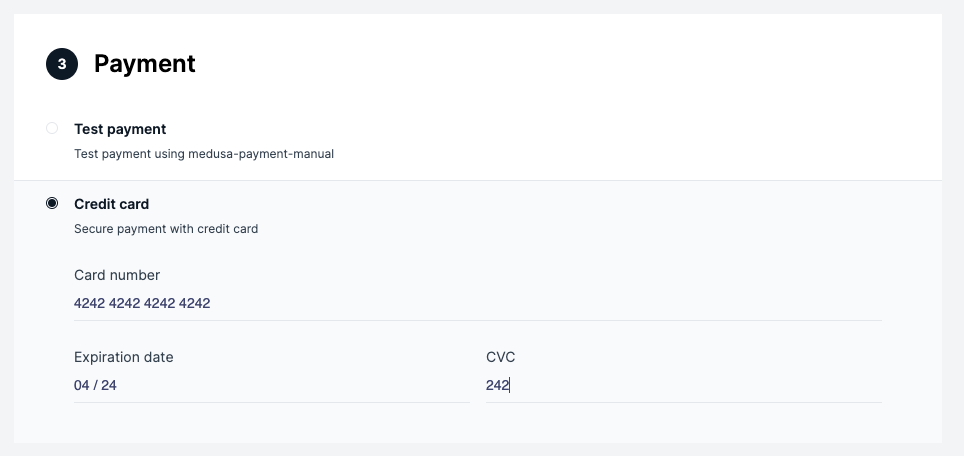
Now, if you run your Medusa backend and your storefront, on checkout you’ll be able to use Stripe.
|
||
|
||
|
||
|
||
### Add to Gatsby Storefront
|
||
|
||
:::note
|
||
|
||
Medusa's Gatsby storefront is deprecated and it is recommended to use the [Next.js storefront](../../starters/nextjs-medusa-starter.mdx) or build your own storefront instead.
|
||
|
||
:::
|
||
|
||
In your `.env.development` file (or the file you’re using for your environment variables) add the following variable with the value set to the Publishable Key:
|
||
|
||
```jsx title=.env.development
|
||
GATSBY_STRIPE_KEY=pk_
|
||
```
|
||
|
||
:::note
|
||
|
||
You might find this environment variable already available so you can just replace its value with your Publishable Key.
|
||
|
||
:::
|
||
|
||
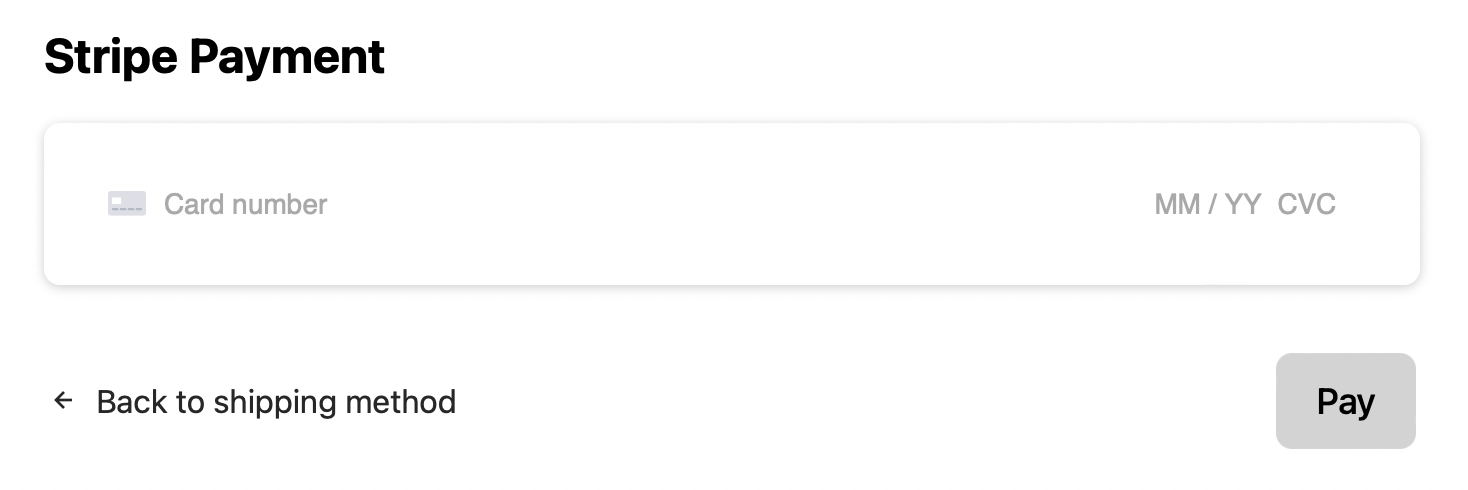
Now, if you run your Medusa backend and your storefront, on checkout you’ll be able to use Stripe.
|
||
|
||
|
||
|
||
### Add to Custom Storefront
|
||
|
||
This section will go over how to add Stripe into a React-based framework. The instructions are general instructions that you can use in your storefront.
|
||
|
||
#### Workflow Overview
|
||
|
||
The integration with stripe must have the following workflow:
|
||
|
||
1. During checkout when the user reaches the payment section, you should [create payment sessions](/api/store/#tag/Cart/operation/PostCartsCartPaymentSessions). This will initialize the `payment_sessions` array in the `cart` object received. The `payment_sessions` is an array of available payment providers.
|
||
2. If Stripe is available as a payment provider, you should select Stripe as [the payment session](/api/store/#tag/Cart/operation/PostCartsCartPaymentSession) for the current cart. This will initialize the `payment_session` object in the `cart` object to include data related to Stripe and the current payment session. This includes the payment intent and client secret.
|
||
3. After the user enters their card details and submits the form, confirm the payment with Stripe.
|
||
4. If the payment is confirmed successfully, [complete the order](/api/store/#tag/Cart/operation/PostCartsCartComplete) in Medusa. Otherwise show an error.
|
||
|
||
#### Install Dependencies
|
||
|
||
Before you start the implementations you need to install the necessary dependencies. You’ll be using Stripe’s React libraries to show the UI and handle the payment confirmation:
|
||
|
||
```bash npm2yarn
|
||
npm install --save @stripe/react-stripe-js @stripe/stripe-js
|
||
```
|
||
|
||
You’ll also use Medusa’s JS Client to easily call Medusa’s REST APIs:
|
||
|
||
```bash npm2yarn
|
||
npm install @medusajs/medusa-js
|
||
```
|
||
|
||
#### Initialize Stripe
|
||
|
||
In this section, you’ll initialize Stripe without Medusa’s checkout workflow. Please note that this is one approach to add Stripe into your React project. You can check out [Stripe’s React documentation](https://stripe.com/docs/stripe-js/react) for other methods or components.
|
||
|
||
Create a container component that will hold the payment card component:
|
||
|
||
```jsx
|
||
import { useState } from "react"
|
||
|
||
import { Elements } from "@stripe/react-stripe-js"
|
||
import Form from "./Form"
|
||
import { loadStripe } from "@stripe/stripe-js"
|
||
|
||
const stripePromise = loadStripe("pk_...")
|
||
|
||
export default function Container() {
|
||
const [clientSecret, setClientSecret] = useState()
|
||
|
||
// TODO set clientSecret
|
||
|
||
return (
|
||
<div>
|
||
{clientSecret && (
|
||
<Elements stripe={stripePromise} options={{
|
||
clientSecret,
|
||
}}>
|
||
<Form clientSecret={clientSecret} cartId={cartId} />
|
||
</Elements>
|
||
)}
|
||
</div>
|
||
)
|
||
};
|
||
```
|
||
|
||
In this component, you need to use Stripe’s `loadStripe` function outside of the component’s implementation to ensure that Stripe doesn’t re-load with every change. The function accepts the Publishable Key.
|
||
|
||
:::note
|
||
|
||
You’ll probably store this Publishable Key in an environment variable depending on your framework. It’s hard-coded here for simplicity.
|
||
|
||
:::
|
||
|
||
Then, inside the component’s implementation, you add a state variable `clientSecret` which you’ll retrieve in the next section.
|
||
|
||
Once the clientSecret is set, the `Elements` Stripe component will wrap a `Form` component you’ll create next. This is necessary because the `Elements` component allows child elements to get access to the card’s inputs and their data using Stripe’s `useElements` hook.
|
||
|
||
Create a new file for the `Form` component with the following content:
|
||
|
||
```jsx
|
||
import {
|
||
CardElement,
|
||
useElements,
|
||
useStripe,
|
||
} from "@stripe/react-stripe-js"
|
||
|
||
export default function Form({ clientSecret, cartId }) {
|
||
const stripe = useStripe()
|
||
const elements = useElements()
|
||
|
||
async function handlePayment(e) {
|
||
e.preventDefault()
|
||
// TODO handle payment
|
||
}
|
||
|
||
return (
|
||
<form>
|
||
<CardElement />
|
||
<button onClick={handlePayment}>Submit</button>
|
||
</form>
|
||
)
|
||
};
|
||
```
|
||
|
||
This component shows a CardElement component from Stripe’s React library. You can use `stripe` to be able to confirm the payment later. The `elements` variable will be used to retrieve the entered card details safely.
|
||
|
||
#### Implement the Workflow
|
||
|
||
You’ll now implement the workflow explained earlier. You’ll use Medusa’s JS Client, so make sure to import it and initialize it in your `Container` component:
|
||
|
||
```jsx
|
||
import Medusa from "@medusajs/medusa-js"
|
||
|
||
export default function Container() {
|
||
const client = new Medusa()
|
||
// ...
|
||
}
|
||
```
|
||
|
||
:::note
|
||
|
||
In your storefront, you’ll probably be managing the Medusa client through a context for better performance.
|
||
|
||
:::
|
||
|
||
Then, in the place of the `//TODO` inside the `Container` element, initialize the payment sessions and create a payment session if Stripe is available:
|
||
|
||
```tsx
|
||
client.carts.createPaymentSessions(cart.id)
|
||
.then(({ cart }) => {
|
||
// check if stripe is selected
|
||
const isStripeAvailable = cart.payment_sessions?.some(
|
||
(session) => (
|
||
session.provider_id === "stripe"
|
||
)
|
||
)
|
||
if (!isStripeAvailable) {
|
||
return
|
||
}
|
||
|
||
// select stripe payment session
|
||
client.carts.setPaymentSession(cart.id, {
|
||
provider_id: "stripe",
|
||
}).then(({ cart }) => {
|
||
setClientSecret(cart.payment_session.data.client_secret)
|
||
})
|
||
})
|
||
```
|
||
|
||
:::note
|
||
|
||
Notice that here it’s assumed you have access to the `cart` object throughout your storefront. Ideally, the `cart` should be managed through a context. So, every time the cart is updated, for example, when the `createPaymentSessions` or `setPaymentSession` are called, the cart should be updated in the context to be accessed from other elements. In this case, you probably wouldn’t need a `clientSecret` state variable as you can use the client secret directly from the `cart` object.
|
||
|
||
:::
|
||
|
||
Once the client secret is set, the form will be shown to the user.
|
||
|
||
The last step in the workflow is confirming the payment with Stripe and if it’s done successfully, completing the user’s order. This part is done in the `Form` component.
|
||
|
||
As you’ll use Medusa’s client again make sure to import it and initialize it:
|
||
|
||
```jsx
|
||
import Medusa from "@medusajs/medusa-js"
|
||
|
||
export default function Form() {
|
||
const client = new Medusa()
|
||
// ...
|
||
}
|
||
```
|
||
|
||
Then, replace the `//TODO` in the `handlePayment` function with the following content:
|
||
|
||
```jsx
|
||
return stripe.confirmCardPayment(clientSecret, {
|
||
payment_method: {
|
||
card: elements.getElement(CardElement),
|
||
billing_details: {
|
||
name,
|
||
email,
|
||
phone,
|
||
address: {
|
||
city,
|
||
country,
|
||
line1,
|
||
line2,
|
||
postal_code,
|
||
},
|
||
},
|
||
},
|
||
}).then(({ error, paymentIntent }) => {
|
||
// TODO handle errors
|
||
client.carts.complete(cartId).then(
|
||
(resp) => console.log(resp)
|
||
)
|
||
})
|
||
```
|
||
|
||
You use the `confirmCardPayment` method in the `stripe` object. You’ll need to pass it the client secret, which you can have access to from the cart object if it’s available through the context.
|
||
|
||
This method also requires the customer’s information like `name`, `email`, and their address. Make sure to place the values for each based on your implementation.
|
||
|
||
Once the promise resolves you can handle the errors, if there are any. If not, you can complete the customer’s order using `complete` from Medusa’s client. This request expects the cart ID which you should have access to as well.
|
||
|
||
If you run your backend and storefront now, you’ll see the Stripe UI element and you’ll be able to make orders.
|
||
|
||

|
||
|
||
---
|
||
|
||
## Capture Payments
|
||
|
||
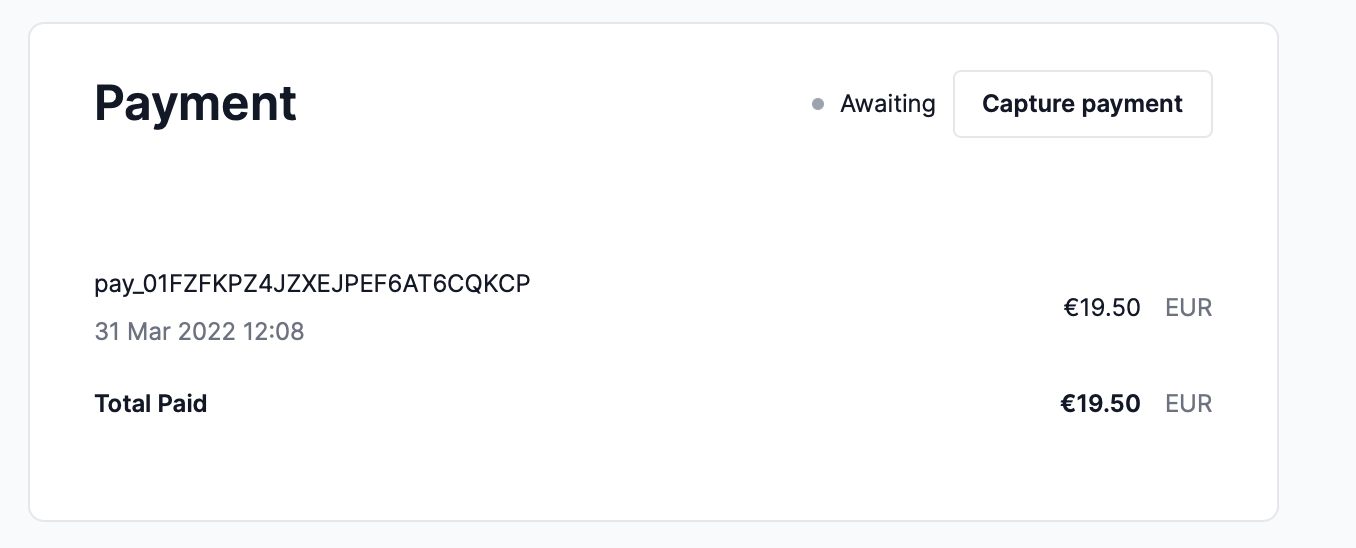
After the customer places an order, you’ll be able to see the order on the admin panel. In the payment information under the “Payment” section, you should see a “Capture” button.
|
||
|
||
|
||
|
||
Clicking this button allows you to capture the payment for an order. You can also refund payments if an order has captured payments.
|
||
|
||
Refunding or Capturing payments is reflected in your Stripe’s dashboard as well. This gives you access to all of Stripe’s analytical capabilities.
|
||
|
||
---
|
||
|
||
## See Also
|
||
|
||
- Check out [more plugins](../overview.mdx) you can add to your store.
|