 589cb18f98
* docs: added description to documentation pages

* docs: added more descriptions

* docs: finished improving meta description

* docs: added searchbox structured data

* docs: added breadcrumbs structured data

* docs: added how to structured data

* docs: improved 404 page

* docs: added how-to frontmatter option
122 lines
5.4 KiB
Markdown
122 lines
5.4 KiB
Markdown
---
|
||
description: 'Learn about what Regions are and how they are used in a Medusa server. Regions represent at least one country on the Medusa server.'
|
||
---
|
||
|
||
# Regions Overview
|
||
|
||
In this document, you’ll learn about Regions and their importance in your Medusa server.
|
||
|
||
## Introduction
|
||
|
||
Regions represent at least one country on your Medusa server. They're used to define different business logic and configurations for a set of countries.
|
||
|
||
For example, you can enable one payment provider for region A, and a different payment provider for region B. Customers can then use the payment provider enabled in their region.
|
||
|
||
This applies to other relations and entities in your store such as different currencies, fulfillment providers, and tax providers.
|
||
|
||
---
|
||
|
||
## Region Configurations
|
||
|
||
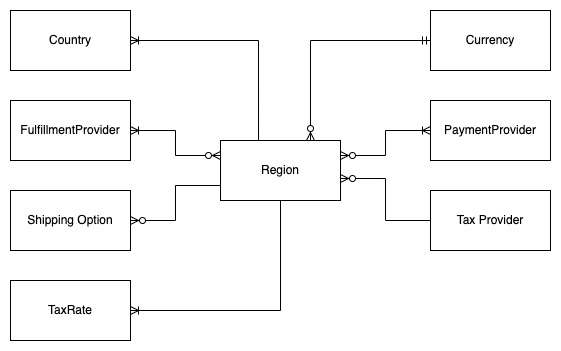
The following configurations can be set for each region:
|
||
|
||
1. The currency used.
|
||
2. The tax provider and rates.
|
||
3. The countries that belong to that region. A country can only belong to one region.
|
||
4. The enabled payment providers.
|
||
5. The enabled fulfillment providers.
|
||
6. The shipping and return shipping options.
|
||
|
||
---
|
||
|
||
## One vs Multiple Regions
|
||
|
||
Your store needs at least one region so that your customers can place orders.
|
||
|
||
If you serve customers in different countries that use the same configurations, such as the same currency and payment providers, then you can include more countries in the same region.
|
||
|
||
If you serve customers in different countries that have at least one different configuration, such as different payment providers, you need to create a new region for those countries.
|
||
|
||
There is no limit on how many regions you can create, and regions can share similar configurations.
|
||
|
||
---
|
||
|
||
## Region Entity Overview
|
||
|
||
A region is stored in the database as a [Region](../../../references/entities/classes/Region.md) entity. Some of its important attributes are:
|
||
|
||
- `name`: The name of the region. Customers will see this name on the storefront.
|
||
- `tax_rate`: A number that indicates the tax rate. The tax rate is a percentage.
|
||
- `tax_code`: An optional string that is used as the code for the default tax rate.
|
||
- `gift_cards_taxable`: A boolean value that indicates whether gift cards in a region are taxable or not.
|
||
- `automatic_taxes`: A boolean value that indicates whether taxes should be calculated during checkout automatically or manually for that region. You can learn more about manually calculating taxes in [this documentation](../taxes/manual-calculation.md).
|
||
|
||
---
|
||
|
||
## Relations to Other Entities
|
||
|
||
As regions are a core part of your Medusa server, there are many relations to other entities.
|
||
|
||
This section covers relations to entities that make up the configurations of a region.
|
||
|
||
|
||
|
||
### Country
|
||
|
||
A region must have at least one country. A country can belong to only one region.
|
||
|
||
The relation between the `Region` and `Country` entities is available on both entities:
|
||
|
||
- You can access the countries that belong to a region by expanding the `countries` relation and accessing `region.countries`.
|
||
- You can access the region of a country by expanding the `region` relation and accessing `country.region`. Also, you can access the ID of the region through `country.region_id`.
|
||
|
||
### Currency
|
||
|
||
A region must have one currency. A currency can be used for more than one region.
|
||
|
||
The relation is available on a region by expanding the `currency` relation and accessing `region.currency`. The 3 character currency code can also be accessed through `region.currency_code`.
|
||
|
||
### FulfillmentProvider
|
||
|
||
A region must have at least one fulfillment provider. A fulfillment provider can be used in more than one region.
|
||
|
||
The relation is available on a region by expanding the `fulfillment_providers` relation and accessing `region.fulfillment_providers`.
|
||
|
||
### PaymentProvider
|
||
|
||
A region must have at least one payment provider. A payment provider can be used in more than one region.
|
||
|
||
The relation is available on a region by expanding the `payment_providers` relation and accessing `region.payment_providers`.
|
||
|
||
### ShippingOption
|
||
|
||
:::info
|
||
|
||
Both shipping options and return shipping options are represented by the `ShippingOption` entity. You can learn more in the [Shipping Architecture documentation](../shipping/overview.md#shipping-option).
|
||
|
||
:::
|
||
|
||
More than one shipping option can belong to a region. The relation is available on a shipping option by expanding the `region` relation and accessing `shipping_option.region`.
|
||
|
||
### TaxProvider
|
||
|
||
A region can have one tax provider. A tax provider can be used for more than one region.
|
||
|
||
The relation is available on a region by expanding the `tax_provider` relation and accessing `region.tax_provider`. You can also access the ID of the tax provider through `region.tax_provider_id`.
|
||
|
||
### TaxRate
|
||
|
||
A region can have more than one tax rate, and a tax rate belongs to one region.
|
||
|
||
The relation between the `Region` and `TaxRate` entities is available on both entities:
|
||
|
||
- You can access the tax rates of a region by expanding the `tax_rates` relation and accessing `region.tax_rates`.
|
||
- You can access the region of a tax rate by expanding the `region` relation and accessing `tax_rate.region`. You can also access the ID of the region through `tax_rate.region_id`.
|
||
|
||
---
|
||
|
||
## See Also
|
||
|
||
- [Use Regions in a storefront](../../storefront/use-regions.mdx).
|
||
- [Use Regions in the admin](../../admin/manage-regions.mdx).
|