 914d773d3a
* initialized next.js project

* finished markdown sections

* added operation schema component

* change page metadata

* eslint fixes

* fixes related to deployment

* added response schema

* resolve max stack issue

* support for different property types

* added support for property types

* added loading for components

* added more loading

* type fixes

* added oneOf type

* removed console

* fix replace with push

* refactored everything

* use static content for description

* fixes and improvements

* added code examples section

* fix path name

* optimizations

* fixed tag navigation

* add support for admin and store references

* general enhancements

* optimizations and fixes

* fixes and enhancements

* added search bar

* loading enhancements

* added loading

* added code blocks

* added margin top

* add empty response text

* fixed oneOf parameters

* added path and query parameters

* general fixes

* added base path env variable

* small fix for arrays

* enhancements

* design enhancements

* general enhancements

* fix isRequired

* added enum values

* enhancements

* general fixes

* general fixes

* changed oas generation script

* additions to the introduction section

* added copy button for code + other enhancements

* fix response code block

* fix metadata

* formatted store introduction

* move sidebar logic to Tags component

* added test env variables

* fix code block bug

* added loading animation

* added expand param + loading

* enhance operation loading

* made responsive + improvements

* added loading provider

* fixed loading

* adjustments for small devices

* added sidebar label for endpoints

* added feedback component

* fixed analytics

* general fixes

* listen to scroll for other headings

* added sample env file

* update api ref files + support new fields

* fix for external docs link

* added new sections

* fix last item in sidebar not showing

* move docs content to www/docs

* change redirect url

* revert change

* resolve build errors

* configure rewrites

* changed to environment variable url

* revert changing environment variable name

* add environment variable for API path

* fix links

* fix tailwind settings

* remove vercel file

* reconfigured api route

* move api page under api

* fix page metadata

* fix external link in navigation bar

* update api spec

* updated api specs

* fixed google lint error

* add max-height on request samples

* add padding before loading

* fix for one of name

* fix undefined types

* general fixes

* remove response schema example

* redesigned navigation bar

* redesigned sidebar

* fixed up paddings

* added feedback component + report issue

* fixed up typography, padding, and general styling

* redesigned code blocks

* optimization

* added error timeout

* fixes

* added indexing with algolia + fixes

* fix errors with algolia script

* redesign operation sections

* fix heading scroll

* design fixes

* fix padding

* fix padding + scroll issues

* fix scroll issues

* improve scroll performance

* fixes for safari

* optimization and fixes

* fixes to docs + details animation

* padding fixes for code block

* added tab animation

* fixed incorrect link

* added selection styling

* fix lint errors

* redesigned details component

* added detailed feedback form

* api reference fixes

* fix tabs

* upgrade + fixes

* updated documentation links

* optimizations to sidebar items

* fix spacing in sidebar item

* optimizations and fixes

* fix endpoint path styling

* remove margin

* final fixes

* change margin on small devices

* generated OAS

* fixes for mobile

* added feedback modal

* optimize dark mode button

* fixed color mode useeffect

* minimize dom size

* use new style system

* radius and spacing design system

* design fixes

* fix eslint errors

* added meta files

* change cron schedule

* fix docusaurus configurations

* added operating system to feedback data

* change content directory name

* fixes to contribution guidelines

* revert renaming content

* added api-reference to documentation workflow

* fixes for search

* added dark mode + fixes

* oas fixes

* handle bugs

* added code examples for clients

* changed tooltip text

* change authentication to card

* change page title based on selected section

* redesigned mobile navbar

* fix icon colors

* fix key colors

* fix medusa-js installation command

* change external regex in algolia

* change changeset

* fix padding on mobile

* fix hydration error

* update depedencies
12 KiB
description
| description |
|---|
| Learn about claims, how the claim process is implemented in the Medusa backend, and a claim’s relation to other entities. |
Claims Architecture Overview
In this document, you’ll learn about claims, how the claim process is implemented in the Medusa backend, and a claim’s relation to other entities.
Overview
An item that the customer ordered may be defected or does not match the original product they ordered. In those cases, a merchant can create a claim to handle this situation by either refunding the customer or replacing the item they got with a different one.
The Medusa core provides the necessary implementation and functionalities that allow you to integrate this process into your store.
ClaimOrder Entity Overview
A claim is represented by the ClaimOrder entity. Some of its attributes include:
type: a string indicating the type of the claim. Its value can be eitherrefundorreplace.payment_status: a string indicating the status of the claim’s payment. Its possible values are indicated by the ClaimPaymentStatus enum. This attribute is useful to check the status of the payment if the claim’s type isrefund.fulfillment_status: a string indicating the status of the claim’s fulfillment. Its possible values are indicated by the ClaimFulfillmentStatus enum. This attribute is useful to check the status of the fulfillment if the claim’s type isreplace.refund_amount: an integer used to indicate the amount that should be refunded to the customer. This is only useful if the claim’s type isrefund.canceled_at: a date indicating when the claim was canceled.
There are other important attributes discussed in later sections. Check out the full ClaimOrder entity in the entities reference.
How are Claims Created
Claims are created in Medusa by an admin (typically a merchant). They are created on an order, and depending on the claim’s type the admin can specify details like the amount to be refunded, or the items to be returned and the new items to replace them.
You can create a claim either using the Create Claim endpoint or using the ClaimService's create method. This section explains the process within the Create Claim endpoint, with a focus on the create method.
Idempotency Key
An Idempotency Key is a unique key associated with a claim. It is generated when the claim creation process is started by the admin using the Create Claim endpoint and can be used to retry the claim creation safely if an error occurs. The idempotency key is stored in the ClaimOrder entity in the attribute idempotency_key.
You can learn more about idempotency keys here.
Create Claim Endpoint Process
The following flow is implemented within the Create Claim endpoint:
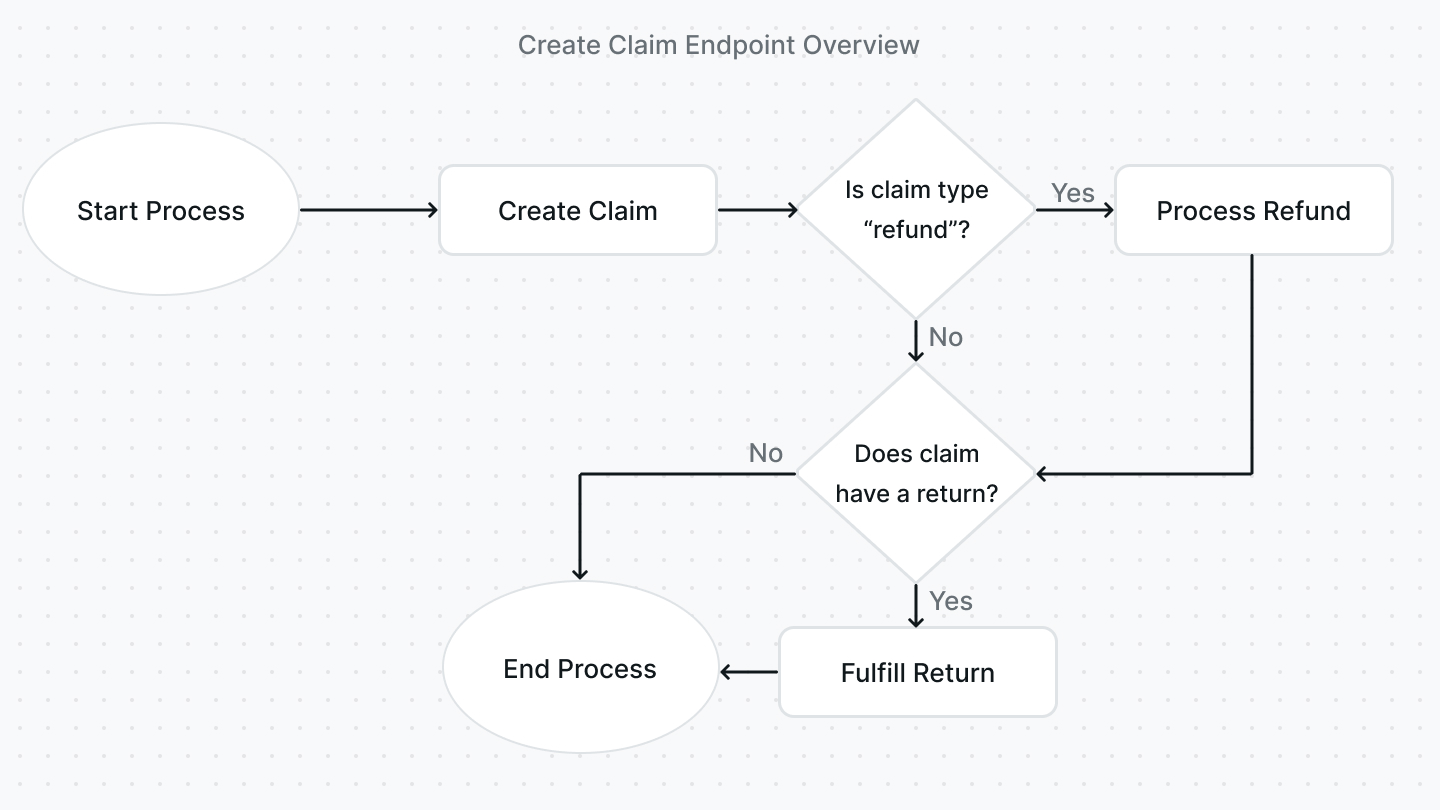
- When the idempotency key’s recovery point is
started, the creation of the claim is started using theClaimService's create method. If the claim is created successfully, the idempotency key’s recovery point is changed toclaim_created. In thecreatemethod:- If the type of the claim is
refundand no refund amount is set, the refund amount is calculated based on the items in the claim using theClaimService's getRefundTotalForClaimLinesOnOrder method. - If new items are specified to send to the customer, new line items, which are represented by the
LineItementity, are generated using theLineItemService's generate method. These line items are later attached to the claim when it’s created under theadditional_itemsrelation. Also, the quantity of these items are reserved from the product variant’s inventory using theProductVariantInventoryService's reserveQuantity method. - The claim is created and saved.
- If there were additional items attached to the claim, tax lines are created for these items using the
TaxProviderService's createTaxLines method. - If a shipping method was chosen to send the additional items to the customer, the shipping method is created using the
ShippingOptionService's createShippingMethod method or updated if it already exists using theShippingOptionService's updateShippingMethod method. - A claim item is created for each of the items specified in the claim. These are the items that were originally in the order and that the claim was created for. The claim items are created using the
ClaimItemService's create method. - If a return shipping method is specified, a return is created using the
ReturnService's create method.
- If the type of the claim is
- When the idempotency key’s recovery point is
claim_created, if the claim’s type isrefund, the refund is processed using theClaimService's processRefund method. If the method is refunded successfully, thepayment_statusattribute of the claim is set torefunded. The refund is created directly on the order the claim belongs to. The recovery point of the idempotency key is changed torefund_handledat the end of this process. - When the idempotency key’s recovery point is
refund_handled, if the claim is associated with a return, the return is automatically fulfilled using theReturnService's fulfill method as it will be handled by the customer. The order associated with the claim is then returned and the idempotency key is set tofinished.
Fulfill a Claim
If a claim’s type is replace, an admin can create a fulfillment for the additional items that should be sent to the customer.
A fulfillment can be created either using the Create Claim Fulfillment endpoint or the ClaimService's createFulfillment method.
:::note
The endpoint handles updating the inventory and reservations. So, if you choose to use the createFulfillment method, you should implement that within your code.
:::
By default, when a fulfillment is created, the claim’s fulfillment_status is set to fulfilled. However, if any of the item’s quantity isn’t fulfilled successfully, the fulfillment_status is set to requires_action.
After creating a fulfillment, you can create a shipment for the fulfillment either using the Create Claim Shipment endpoint or the ClaimService's createShipment method. If only some of the items and their quantities are shipped, the fulfillment_status of the claim is set to partially_shipped. Otherwise, if all items and quantities are shipped, the fulfillment_status of the claim is set to shipped.
You can alternatively cancel a fulfillment either using the Cancel Claim Fulfillment endpoint or the ClaimService's cancelFulfillment method. This would change the fulfillment_status of the claim to canceled.
Handling a Claim's Return
A claim's return can be marked as received, which would adjust the inventory and change the status of the return. This process is explained within the Returns documentation.
Cancel a Claim
An admin can cancel a claim if it hasn’t been refunded either using the Cancel Claim endpoint or the ClaimService's cancel method.
If any fulfillments were created, they must be canceled first. Similarly, if the claim is associated with a return, the return must be canceled first.
After the claim is canceled, the claim’s fulfillment_status is set to canceled.
Relation to Other Entities
This section includes relations that weren’t mentioned in other sections.
Order
A claim belongs to an order, which is the order it was created for. An order is represented by the Order entity.
You can access the order’s ID using the order_id attribute of the claim. You can also access the order by expanding the order relation and accessing claim.order.
ClaimItem
A claim’s items are represented by the ClaimItem entity. A claim can have more than one claim item.
You can access a claim’s items by expanding the claim_items relation and accessing claim.claim_items.
LineItem
A claim’s additional items that should be sent to the customer are represented by the LineItem entity. A claim can have more than one additional item.
You can access a claim’s additional items by expanding the additional_items relation and accessing claim.additional_items.
Return
If a claim’s type is replace, it will be associated with a return. A return is represented by the Return entity.
You can access the return by expanding the return_order relation and accessing claim.return_order.
Address
If a claim’s type is replace, it can be associated with a shipping address. A shipping address is represented by the Address entity.
You can access the shipping address’s ID using the shipping_address_id of the claim. You can also access the shipping address by expanding the shipping_address relation and accessing claim.shipping_address.
ShippingMethod
If a claim’s type is replace, it can be associated with more than one shipping method which are used to ship the additional items. A shipping method is represented by the ShippingMethod entity.
You can access the claim’s shipping methods by expanding the shipping_methods relation and accessing claim.shipping_methods.
Fulfillment
If a claim’s type is replace, it can be associated with more than one fulfillment which are created to fulfill the additional items. A fulfillment is represented by the Fulfillment entity.
You can access the claim’s fulfillment by expanding the fulfillments relation and accessing claim.fulfillments.