
155 lines
12 KiB
Markdown
155 lines
12 KiB
Markdown
---
|
||
description: "Learn about claims, how the claim process is implemented in the Medusa backend, and a claim’s relation to other entities."
|
||
---
|
||
|
||
# Claims Architecture Overview
|
||
|
||
In this document, you’ll learn about claims, how the claim process is implemented in the Medusa backend, and a claim’s relation to other entities.
|
||
|
||
## Overview
|
||
|
||
An item that the customer ordered may be defected or does not match the original product they ordered. In those cases, a merchant can create a claim to handle this situation by either refunding the customer or replacing the item they got with a different one.
|
||
|
||
The Medusa core provides the necessary implementation and functionalities that allow you to integrate this process into your store.
|
||
|
||
---
|
||
|
||
## ClaimOrder Entity Overview
|
||
|
||
A claim is represented by the `ClaimOrder` entity. Some of its attributes include:
|
||
|
||
- `type`: a string indicating the type of the claim. Its value can be either `refund` or `replace`.
|
||
- `payment_status`: a string indicating the status of the claim’s payment. Its possible values are indicated by the [ClaimPaymentStatus enum](../../references/entities/enums/ClaimPaymentStatus.md). This attribute is useful to check the status of the payment if the claim’s type is `refund`.
|
||
- `fulfillment_status`: a string indicating the status of the claim’s fulfillment. Its possible values are indicated by the [ClaimFulfillmentStatus enum](../../references/entities/enums/ClaimFulfillmentStatus.md). This attribute is useful to check the status of the fulfillment if the claim’s type is `replace`.
|
||
- `refund_amount`: an integer used to indicate the amount that should be refunded to the customer. This is only useful if the claim’s type is `refund`.
|
||
- `canceled_at`: a date indicating when the claim was canceled.
|
||
|
||
There are other important attributes discussed in later sections. Check out the [full ClaimOrder entity in the entities reference](../../references/entities/classes/ClaimOrder.md).
|
||
|
||
---
|
||
|
||
## How are Claims Created
|
||
|
||
Claims are created in Medusa by an admin (typically a merchant). They are created on an order, and depending on the claim’s type the admin can specify details like the amount to be refunded, or the items to be returned and the new items to replace them.
|
||
|
||
You can create a claim either using the [Create Claim endpoint](/api/admin#tag/Orders/operation/PostOrdersOrderClaims) or using the `ClaimService`'s [create method](../../references/services/classes/ClaimService.md#create). This section explains the process within the Create Claim endpoint, with a focus on the `create` method.
|
||
|
||
### Idempotency Key
|
||
|
||
An Idempotency Key is a unique key associated with a claim. It is generated when the claim creation process is started by the admin using the Create Claim endpoint. The idempotency key is stored in the `ClaimOrder` entity in the attribute `idempotency_key`.
|
||
|
||
That Idempotency Key is then set in the header under the `Idempotency-Key` response header field along with the header field `Access-Control-Expose-Headers` set to `Idempotency-Key`.
|
||
|
||
The backend wraps essential parts of the claim creation process in its own step and stores the current step (known as recovery point) of the process with its associated Idempotency Key.
|
||
|
||
Then, if the request is interrupted for any reason or an error occurs, the client can retry creating the return using the Idempotency Key, and the flow will continue from the last stored step.
|
||
|
||
### Create Claim Endpoint Process
|
||
|
||
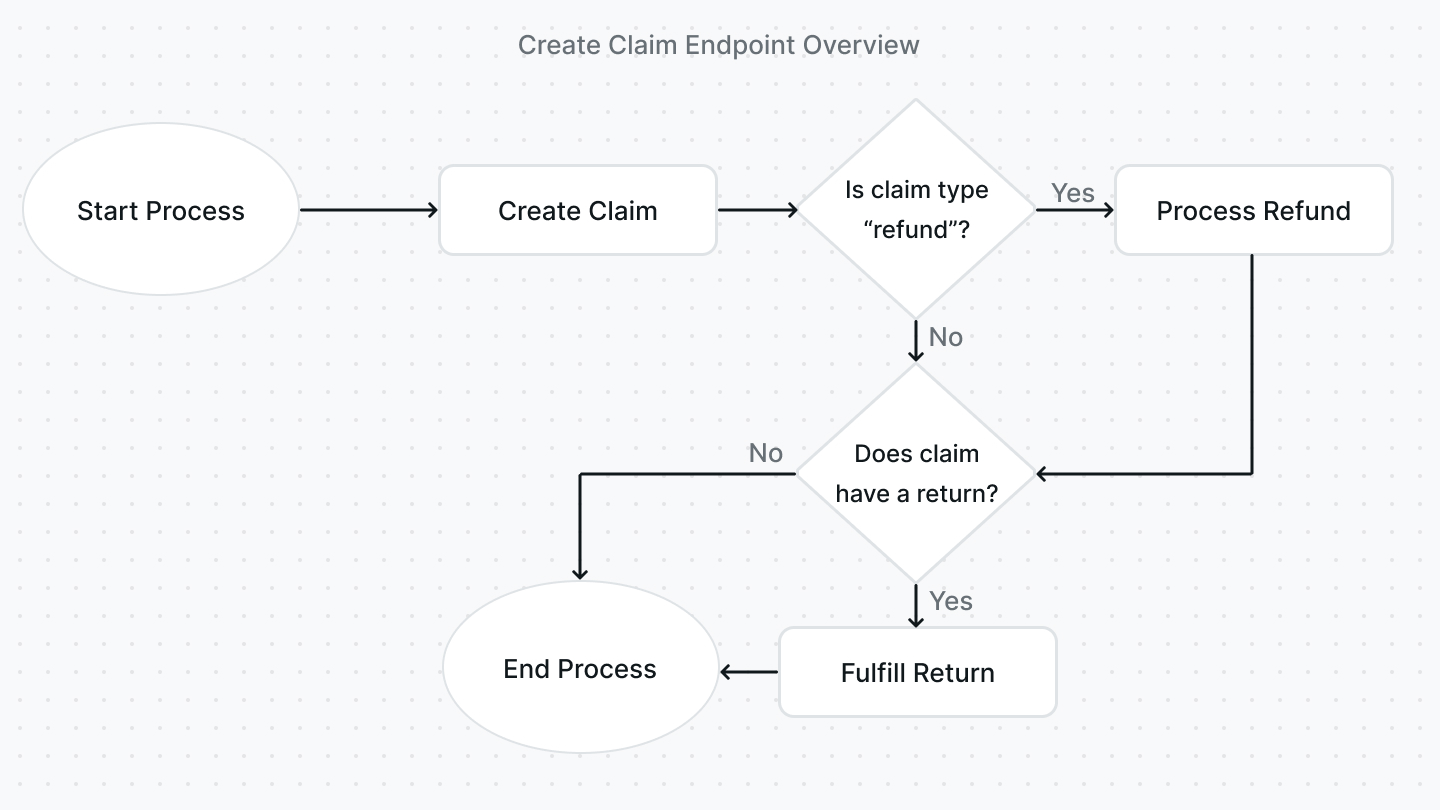
The following flow is implemented within the Create Claim endpoint:
|
||
|
||
|
||
|
||
1. When the idempotency key’s recovery point is `started`, the creation of the claim is started using the `ClaimService`'s [create method](../../references/services/classes/ClaimService.md#create). If the claim is created successfully, the idempotency key’s recovery point is changed to `claim_created`. In the `create` method:
|
||
1. If the type of the claim is `refund` and no refund amount is set, the refund amount is calculated based on the items in the claim using the `ClaimService`'s [getRefundTotalForClaimLinesOnOrder method](../../references/services/classes/ClaimService.md#getrefundtotalforclaimlinesonorder).
|
||
2. If new items are specified to send to the customer, new line items, which are represented by the `LineItem` entity, are generated using the `LineItemService`'s [generate method](../../references/services/classes/LineItemService.md#generate). These line items are later attached to the claim when it’s created under the `additional_items` relation. Also, the quantity of these items are reserved from the product variant’s inventory using the `ProductVariantInventoryService`'s [reserveQuantity method](../../references/services/classes/ProductVariantInventoryService.md#reservequantity).
|
||
3. The claim is created and saved.
|
||
4. If there were additional items attached to the claim, tax lines are created for these items using the `TaxProviderService`'s [createTaxLines method](../../references/services/classes/TaxProviderService.md#createtaxlines).
|
||
5. If a shipping method was chosen to send the additional items to the customer, the shipping method is created using the `ShippingOptionService`'s [createShippingMethod method](../../references/services/classes/ShippingOptionService.md#createshippingmethod) or updated if it already exists using the `ShippingOptionService`'s [updateShippingMethod method](../../references/services/classes/ShippingOptionService.md#updateshippingmethod).
|
||
6. A claim item is created for each of the items specified in the claim. These are the items that were originally in the order and that the claim was created for. The claim items are created using the `ClaimItemService`'s [create method](../../references/services/classes/ClaimItemService.md#create).
|
||
7. If a return shipping method is specified, a return is created using the `ReturnService`'s [create method](../../references/services/classes/ReturnService.md#create).
|
||
2. When the idempotency key’s recovery point is `claim_created`, if the claim’s type is `refund`, the refund is processed using the `ClaimService`'s [processRefund method](../../references/services/classes/ClaimService.md#processrefund). If the method is refunded successfully, the `payment_status` attribute of the claim is set to `refunded`. The refund is created directly on the order the claim belongs to. The recovery point of the idempotency key is changed to `refund_handled` at the end of this process.
|
||
3. When the idempotency key’s recovery point is `refund_handled`, if the claim is associated with a return, the return is automatically fulfilled using the `ReturnService`'s [fulfill method](../../references/services/classes/ReturnService.md#fulfill) as it will be handled by the customer. The order associated with the claim is then returned and the idempotency key is set to `finished`.
|
||
|
||
---
|
||
|
||
## Fulfill a Claim
|
||
|
||
If a claim’s type is `replace`, an admin can create a [fulfillment](./fulfillments.md) for the additional items that should be sent to the customer.
|
||
|
||
A fulfillment can be created either using the [Create Claim Fulfillment endpoint](/api/admin#tag/Orders/operation/PostOrdersOrderClaimsClaimFulfillments) or the `ClaimService`'s [createFulfillment method](../../references/services/classes/ClaimService.md#createfulfillment).
|
||
|
||
:::note
|
||
|
||
The endpoint handles updating the inventory and reservations. So, if you choose to use the `createFulfillment` method, you should implement that within your code.
|
||
|
||
:::
|
||
|
||
By default, when a fulfillment is created, the claim’s `fulfillment_status` is set to `fulfilled`. However, if any of the item’s quantity isn’t fulfilled successfully, the `fulfillment_status` is set to `requires_action`.
|
||
|
||
After creating a fulfillment, you can create a shipment for the fulfillment either using the [Create Claim Shipment endpoint](/api/admin#tag/Orders/operation/PostOrdersOrderClaimsClaimShipments) or the `ClaimService`'s [createShipment method](../../references/services/classes/ClaimService.md#createshipment). If only some of the items and their quantities are shipped, the `fulfillment_status` of the claim is set to `partially_shipped`. Otherwise, if all items and quantities are shipped, the `fulfillment_status` of the claim is set to `shipped`.
|
||
|
||
You can alternatively cancel a fulfillment either using the [Cancel Claim Fulfillment endpoint](/api/admin#tag/Orders/operation/PostOrdersClaimFulfillmentsCancel) or the `ClaimService`'s [cancelFulfillment method](../../references/services/classes/ClaimService.md#cancelfulfillment). This would change the `fulfillment_status` of the claim to `canceled`.
|
||
|
||
---
|
||
|
||
## Handling a Claim's Return
|
||
|
||
A claim's return can be marked as received, which would adjust the inventory and change the status of the return. This process is explained within the [Returns documentation](./returns.md#mark-return-as-received-process).
|
||
|
||
---
|
||
|
||
## Cancel a Claim
|
||
|
||
An admin can cancel a claim if it hasn’t been refunded either using the [Cancel Claim endpoint](/api/admin#tag/Orders/operation/PostOrdersClaimCancel) or the `ClaimService`'s [cancel method](../../references/services/classes/ClaimService.md#cancel).
|
||
|
||
If any fulfillments were created, they must be canceled first. Similarly, if the claim is associated with a return, the return must be canceled first.
|
||
|
||
After the claim is canceled, the claim’s `fulfillment_status` is set to `canceled`.
|
||
|
||
---
|
||
|
||
## Relation to Other Entities
|
||
|
||
This section includes relations that weren’t mentioned in other sections.
|
||
|
||
### Order
|
||
|
||
A claim belongs to an [order](./orders.md), which is the order it was created for. An order is represented by the `Order` entity.
|
||
|
||
You can access the order’s ID using the `order_id` attribute of the claim. You can also access the order by expanding the `order` relation and accessing `claim.order`.
|
||
|
||
### ClaimItem
|
||
|
||
A claim’s items are represented by the `ClaimItem` entity. A claim can have more than one claim item.
|
||
|
||
You can access a claim’s items by expanding the `claim_items` relation and accessing `claim.claim_items`.
|
||
|
||
### LineItem
|
||
|
||
A claim’s additional items that should be sent to the customer are represented by the `LineItem` entity. A claim can have more than one additional item.
|
||
|
||
You can access a claim’s additional items by expanding the `additional_items` relation and accessing `claim.additional_items`.
|
||
|
||
### Return
|
||
|
||
If a claim’s type is `replace`, it will be associated with a [return](./returns.md). A return is represented by the `Return` entity.
|
||
|
||
You can access the return by expanding the `return_order` relation and accessing `claim.return_order`.
|
||
|
||
### Address
|
||
|
||
If a claim’s type is `replace`, it can be associated with a shipping address. A shipping address is represented by the `Address` entity.
|
||
|
||
You can access the shipping address’s ID using the `shipping_address_id` of the claim. You can also access the shipping address by expanding the `shipping_address` relation and accessing `claim.shipping_address`.
|
||
|
||
### ShippingMethod
|
||
|
||
If a claim’s type is `replace`, it can be associated with more than one [shipping method](../carts-and-checkout/shipping.md#shipping-method) which are used to ship the additional items. A shipping method is represented by the `ShippingMethod` entity.
|
||
|
||
You can access the claim’s shipping methods by expanding the `shipping_methods` relation and accessing `claim.shipping_methods`.
|
||
|
||
### Fulfillment
|
||
|
||
If a claim’s type is `replace`, it can be associated with more than one fulfillment which are created to fulfill the additional items. A fulfillment is represented by the `Fulfillment` entity.
|
||
|
||
You can access the claim’s fulfillment by expanding the `fulfillments` relation and accessing `claim.fulfillments`.
|
||
|
||
---
|
||
|
||
## See Also
|
||
|
||
- [How to manage claims using REST APIs](./admin/manage-claims.mdx)
|
||
- [Orders architecture overview](./orders.md)
|
||
- [Returns architecture overview](./claims.md)
|